
A practical scoring model to decide when to Delegate, Assist, or stay Human-Led.

This essay was originally published on my Substack Syntax Stream, where I write about principles of human–AI interaction.
For years, application design followed a straightforward goal: reduce friction so users can complete their jobs faster. We mapped flows, removed steps, and optimized interactions — assuming the user would remain the primary actor.
AI changes that assumption.
Today, we find ourselves in a dangerous “messy middle.” We are building software that can act, decide, and synthesize, yet we are still designing it as if it were a simple tool. If we want to build products people actually love, we have to stop “sprinkling” AI onto our workflows. We have to answer one fundamental question:
Who holds the steering wheel at this specific moment, and what is the logic that justifies it?
We need a systematic way to move beyond “assistance everywhere.” We need to know when to step back and let the machine take the wheel entirely, and when to protect the human’s role as the accountable driver.
This article provides a practical framework that turns the “who does what” decision into a repeatable process.
The Three Control Modes
Every task maps to one of three modes. Each defines who acts, who decides, and what the interface must enforce.

1) Human-Led
The human retains full control. AI’s role is to surface evidence, highlight tradeoffs, and structure the decision — but never to act. The human reads, weighs, chooses, and executes.
Design goal: Improve decision quality and accountability by giving the human clear evidence, tradeoffs, and structured rationale support.
When to use it: High-stakes decisions requiring subjective judgment, empathy, or ethical nuance, or where the process itself creates value.
Common UX patterns
- Evidence packs (relevant facts, sources, prior cases, policies)
- Tradeoff framing (pros/cons, risks, alternatives)
- Structured decision templates (criteria + rationale capture)
- “Second opinion” critique (counterarguments, failure modes)
- Clear accountability cues (what is suggestion vs decision)
2) Assist
AI does the heavy lifting — generating drafts, running calculations, scanning documents — but cannot commit consequential actions without explicit human approval. The human reviews, edits, and signs off.
Design goal: Maximize speed and iteration while ensuring safe commitment through previews, diffs, and explicit human approval at key points.
When to use it: High-variability tasks with medium-to-high stakes where errors are costly or hard to detect, and accountability must remain with a human
Common UX patterns
- Draft-first flows (generate → edit → approve)
- Plan-before-execute (“here’s what I will do”)
- Diff-based review (show changes, not just final output)
- Provenance panels (inputs, sources, constraints used)
- Uncertainty and “why” explanations (when/why the system is unsure)
- Tight correction loops (edit a section, regenerate locally)
- Clear commit controls (approve/apply with scope visibility)
3) Delegate
AI owns the task. It acts autonomously within defined boundaries. Humans don’t approve individual actions — they set constraints upfront and review outcomes after the fact.
Design goal: Run on autopilot with guardrails — minimize user involvement while keeping traceability, monitoring, and rollback when needed.
When to use it: High-volume, low-stakes, predictable tasks with clear success criteria and easily detectable errors — where human review adds friction without adding value (e.g., data entry, spam filtering, meeting scheduling).
Common UX patterns
- Global constraints (allowlists, budgets, scopes, time windows)
- Activity logs / timelines (what happened, when, and under which policy)
- Monitoring by exception (alerts only on anomalies)
- Rollback/undo where feasible (or compensating actions)
- Audit views (sampling, QA workflows, policy compliance)
The Scoring Model
Knowing the three modes isn’t enough. You need a systematic way to decide which mode fits which task. These variables determine whether a machine should act and whether it is worth the investment to make it do so.
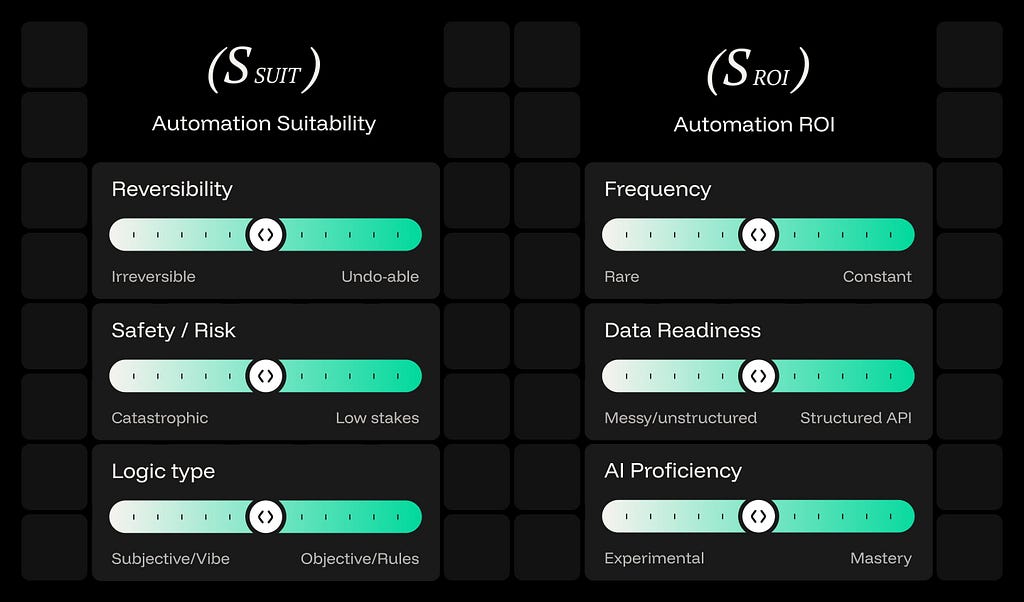
Dimension 1: Automation Suitability (S_SUIT)
This measures risk and controllability. High score = safer to automate.
- Reversibility: Can the action be undone? High reversibility allows for deeper delegation.
- Safety / Risk: What is the “blast radius” of a failure? Catastrophic risks require human-led guardrails.
- Logic Type: Is the task governed by objective rules (deterministic) or subjective “vibes” (probabilistic)?
Dimension 2: Automation ROI (S_ROI)
This measures value and feasibility. High score = strong payoff for building automation.
- Frequency: Is this a rare occurrence or a constant, high-volume workflow?
- Data Readiness: Is the necessary information messy and unstructured, or accessible via a structured API?
- AI Proficiency: Does the current model’s capability show experimental results or consistent mastery of the task?
Mapping Scores to Control Modes
To move from raw scores to a functional product strategy, the framework uses a four-quadrant matrix to determine the optimal relationship between the user and the machine. By plotting Automation ROI on the X-axis against Automation Suitability on the Y-axis, you can categorize any workflow into one of four distinct strategic buckets.
- Delegate (High ROI / High Suitability): The AI executes end-to-end within constraints while humans move to an auditor role. The goal is work removal through invisible execution and background guardrails.
- Assist (High ROI / Low Suitability): High-leverage tasks that are too risky for full autonomy. The AI drafts in steps, requiring a “human handshake” via previews and explicit approval at critical commits.
- Human-Led (Low ROI / Low Suitability): High-stakes or subjective tasks where human judgment is the primary value. The AI advises with evidence, but the human remains firmly at the steering wheel.
- Defer (Low ROI / High Suitability): Safe to automate, but the effort outweighs the gain. Keep these manual or use lightweight helpers until task frequency or AI proficiency shifts the ROI.
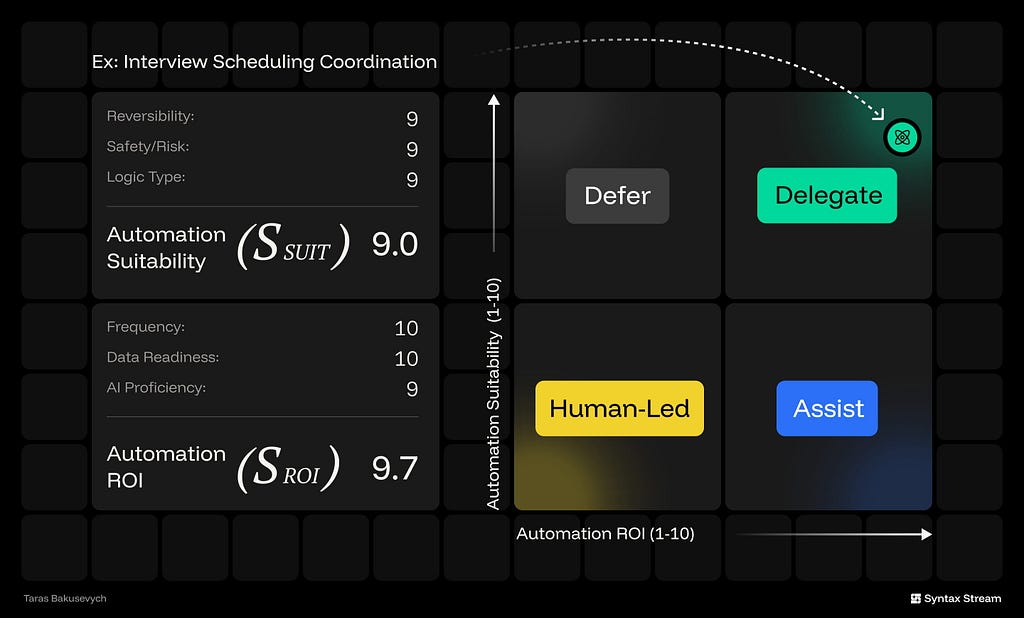
Here’s an example: interview scheduling coordination.
It’s frequent and time-consuming (high ROI), it’s mostly rules-based, low stakes, and easy to undo (high suitability). When we score it, it lands in the top-right quadrant — Delegate — which means the product should run it end-to-end within constraints, and only pull a human in for exceptions.

The Cheatsheet
After scoring dozens of workflows, clear patterns emerge in how tasks cluster:
(Human-Led): Anything involving ethics, legal commitments, personnel decisions, strategic direction, or crisis response. These tasks require judgment that can’t be delegated — not because AI isn’t capable, but because accountability must remain with humans.
(Assist): Content generation, insight detection, triage, and any task where AI can produce a strong first draft but the final call requires human review. Payment approvals and moderation decisions sit here too — AI flags and suggests, humans commit.
(Delegate): Data operations dominate this range. ETL jobs, categorization, normalization, spam filtering, scheduling, notification routing. High volume, structured inputs, clear rules, easy rollback.
The scoring isn’t meant to be precise — it’s meant to force the conversation. When your team debates whether “content moderation” is a 4 or a 6, you’re having the right discussion about what level of human oversight that task actually needs.

Apply the framework in 6 steps
- List core workflows (10–30).
Use verb+object: “schedule interviews,” “approve access,” “triage tickets.” - Mark commit points.
Where does it become real: send/publish/grant/pay/write/delete? - Score each workflow on two scales (1–10).
S_SUIT: reversibility + risk/blast radius + rules vs judgment
S_ROI: frequency + data readiness + AI performance - Plot on the matrix and assign a mode.
Human-Led, Assist, Delegate, Defer - Design by mode (use proven patterns).
- Gate autonomy with metrics.
Track errors, reversals, exceptions, time saved, and review quality (avoid rubber-stamping).
The delegation matrix doesn’t tell you where to “add AI.” It tells you what form of control to design — autopilot, copilot, helper, or advisor.
Every task requires a specific answer to the question: “Who holds the steering wheel here?”

The AI delegation matrix: what parts of your UI shouldn’t exist? was originally published in UX Collective on Medium, where people are continuing the conversation by highlighting and responding to this story.
This post first appeared on Read More