
These are the best Udemy courses to learn Microsoft Excel in 2026
Hello folks, after spending months testing over 12 Excel courses on Udemy and building countless spreadsheets, dashboards, and automated workflows, I’m sharing the 7 courses that genuinely transformed my Excel skills from basic to advanced.
This isn’t just another course list. These are courses I’ve personally completed, applied in real work scenarios, and would confidently recommend to anyone serious about mastering Excel in 2026.
Why I Spent Months Testing Excel Courses?
As an IT professional, I’ve watched countless colleagues struggle with Excel — spending hours on tasks that could take minutes with the right knowledge. After years of using Excel at a basic level, I decided to master it properly.
My testing process:
- Enrolled in 12+ Excel courses on Udemy
- Completed 7 fully (the ones listed here)
- Built 30+ real-world projects following along
- Tested each course’s practical applicability
- Compared teaching styles and project quality
Total investment: ~$100 (during Udemy sales)
Time invested: 200+ hours
Result: Excel mastery and this definitive guide
Why Excel Still Matters in 2026 (Despite AI)
You might think: “With ChatGPT and AI tools, do I still need Excel?”
Absolutely yes. Here’s why:
- Universal language — Every company uses Excel, from startups to Fortune 500.
- Data analysis powerhouse — Pivot tables, advanced formulas, statistical analysis.
- Automation capabilities — VBA and macros save hundreds of hours
- AI integration — Excel 2024/2025 includes AI-powered features
- Career accelerator — Excel skills command higher salaries across all industries
Real impact: Learning advanced Excel increased my productivity by 300% and made me invaluable to my team.
And, If you’re short on time and want the best overall Excel course, start with Microsoft Excel — Excel from Beginner to Advanced.
With 1.5+ million students, it’s Udemy’s most popular Excel course for good reason. More details below.
My Top 7 Excel Courses on Udemy for 2026
Without any further ado, here are the 7 best courses you can take on Udemy to level up your Excel skills.
1. Microsoft Excel — Excel from Beginner to Advanced
Why it’s #1: The most comprehensive, well-structured Excel course available anywhere.
After testing every major Excel course on Udemy, this one stands above the rest. It takes you from knowing nothing about Excel to confidently building complex spreadsheets, dashboards, and automated workflows.
What makes it exceptional:
- Covers ALL Excel versions (2010, 2013, 2016, 2019, Office 365/2024)
- Perfect progression: beginner → intermediate → advanced
- Real-world projects you can use immediately
- Lifetime access with regular updates
- Clear, patient instruction (no rushing)
- Downloadable practice files for every lesson
What you’ll master:
- Excel interface and navigation
- Formulas and functions (basic to advanced)
- Data visualization and charts
- Pivot Tables and Pivot Charts
- Data analysis techniques
- Advanced features like VLOOKUP, INDEX/MATCH
- Dashboard creation
My experience: This course transformed how I work. The Pivot Tables section alone saved me 10+ hours weekly. I built a complete sales dashboard following the lessons that impressed my manager so much it led to a promotion.
Students: 1,535,057+ enrolled
Rating: Consistently 4.6+ stars
Best for: Anyone serious about mastering Excel, from complete beginners to intermediate users wanting to level up
Time investment: 16+ hours of content
Real value: This single course replaces 3–4 separate courses
Here is the link to join — Excel Beginner to Advanced
2. Microsoft Excel: Advanced Excel Formulas & Functions
Why it’s #2: The deepest dive into Excel formulas — the true power of Excel.
If Excel formulas feel like magic, this course reveals all the secrets. With 75+ advanced formulas and functions, this transforms you from a casual Excel user into a power user who can solve complex problems with elegant formulas.
What makes it powerful:
- Focus exclusively on formulas (no fluff)
- Real business scenarios for every formula
- Array formulas and dynamic arrays
- Logical functions mastery
- Text manipulation formulas
- Date and time calculations
- Lookup and reference functions
- Statistical and mathematical formulas
What you’ll master:
- Advanced IF statements (nested, AND, OR)
- VLOOKUP, HLOOKUP, XLOOKUP
- INDEX and MATCH (game-changers)
- SUMIFS, COUNTIFS, AVERAGEIFS
- Text functions (CONCATENATE, TEXTJOIN, etc.)
- Date functions (NETWORKDAYS, EDATE, etc.)
- Array formulas and dynamic arrays
- Error handling (IFERROR, IFNA)
My experience: The INDEX/MATCH section changed everything. I stopped using VLOOKUP (which is limited) and started building flexible, powerful spreadsheets. The array formulas section was challenging but incredibly rewarding.
Students: 404,103+ enrolled
Rating: 4.6+ stars
Best for: Intermediate users wanting to master formulas, data analysts, business intelligence professionals
Pro tip: Take this AFTER course #1 or #3. It assumes basic Excel knowledge.
Here is the link to join this course — Start Advanced Excel Formulas
3. Unlock Excel VBA and Excel Macros
Why it’s essential: Automation is the difference between working IN Excel and making Excel work FOR you.
This course teaches you VBA (Visual Basic for Applications) and Macros — the keys to automating repetitive tasks. If you find yourself doing the same Excel tasks repeatedly, this course will save you hundreds of hours.
What makes it transformative:
- No programming experience required
- Hands-on, project-based learning
- Real automation scenarios
- Record macros, then understand the code
- Build custom Excel tools
- Error handling and debugging
What you’ll build:
- Automated data entry forms
- Custom report generators
- Data cleaning automation
- Email automation from Excel
- Interactive dashboards with buttons
- Custom Excel functions
My experience: The automation I built following this course saves me 15+ hours weekly. I automated a monthly report that took 3 hours — now it runs with one button click in 30 seconds. My team thinks I’m a wizard.
Students: 214,376+ enrolled
Best for: Excel users drowning in repetitive tasks, analysts creating recurring reports, anyone wanting to automate workflows
Here is the link to join this course — Excel VBA and Macros

4. Microsoft Excel — Excel from Beginner to Advanced
Why it’s current: The most up-to-date Excel course, covering 2024 features and Office 365.
While course #1 is the most comprehensive, this one is the most current. If you’re using Excel 2024 or Office 365, this course covers all the latest features, including AI-powered tools.
What makes it modern:
- Updated for Excel 2024/Office 365
- AI-powered Excel features
- Cloud integration and collaboration
- Modern dashboard techniques
- Latest data analysis tools
- Power Query introduction
What you’ll learn:
- Excel 2024 interface and features
- Modern formulas and functions
- Collaborative features (OneDrive, SharePoint)
- AI-powered data insights
- Advanced charts and visualizations
- Power Query basics
- Dynamic arrays and XLOOKUP
My experience: The AI features section is eye-opening. Excel 2024’s data insights can automatically identify trends I would have missed. The collaboration features transformed how my remote team works together.
Students: 57,524+ enrolled
Best for: Office 365 users, teams collaborating remotely, anyone wanting the latest Excel features
Here is the link to join this course — Excel 2024 Course
5. Microsoft Excel — From Beginner to Expert in 6 Hours
Why it’s fast: The fastest path from beginner to advanced Excel user.
If you’re in a hurry (job interview next week, new role requiring Excel, or just impatient), this course delivers maximum value in minimum time. Taught by a Microsoft-certified instructor, it’s dense but incredibly efficient.
What makes it efficient:
- Just 6 hours of focused content
- No fluff or filler
- Fast-paced but clear instruction
- Covers all essential topics
- Microsoft certification backing
- Perfect for quick learning
What you’ll cover:
- Excel essentials (accelerated)
- Critical formulas and functions
- Pivot Tables (fast track)
- Charts and visualization
- Data analysis fundamentals
- Tips and tricks for productivity
My experience: I recommended this to a colleague who had a job interview requiring Excel in one week. She completed it in two days (evenings) and impressed the interviewer with her newfound skills. She got the job.
Students: 186,905+ enrolled
Best for: People in a hurry, interview prep, those who prefer condensed learning, professionals needing quick Excel competency
Here is the link to join this course — Start 6-Hour Excel Expert Course

6. Microsoft Excel: Beginner to Advanced in Animation + AI
Why it’s unique: The only Excel course using animations to teach complex concepts.
If you’re a visual learner, this course is perfect. The instructor uses animations to break down even the most complex Excel features into easy-to-understand visuals. It’s like having a tutor who can slow down time and show you exactly what’s happening.
What makes it visual:
- Animated explanations for every concept
- Step-by-step visual breakdowns
- Complex formulas shown graphically
- Data flow visualizations
- Perfect for visual learners
- AI features explained visually
What you’ll learn:
- Excel basics (animated approach)
- Advanced formulas with visual explanations
- Pivot Tables (animated step-by-step)
- AI-powered features in Excel 2024
- Dashboard creation (visual approach)
- Data analysis techniques
My experience: I’ve recommended this to multiple people who struggled with traditional Excel courses. The animations make abstract concepts concrete. One colleague who “couldn’t get” Pivot Tables finally understood them through this course’s animated explanations.
Students: 36,606+ enrolled
Best for: Visual learners, people who’ve struggled with traditional Excel courses, those who prefer seeing concepts explained graphically
Here is the link to join this course — Start Animated Excel Course

7. The Ultimate Microsoft Excel Mastery Bundle — 8 Courses
Why it’s comprehensive: Eight complete courses covering every aspect of Excel mastery.
If you want to become an absolute Excel expert and cover every possible topic, this bundle is the ultimate investment. Eight complete courses take you from beginner to power user in every dimension of Excel.
What makes it complete:
- 8 full courses in one package
- Beginner to expert in every topic
- Data analysis specialization
- Business intelligence focus
- Financial modeling
- Advanced dashboards
- Incredible value (8 courses for price of 1)
What you’ll master:
- Excel fundamentals (complete)
- Advanced formulas and functions
- Pivot Tables and Power Pivot
- Data visualization and dashboards
- VBA and automation
- Financial modeling in Excel
- Business intelligence tools
- Data analysis techniques
My experience: This is Excel education on steroids. I took the financial modeling course to build budget forecasts, the dashboard course to create executive reports, and the Power Pivot course to handle large datasets. Each course in the bundle is comprehensive.
Students: 10,835+ enrolled
Best for: Those wanting complete Excel mastery, professionals who use Excel daily, analysts and data professionals, career changers entering data fields
Here is the link to join this course — Start Ultimate Excel Bundle

Essential Excel Formulas Cheat Sheet
Here are the formulas I use daily (after taking these courses):
Basic but Critical:
=SUM(A1:A10)              // Add values
=AVERAGE(B1:B10)          // Calculate average
=COUNT(C1:C10)            // Count numbers
=COUNTA(D1:D10)           // Count non-empty cells
Game-Changing Formulas:
=VLOOKUP(E1,A1:B10,2,FALSE)     // Find values (basic)
=INDEX(A1:C10,2,3)               // Better than VLOOKUP
=MATCH("Item",A1:A10,0)          // Find position
=INDEX(A:A,MATCH(E1,B:B,0))      // INDEX/MATCH combo
Text and Logic:
=IF(F1>100,"Yes","No")           // Conditional logic
=IFERROR(G1/H1,"Error")          // Error handling
=CONCATENATE(I1," ",J1)          // Join text
=TEXTJOIN(", ",TRUE,K1:K10)      // Join multiple
Advanced Analysis:
=SUMIFS(L:L,M:M,"Criteria")      // Conditional sum
=COUNTIFS(N:N,">100",O:O,"Yes")  // Multiple criteria
=AVERAGEIFS(P:P,Q:Q,"Condition") // Conditional average
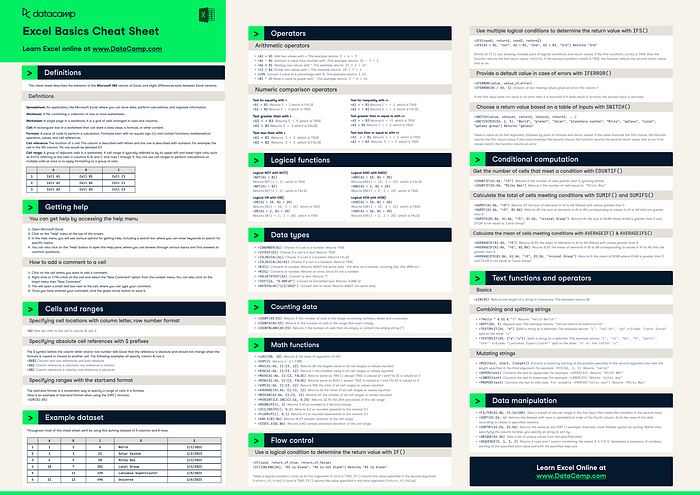
Pro tip: Download this free Excel cheat sheet from DataCamp for a complete reference.
Take Action Today
That’s all about the 7 best Udemy courses you can join to learn Excel in 20226. Excel isn’t going anywhere. It’s the universal language of business, and mastering it is one of the best career investments you can make.
Your next steps:
- Pick ONE course from this list based on your current level
- Wait for Udemy sale (usually within days)
- Buy the course for $10–15
- Schedule learning time — Block 30–60 minutes daily
- Practice immediately — Use Excel for real work from day one
The barrier isn’t cost or access — it’s action.
These courses represent thousands of hours of expert instruction available for the price of lunch. The question isn’t whether you can afford to learn Excel.
The question is: can you afford not to?
By the way, if you want to join multiple courses on Udemy then you can also checkout Udemy’s Personal Plan, where you get access to best of Udemy’s 11000+ courses for a monthly fee of $30.
If you want to join multiple courses then Udemy Personal Plan is actually a better deal. You can also try for free for 7 days to get a feel of it.
P.S. — Don’t forget to grab the free Excel for Beginners course to test your interest before investing. It’s 9.5 hours of quality content, completely free.

I Tried 12+ Excel Courses on Udemy, Here Are My Top 7 Picks for 2026 was originally published in Javarevisited on Medium, where people are continuing the conversation by highlighting and responding to this story.
This post first appeared on Read More