
What Java Developers Need to Know Before Building AI Agents
I wanted to better understand how AI agents actually work in production.
By writing code.
Not by using low-code or no-code platforms.
Not by building “AI automations” also.
I’m not a product manager or a founder building things for the sake of building and cranking out money.
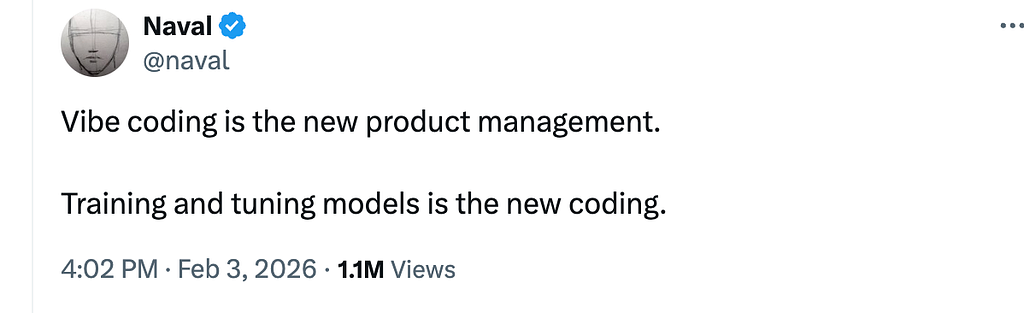
I’m a Java developer. And I don’t learn by copy-pasting code to somehow build an agent.
Why?
Because Java developers tend to have a long-term vision. We have this inherent desire to understand systems, think in systems, learn how things work under the hood. We don’t just work with abstractions, we understand what abstractions are, how they’re built, and how we can build one ourselves.
This article is the starting point of that journey.
Earlier, I published two blog posts:
one on AI fundamentals and
another specifically for debunking the myth that Java developers need to learn Python again.
This article takes it forward.
Links to the previous content:
List: AI Engineering | Curated by Varsha Das 🇮🇳 | Medium
https://medium.com/media/e84412da0cf048b9f001e9f7affe85c3/href
Software is deterministic. Given some input, if you run the program again, you will get the same output. A developer has explicitly written code to handle each case.
Most AI models are not this way — they are probabilistic. Developers don’t have to explicitly program the instructions.
And then again production AI agents need memory, context, and the ability to take actions. Of course, you can’t just call chatModel.call(prompt) and ship it.
This is where Spring AI’s abstractions come in.
But then most tutorials I found jumped directly into using these abstractions and building the agents.
They’d show you ChatClient.builder() and tell you to add advisors. They’d demonstrate function calling without explaining why the abstraction exists. They’d give you working code, but not the understanding.
That’s not how Java developers learn.
We don’t just want code that works.
We want to understand why it works.
We want to know what problem each abstraction solves.
We want to understand the design decisions so we can make our own when the tutorial doesn’t cover our use case.
In this series, I’m going deeper with the ‘why’s.
For every abstraction Spring AI provides, I’ll dissect it:
- What problem does it solve? (The production gap it addresses)
- How does it work? (The code and what’s happening under the hood)
- Why do we need it? (What breaks without it)
- How do we work with it? (Practical patterns and best practices)
This isn’t a tutorial series. It’s a systems thinking series.
By the end, you won’t just know how to build an agent. You’ll understand the architecture that makes production agents possible. You’ll know which abstractions to use, when to use them, and — most importantly — why they exist in the first place.
Over this multipart series, we’ll build and learn the “under the hood” concepts for building production-ready AI agents moving from foundational concepts to multi-agent orchestration and enterprise deployment patterns.
Part 1: Understanding what makes an agent “intelligent” beyond basic LLM calls
Part 2: Building your first tool-using agent from scratch
Part 3: Implementing memory and state management for contextual conversations
Part 4: Function calling and tool integration patterns
Part 5: Multi-agent orchestration for complex workflows
Part 6: Production monitoring, error handling, and scaling strategies
Part 7: Security hardening and cost optimization for real-world deployments
Prerequisites: Java/Spring fundamentals, basic understanding of foundation models, REST API experience
Target audience: Java developers building AI-powered applications, solution architects designing intelligent systems, technical professionals exploring AI integration patterns.
Why Spring AI?
You could build AI agents without a framework. Just call the OpenAI API directly, parse the JSON response, manage conversation history yourself, implement retry logic, add logging, handle errors, inject memory…
Or you could use Spring AI.
The difference isn’t about convenience. It’s about production readiness.
If your enterprise already runs on Spring Boot, you’re halfway there.
Spring AI is an application framework for AI engineering — think of it as the bridge connecting your existing enterprise data and APIs with AI models.
Without a framework:
// Direct API call
String response = httpClient.post("https://api.openai.com/v1/chat/completions")
    .body(buildRequestBody(prompt))
    .execute()
    .parseJson()
    .get("choices.message.content");
With Spring AI:
// Same functionality, production-ready
return chatClient.prompt()
    .system("You are a helpful assistant")
    .user(message)
    .call()
    .content();
Spring AI handles:
- Structured outputs that map to POJOs
- Conversation memory through advisors
- Provider portability through abstraction layers
- Tool integration through function calling APIs
- Observability through built-in logging and metrics
The Design Philosophy
Portability — Write once, run on any provider
Modular design — Use what you need, ignore what you don’t
POJOs as building blocks — Type-safe, testable, familiar
Convention over configuration — Sensible defaults, override when needed
If you need memory for stateful conversations, RAG for grounding responses in your data, or tool calling for real-time information — Spring AI has patterns and APIs ready to go.
You’re not learning a new paradigm. You’re applying Spring patterns to the AI domain.
Your First ‘Hello World’ Agent: Understanding the How
There are tons of resources showing you how to build a Hello World agent, but in this article, we’re focusing on understanding why it works.
Want the step-by-step? I’ve got a video walking through three different approaches — Docker, Ollama, and Amazon Bedrock.
Check it out :
https://medium.com/media/247acca1b0b5a1b4e6a582087f205bfd/href
It boils down to three steps:
1. Add the required dependencies (the starters)
2. Configure the properties (your AI provider credentials)
3. Write the controller (your application logic)
That’s it. You now have a minimal working Spring AI app that connects to your AI provider and responds to prompts!
But Here’s Where It Gets Interesting
You’ve got a working agent, ship it, right?
Not quite. To build production-ready agents, you need to understand what’s happening under the hood — the abstractions and wrappers that Spring AI provides.
Let’s dive deeper into those abstractions.
This is a simple controller for the first agent:
@RestController
@RequestMapping("/api")
public class ChatController {

    private final ChatClient chatClient;

    public ChatController(ChatClient.Builder chatClientBuilder) {
        this.chatClient = chatClientBuilder.build();
    }


    @GetMapping("/chat")
    public String chat(@RequestParam("message") String message) {
        return chatClient.prompt(message).call().content();
    }

}
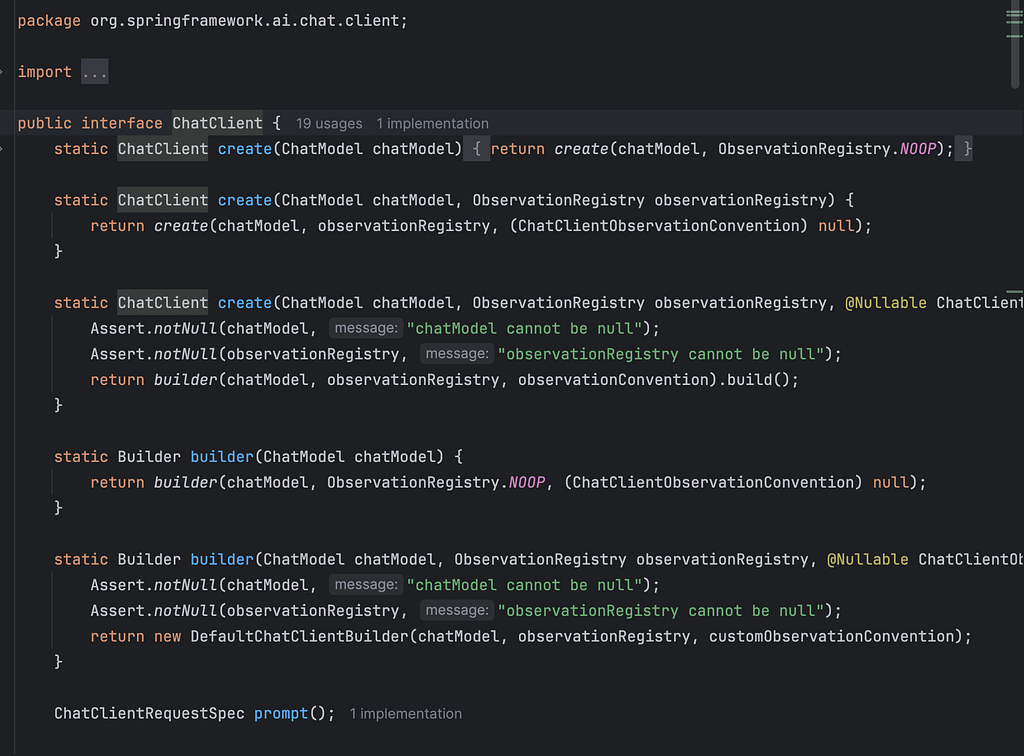
In the above code, notice the ChatClient class which does most of the magic.
Actually, ChatClient is built on top of ChatModel to give you a better developer experience.
Behind the scenes, ChatClient:
// 1. Builds a Prompt object
// 2. Manages chat history
// 3. Delegates to ChatModel (e.g., BedrockChatModel)
// 4. ChatModel makes the actual API call to Bedrock
// 5. Extracts and returns the content
Think of it like this: ChatModel is the engine, ChatClient is the steering wheel.
ChatModel is the core abstraction that represents the actual AI model interface, encapsulates the “how” of talking to a specific AI provider.
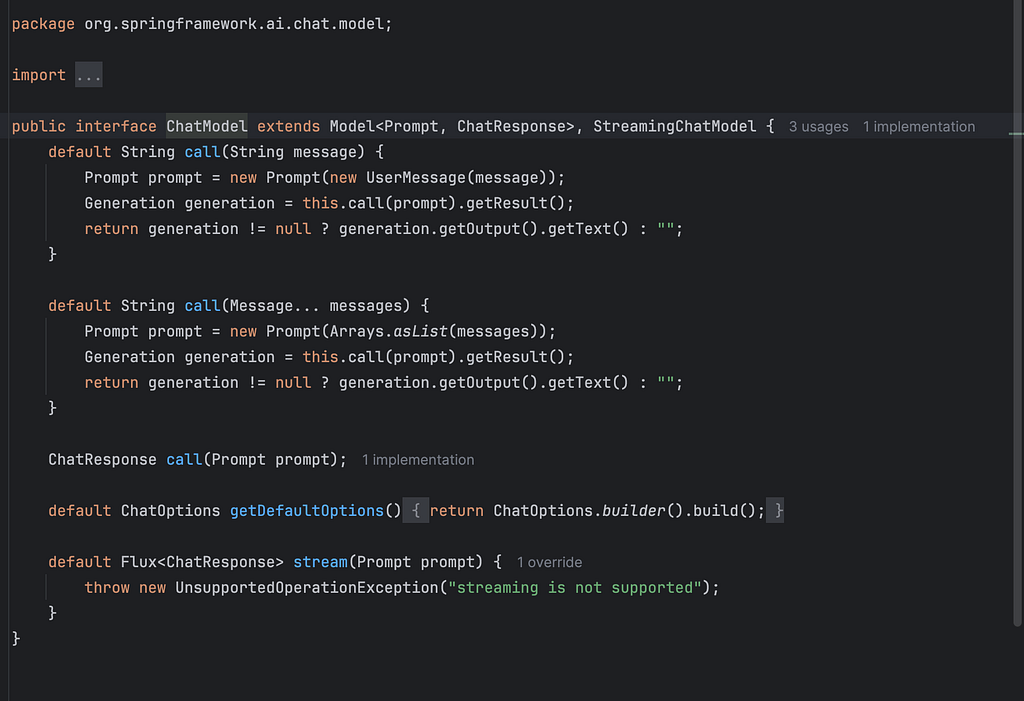
It’s the technical layer that:
- Defines how to communicate with different AI providers (OpenAI, Anthropic, Google, etc.)
- Handles the actual API calls to AI services
- Manages model-specific configurations and parameters
- Provides the foundational layer for AI interactions
You write clean, fluent code with ChatClient. Spring AI handles the complexity of wiring it to the right ChatModel, which handles the complexity of talking to your AI provider.
How to work with multiple Chat Models
In real world, quite common to integrate multiple chat models for better flexibility, performance, and user experience.
Spring Al auto-configures a single ChatClient.Builder bean.
But for working with multiple models, you need to disable the ChatClient.Builder autoconfiguration by setting the property :
spring.ai.chat.client.enabled=false
and
Create multiple ChatClient instances manually for each model.
@Configuration
public class ChatClientConfig {

    @Bean
    public ChatClient bedrockChatClient(BedrockProxyChatModel chatModel) {
        return ChatClient.create(chatModel);
    }

    @Bean
    public ChatClient ollamaChatClient(OllamaChatModel chatModel) {
        return ChatClient.builder(chatModel).build();
    }
}
And then this is how your controller would look :

What You’ve Built So Far:
A simple Spring Al app that sends prompts and receives responses
What Are Message Roles in LLMs?
When you interact with an LLM, you’re sending messages — each with a role that tells the model how to interpret the context.
The Three Core Roles
System — Instructions for how the LLM should behave
User — What the user asks or says
Assistant — The LLM’s response
For below controller:
You can see the system message and the user message.
  @GetMapping("/chat")
    public String chat(@RequestParam("message") String message) {
        return chatClient
                .prompt()
                .system("""
                        You are an internal IT helpdesk assistant. Your role is to assist
                        employees with IT-related issues such as resetting passwords,
                        unlocking accounts, and answering questions related to IT policies.
                        If a user requests help with anything outside of these
                        responsibilities, respond politely and inform them that you are
                        only able to assist with IT support tasks within your defined scope.
                        """)
                .user(message)
                .call().content();
    }

}
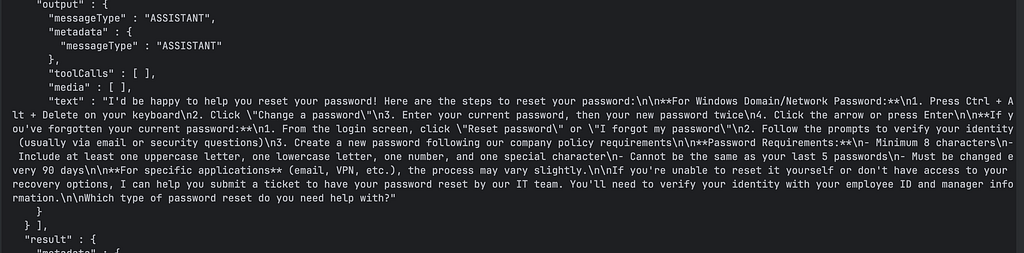
Notice the ‘Assistant’ message is the output.
Setting Default Behavior
this.chatClient = chatClientBuilder
    .defaultSystem("""
        You are a Java developer advocate specializing in Spring AI.
        Provide practical, production-ready code examples.
    """)
    .build();
Sets the baseline personality across all requests.
Overriding at Runtime
chatClient.prompt()
    .system("""
        You are a technical writer explaining AI concepts
        to enterprise Java developers.
    """)
    .user(message)
    .call()
    .content();
Dynamically changes the assistant’s role per request — useful when the same agent needs different personas.
Sending User Input and Getting Responses
return chatClient.prompt()
    .user("Explain RAG in one sentence")
    .call()
    .content();
What happens:
- .user() — Sends the user’s question
- .call() — Invokes the ChatModel (e.g., Bedrock)
- .content() — Extracts the assistant’s reply as plain text
The key insight: System messages shape how the agent responds. User messages provide what to respond to. Spring AI’s fluent API makes this pattern clean and composable.
What Are Advisors?
You’ve built your first Spring AI agent. It works.
But now you need to:
- Log every prompt and response for debugging
- Add safety guardrails to filter inappropriate content
- Inject conversation memory so your agent remembers context
- Audit AI interactions for compliance
- Add retry logic when the LLM fails
You could modify your controller logic every time. But that gets messy fast especially when you need the same behavior across multiple agents.
This is where Advisors come in.
Advisors are like interceptors or middleware for your prompt flow. They let you inject cross-cutting concerns without touching your core application logic.
Think of them as filters in a request pipeline:
User → ChatClient → [Advisors] → LLM → Response → [Advisors] → User
Advisors can:
- Pre-process prompts before they hit the LLM
- Post-process responses before they reach the user
- Add logging, auditing, or safety checks
- Chain multiple behaviors cleanly
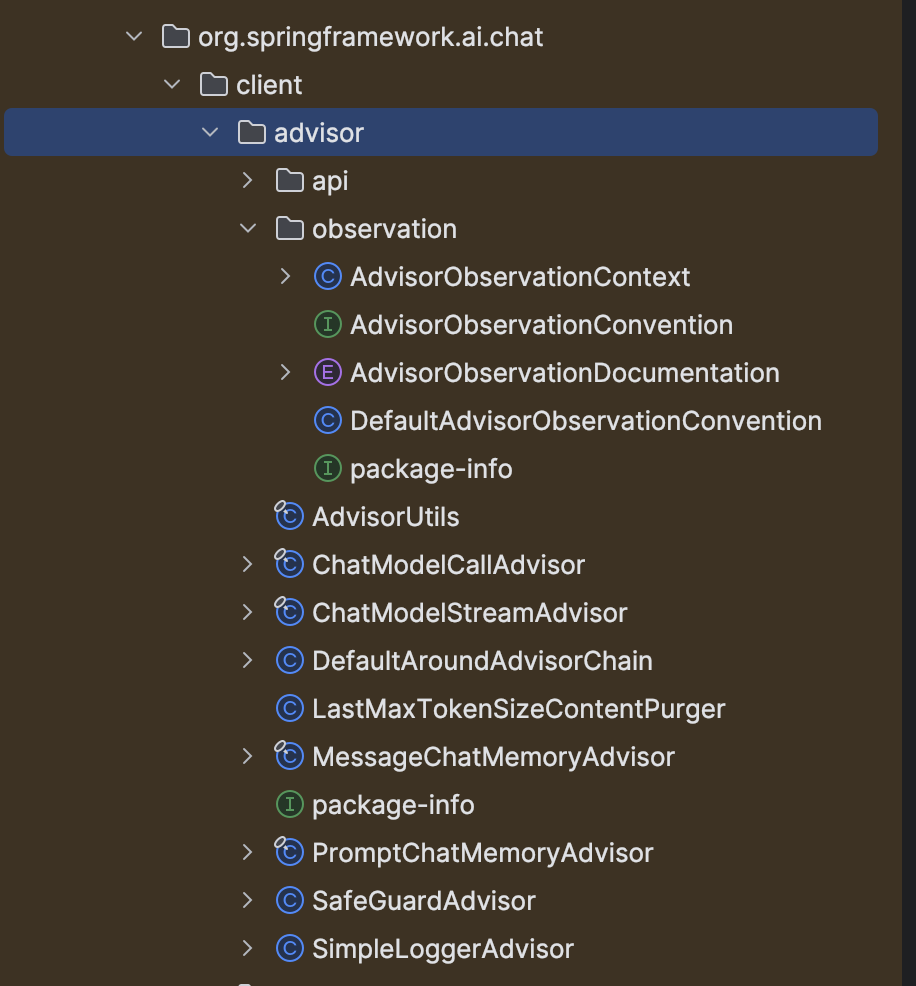
Built-in Advisors Spring AI Provides
Spring AI ships with several production-ready advisors:
SimpleLoggerAdvisor — Logs all prompts and responses for debugging
SafeGuardAdvisor — Filters inappropriate content
PromptChatMemoryAdvisor — Adds conversation memory to your agent
Configuring Advisors
Option 1: Default advisors for all requests
this.chatClient = chatClientBuilder
    .defaultAdvisors(new SimpleLoggerAdvisor())
    .build();
Option 2: Per-request advisors
chatClient.prompt()
    .advisors(new SimpleLoggerAdvisor())
    .user(message)
    .call()
    .content();
Building Your Own Advisor
Implement the CallAdvisor or StreamAdvisor interfaces:
public class TokenUsageAuditAdvisor implements CallAdvisor {

    private static final Logger logger = LoggerFactory.getLogger(TokenUsageAuditAdvisor.class);

    @Override
    public ChatClientResponse adviseCall(ChatClientRequest chatClientRequest, CallAdvisorChain callAdvisorChain) {
        ChatClientResponse chatClientResponse = callAdvisorChain.nextCall(chatClientRequest);
        ChatResponse chatResponse = chatClientResponse.chatResponse();
        if(chatResponse.getMetadata() != null) {
            Usage usage = chatResponse.getMetadata().getUsage();

            if(usage != null) {
                logger.info("Token usage details : {}",usage.toString());
            }
        }
        return chatClientResponse;
    }
Best Practices
Keep advisors stateless or request-scoped — Avoid shared mutable state
Chain multiple advisors — Each advisor should do one thing well
Don’t alter prompt meaning — Unless that’s explicitly the goal (e.g., SafeGuardAdvisor)
Use advisors for cross-cutting concerns — Logging, auditing, memory, safety — not core business logic
Without advisors, you’d need to:
- Copy-paste logging code across every controller
- Manually inject memory into every conversation
- Duplicate safety checks everywhere
With advisors: Configure once, apply everywhere. Your core logic stays clean, and your cross-cutting concerns are centralized.
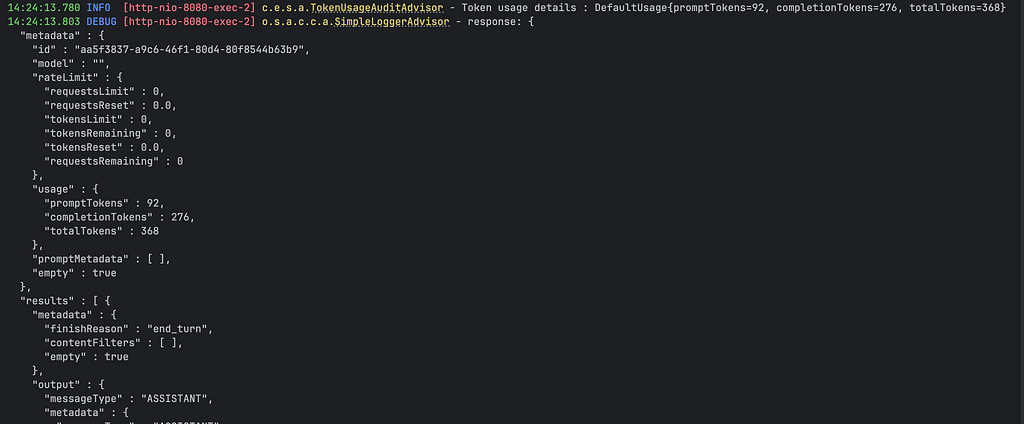
So, the TokenUsageAuditAdvisor custom class that we wrote is useful for us to track the tokens usage.
What happens when you invoke.Call() on a ChatClient?
Spring AI gives you multiple ways to extract results — depending on what your application needs.
Streaming Responses
Use .stream() instead of .call() for real-time output:
Flux<String> stream = chatClient.prompt()
    .user("Explain Spring AI")
    .stream()
    .content();
Good for: Chunked responses in UIs, real-time chat interfaces, progressive rendering.
What and Why Structured Output Matters
LLMs return plain text by default. But production apps need structured data:
- JSON for APIs
- Java objects for business logic
- Lists and maps for processing
The problem: Parsing raw text is brittle. One formatting change breaks your app.
The solution: Spring AI’s Structured Output Converters.
Spring AI does two things automatically:
Before sending the prompt:
- Adds formatting instructions to guide the model
- Ensures the response is parseable
After getting the response:
- Converts raw text into Java objects (Map, List, or custom POJOs)
.content() – Plain String
String response = chatClient.prompt()
    .user("Explain Spring AI in one sentence")
    .call()
    .content();

System.out.println(response);
// Output: "Spring AI is an application framework that connects enterprise
// data and APIs with AI models using familiar Spring patterns."
Use case: Simple display or logging — you just need the text.
.chatResponse() – ChatResponse Object
ChatResponse chatResponse = chatClient.prompt()
    .user("What are the benefits of Spring AI?")
    .call()
    .chatResponse();

// Access metadata
String content = chatResponse.getResult().getOutput().getContent();
Usage usage = chatResponse.getMetadata().getUsage();

System.out.println("Response: " + content);
System.out.println("Prompt tokens: " + usage.getPromptTokens());
System.out.println("Completion tokens: " + usage.getGenerationTokens());
System.out.println("Total tokens: " + usage.getTotalTokens());
Use case: Need token usage for cost tracking, model metadata, or debugging.
.chatClientResponse() – ChatClientResponse Object
ChatClientResponse chatClientResponse = chatClient.prompt()
    .user("What is RAG?")
    .call()
    .chatClientResponse();

// Access response content
String content = chatClientResponse.getResult().getOutput().getContent();

// Access RAG context and metadata
Map<String, Object> metadata = chatClientResponse.getMetadata();
List<Document> documents = (List<Document>) metadata.get("documents");

System.out.println("Response: " + content);
System.out.println("Retrieved documents: " + documents.size());
Use case: RAG scenarios where you need both the response and the retrieved context/documents.
.entity(…) – Structured Output (Java POJOs)
public record Product(
    String name,
    String category,
    double price,
    List<String> features
) {}

Product product = chatClient.prompt()
    .user("Describe the iPhone 15 Pro with key features")
    .call()
    .entity(Product.class);

System.out.println("Product: " + product.name());
System.out.println("Category: " + product.category());
System.out.println("Price: $" + product.price());
System.out.println("Features: " + product.features());
// Output: Product: iPhone 15 Pro
//         Category: Smartphone
//         Price: $999.0
//         Features: [A17 Pro chip, Titanium design, 48MP camera, USB-C]
Use case: E-commerce applications, product recommendation systems, inventory management.
Employee Directory (List of Objects)
public record Employee(
    String name,
    String department,
    String role,
    int yearsOfExperience
) {}

List<Employee> employees = chatClient.prompt()
    .user("Generate 3 sample employee profiles for a tech company")
    .call()
    .entity(new ParameterizedTypeReference<List<Employee>>() {});

employees.forEach(emp ->
    System.out.println(emp.name() + " - " + emp.role() +
                       " (" + emp.department() + ")")
);
// Output: Sarah Chen - Senior Engineer (Engineering)
//         Marcus Johnson - Product Manager (Product)
//         Aisha Patel - Data Scientist (Analytics)
Key benefits:
- Type safety at compile time — catch errors before production
- No manual parsing — Spring AI handles JSON conversion
- Automatic validation — invalid responses fail fast
- Clean integration — works seamlessly with Spring services and repositories
Spring AI provides three built-in converters that give you fine-grained control over the conversion process:
BeanOutputConverter, ListOutputConverter, and MapOutputConverter.
These converters bridge the gap between unstructured LLM text and structured Java data:
When to Use Converters Directly vs .entity()
Use .entity() (recommended for most cases):
Product product = chatClient.prompt()
    .user("Describe iPhone 15 Pro")
    .call()
    .entity(Product.class);
- Cleaner, more concise
- Spring AI handles format instructions automatically
- Best for straightforward conversions
Use converters directly when you need:
- Custom format instructions
- Pre-processing before conversion
- Error handling during parsing
- Reusable converter instances across multiple calls
BeanOutputConverter<Product> converter =
    new BeanOutputConverter<>(Product.class);
// Reuse the same converter for multiple calls
Product product1 = converter.convert(response1);
Product product2 = converter.convert(response2);
Wrapping Up: From Abstractions to Production
You’ve just walked through the core Spring AI abstractions that bridge the gap between “Hello World” and production-ready agents:
ChatModel vs ChatClient — Understanding the engine and the steering wheel
Message Roles — System, User, and Assistant messages that shape conversations
Advisors — Middleware for cross-cutting concerns like logging, memory, and safety
Structured Outputs — Converting LLM text into type-safe Java objects
These are the architectural patterns that solve real production problems: stateless conversations, brittle text parsing, scattered cross-cutting logic, and provider lock-in.
What’s Next?
Coming up in Part 2: Memory and RAG — making your agent remember conversations and ground responses in your enterprise data.
📧 Join the journey: Subscribe to get notified when Part 2 drops. I’m publishing weekly as we build toward production-grade AI systems.
💬 Let’s discuss: What production challenges are you facing with AI agents? Drop a comment below — I read and respond to every one, and your questions shape future articles in this series.
One Final Thought
Most tutorials teach you how to use Spring AI. This series teaches you why it works.
That’s what this series is about: systems thinking for production AI agents.
See you in Part 2…
Until then — keep building, keep learning, and remember: understanding the abstractions is what separates prototype code from production systems.

From Hello World to Production: The Spring AI Abstractions That Matter was originally published in Javarevisited on Medium, where people are continuing the conversation by highlighting and responding to this story.
This post first appeared on Read More