
A reverse-engineered drafting process that keeps humans in charge

Reverse-engineered plagiarism
A few years ago, a former design director used to pull me into random calls, appearing to be serious & urgent. While I thought I was getting fired or about to get started on an urgent design ask, he just wanted to talk about philosophy & K-Pop. As jarring as that was, I found it hilarious. During one of those calls, he shared an anecdote about how he helped his daughter with a college essay using ChatGPT. I used to work as a writing tutor, so any use of ChatGPT in the writing process struck me as suspicious. But, what they did with AI for her essay was actually brilliant.
He suggested that she write out the full essay with reckless abandon for citing sources: no reference formatting, no concern for straw-manned arguments, accurate quotes, or making sure paraphrases are in her own words. Rather, just write all the ideas down first. Then, upload the essay to ChatGPT and have it run a plagiarism check, finding the sources the draft is referencing. From there, they would review the ‘plagiarized’ sources, cite & quote them properly, or remove the content from the essay, and weave it into her original work.
While, at first glance, I had my reservations, I realized this approach didn’t replace her voice or her original work; it reduced friction in her writing process. Here’s why: She first began writing everything on her own & without AI, so the tone, style, and phrasing were hers alone. Second, while she might be inaccurate or wrong about how she alluded to or referenced sources, all that can be corrected later. Lastly, she had ChatGPT handle the critical & clerical work: suggesting revisions, searching for relevant sources, and helping her integrate them properly into whatever citation style her class required. AI wasn’t writing the essay for her, she was using AI effectively by keeping her “authentic voice… to enhance expression, not to replace original thought,” as the Enago Academy would couch it.¹ Her voice came first, ChatGPT came second.
At the writing center I worked for, students could ask for help with anything from brainstorming paper topics to final edits. Our job was to guide students by keeping them on topic, catching blindspots, grammatical mistakes, and shaping the general structure. We gave them the feedback, but the students still had to apply it. The same is true for setting up AI as a writing tutor. I’ll argue that AI platforms setup with a tutoring persona can preserve a writer’s creative integrity and remove friction for research & citing sources. I’ll demonstrate this through a reverse-engineering drafting (or reDraft) process for writing.
Before laying the process out, I’ll explain why we should care about writing, how AI can complement it, and some caveats to consider. Then, I’ll provide a high-level overview of the reDraft process, and go through it step by step on how I used it for my last article, noting what worked well & what I would have done differently.
Get behind me, AI writer
You’re reading this article, which indicates you value writing already. Writing for our own sakes is important for many reasons too: it organizes our thinking, allows us to contribute our knowledge, and works as a self-teaching mechanism. If you can write about a given subject, it’s clear you understand it. I know many designers & former colleagues in philosophy who have great things to say. My hope is to encourage the would-be writers who have insights to share with a process that fast-tracks them through the drafting stage and into editing.
That being said, using AI for written work or any creative material is tricky. On the one hand, it can operate as a great on-demand feedback generator. When writing centers are closed — or I’m just not in an easy or quick environment to get feedback — having something give me writing a second look has benefited me greatly. I still believe human feedback is more valuable — especially for brainstorming, style, and tone at least — but it’s nice to have something that compares sources, grammatical mistakes, and mechanics quickly too.
On the other hand, the temptation is to let AI creep into your work as a co-author or a ghostwriter. While some can differentiate the AI slop from crafted work, it’s becoming more difficult to tell when something is solely generated by AI. At the worst of times, people may just post completely AI-generated content and claim it as their own. I’ll take a firm stance against that approach. So, if you’re expecting an AI-first writing process, I’m afraid you’ll be disappointed. AI comes second here.
A tale of two processes
Building snowmen
Before any AI tools, my traditional writing process was more akin to Randy Ingermanson’s Snowflake Method. While that was geared towards long-form fiction, it served me well for nonfiction & academic writing too. The idea was to start with a sentence capturing your general thought, idea, or argument and then continuously expand that sentence into a paragraph, from a paragraph to a page, and so on. It’s a fractal process, like how a snowflake is a fractal shape of itself.² So, I may have started with a thesis statement and then thought through how I needed to support my claim.
But I had serious struggles — like many others — with writer’s block, uncertain about direction in both my ideas & method, and struggled with getting thoughts to paper even when I knew what I wanted to say. Usually, I enjoy the grind of a process, but I rarely did for writing.
Throwing clay
Pairing my tutoring experience with my director’s brilliance, my goal was to standardize his idea into a process to get me back on track with writing. His insight to ‘reverse engineer’ finding relevant sources, could be extrapolated in other areas of writing: drafting, revisions, alt-text, image captions, SEO, etc. Further & most importantly, I wanted to maintain creative ownership, integrity, and approach this process with a solid ethical foundation.
The phrase reverse-engineered drafting is fitting because it inverts the snowflake method completely: crank out all the content and then clean it up. I rarely would just sit down & write everything without worry for what my overall draft looks like, tone, voice, and grammar — all of which I should care about later in the editing stage. By way of analogy, think of the snowflake method like basket weaving by starting with one long leaf and continuously adding more and more to create a basket.
Alternatively, the reverse-engineered drafting, or reDraft, process is more akin to throwing clay in the sense that you start with an unformed lump that’s morphed into a pot. I soon realized that early drafts have a lot to offer; and this isn’t exclusive to the reDraft process either. AI can help shed some light through the muck like a writing tutor can help clarify some points that your paper could be saying without robbing the author of ownership.
I know AI isn’t required for a reverse-engineered approach in the way I’m describing, either; that’s perfectly fine. But for myself, I fall into so many tangents, get into the weeds on details that aren’t pertinent and sometimes end up writing nothing at all. It could take months or years (looking at my publishing history on Medium), before I actually finish a full draft. Just giving myself the permission to work with an unformed lump for a draft, knowing that AI can give me some clear feedbac,k was enough for me to crank out some undercooked, yet fully-baked thoughts.
If you’re wondering whether I used the reDraft process on this article, I absolutely did. And, of course, I asked AI for feedback on how to standardize & refine the reDraft process too. I have a dedicated Perplexity Space called “Writer’s Room” that runs off the reDraft process. In what’s to come, though, I’ll walk through the process in detail, step by step, in case you’d want to bring it to your frontier model of choice. I’ll also share a link to the custom instructions I use on Perplexity as well.
Reverse-engineered drafting
With AI’s help, of course, I’ve distilled this down to a 5-step process from conception to submission. Depending on how much I already know about a subject, whether I’m constructing an argument or exploring an idea, the early steps may look slightly different. I’ll explain more when we go into more detail about each step.
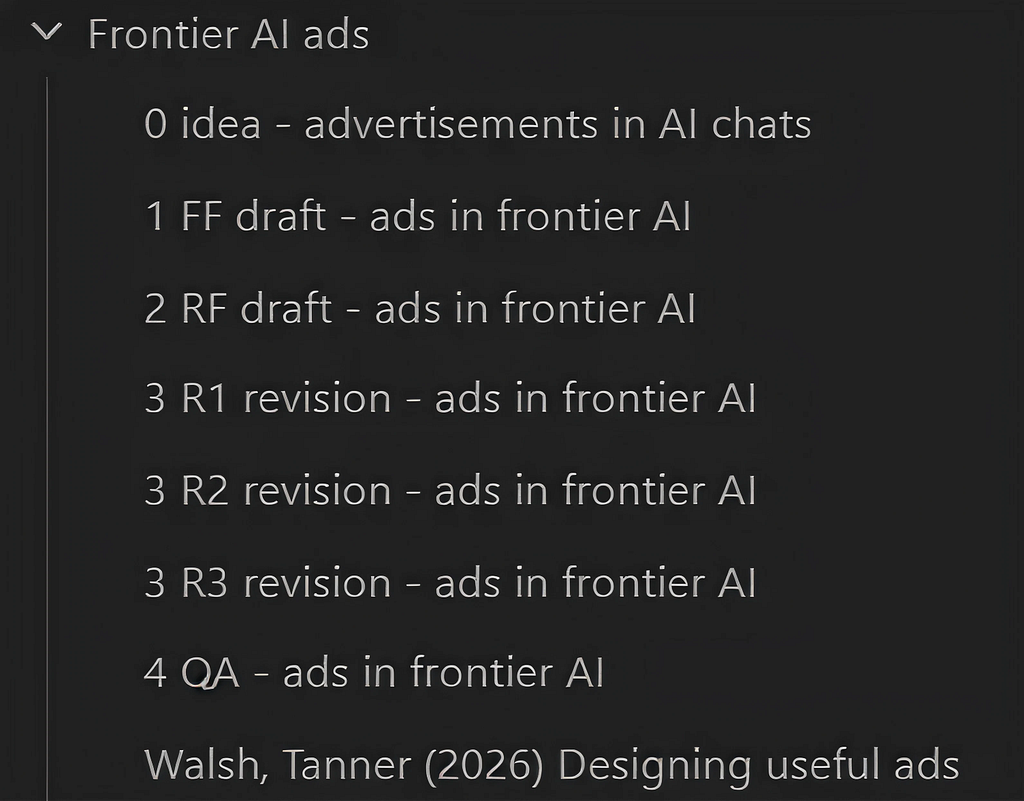
In addition to Perplexity, I use Obsidian to help me keep track of where I’m at in the process with multiple note files as drafts with specific naming conventions. I’ll be sure to share those, too, that I’ll add after each step’s description. For now, let’s look at the process as a whole.
reDraft process
- Step 1: free-form drafting (1 FF draft)
- Step 2: rough feedback (2 RF draft)
- Step 3: revision rounds (3 R# revision)
- Step 4: quality check (4 QA check
- Step 5: final review (published title)
I’ll use my last article, “Designing useful ads,” to walk through each step in more detail since it was both an idea I wanted to explore & to test out this process.³ I’ll share what worked well, learnings from mistakes I made, and some adjustments I did.
For reference, here’s how I organize my Obsidian notes based on the naming conventions for each of the five steps.
Step 1: Free-form drafting
Instructions:
Begin writing without concern for spelling, grammar, or perfect citations. Focus on getting all ideas, arguments, visuals and references onto the page. Loosely note sources or ideas as you write.
This step is about writing & more writing. Get all the ideas on paper with that same reckless abandon, ignoring not only proper citations but also proper grammar, spelling, punctuation, paper structure, and having a clear thesis. Easier said than done, of course; I care too much about spelling & grammar still. Yet, speed is key for step one. The more you have written down, the more you have to work with later.
With my last article, I began with general ideas and gave each paragraph an H4 heading in Obsidian that captured the thought for me. Because of the outline view and that headings can collapse like accordions, Obsidian makes it easy to quickly track & scan a working draft. Here’s how that looked for me in step one:
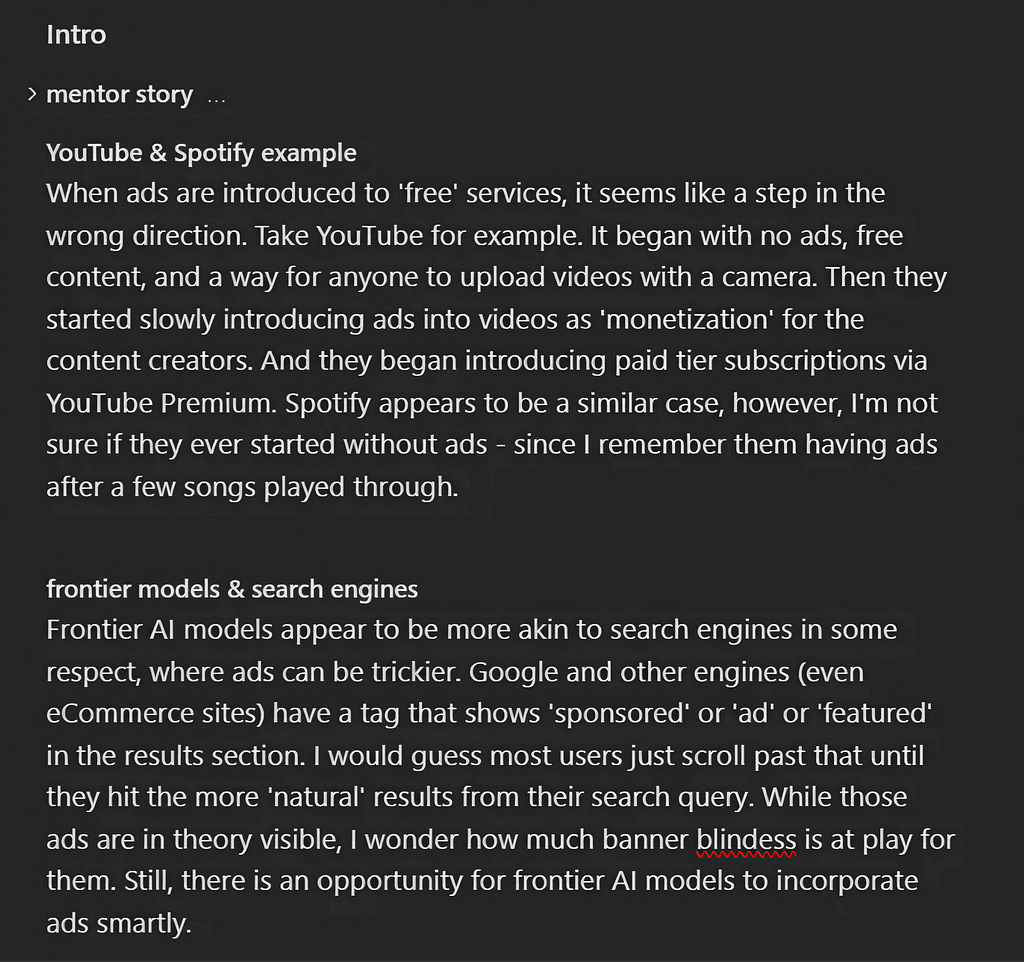
It’s quick, messy, fairly coherent, but also some word vomit. But that’s the point. I can go back & clean up what I wanted to say about YouTube during the editing stage.
Reverse-engineering a brainstorm
There’s another article idea I’m exploring about whether data trackers can help increase virtuous behavior. I have a Garmin watch & a background in philosophy, so I know a bit about data tracking & virtue ethics. What I don’t know is much about how the general data-tracking community might take data tracking to the extreme nor what the ethical implications of that might be. So, I wanted to learn more in two ways: top sources & controversies. For this, I tend to use the following prompt as a starting point:
- “What are the top stories in [subject/topic] and what are people divided on?”
If I’m just eager to write about something but nothing comes to mind, I might plug in either of these prompts into Perplexity:
- “Here are my interests [list of my interests], what are some topics I could consider writing about?”
- “Generate writing prompts for me to explore based on my interests”
AI is great for brainstorming & giving some initial direction to start writing from scratch. I keep it ethical by making sure I’m doing the research though, looking through the summarized sources, and thinking about my own stance on the matter. AI is solely providing a general direction for me to do that. And I can narrow my focus, sources, and clarify my own position, taking notes for my Zettlekasten-inspired Obsidian vault to draw from later.
Visual assets
Since I work as a UX designer, Figma (and similar tools) works great for quick visuals to illustrate a point or make themed article banners like I have. I’ll create a page in a “writing” file for each article specifically with a component library that maintains a consistent color scheme & typography.
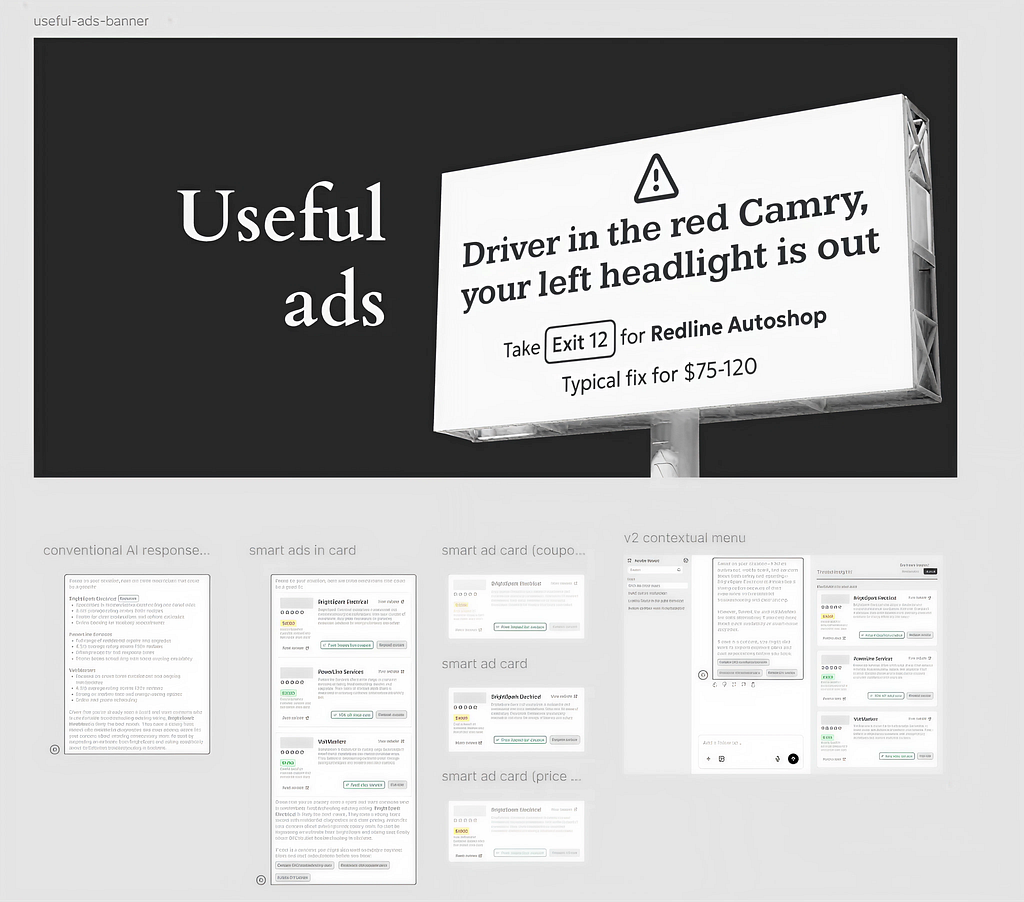
Figma recently added a generic component library making it easy for me to quickly wire out an AI chat interface to illustrate my points & examples. Further, now that more AI features are in Figma, I had an easier time working with placeholder content and didn’t have to use lorem text anywhere. Until I had those visuals ready, I just added placeholders in the draft like so:
Before having my Perplexity Space give some feedback on it, I polished up the formatting a little by giving each paragraph an H4 heading that I may have missed earlier and clearly explain in my prompt what is meant to be placeholder in my draft. Sometimes the thesis comes later though too, which was true for the AI ads article. So, I’ll quickly take a shot on what point I’m trying to make that I can change up later if needed. For this I started with: ads in AI can be useful and done better. Sure it’s not punchy, that detailed, or even helpful; but it gets my aim in a nutshell.
Step 2: Rough feedback
Instructions:
Upload the draft for feedback on:
– Structure: Logical flow and overall organization
– Thesis/Focus: Clarity and specificity of the central idea
– Flesh-out: Fill out details for core argument & ideas
– Sources: Relevance and sufficiency of cited material
– Blind Spots: Identify missing context, underdeveloped arguments, or evidence
I’ll export the free-form draft as a PDF and begin a thread in my “Writer’s Room” Perplexity Space. I typically write a prompt like this:
- “I have a free-form draft for a new article idea I’m writing as an attached PDF. So step 1 in the reDraft process is done. Provide initial feedback for Step 2. (attached PDF)”
After all the feedback is generated, I have Perplexity compile it into a list of to-do items for me to tackle too.
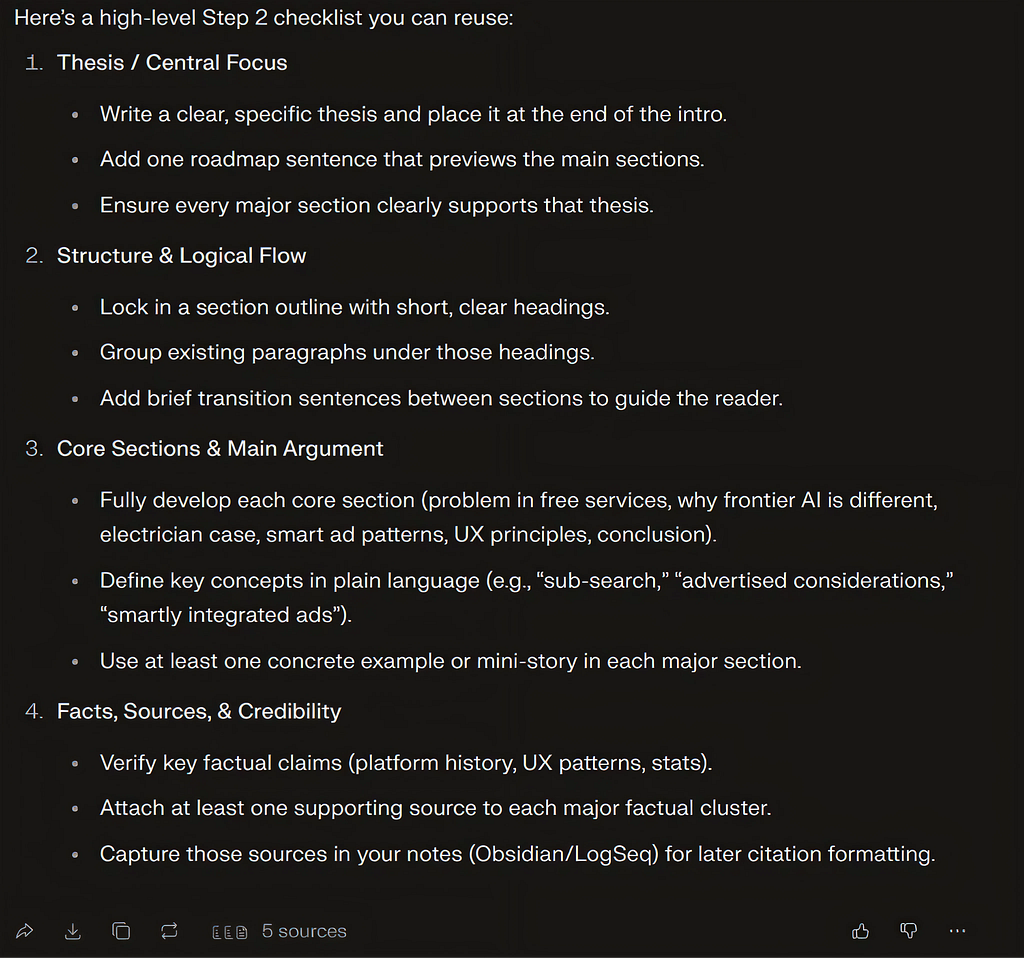
If I’m struggling with a particular item, I’ll bring it to Perplexity and treat it like a writing tutorial. For example, my initial thesis lacked clarity & direction. So, I asked Perplexity how it might phrase my thesis statement. While tutoring students, I would help them sharpen theses in a similar fashion, going back & forth on several revisions with different wording, sentence structure, aim, and focus. I’d suggest my take on it, then the student would bounce back with theirs. Well, the same is true here:
1 Perplexity’s suggestion:

2 My revision:
While advertisements in any free service risk user frustration & brand trust, frontier AI models have a unique opportunity to subvert user expectations for advertisements in a way that enhances the value of AI threads & responses without compromising utility.
3 Perplexity’s revision:

4 My revision:
While advertisements in free services like ChatGPT risk frustrating users and harming brand trust, frontier AI models have a unique opportunity to integrate them smartly via sponsored comparisons, optional sub-searches underpinned by UX principles like information scent, information grouping, and signal-to-noise ratio that can enhance utility without compromise.
5 My own final revision:
While advertisements in free services like ChatGPT risk frustrating users and harming brand trust, frontier AI models have a unique opportunity to integrate them smartly into the threads & responses that have the potential to enhance utility without compromise or worry of banner blindness.
It might be tempting to take AI’s revisions as is, but sometimes the word slop creeps in. So it’s important that you read it carefully & adjust it to your voice & needs — especially for your core argument. Setting up guard rails in your prompting can help curb that temptation & have AI help focus on giving you actionable feedback, as opposed to doing the work for you. Consider explaining what your goals are for a thesis or what you don’t like about it for instance. Good prompts lead to good feedback; and, as Justin Jeffrey reported on students seeking AI feedback, “poor prompts led to weak feedback.”⁴
While I had to improve some structural changes in the article, Perplexity suggested I keep the general roadmap as is — which was flattering, I guess. But it suggested that I integrate my visuals within the case study & provide analysis paragraphs that explain the design and the principles they adhere to. That suggestion was very insightful, and it was nice to decide how to capitalize on that insight myself.
Once I had fleshed out some weaker sections and cut redundant ones, it was time to check for ‘plagiarism’ and find some sources. Here’s the gist of the prompt I used:
“Okay, let’s find sources that are talking about what I’m writing about, referencing or alluding to. And let’s find similar works that are talking about the same topics or ideas as I am.”
While I saw many folks talking about ads in AI platforms, there didn’t appear to be a lot of discussion on how they could be better for people — admittedly, this could be me relying on AI a bit too much to catch blindspots like that. But with the sources it did recommend, Perplexity gave a brief summary for each one & showed in my draft where each source challenged or complemented a point I was making. For my part, I’d check the source, read through it, and find what was most relevant or helpful or more concrete for my article.
Last, I asked Perplexity to provide a Chicago-style bibliography citation of the source for me to track references at the end of the draft and making sure the right information is included & hyperlinked if needed.
Step 3: Revision rounds
Instructions:
Compile feedback into action items for the following categories
Round 1: Structure and Organization
– Refine thesis or focus statement.
– Ensure logical flow and coherence.
– Organize sections with clear headings and subheadings.
Round 2: Paragraphing and Clarity
– Improve topic sentences and transitions.
– Clarify arguments and evidence.
– Ensure each paragraph supports the main idea.
Round 3: Sentence-level Polish
– Refine sentence structure for clarity and readability.
– Correct grammar, punctuation, spelling, and syntax.
– Adjust word choice, tone, and style for the intended audience.
Embarrassing but honest disclaimer: Admittedly, I didn’t go through the three rounds as I laid out above. Perplexity’s custom instructions weren’t as solidified at this point, and I conflated a lot of steps 2 & 3 together where I lost a good bit of focus on what I was doing. And the same is true for steps 4 & 5 too, but I’ll table that for now. For the remainder of this section, read what I should have done instead.
Round 1
Here, the focus is on tying ideas together, being consistent, and making sure the draft is complete from start to finish. I’ll begin by first collapsing all paragraph headings between the introduction & conclusion sections to get an overview of the narrative flow, and then revise the intro or conclusion as needed.
The rest of round one is spent examining how a section ties to the previous & following sections, and then how each paragraph ties to the previous & following ones. Having labelled each paragraph topic saved time by allowing me to glance at how the paragraphs relate to each other, cut them if they don’t, or reorganize them if there’s a better fitting spot.
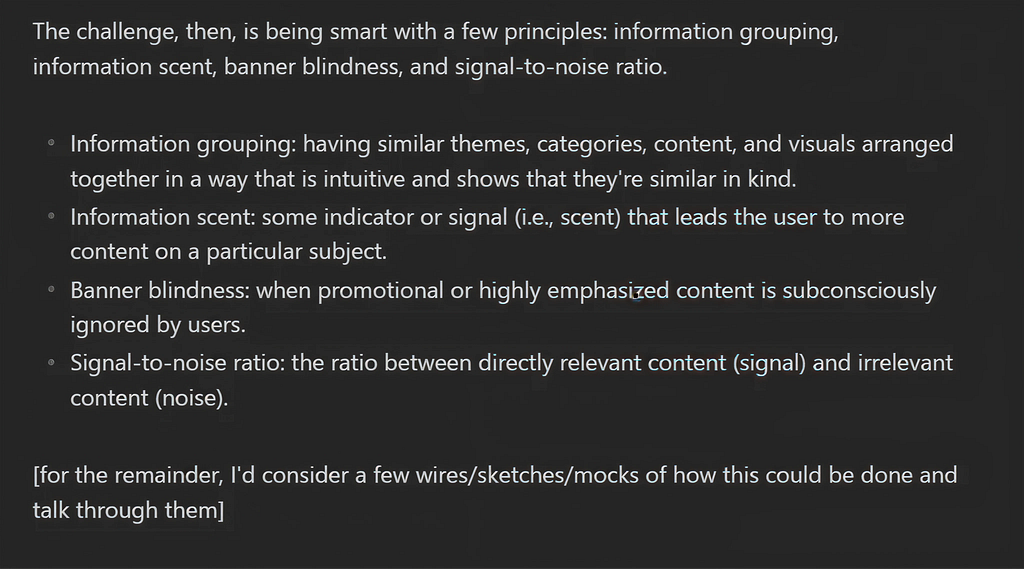
For example, it was time to explain how the UX principles applied to my lo-fi content cards in a few analysis paragraphs. This began with a list of principles and some rough definitions of them that later merged into analysis paragraphs near the visual design:
Before:
After:
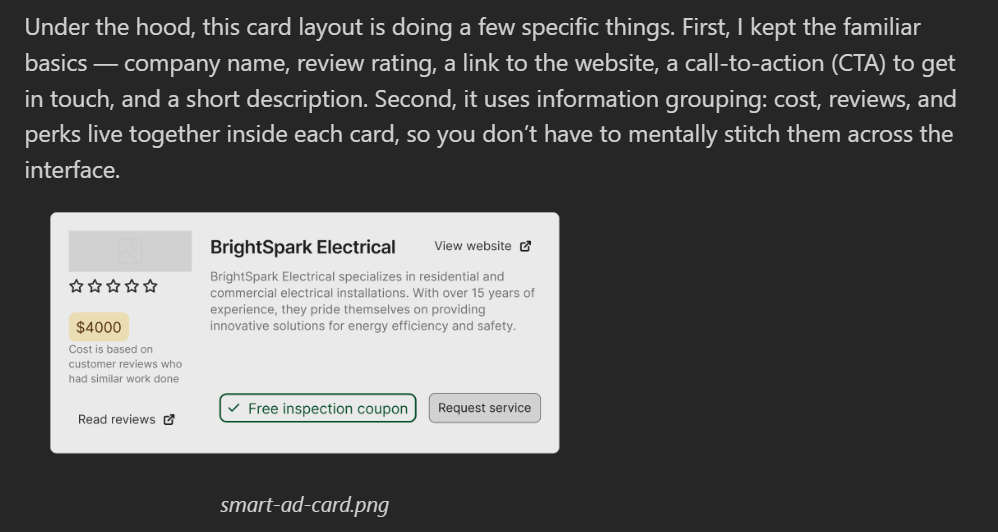
Round 2
Now that the ideas connect and the story is consistent, it’s time to polish the formatting. I’ll start thinking through names for each section or at least a phrase that explains what the section talks about. Eventually, my hope is that I’ll come up with something clever or cheesy — like Lewis & Clark themed section headings on how to trailblaze the frontier for frontier AI advertisements. While there seemingly isn’t a lot for this round, finalizing the larger essay structure & themes would allow me to hone in on the finer details now.
Round 3
If anyone caught my case study article immediately after it published, you’ll know that I overlooked a lot I needed to do in this round. Unfortunately, I can’t blame the sloppy writing on AI either since it’s directly from my rougher drafts — at least it’s my slop though. Again, learn from my mistakes; never skip sentence-level edit day.
While the tasks might differ from article to article, some things were already done more or less like thesis statement revisions, case study coherence, and so on. So what I have above was how I approached each task per round.
This round has a higher workload than the others, as the focus is to go through each paragraph & tighten up the sentences, flow, and grammar for a cleaner polish. Usually, I aim to keep sentences as short as I can without losing clarity of the ideas. But making sure your tone, voice, and style are showcased is most important.
If needed, take one section at a time. I’ve learned it’s better not to approach this round all at once, too. All the writing & structure is there, so it’s easier to come back and know what’s left to do after a break from editing. Once I’m satisfied with the sentences, coherence, and structure of the paragraph, I’ll delete the paragraph headings then move to the next section. For me, this gives me the sense of completion for what sections are revised and indicates that I’ve given this some close attention at the sentence level too.
So, after three rounds of editing, I’ll move into the next step in the process. At this point, I should have my draft in good shape, my visuals replaced the placeholder spots, and trimmed down the excess content I don’t need.
Step 4: Quality check
Instructions:
Check that your draft meets the following criteria before publishing
– Clear and specific thesis or focus
– Logical and coherent structure
– Credible and well-integrated evidence
– Readable and engaging style
– No major errors in grammar or mechanics
– Visual appeal and formatting where appropriate
– Strong conclusion (summary, call to action, or takeaway)
– Relevant tags or SEO if publishing online
– Banner image
– Article title & subtitle
Many of the tasks here may feel they’ve already been done. But it’s nice to have Step 4 as another round of feedback from Perplexity to catch my gaffs that I’ll miss in Obsidian or just mistakes I plainly overlooked. As Riwa By claims, AI goes beyond a traditional spellchecker because it can “analyze entire sentences, understand context, suggest rephrasing, and… match tone and intent,” making it a solid writing tutor.⁵
With what AI can do now, there’s really no excuse for leaving out alt-text & captions for visuals. At the very least, I think there’s an argument for having this content generated — especially if the visuals are your own work or if you want to properly reference copyrighted imagery. But if you want to keep things in your own words, draft the captions, alt-text, and SEO descriptions of the article too. The AI tutor can give solid feedback on this also for screen reader users and teasing out details in captions that might be subtle in the imagery.
What’s unique to this section, though, is coming up with a title. I would spend way too much time crafting a title & subtitle before I had even the idea fully formed in my head. However, with the reDraft process, content comes first & cool titles come after. For the AI ads article, I threw some of my rough title ideas at Perplexity to refine further:
- “AI Trailblazing: the final AI frontier”
- “Helpful marketing: how AI can make ads useful”
- “UX for ads: AI’s unique opportunity”
I ended up with “Useful ads: Trailblazing UX for Frontier AI” but quickly realized that’s a very vague title that doesn’t convey much. So I quickly changed it to “Designing useful ads” and the good folks at UX Collective provided a cleaner, more descriptive subtitle (thank you!): “Redefining the relationship between AI utility and digital advertising.” Thankfully, I didn’t have to rework my article banner image, since I usually don’t have those matching one-to-one with the title anyway.
Step 5: Final review
For my own peace of mind, I’ll have Perplexity review it one last time, providing exactly what I’d put in Medium’s draft page. However, since most AI platforms probably could offer endless feedback for ‘improvement,’ I had included in the Perplexity custom instructions to say when something is ‘good enough for my purposes.’ I’m not trying to be the next Dostoyevsky or Nobel Prize winner, so I can strive for excellence on my own standards rather than absolute perfection.
But if you — like me — eagerly tried a new writing process and noticed a lot of mistakes after it’s posted, I have two thoughts. First, Medium thankfully allows edits after posting; I can make some minor tweaks, fix grammar, or correct mistakes that I come across. Second & more generally speaking, even if you can’t (or shouldn’t) make changes, I’m comfortable with saying that was not my best work & can do better next time. Even though I notice things in my very first Medium article that I want to change or improve, I’m resisting the temptation and trying to lean into my own advice.
Don’t just eat fish, learn how to fish
While AI can be easily abused for any creative process, it can remove a lot of friction while maintaining human ownership of a work. It just has to be done with care & self-restraint on what we allow AI to do for us. The goal is to identify clear boundaries in prompts & instructions so that we focus more on our ideas, style, and prose.
More work does need to be done on a process like this for more stringent, professional work. The reDraft could be a decent start which academics could refine further — keeping the ethics, ownership, and standards honest for peer-review publications.
For newer writers, it may be more challenging to pushback against an AI tutor also. The Enago Academy warns that these platforms sound very confident, tout expertise, and have convincing explanations even when they’re factually wrong. But sources are linked in AI responses; click the links, skim the sources, and make your own judgement — especially for topics you’re still learning. Your name is on the byline for what you post online regardless if you had human or AI feedback.¹ Thus, it’s important to couch AI as an assistant, a librarian, and as a tutor that gives suggestions as opposed to gospel.
I love learning new things, and I don’t do myself nor my readers any good by having AI generate content I know nothing about. The old proverb “give a man a fish, and you feed him for a day; teach a man to fish, and you feed him for a lifetime” applies to AI creativity too. Write for yourself to understand new ideas, pay attention to what feedback AI gives you, and improve your writing style. In Jeffrey’s study, he found that AI helped students improve their writing where “82% reported improved error recognition” and “80% noticed details they typically missed.”⁴ AI can give you a full article to share in minutes, but it can also teach you how to write one yourself.
AI usage disclaimer: AI tools were used for editing visual assets, writing feedback, assistance in locating relevant sources, & Chicago-style citation formatting; all early drafts, ideas, arguments, & experiences in this article are my own.
References
- Link to custom instructions for Perplexity Space.
[1] Enago Academy. “AI in Academic Writing: How to Use Technology Without Losing Your Voice.” Enago Academy, December 14, 2025. https://www.enago.com/academy/ai-in-academic-writing-how-to-use-technology-without-losing-your-voice/.
[2] Ingermanson, Randy. How to Write a Novel Using the Snowflake Method. North Charleston, SC: CreateSpace Independent Publishing Platform, 2014.
[3] Walsh, Tanner. “Designing Useful Ads: Redefining the Relationship Between AI Utility and Digital Advertising.” UX Collective (Medium), February 9, 2026. https://medium.com/user-experience-design-1/useful-ads-7899e1711157.
[4] Jeffrey, Justin. “Draft–Redraft–Reframe: Using ChatGPT to Build Student Ownership of Writing.” Impact (Chartered College of Teaching), October 27, 2025. https://my.chartered.college/impact_article/draft-redraft-reframe-using-chatgpt-to-build-student-ownership-of-writing/.
[5] By, Riwa. “AI vs Traditional Grammar Checkers (2025): Which Is Best?” ByRiwa, October 13, 2025. https://www.byriwa.com/ai-vs-traditional-grammar-checkers/.

Get behind me, AI writer was originally published in UX Collective on Medium, where people are continuing the conversation by highlighting and responding to this story.
This post first appeared on Read More