
Writing blog posts can take a lot of time. Between brainstorming ideas, creating outlines, and turning everything into a polished article, it’s easy to get stuck staring at a blank page.
That’s where AI can make a big difference. Today’s AI blog tools have changed blogging by helping you generate ideas, write full blog post drafts, and optimize content for search engines.
I’ve tried many AI blog generators while experimenting with different writing workflows, but only five really stood out for their quality, reliability, and ease of use.
These are the tools I keep coming back to and use myself. In this guide, I’ll share the 5 best AI blog post generators worth trying, so you can blog faster and create better content.

Quick Summary: I recommend All in One SEO (AIOSEO) if you want to write and optimize content directly inside WordPress. For a flexible AI partner that helps with brainstorming and conversational drafts, ChatGPT is my top choice.
💡My Verdict: The Best AI Blog Generators
In a hurry? Take a look at my top picks to make a quick decision:
| # | Tool Name | Best For | Pricing |
|---|---|---|---|
| 🥇 | All in One SEO | AI writing + SEO optimization inside WordPress | Starts at $49.50/yr + Free |
| 🥈 | ChatGPT | Flexible AI content generation, brainstorming, and conversational writing | Starts at $20/month + Free |
| 🥉 | Semrush AI Article Generator | Data-driven SEO content creation with keyword insights | Starts at $60/mo |
| 4 | Rytr | Budget-friendly AI writing for quick drafts and beginners | Starts at $7.50/month + Free |
| 5 | Jasper | Enterprise-grade AI content creation for teams and agencies | Starts at $59/month per seat |
Why AI Blog Post Generators Are Important for Bloggers
AI blog post generators aren’t just a trend. They’re tools that actually make blogging faster, smarter, and more efficient.
They handle time-consuming tasks so you can focus on creating better content and growing your blog. Here’s why these tools are essential:
- Save Time on Content Creation: Generate full drafts, outlines, or topic ideas in minutes, instead of spending hours writing from scratch.
- Improve Content Quality: Built-in grammar checks, SEO suggestions, and readability enhancements make your posts polished and professional.
- Scale Your Blogging Efforts: Publish consistently without needing a large writing team, which keeps your blog active and engaging.
- Experiment and Brainstorm Ideas: Quickly generate new angles, headlines, and meta descriptions to keep your content fresh.
- Integrate Easily: Many AI tools work directly with WordPress, Google Docs, or your favorite editors for a smooth workflow.
Overall, using the right AI generator can improve how you approach blogging. With these tools, you’ll save time, boost quality, and consistently produce content your audience loves.
How I Tested and Reviewed These AI Blog Generators
I wrote a blog post with each tool to see how they perform in real-world scenarios. I wanted to know which AI blog generators truly deliver, so I put each tool through thorough testing.
This helped me separate the ones that work well from those that fall short.
Here’s how I tested them:
- Installed or Connected Tools – Set up each AI generator, including plugins, web apps, and integrations where applicable. This helped me see which tools were easy to use for beginners.
- Tested Writing Speed & Content Quality – Created full blog posts to evaluate readability, accuracy, and engagement. This allowed me to find the specific generators that deliver accurate, engaging text with minimal editing required.
- Compared Free vs Paid Plans – Assessed feature differences, limitations, and overall value between tiers to see which blog post generators are worth the money for bloggers.
- Evaluated Integration & Workflow – Tested how easily each tool works with WordPress, Google Docs, and other platforms to speed up workflows for writers.
- Checked SEO Friendliness – Reviewed built-in keyword suggestions, meta description support, and optimization features. This allowed me to see which platforms actively improve content visibility and can bring traffic to your website.
- Reviewed Support, Updates & Learning Curve – Examined documentation, tutorials, and customer support to see easy of use for beginners.
Why Trust WPBeginner for AI Blog Generator Recommendations?
At WPBeginner, we don’t just list tools—we test them in real-world blogging environments. This means you get recommendations based on actual usage, not marketing hype.
Our guidance is always honest and beginner-friendly. We focus on tools that are easy to use, reliable, and deliver real value for bloggers of all levels.
We’ve tested these AI blog generators on multi-author blogs and demo personal sites. This ensures our picks work no matter the size or scope of your blog.
With WPBeginner, you can be confident these AI tools will help you create content faster, improve quality, and streamline your blogging workflow. To learn more, take a look at our editorial process.
💡Expert Tip: Always treat AI as your co-pilot, not an autopilot! To rank well on Google, you must review your AI-generated drafts, add your personal experience, and optimize the final text using a WordPress SEO plugin.
Ready to get started? Let’s dive into my top picks for the best AI blog post generators:
- All in One SEO for WordPress – AI-Powered Blog Optimization & Content Assistant
- ChatGPT – Flexible AI Content Generation
- Semrush AI Article Generator – Create Search-Friendly Content in Minutes
- Rytr – Budget-Friendly AI Assistant
- Jasper – Enterprise-Grade AI Content Creator
- Other AI Blog Generators Worth Trying
- Which AI Blog Generator Should You Use?
- Frequently Asked Questions About AI Blog Post Generators
- Additional Resources to Help You Write Blog Posts
1. All in One SEO for WordPress – AI-Powered Blog Optimization & Content Assistant

| ✅ Pros of All in One SEO | ✅ AI-powered title and meta description generation ✅ Creates SEO-optimized blog post drafts ✅ Generates tables, key takeaways, and FAQ sections with AI ✅ Built-in content readability scoring for polished posts ✅ AI Image Generator for unique visuals ✅ An intuitive AI Assistant block ✅ Works completely inside WordPress |
| ❌ Cons of All in One SEO | ❌ Free version is limited ❌ AI features are supplementary, not full content replacement |
| Pricing | Starts at $49.50/yr + Free |
| Best For | WordPress bloggers who want AI-assisted content creation and built-in SEO optimization in one tool |
After thorough testing, I’ve found All in One SEO to be the overall best AI blog post generator for WordPress.
AIOSEO’s AI Assistant acts like a creative partner, helping you structure and generate full articles in seconds, right inside the WordPress editor.
It’s not just an SEO plugin—it’s a complete AI writing assistant. It combines optimization, content guidance, and AI-powered suggestions for titles and meta descriptions.
For more details about using it, see our complete AIOSEO review.
My Experience
Writing with AIOSEO is incredibly simple. I open a new post, add the AIOSEO AI Assistant block, type a clear prompt, and within seconds, I get a well-structured first draft.
This alone saves me hours compared to starting from a blank page.
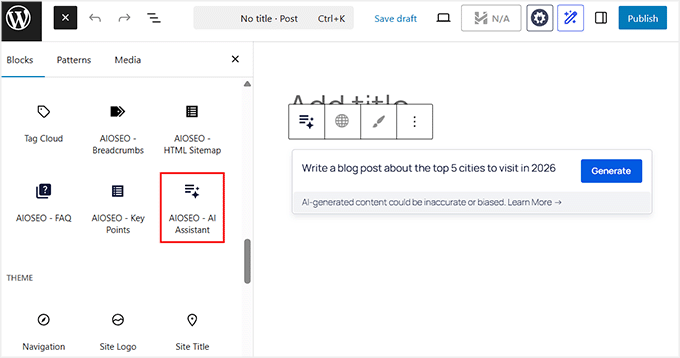
The AI doesn’t just generate text—it helps me organize my ideas. I can quickly create headings, bullet points, and even comparison tables without worrying about formatting.
For instance, when I wrote a demo post about the top cities to visit, the AI automatically generated a comparison table. I could drop it straight into the post.

On-page SEO is also baked right in. The AI suggests optimized titles, meta descriptions, and readability improvements as I write.
I no longer have to switch between multiple plugins or tabs. The entire workflow stays inside WordPress, which keeps my focus on content rather than technical details.
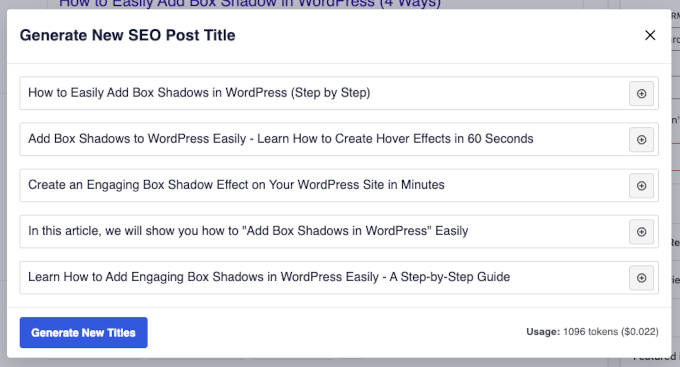
The AI Image Generator is another time-saver. I can produce unique visuals, illustrations, and banners directly in WordPress.
All generated images are automatically added to my Media Library, ready to use anywhere on my site. This has replaced the hours I used to spend hunting for stock photos.
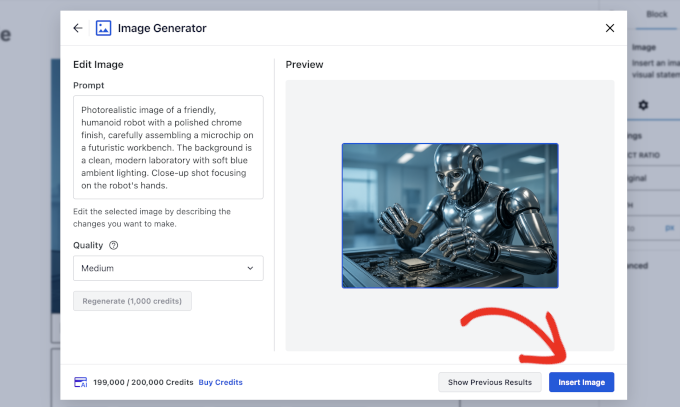
Even when the AI output isn’t perfect, refining it is straightforward. Adjusting the prompt or generating additional blocks allowed me to expand sections, go deeper on key points, and add examples. This makes the content feel personal and high-quality.
The AI is fast, but the human touch is still essential, and AIOSEO makes combining both effortless.
Overall, using AIOSEO has transformed how I can create content. It lets me write faster, stay organized, and produce polished posts—all without ever leaving WordPress.
Why I recommend All in One SEO: AIOSEO is my go-to AI blog generator for WordPress. It lets you generate content quickly, optimize for search engines, and create visually engaging posts—all from one plugin. It’s perfect for bloggers of all levels who want to save time, maintain quality, and make sure every post is SEO-ready.
💡Expert Tip: If you don’t yet have a WordPress site, check out our guide on how to create a WordPress website to get started and take full advantage of AIOSEO’s AI Assistant.
2. ChatGPT – Flexible AI Content Generation

| ✅ Pros of ChatGPT | ✅ Generates natural, human-like text across diverse topics ✅ Highly flexible with tone, style, and audience adaptation ✅ Excellent for brainstorming headlines, outlines, and meta descriptions ✅ Multi-language support for global content |
| ❌ Cons of ChatGPT | ❌ Outputs sometimes include generic or factually incorrect content ❌ Not natively integrated into WordPress or Google Docs ❌ Requires human editing to ensure accuracy and SEO optimization |
| Pricing | Starts at $20/month + Free |
| Best For | Bloggers who want a creative AI assistant capable of conversational writing, flexible brainstorming, and content refinement |
I recommend ChatGPT if you need a flexible assistant that can help with everything from brainstorming to refining your conversational tone.
While it does not have the WordPress integration that AIOSEO offers, its ability to generate natural text is excellent. It also adapts to your specific writing style.
I rely on it for creating outlines, writing full sections, and polishing drafts before final edits. This is why it earns a solid second place on my list of AI blog generators.
My Experience
Using ChatGPT feels like having a co-writer at your side. I can give it a clear prompt and get a full draft in seconds. This is a huge time-saver when working on multiple posts per week.
The AI adapts to the tone I need, whether it’s friendly and approachable for beginners or more professional for technical topics.
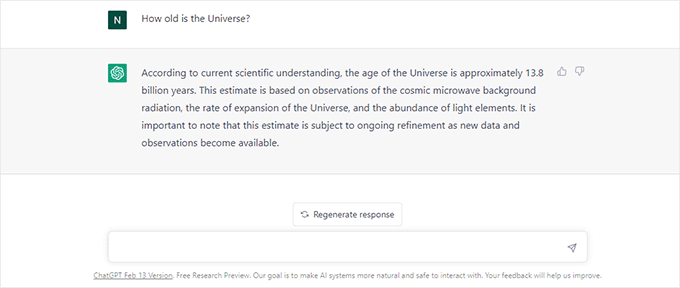
I especially appreciate its brainstorming capabilities. For every post, I use ChatGPT to generate headline options, outline sections, and even suggest FAQs.
This alone reduces hours of planning and keeps my content structured and relevant.
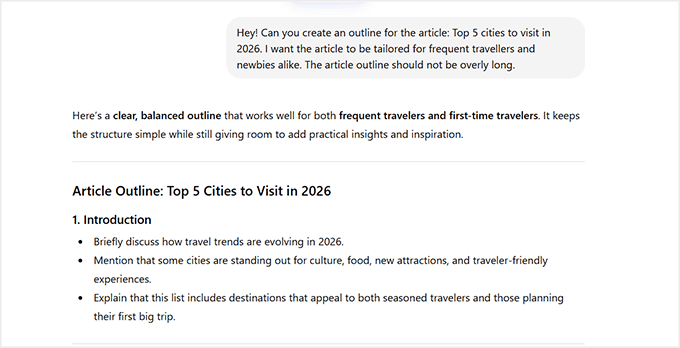
Although I strictly recommend fact-checking your content, I usually treat ChatGPT’s output as a strong first draft rather than a finished article.
Before publishing, I quickly verify statistics, dates, and technical details. Then I refine the wording to better match the voice and standards we use on WPBeginner.
Why I recommend ChatGPT: It earns its second-place spot because of its versatility and creativity. ChatGPT is not just for drafting text—it helps you experiment with tone, structure, and ideas. When combined with careful editing and SEO optimization, it can produce human-like content that connects with readers and saves a huge amount of writing time.
💡Alternative: Claude is another excellent AI writing assistant that’s especially strong at generating clear, well-structured long-form content.
In my testing, it followed instructions closely and produced thoughtful drafts. This makes it a great option for bloggers who want an alternative to ChatGPT for brainstorming, writing, and refining posts.
3. Semrush AI Article Generator – Create Search-Friendly Content in Minutes
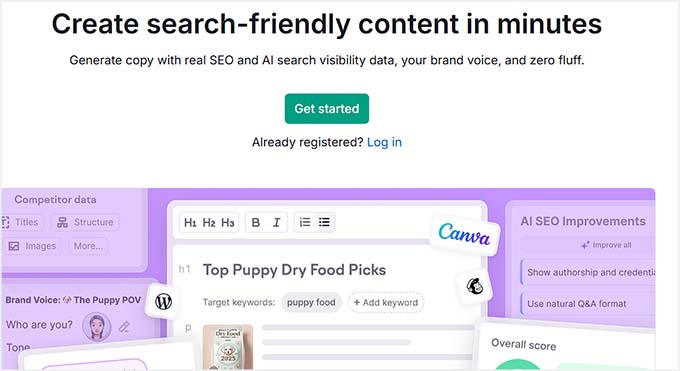
| ✅ Pros of Semrush AI Article Generator | ✅ Generates blog posts in just a few clicks ✅ Uses real SEO data from Semrush ✅ Helps optimize for Google and AI search visibility ✅ Can turn blog posts into social media posts and emails ✅ Supports direct publishing integrations (WordPress, Mailchimp, and more) ✅ Includes AI image generation and AI chat for brainstorming and editing |
| ❌ Cons of Semrush AI Article Generator | ❌ Requires a Semrush subscription ❌ Works best if you already understand basic SEO concepts ❌ Some drafts may still need editing for tone and clarity |
| Pricing | Starts at $60/mo |
| Best For | Bloggers, marketers, and teams who want to create SEO-optimized articles backed by real search data |
Semrush AI Article Generator is built for bloggers who want to turn real-time data into search-ready drafts. Unlike many AI tools that simply generate text from prompts, Semrush combines AI writing with real SEO data.
This helps you create content that’s designed to rank on Google and appear in AI-powered search results.
My Experience
Using the Semrush AI Article Generator felt very different from testing typical AI writing tools.
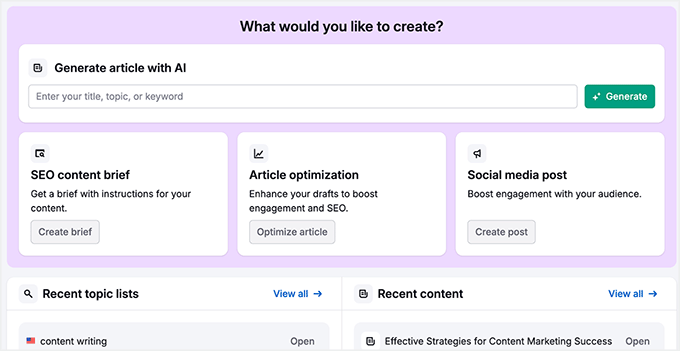
Instead of starting with a blank prompt, the platform guides you through keyword selection, search intent, and competitor analysis before generating the draft.
This approach helped me create articles that were already structured around ranking opportunities rather than just sounding good.
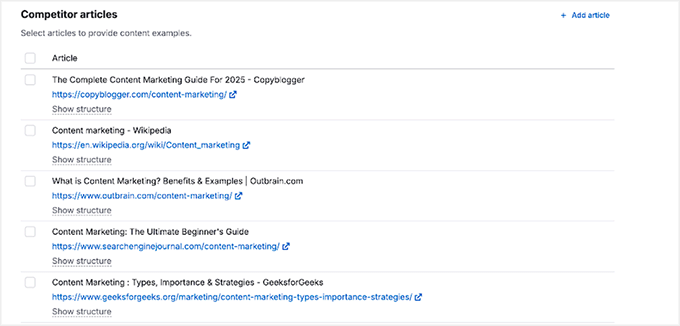
I also liked how the AI automatically integrated relevant keywords and optimized the article structure. Instead of manually adding keywords later, the content was already aligned with SEO best practices from the start.
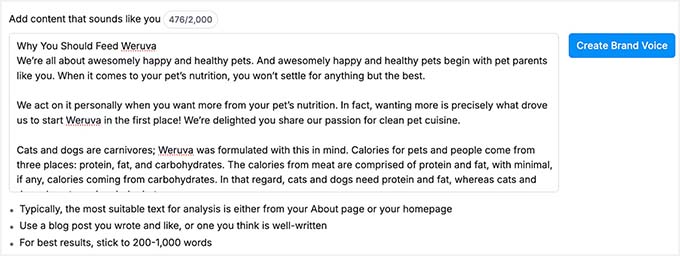
The brand voice feature was another highlight.
By providing a writing sample, I was able to train the AI to match a more natural tone. This helps reduce the “generic AI writing” feel that many tools produce.
However, it’s worth noting that Semrush’s AI Article Generator isn’t as conversational or flexible as tools like ChatGPT or AIOSEO.
Because it focuses heavily on SEO data and structure, some drafts can feel a bit robotic or repetitive, requiring editing to sound more natural.
It also works best if you’re already using the Semrush ecosystem. This means the cost and learning curve may be higher for beginners who just want a simple AI writing tool.
Why I recommend Semrush AI Article Generator: If your main goal is to create content that ranks in search engines, Semrush’s AI Article Generator is a powerful choice. By combining AI writing with real keyword data and SEO optimization, it turns ideas into search-ready blog posts.
💡Alternative: If you don’t need a full AI blog generator, SEOBoost is a great option for AI-powered content research, outlines, and optimization.
It analyzes top-ranking pages, builds SEO content briefs, and provides real-time optimization suggestions. This helps you structure articles that have a better chance of ranking.
4. Rytr – Budget-Friendly AI Assistant
| ✅ Pros of Rytr | ✅ Very affordable compared to most AI writing tools ✅ Supports 30+ writing use cases, including blog posts and outlines ✅ Allows tone and language customization ✅ Includes a Chrome extension for writing across different platforms |
| ❌ Cons of Rytr | ❌ Content quality can be inconsistent or repetitive ❌ Long-form blog posts often need significant editing and expansion ❌ Limited SEO guidance and optimization tools |
| Pricing | Starts at $7.50/month + Free |
| Best For | Beginners, bloggers on a budget, and anyone who wants a simple AI assistant for generating quick drafts and ideas |
If you are on a budget, Rytr is an easy-to-use assistant for generating quick blog ideas and product descriptions. It’s designed to help you quickly generate blog drafts, outlines, and short-form content without the complexity or high cost of more advanced AI tools.
While it doesn’t offer the deep SEO integrations you’ll find in tools like AIOSEO or Semrush, it does a great job of helping you get ideas on the page fast.
My Experience
Using Rytr felt straightforward from the start. The setup process only took a few minutes, and the interface made it easy to choose a content type, tone, and language before generating text.
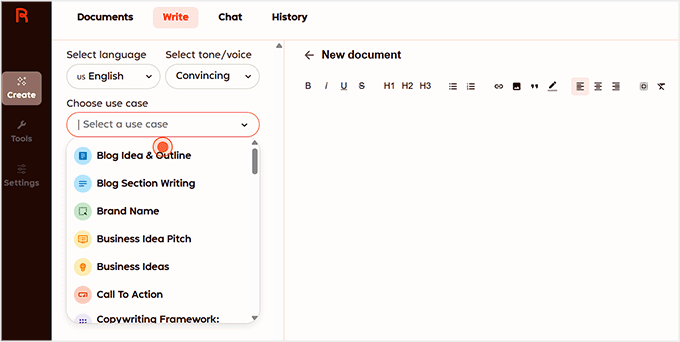
I tested Rytr by creating a few short blog sections and outlines.
The tool generated results quickly, which made it helpful for kickstarting content ideas or drafting simple sections.
Rytr also includes 30+ content templates, allowing you to create product descriptions and even social media captions.
In my experience, it’s particularly helpful for overcoming writer’s block and creating rough drafts that you can later refine and expand into a full article.
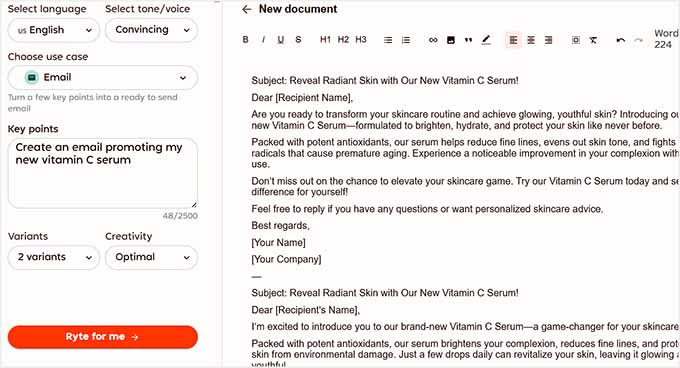
However, for longer blog posts, I noticed that the content sometimes needed extra editing to improve flow and depth.
That said, Rytr still performs well for what it’s designed to do: quick content generation at an affordable price. For beginners who want to experiment with AI writing without committing to a more expensive platform, it’s a solid starting point.
Why I recommend Rytr: Rytr earns its place on this list because it offers accessible AI writing tools at a very affordable price. While it may not replace more advanced AI platforms, it’s a great option for bloggers who want to generate outlines and quick drafts without a high cost.
5. Jasper – Enterprise-Grade AI Content Creator

| ✅ Pros of Jasper | ✅ Generates polished and structured long-form content ✅ Large library of pre-built content templates ✅ Built-in team collaboration and project organization tools ✅ Consistent outputs suitable for high-volume publishing |
| ❌ Cons of Jasper | ❌ Expensive compared to many other AI writing tools ❌ Can have a steeper learning curve for beginners ❌ Works best when combined with other SEO tools |
| Pricing | Starts at $59/month per seat |
| Best For | Agencies, professional bloggers, and teams that need to scale content production without sacrificing quality |
Jasper is a powerful platform for teams that need to produce a high volume of content while maintaining a consistent brand voice.
It’s built with scalability in mind, offering advanced AI writing features, structured templates, and collaboration tools that make it easier to manage high-volume content workflows.
My Experience
Using Jasper felt more like working with a full content platform rather than just a writing assistant.
The templates helped speed up the process of building structured articles, especially when creating introductions, outlines, and section drafts.
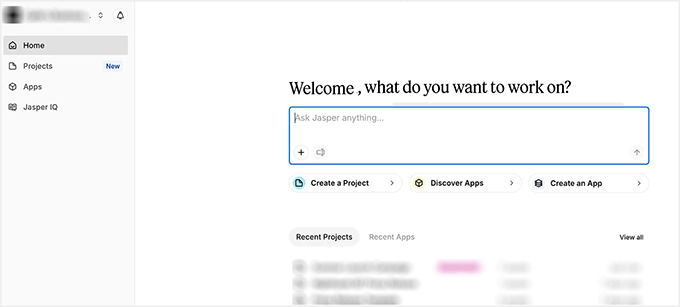
I also liked how Jasper handles long-form content generation. Compared to some simpler AI tools, the outputs looked more organized and polished. This greatly reduced the amount of editing needed afterward.
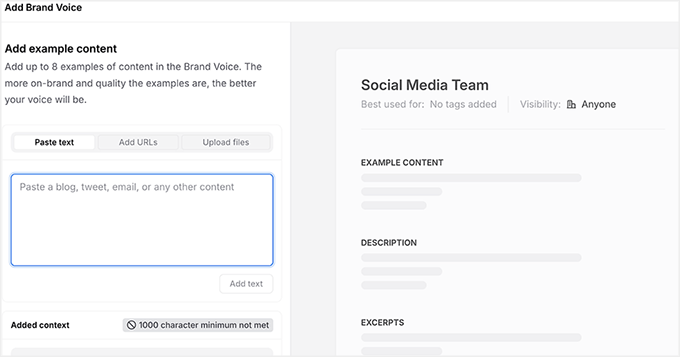
Another feature I really like is Jasper’s Brand Voice system. You can upload examples of your existing content, files, or even URLs from your website, and Jasper will analyze them to understand your writing style.
From there, it generates a brand voice profile that helps keep all your content consistent. This is particularly useful for teams because everyone can generate content that matches the same tone.
However, Jasper’s advanced features also mean there’s more to learn at the beginning, and the pricing can be a bit high for solo bloggers just getting started.
For teams or businesses producing content at scale, though, it can be a very powerful solution.
Why I recommend Jasper: This tool is designed for serious content production. If you run a blog, agency, or marketing team that publishes content frequently, Jasper’s templates, long-form generation, and collaboration tools can significantly speed up your workflow.
Other AI Blog Generators Worth Trying
While the tools above are some of the best AI blog generators I tested, they’re not the only options available.
Here are a few additional AI blog generators worth trying if you want more features, different pricing options, or alternative writing styles.
1. Copy.ai – Fast AI Writing for Marketing & Short Blogs

The Good: Beginner-friendly interface with lots of templates for blog ideas, social media posts, and marketing copy.
The Bad: The free plan has usage limits, and longer blog posts may require additional editing.
Best For: Quickly generating marketing copy and social media posts.
2. Writesonic – AI Blog Post Generator with Templates

The Good: Creates blog ideas, outlines, and full posts using templates. Supports multiple writing tones and languages, and offers a beginner-friendly interface with a free trial.
The Bad: Long-form content often needs editing, and the free plan comes with usage limits.
Best For: Template-based AI writing.
3. QuillBot AI Blog Post Generator – Paraphrase & Draft Creator

The Good: Excellent paraphrasing tools that help improve readability and rewrite existing content. It also offers a free tier.
The Bad: Not as advanced for generating long-form SEO-focused blog posts compared to other AI tools.
Best For: Improving readability and writing blog drafts.
Which AI Blog Generator Should You Use?
For bloggers who want the simplest setup and the easiest experience, I recommend starting with All in One SEO. Its AI Assistant works directly inside WordPress. It lets you generate drafts, structure your articles, and even create SEO-ready titles and meta descriptions without switching between multiple tools.
It’s perfect if you want an all-in-one solution that speeds up writing while keeping your content optimized for search engines.
If you want to expand your creative options, tools like ChatGPT or Claude are excellent for conversational, human-like content, and brainstorming new ideas.
On the other hand, Rytr is ideal for budget-conscious users who need quick drafts and simple short-form content.
For larger-scale blogging, Jasper offers structured templates, brand voice support, and multi-language capabilities. This helps you generate polished, professional content faster.
💡Expert Tip: No matter which AI generator you choose, the best results come when you combine AI output with your own editing.
Fact-checking, refining the tone, and adding personal insights help make sure your content resonates with readers while remaining optimized for search engines.
Using AI as your creative partner rather than a replacement makes blogging faster, easier, and more effective.
Frequently Asked Questions About AI Blog Post Generators
AI blog generators are powerful tools, but they also raise a lot of questions—especially for beginners. In this section, I’ve answered the most common questions about using AI to write, optimize, and publish blog content.
Can I rely solely on AI to write my blog?
AI can generate content quickly, but it shouldn’t replace human editing. Always review, fact-check, and add your own insights to ensure quality and accuracy.
Which AI blog post generator is best for beginners?
For beginners, AIOSEO’s AI Assistant is ideal—it’s built directly into WordPress and combines AI drafting with SEO guidance. Rytr is also great for simple, fast drafts on a budget.
How do I optimize AI content for SEO?
Use tools like AIOSEO to generate optimized titles, meta descriptions, headings, and readability suggestions. Combine these with proper keywords and human editing for best results.
Are AI-generated posts original?
AI generates unique text based on patterns it has learned, so the output is typically original. However, always check for plagiarism and refine content to avoid accidental repetition.
Will Google penalize my site for using AI content?
Actually, Google focuses on content quality rather than how it was created. As long as your posts are helpful, original, and provide value to your readers, your site won’t be penalized for using AI.
Additional Resources to Help You Write Blog Posts
Writing great blog posts takes more than just generating text—it’s about planning, optimizing, and refining your content.
These additional resources will help you level up your blogging workflow, improve SEO, and make your posts more engaging for readers:
- Blogging Statistics, Trends & Data – Ultimate List (UPDATED)
- Proven Ways to Make Money Online Blogging with WordPress
- How to Create AI-Powered Content Briefs for WordPress – My Proven Strategy
- I tested best AI automation tools for WordPress (my honest reviews)
- Must See SEO Guide for All WordPress Bloggers
- How to Quickly Generate 100+ Blog Post Ideas (Easy Methods)
- How to Check If Your WordPress Blog Posts Are Ranking for the Right Keywords
If you liked this article, then please subscribe to our YouTube Channel for WordPress video tutorials. You can also find us on Twitter and Facebook.
The post 5 Best AI Blog Post Generators I Actually Use (& Recommend) first appeared on WPBeginner.
This post first appeared on Read More