
My favorite AI Coding Tools for developers in 2026
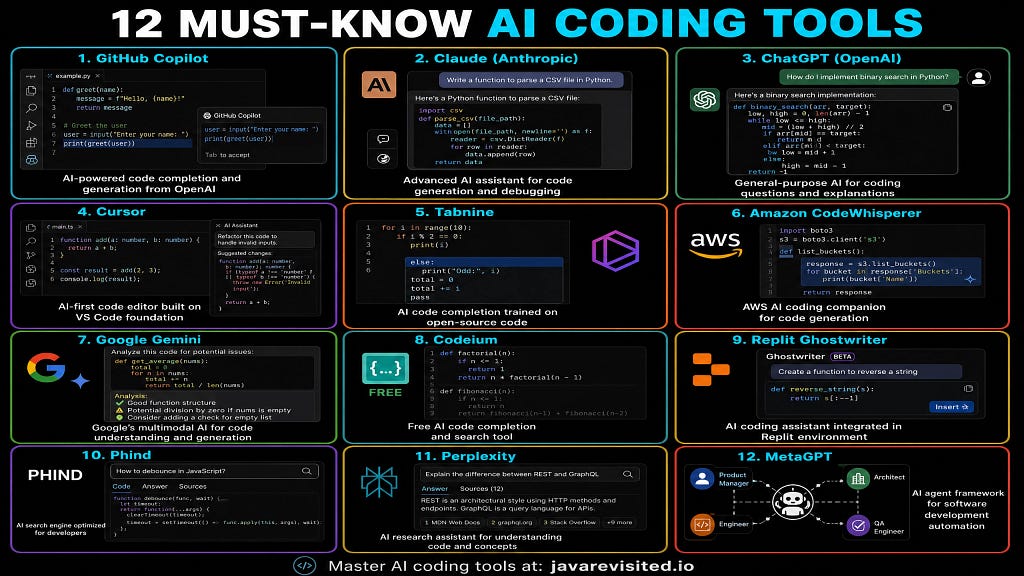
Hello friends the way we write code has changed more in the last two years than in the previous ten. The developers who understand this and adapt are shipping faster, building more ambitious projects, and becoming genuinely hard to compete with. The ones who don’t are spending twice as long on work that could take half the time.
I’ve spent hundreds of hours working with GitHub Copilot, Cursor, Claude Code, Amazon Q, Replit, and a dozen other AI coding tools. Some completely transformed how I work.
Others were hype with underwhelming substance. This article is the honest breakdown of what’s actually worth your time in 2026.
Whether you’re a backend engineer, a full-stack developer, or a data scientist who writes code, these are the 10 AI tools that will matter most this year — and the courses to help you actually master each one.
New to Generative AI? Before diving into specific tools, I’d recommend going through the Generative AI Handbook on Educative first. Understanding how LLMs actually work makes every tool on this list click faster and makes you dramatically more effective when prompting them.
10 AI Coding Tools Every Developer Should Know in 2026
Without any further ado, here are the 10 AI Coding tools every developer should learn in 2026, I have also shared relevant resources like online courses, books and tutorials for your reference.
1. Claude Code by Anthropic — Best for Context-Aware, Production-Quality Code
Claude Code is the tool that has most changed how I approach complex coding tasks. Built on Anthropic’s Claude models, it doesn’t just autocomplete — it understands what you’re trying to build and reasons about the best way to do it.
Where GitHub Copilot excels at line-by-line completion, Claude Code excels at bigger-picture tasks: refactoring a sprawling module, explaining a 500-line function you’ve never seen, generating an entire feature from a natural language description, or debugging a subtle logic error by actually reasoning through the code flow.
The conversational approach means you can iterate — “make that function more efficient,” “add error handling,” “explain why you chose that data structure” — and get thoughtful responses that improve with each exchange.
Why learn it: Claude stands out for its accuracy, reasoning depth, and ability to maintain context across a long coding session. For developers who want a thinking partner rather than just an autocomplete engine, Claude Code is in a class of its own.
🎓 Recommended course: Claude Code: Building Faster with AI, from Prototype to Prod

2. GitHub Copilot — The Original AI Pair Programmer
The tool that started the AI coding revolution and still dominates adoption. GitHub Copilot writes code in real time as you type — suggesting entire functions, generating boilerplate, proposing API usage, and even writing test cases based on the code it sees in your editor.
It lives inside VS Code, JetBrains, and other major editors, making it the most frictionless AI coding tool available. The GitHub Copilot certification (GH-300) is also increasingly appearing in job descriptions, which makes becoming fluent in it a career move, not just a productivity hack.
Why learn it: No other tool has this level of editor integration and ecosystem maturity. Even if you use other AI tools for specific tasks, Copilot remains the best for continuous, in-flow code assistance.
🎓 Recommended course: Mastering GitHub Copilot on Educative
Master GitHub Copilot – AI-Powered Course
3. Cursor — The AI-Native Code Editor Built for Real Codebases
Cursor is VS Code but with GPT-4 and Claude built in at a deep level — not bolted on. The crucial difference is that Cursor understands your entire codebase, not just the file you’re currently editing.
That means when you ask it to add a feature, fix a bug, or refactor a module, it actually has the context it needs to give you an answer that works.
For developers working on real, multi-file projects — not just tutorials or toy examples — Cursor is the tool that most closely replicates the experience of having a senior engineer who knows your codebase sitting next to you.
If you don’t know SpaceX bought the cursor for 60M, that shows its value.
Why learn it: Cursor is becoming the preferred editor for serious developers in the AI era. Its whole-codebase context understanding solves the biggest limitation of tools like Copilot — giving suggestions without understanding how the pieces fit together.
🎓 Recommended course: Build Smarter Code with Cursor AI on Educative
Learn Cursor AI: Code Smarter and Build Anything with AI
4. ChatGPT — The Universal AI Coding Assistant
ChatGPT remains one of the most versatile tools in a developer’s arsenal — not because it’s the best at any specific coding task, but because it’s the best at the wide range of coding-adjacent tasks that fill a developer’s day: explaining an error message, writing a regex pattern, generating a SQL query, producing a test plan, drafting technical documentation, or just thinking through an architectural decision.
The Code Interpreter / Advanced Data Analysis mode adds Python execution, data analysis, chart generation, and real-time debugging — making it particularly powerful for data engineers and analysts.
Why learn it: ChatGPT’s versatility makes it the highest-ROI tool for developers who want a single interface that handles everything from quick questions to complex analysis.
🎓 Recommended course: ChatGPT: Complete ChatGPT Course For Work 2026 (Ethically)!

5. Amazon Q Developer — Best for AWS-Native Development
Amazon’s answer to GitHub Copilot, built specifically for the AWS ecosystem. Amazon Q Developer understands AWS services deeply — it can help you write Lambda functions, CloudFormation templates, CDK stacks, and IAM policies with context that generic coding tools simply don’t have.
If you’re building cloud-native applications on AWS, Amazon Q Developer is the most valuable specialized tool available. It generates security-aware, production-ready code that integrates naturally with the AWS services you’re already using.
💡 Why learn it: For AWS developers, Amazon Q Developer is the tool that understands your platform better than any general-purpose assistant. If your infrastructure is AWS, this is a significant productivity multiplier.
🎓 Recommended course: Amazon Q Developer for Programmers and DevOps AWS AI Coding
6. CrewAI — Best for Building Multi-Agent AI Systems
CrewAI is the most important framework on this list for developers building the next generation of software — not just AI-assisted development, but AI doing development through autonomous, collaborative agent systems.
CrewAI enables you to create teams of AI agents, each with defined roles, goals, and capabilities — and have them collaborate on complex, multi-step engineering tasks. The allow_code_execution parameter even lets agents write and execute code themselves, creating genuine agentic software development workflows.
This is where software engineering is heading, and understanding CrewAI now puts you well ahead of where the industry will be in 12–18 months.
💡 Why learn it: Multi-agent systems are the next paradigm after single-LLM coding assistants. CrewAI is the most mature framework for building them, and the developers who understand it will be defining how software gets built in the future.
🎓 Recommended courses:
- AI Agents & Workflows — The Practical Guide on Udemy
- Build AI Agents and Multi-Agent Systems with CrewAI on Educative

7. Replit Ghostwriter — Best for Cloud-Based Rapid Prototyping
Replit has evolved from a simple online IDE into a complete cloud development environment with AI assistance built in. Ghostwriter helps you generate, explain, and debug code directly in the browser — no local setup, no configuration, no environment conflicts.
For hackathons, quick prototypes, or running scripts that you don’t want to set up locally, Replit’s combination of cloud IDE and AI assistance is genuinely unbeatable. It’s also increasingly popular for vibe coding — the practice of building applications through natural language descriptions rather than traditional programming.
💡 Why learn it: When you need to go from idea to working prototype in hours rather than days, Replit is the fastest path. Its AI assistance removes the friction of setup and environment management that slows down traditional development.
🎓 Recommended course: The Complete AI Coding Course (2026) — Cursor, Replit, Claude Code

8. Tabnine — Best for Enterprise Teams With Privacy Requirements
Tabnine uses LLMs fine-tuned on your team’s specific codebase — which is its key differentiator. Where Copilot and Claude learn from public code, Tabnine learns from your code. The suggestions it makes reflect your team’s conventions, naming patterns, and architectural choices rather than generic internet code.
The privacy consideration is also significant. Tabnine offers on-premise deployment options for enterprises that can’t send their code to external APIs — a non-negotiable requirement for many regulated industries and companies working on sensitive proprietary code.
Why learn it: If you’re working in an enterprise environment with strict data governance requirements, Tabnine is often the only AI coding assistant that satisfies both security and compliance teams while still delivering genuine productivity gains.
🎓 Recommended course: Vibe Coding with ChatGPT, GitHub Copilot, Tabnine & More
9. Codeium — Best Free Alternative to GitHub Copilot
Codeium is fast, free, and surprisingly capable — and that combination makes it the best starting point for developers who want AI code assistance without a subscription.
It integrates with VS Code, JetBrains, Vim, and most major editors, and delivers completion quality that genuinely competes with Copilot for standard coding tasks.
For independent developers, students, or anyone who wants to explore AI-assisted coding before committing to a paid tool, Codeium is the obvious first choice. Many developers end up staying with it permanently.
Why learn it: There’s no reason not to use Codeium if you’re not already using a paid AI coding tool. It removes all the friction — free to use, easy to install, and immediately useful across every language and editor it supports.
10. OpenDevin — The Future: AI Agents That Code Entire Applications
OpenDevin is the most forward-looking tool on this list — and probably the most important to understand even if you don’t use it yet. It’s an open-source AI software agent that can perform real-world development tasks by combining planning, file editing, terminal use, and web browsing.
Where all the other tools on this list assist developers, OpenDevin moves toward AI that can be the developer for specific, well-defined tasks. Writing code, running tests, fixing failures, pushing to GitHub — it can do sequences of development work autonomously.
This is where the industry is heading. Understanding how these agentic development systems work now positions you well ahead of where the conversation will be in 12–24 months.
Why learn it: OpenDevin represents the next evolution of AI coding tools — from assistants to autonomous agents. Get in early, understand the possibilities and the limitations, and you’ll be prepared for a shift in software engineering that’s already beginning.
How to Build Your AI Coding Stack in 2026?
You don’t need to master all 10 of these at once. Here’s how I’d prioritize based on your situation:
If you’re just getting started with AI coding tools: → Start with ChatGPT for general assistance and Codeium for in-editor completion (both free). This gives you immediate productivity gains with zero cost.
If you’re a professional developer wanting maximum productivity: → Cursor for your primary editor + Claude Code for complex reasoning tasks. This combination covers 90% of what you need.
If you’re on AWS: → Add Amazon Q Developer to any of the above. Its AWS-specific knowledge makes it dramatically more useful than generic tools for cloud work.
If you’re in an enterprise with privacy requirements: → Tabnine is likely your only option for in-editor AI assistance. Invest in learning it properly.
If you’re building AI-powered applications: → Learn CrewAI for multi-agent systems. This is where the real leverage is for AI-native product development.
Learn the Tools Properly
Picking up a new AI coding tool takes a few hours. Mastering it — understanding how to prompt effectively, when to use which capability, how to integrate it into your workflow — takes deliberate practice with the right resources.
For Educative courses, you’ll need an Educative subscription — currently around $14.99/month for access to 1,200+ hands-on courses, cloud labs, and projects. There’s also a 7-day free trial if you want to try before committing.
Educative Unlimited: Excel with AI-Powered Learning
For the Udemy courses linked above, watch for sales — these frequently drop to $10–15 and come with lifetime access.
And, If you want to join multiple courses across AWS, GenAI, and ML on Udemy, the Udemy Personal Plan at ~$30/month gives you instant access to 11,000+ courses. For engineers learning multiple AWS services simultaneously, it’s significantly better value than buying courses individually.
Online Courses – Learn Anything, On Your Schedule | Udemy
Final Word
The developers who thrive in 2026 are not the ones who type the fastest or know the most syntax. They’re the ones who know how to think clearly about problems, prompt AI tools effectively, and use the right tool for each task in their workflow.
The 10 tools above represent the current landscape of what’s worth learning. Start with the ones that match your immediate needs and work outward. The learning curve for each is short — the compounding benefit of using them well is substantial.
The game has changed. These are the rules.
P.S. — If you want to build the foundational AI understanding that makes all these tools more effective, start with the Machine Learning Handbook and Generative AI Handbook on Educative. Understanding what’s happening under the hood makes you significantly better at working with the tools on top.
Machine Learning Handbook – Free AI-Powered Course

I Spent 300+ Hours Testing AI Coding Tools: Here Are the 10 Every Developer Should Know in 2026 was originally published in Javarevisited on Medium, where people are continuing the conversation by highlighting and responding to this story.
This post first appeared on Read More