

How to Back Up Your Kafka Cluster: A Guide to Point-in-Time Recovery
Apache Kafka has been running in production environments for over a decade, yet most enterprise teams still don’t have a genuine backup strategy. When OSO engineers ask customers about their Kafka backup approach, the answer is almost always the same: “We use replication factor three” or “We’ve set up cluster linking.”
Neither of these is actually a backup.
As organisations increasingly treat Kafka as a storage mechanism and single source of truth rather than a temporary queue, this misconception has become a ticking time bomb in data architectures. True Kafka backup requires immutability, separation from the live system, and—crucially—consumer group offset recovery. Without these elements, disaster recovery remains incomplete, leaving organisations exposed to data loss scenarios that replication simply cannot address.
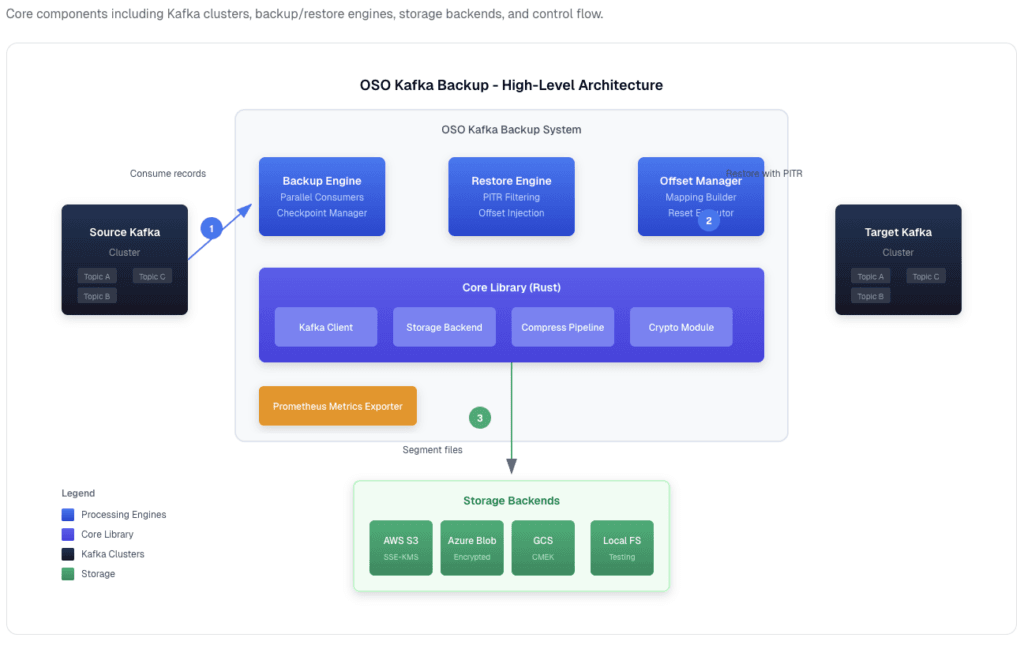
This guide walks through how to implement genuine Kafka backup with point-in-time recovery using OSO’s open-source kafka-backup tool, a high-performance CLI written in Rust that supports S3, Azure Blob, GCS, and local filesystem storage.
How Has Kafka’s Role in Modern Architectures Changed?
Traditionally, teams treated Kafka as a temporary message queue—if something went wrong, the strategy was simply to rebuild the consumer group and reprocess from upstream sources. That approach worked when Kafka was merely a transit layer between systems.
The modern reality is quite different. Developer teams now treat Kafka more like a PostgreSQL database than a messaging queue. Topics have become the authoritative source of truth in data pipelines, with critical business events living exclusively in Kafka.
Consider a payments platform with topics like payments.initiated, payments.captured, payments.failed, and payments.refunded. A consumer group called payment-processor reads through these topics, currently at offset 500,000 of the payments.initiated topic. If these topics are corrupted or lost—through accidental deletion, schema corruption, or a bug writing garbage data—there’s no single upstream source to recreate the canonical payment record. The data exists in fragments across downstream systems, but the authoritative event stream is gone.
This shift from temporary queue to source of truth demands a corresponding change in how teams think about disaster recovery.
Why Isn’t Replication Factor Enough?
Kafka’s built-in replication (typically factor three) copies partitions across different brokers. This protects against hardware failure on a single node—if one broker dies, the replicas on other brokers continue serving data. It’s excellent redundancy, but it’s not backup.
Replication cannot protect against:
- Accidental deletion: Running
kafka-topics --delete payments.capturedpropagates to all replicas - Code bugs writing garbage data: Corrupted messages replicate to all copies
- Schema corruption or serialisation bugs: These propagate across all replicas
- Poison pill messages: Messages that consumers cannot process exist on every replica
- Tombstone records in Kafka Streams applications: Tombstones replicate across all brokers
The fundamental limitation is that replication is synchronous with the live system. Any problem in the primary partition immediately propagates to replicas. True backup must be immutable and isolated from the live cluster.
What’s Wrong with Cluster Linking and Shadowing?
When enterprises ask major streaming platform providers about backup, the typical recommendation is cluster linking (or shadowing). This involves spinning up a secondary cluster in a different region and continuously replicating data.
The cost problem is immediately apparent: this approach essentially doubles infrastructure spend. Organisations pay for an entire second cluster—compute, storage, networking—that sits idle until disaster strikes.
But the architectural problem is more serious. Cluster linking replicates the problem, not just the data. If a producer writes corrupted messages due to a code bug at 2:30 PM, those corrupted messages replicate to the secondary cluster. If someone tombstones critical records, those tombstones propagate. The linked cluster isn’t a point-in-time backup—it’s a mirror of whatever state the primary cluster is in, including its problems.
What’s actually needed is point-in-time recovery capability—the ability to say “restore to 2:29 PM, one minute before the bug started writing garbage data.”
Why Do Most Kafka Backup Approaches Fail?
Many teams write custom scripts that dump topics to object storage (S3, Azure Blob, GCS). This captures the messages themselves, but misses a critical piece: consumer group offset state.
When restoring from a message-only backup, consumer groups face an impossible choice:
- Reset to earliest and reprocess everything—creating duplicates in downstream systems
- Reset to latest and skip to current—losing all messages between the backup point and now
- Guess at an offset position—hoping to land somewhere reasonable
None of these options is acceptable for production systems where data integrity matters.
True Kafka recovery requires snapshotting the __consumer_offsets topic separately. This captures which consumer group had read up to which offset at any given point in time. For example, at 2:29 PM, the payment-processor consumer group had read up to offset 492,000 of the payments.initiated topic. On restore, consumers resume from exactly offset 492,000—no duplicates, no skipped messages.
This pattern is borrowed from how Apache Flink and Spark handle checkpointing for streaming applications, applied specifically to Kafka’s architecture.
How Does Point-in-Time Kafka Recovery Actually Work?
Let’s walk through a realistic disaster scenario to see how proper Kafka backup with offset recovery works in practice.
The Scenario
Friday, 2:00 PM. A payments platform has a bug in their code that starts writing garbage data to payments.captured at 2:30 PM. The corrupted data begins propagating to downstream systems—the data warehouse, the recommendation engine, the fraud detection system. The team discovers the problem at 2:47 PM.
Step 1: Assess (2:48 PM)
The ops team determines: “When did the bug start?” They trace it to 2:30 PM and decide to restore to 2:29 PM—one minute before corruption began.
Step 2: Restore (2:50 PM)
Using the OSO kafka-backup tool, a single CLI command initiates point-in-time recovery. First, create a restore configuration file:
mode: restore
backup_id: "payments-backup"

target:
  bootstrap_servers: ["kafka-production:9092"]

storage:
  backend: s3
  bucket: my-kafka-backups
  region: us-east-1
  prefix: prod/

restore:
  # Point-in-time recovery - restore to 2:29 PM
  time_window_end: 1732886940000  # 2025-11-29 14:29:00 in epoch millis

  # Restore consumer group offsets
  consumer_groups:
    - payment-processor
Then execute the restore:
kafka-backup restore --config restore.yamlThe tool performs these operations:
- Reads date-partitioned backup files from S3 (backups are structured for fast access)
- Filters out all messages after 2:29 PM
- Writes them to the production cluster
- Looks up the consumer group offset at that timestamp (offset 492,000)
- Resets the
payment-processorconsumer group to offset 492,000
Step 3: Verify (2:55 PM)
The team confirms:
- Messages from 2:00–2:29 PM are restored ✓
- Consumer group offsets are reset correctly ✓
- Downstream systems can resume consuming ✓
Step 4: Resume (3:00 PM)
Services resume reading from offset 492,000, as if the bug never happened. Total recovery time: approximately 10 minutes.
The Tradeoff
What’s lost: 18 minutes of data (2:29 PM to 2:47 PM)—but this is corrupted data that would have caused bigger problems if retained.
What’s saved: Preventing corrupted data flowing to data warehouses, wrong refund amounts being processed, recommendations based on garbage data, and auditing nightmares when regulators ask questions.
The alternative: Most teams would be recovering from backups that are hours old, or rebuilding from scratch (which takes days).
How Do You Set Up Continuous Kafka Backup?
Getting started with the OSO kafka-backup tool is straightforward. The tool is available for macOS, Linux, Windows, and as a Docker image.
Installation
macOS (Homebrew):
brew install osodevops/tap/kafka-backupLinux:
curl --proto '=https' --tlsv1.2 -LsSf
  https://github.com/osodevops/kafka-backup/releases/latest/download/kafka-backup-cli-installer.sh | sh
Docker:
docker pull osodevops/kafka-backupConfigure Continuous Backup
Create a backup configuration file backup.yaml:
mode: backup
backup_id: "daily-backup-001"

source:
  bootstrap_servers: ["kafka:9092"]

topics:
  include: ["orders-*", "payments-*"]
  exclude: ["*-internal"]

storage:
  backend: s3
  bucket: my-kafka-backups
  region: us-east-1
  prefix: prod/

backup:
  compression: zstd
  segment_max_bytes: 134217728  # 128MB
Run the backup:
kafka-backup backup --config backup.yamlThe tool continuously backs up messages to S3 in compressed, date-partitioned segments, capturing both message data and consumer group offset snapshots.
Storage Structure
Backups are stored in a structured format that enables efficient point-in-time recovery:
s3://kafka-backups/
└── {prefix}/
    └── {backup_id}/
        ├── manifest.json           # Backup metadata
        ├── state/
        │   └── offsets.db          # Checkpoint state
        └── topics/
            └── {topic}/
                └── partition={id}/
                    ├── segment-0001.zst
                    └── segment-0002.zst
What Advanced Features Support Enterprise-Scale Recovery?
For large enterprise deployments, the OSO kafka-backup tool includes features that significantly reduce recovery time and ensure consistency.
Parallel Bulk Offset Reset
Imagine 500 consumer groups, each consuming from different topics and partitions, all needing offset resets simultaneously.
Sequential approach: Reset each group one at a time with ~10ms latency per group = approximately 5 seconds total.
Parallel approach: Batch requests to the Kafka broker, resetting 50 groups simultaneously = approximately 100ms total (50x faster).
For large enterprise clusters with hundreds of consumer groups, this reduces recovery time from minutes to seconds.
Atomic Rollback
Consider this scenario: you restore data successfully, but the offset reset fails—perhaps the broker goes down mid-operation. You’re left in an inconsistent state: data restored, but offsets weren’t updated. Consumers would reprocess everything, creating duplicates.
The kafka-backup tool implements atomic rollback, inspired by database transaction semantics:
- Snapshot current offsets before restore
- Restore data
- Reset offsets
- If step 3 fails → automatically rollback to the snapshot
- Everything is consistent again
Either the whole operation succeeds, or it’s as if nothing happened.
Consumer Offset Management Commands
The CLI provides granular control over offset management:
# Plan offset reset (dry run)
kafka-backup offset-reset plan
  --path s3://bucket
  --backup-id backup-001
  --groups my-group

# Execute offset reset
kafka-backup offset-reset execute
  --path s3://bucket
  --backup-id backup-001
  --groups my-group
How Do You Validate Your Backup Strategy?
The kafka-backup-demos repository provides ready-to-run examples for testing backup and recovery scenarios before you need them in production.
Quick Start with Demos
# Clone the demos repository
git clone https://github.com/osodevops/kafka-backup-demos
cd kafka-backup-demos

# Start the demo environment (Kafka + MinIO for S3-compatible storage)
docker compose up -d

# Run the basic backup/restore demo
cd cli/backup-basic && ./demo.sh
Available demos include:
| Demo | Description |
|---|---|
| Basic Backup & Restore | Full backup/restore cycle with S3/MinIO |
| Point-in-Time Recovery | Millisecond-precision time-window filtering |
| Large Messages | Compression comparisons for 1-10MB payloads |
| Offset Management | Consumer group offset snapshots and resets |
| Kafka Streams PITR | Point-in-time recovery with stateful stream processing |
| Spring Boot Integration | Microservice integration patterns |
| Benchmarks | Throughput, latency, and scaling tests |
Validate Backup Integrity
# List available backups
kafka-backup list --path s3://bucket/prefix

# Describe a specific backup
kafka-backup describe
  --path s3://bucket
  --backup-id backup-001
  --format json

# Deep validation of backup integrity
kafka-backup validate
  --path s3://bucket
  --backup-id backup-001
  --deep
What Should You Consider Before Implementing Kafka Backup?
Assess Your Kafka Usage Pattern
If your organisation treats Kafka topics as the source of truth (not just a transit layer), backup is no longer optional. Ask yourself: “If this topic disappeared or was corrupted, could we recreate it from upstream sources?” If the answer is no, you need backup.
Evaluate Your Current “Backup” Approach
- Replication factor protects against hardware failure only
- Cluster linking protects against regional outages but not data corruption
- Custom dump scripts may miss consumer offsets entirely
Key Requirements for Backup Tooling
When evaluating Kafka backup solutions, look for:
- Incremental, continuous backup (not just nightly snapshots)
- Consumer group offset capture and recovery
- Point-in-time restore capability with millisecond-level granularity
- Parallel offset reset for enterprise-scale recovery
- Atomic rollback to prevent inconsistent states
- Support for your storage backend (S3, GCS, Azure, local filesystem)
- Kubernetes-native deployment options for cloud-native environments
Compliance Considerations
Regulated industries (financial services, healthcare) may have explicit requirements for data retention and recovery capabilities. The OSO kafka-backup Enterprise Edition includes GDPR-compliant data erasure from backups, audit logging, and encryption at rest for organisations with stringent compliance requirements.
Conclusion
The way organisations use Apache Kafka has fundamentally changed. What was once a temporary message queue has become a persistent storage layer and source of truth for critical business data. This shift demands a corresponding change in how teams think about disaster recovery.
Replication and cluster linking are redundancy mechanisms, not backup solutions. They protect against infrastructure failure but offer no defence against software bugs, schema corruption, accidental deletion, or any problem that propagates across replicas.
When disaster strikes—as it did in the payments example at 2:30 PM on a Friday afternoon—the difference between a 10-minute recovery with point-in-time precision and a multi-day rebuild from scratch can mean the difference between a minor incident and a catastrophic business failure.
OSO engineers recommend that any organisation running Kafka in production—particularly those storing critical state in topics—implement a genuine backup strategy with point-in-time recovery and consumer offset snapshots. The question isn’t whether you can afford to implement backup; it’s whether you can afford the consequences of not having it when disaster strikes.
Ready to implement proper Kafka backup?
- Open-source tool: github.com/osodevops/kafka-backup
- Documentation: github.com/osodevops/kafka-backup-docs
- Try the demos: github.com/osodevops/kafka-backup-demos
This post first appeared on Read More