

CodeQL Query Suites in GHAS — A Practical Guide for Java Teams
CodeQL Query Suites in GHAS — A Practical Guide for Java Teams
CodeQL query suites shape the scope, speed, and signal quality of GitHub Advanced Security scans. Start with the official, tag-driven suites for broad coverage, add a few targeted custom queries for organization-specific risks, and evolve your approach as your triage process matures.
Why query suites matter
CodeQL doesn’t just run code analysis — it runs what you tell it to run. The query suite you choose determines which vulnerability patterns are checked, how long scans take, and how noisy results will be for your team. Picking the right structure reduces missed issues, lowers false positives, and keeps developer fatigue in check.
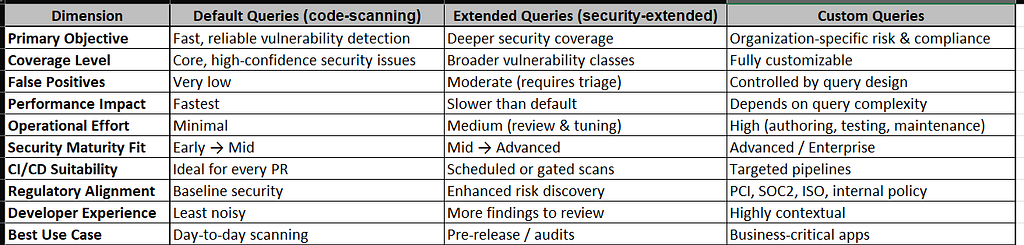
CodeQL Query Suite Types Common suite types explained
Default Query Suite
- What it is: The out-of-the-box set that runs when no configuration is provided.
- When to use: Teams starting with GHAS or wanting fast, reliable scans.
- Trade-offs: Good baseline coverage but may miss advanced or niche issues.
Security-Extended Suite
- What it is: A superset of the default queries that targets more advanced and less common vulnerabilities.
- When to use: Security-conscious teams or regulated environments.
- Trade-offs: Longer scan times and more alerts to triage.
Custom Query Suites
- What it is: Your own .qls file that lists specific .ql queries or points to a folder of custom queries.
- When to use: When you need checks for internal APIs, compliance rules, or industry-specific risks.
- Trade-offs: Powerful but requires governance and maintenance; poorly written queries can cause false positives or performance issues.
Risks & Considerations
– Default suite: May not be sufficient for high-security environments.
– Extended suite: Can overwhelm teams with alerts if not triaged properly.
– Custom queries: Powerful but require governance — poorly written queries can cause false positives or performance issues.
Recommended strategy
- Start broad — enable the official, tag-driven suite (Option B) to get comprehensive, well-maintained coverage.
- Mature your triage — build processes to review and tune alerts so your team can handle more signal without burnout.
- Add targeted custom queries — introduce a small set of vetted custom queries (Option A style) for internal APIs, compliance checks, or high-risk modules.
- Govern and iterate — version your custom queries, run performance tests, and periodically review both coverage and false-positive rates.
Example GitHub Actions workflows –
Default Java workflow
name: "CodeQL - Java (Maven, Java 17, default queries)"
on:
  push:
    branches: [ main ]
  pull_request:
    branches: [ main ]

jobs:
  codeql:
    name: CodeQL Analysis (Java)
    runs-on: ubuntu-latest
    permissions:
      actions: read
      contents: read
      security-events: write
    steps:
      - name: Checkout
        uses: actions/checkout@v4

      - name: Initialize CodeQL
        uses: github/codeql-action/init@v2
        with:
          languages: java
          queries: default

      - name: Set up JDK 17
        uses: actions/setup-java@v4
        with:
          distribution: temurin
          java-version: '17'

      - name: Build with Maven (allow CodeQL to capture)
        run: |
          mvn -B -DskipTests package

      - name: Run CodeQL analysis
        uses: github/codeql-action/analyze@v2
        with:
          category: "security"
Security-extended Java workflow
# same as above but with queries: security-extended
name: "CodeQL - Java (Maven, Java 17, security-extended)"
on:
  push:
    branches: [ main ]
  pull_request:
    branches: [ main ]

jobs:
  codeql:
    name: CodeQL Analysis (Java)
    runs-on: ubuntu-latest
    permissions:
      actions: read
      contents: read
      security-events: write
    steps:
      - name: Checkout
        uses: actions/checkout@v4

      - name: Initialize CodeQL
        uses: github/codeql-action/init@v2
        with:
          languages: java
          queries: security-extended

      - name: Set up JDK 17
        uses: actions/setup-java@v4
        with:
          distribution: temurin
          java-version: '17'

      - name: Build with Maven (allow CodeQL to capture)
        run: |
          mvn -B -DskipTests package

      - name: Run CodeQL analysis
        uses: github/codeql-action/analyze@v2
        with:
          category: "security"
Custom OWASP Top 10 suite example
# init step with custom suite
./codeql-custom/owasp-top10.qls
name: "CodeQL - Maven Java 17 + OWASP custom queries"
on:
  push:
    branches: [ main ]
  pull_request:
    types: [opened, synchronize, reopened]

permissions:
  security-events: write
  contents: read

jobs:
  codeql:
    name: CodeQL Scan
    runs-on: ubuntu-latest
    steps:
      - name: Checkout
        uses: actions/checkout@v4

      - name: Initialize CodeQL
        uses: github/codeql-action/init@v2
        with:
          languages: java
          queries: >
            security-extended
            ./codeql-custom/owasp-top10.qls

      - name: Build with Maven (Java 17)
        run: |
          echo "Using Java 17"
          sudo apt-get update && sudo apt-get install -y openjdk-17-jdk
          mvn -B -DskipTests package

      - name: Perform CodeQL database creation and analysis
        uses: github/codeql-action/analyze@v2
        with:
          category: "security"
Option A custom queries — “Custom queries targeting OWASP Top 10 patterns for Java” is a CodeQL query suite definition. It instructs CodeQL to run specific, custom queries that each correspond to one of the OWASP Top 10 categories against Java code.
Each line points to a specific custom CodeQL query (.ql) file. Each query specifically addresses one of the OWASP Top 10.
# owasp-top10.qls
name: OWASP-Top-10
description: Custom queries targeting OWASP Top 10 patterns for Java
queries:
  - codeql-custom/java/A1_Injection.ql
  - codeql-custom/java/A2_BrokenAuth.ql
  - codeql-custom/java/A3_SensitiveDataExposure.ql
  - codeql-custom/java/A4_XMLExternalEntities.ql
  - codeql-custom/java/A5_BrokenAccessControl.ql
  - codeql-custom/java/A6_SecurityMisconfig.ql
  - codeql-custom/java/A7_CrossSiteScripting.ql
  - codeql-custom/java/A8_InsecureDeserialization.ql
  - codeql-custom/java/A9_UsingComponentsWithKnownVulns.ql
  - codeql-custom/java/A10_InsufficientLoggingAndMonitoring.ql
Option B CodeQL queries by tags — “OWASP Top 10 Security Queries for Java” is a configuration for CodeQL to scan Java codebases for security vulnerabilities that map directly to the OWASP Top 10 list, by selecting queries via their CWE tags.
It is useful for focused, compliance-driven security analysis.
# OWASP Top 10 Query Suite for Java
# This query suite includes CodeQL queries that map to OWASP Top 10 security vulnerabilities
#
# Note: Some CWE entries may appear similar but are intentionally included for comprehensive coverage:
# - CWE-074 (Command Injection) and CWE-078 (OS Command Injection): CWE-078 is more specific
#   while CWE-074 is broader, ensuring queries tagged with either are captured

- description: OWASP Top 10 Security Queries for Java

- queries: .
  from: codeql/java-queries

- include:
    kind:
      - problem
      - path-problem
    tags contain:
      - security
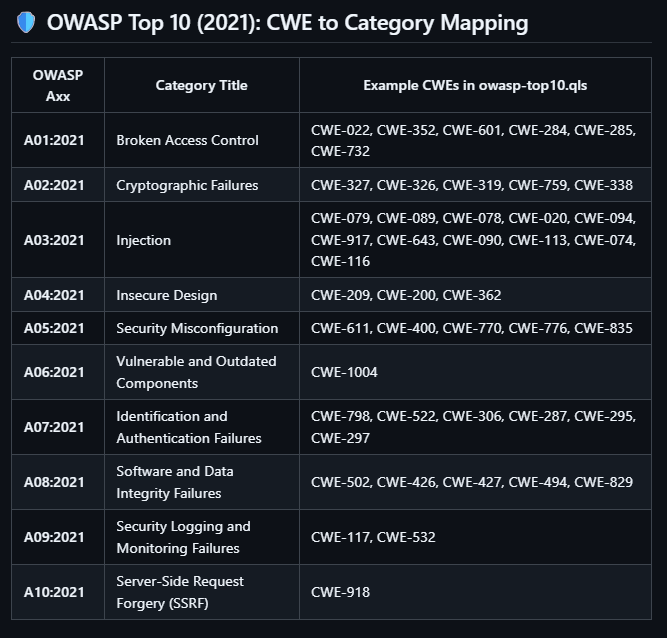
      - external/cwe/cwe-079  # A03:2021 - Injection (Cross-site Scripting)
      - external/cwe/cwe-089  # A03:2021 - Injection (SQL Injection)
      - external/cwe/cwe-078  # A03:2021 - Injection (OS Command Injection)
      - external/cwe/cwe-020  # A03:2021 - Injection (Improper Input Validation)
      - external/cwe/cwe-022  # A01:2021 - Broken Access Control (Path Traversal)
      - external/cwe/cwe-352  # A01:2021 - Broken Access Control (CSRF)
      - external/cwe/cwe-798  # A07:2021 - Identification and Authentication Failures
      - external/cwe/cwe-327  # A02:2021 - Cryptographic Failures
      - external/cwe/cwe-326  # A02:2021 - Cryptographic Failures
      - external/cwe/cwe-502  # A08:2021 - Software and Data Integrity Failures
      - external/cwe/cwe-094  # A03:2021 - Injection (Code Injection)
      - external/cwe/cwe-611  # A05:2021 - Security Misconfiguration (XXE)
      - external/cwe/cwe-918  # A10:2021 - Server-Side Request Forgery (SSRF)
      - external/cwe/cwe-601  # A01:2021 - Broken Access Control (Open Redirect)
      - external/cwe/cwe-319  # A02:2021 - Cryptographic Failures (Cleartext Transmission)
      - external/cwe/cwe-522  # A07:2021 - Identification and Authentication Failures
      - external/cwe/cwe-759  # A02:2021 - Cryptographic Failures (Weak Hash)
      - external/cwe/cwe-917  # A03:2021 - Injection (Expression Language Injection)
      - external/cwe/cwe-643  # A03:2021 - Injection (XPath Injection)
      - external/cwe/cwe-090  # A03:2021 - Injection (LDAP Injection)
      - external/cwe/cwe-113  # A03:2021 - Injection (HTTP Response Splitting)
      - external/cwe/cwe-074  # A03:2021 - Injection (Command Injection)
      - external/cwe/cwe-116  # A03:2021 - Injection (Improper Encoding/Escaping)
      - external/cwe/cwe-117  # A09:2021 - Security Logging and Monitoring Failures
      - external/cwe/cwe-532  # A09:2021 - Security Logging and Monitoring Failures
      - external/cwe/cwe-209  # A04:2021 - Insecure Design (Information Exposure)
      - external/cwe/cwe-200  # A04:2021 - Insecure Design (Information Exposure)
      - external/cwe/cwe-306  # A07:2021 - Identification and Authentication Failures
      - external/cwe/cwe-284  # A01:2021 - Broken Access Control
      - external/cwe/cwe-285  # A01:2021 - Broken Access Control
      - external/cwe/cwe-287  # A07:2021 - Identification and Authentication Failures
      - external/cwe/cwe-295  # A07:2021 - Identification and Authentication Failures (Cert Validation)
      - external/cwe/cwe-297  # A07:2021 - Identification and Authentication Failures (Cert Validation)
      - external/cwe/cwe-338  # A02:2021 - Cryptographic Failures (Weak PRNG)
      - external/cwe/cwe-362  # A04:2021 - Insecure Design (Race Condition)
      - external/cwe/cwe-400  # A05:2021 - Security Misconfiguration (Resource Exhaustion)
      - external/cwe/cwe-426  # A08:2021 - Software and Data Integrity Failures
      - external/cwe/cwe-427  # A08:2021 - Software and Data Integrity Failures
      - external/cwe/cwe-494  # A08:2021 - Software and Data Integrity Failures
      - external/cwe/cwe-829  # A08:2021 - Software and Data Integrity Failures
      - external/cwe/cwe-732  # A01:2021 - Broken Access Control (Incorrect Permissions)
      - external/cwe/cwe-770  # A05:2021 - Security Misconfiguration
      - external/cwe/cwe-776  # A05:2021 - Security Misconfiguration (XML Entity Expansion)
      - external/cwe/cwe-835  # A05:2021 - Security Misconfiguration (Infinite Loop)
      - external/cwe/cwe-1004 # A06:2021 - Vulnerable and Outdated Components
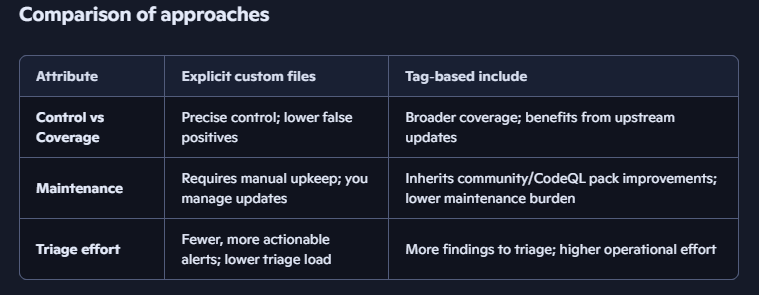
Which query suite structure should you prefer?
Option A :
Pros:
- Full control: You pick exactly which queries to run.
- Custom content: Can include internal, organization-specific, or finely-tuned queries.
- Transparency: You know exactly what each query checks and can review/modify them.
Cons:
- Maintenance: You must keep these queries up to date with both new threats and evolving best practices.
- Coverage risk: You might miss some relevant issues if your custom queries are incomplete.
- Effort: Requires expertise to write, validate, and maintain high-quality CodeQL queries.
Option B :
Pros:
- Low maintenance: You leverage the continuously updated and tested official CodeQL Java queries.
- Broad, comprehensive coverage: All community/built-in queries covering applicable CWEs run, so fewer issues missed.
- Automatic updates: As GitHub/CodeQL improve their queries, you benefit instantly.
- Easy to extend: Just add more tags or adjust filtering logic as needed.
- Compliance-friendly: Ensures you’re covering all current, recognized weaknesses mapped to OWASP Top 10.
Cons:
- Less control/focus: You run many queries, some may generate more alerts (some less relevant) and cannot fine-tune everything to your application/profile.
- Harder to explain/exclude: If a specific query is noisy, you need to manage filtering separately.
Best Practice
Many mature security teams use both:
- Start with Option B (broad, official coverage),
- Add a handful of Option 1-style custom queries for internal or special needs.
Last but not least — OWASP Top 10 (2021): CWE to Category Mapping
For most Java teams, the fastest path to meaningful security coverage is: enable the official CodeQL suites (security-extended when you’re ready), build a triage workflow, then add a small, well-governed set of custom queries for organization-specific risks.
This hybrid approach balances coverage, maintainability, and developer productivity.
Thanks for reading to the end — let’s keep exploring GHAS and sail together into a GitHub‑powered security future.

CodeQL Query Suites in GHAS — A Practical Guide for Java Teams was originally published in Javarevisited on Medium, where people are continuing the conversation by highlighting and responding to this story.
This post first appeared on Read More