

System Design Explained Like You’re Building Real Products
With 5 Practical Examples Every Engineer Must Understand
Click Here to read for free — and if you loved it, fuel my learning with a Coffee!
Introduction: Why System Design Feels Hard (But Isn’t)
System design scares many developers not because it’s complex, but because it’s poorly explained.
Most tutorials jump straight into:
- “Use Kafka”
- “Add Redis”
- “Shard the database”
But they never explain why.
System design is not about tools.
It’s about thinking clearly under constraints.
At its core, system design answers just four questions:
- What problem are we solving?
- How many users and how much data?
- What can fail?
- What trade-offs are acceptable?
Once you understand this mindset, system design becomes logical even enjoyable.
In this blog, we’ll:
- Build 5 real-world systems
- Start from requirements
- Slowly evolve them
- Talk about scalability, reliability, performance
- And explain every decision in plain English
No jargon without meaning.
No “magic boxes”.
Let’s start.

Core System Design Concepts (Quick Foundation)
Before jumping into examples, let’s align on a few ideas.
Functional vs Non-Functional Requirements
Functional = what the system does
Non-functional = how well it does it
Example:
- Functional: “User can send a message”
- Non-functional: “Message should be delivered within 200ms”
Scalability
Can the system handle:
- More users?
- More data?
- More traffic?
Availability vs Consistency (CAP Theorem — Simply)
- Availability: System responds even if some parts fail
- Consistency: Everyone sees the same data at the same time
You usually cannot get both perfectly.
Horizontal vs Vertical Scaling
- Vertical: Bigger server
- Horizontal: More servers (preferred)
Now let’s design real systems.
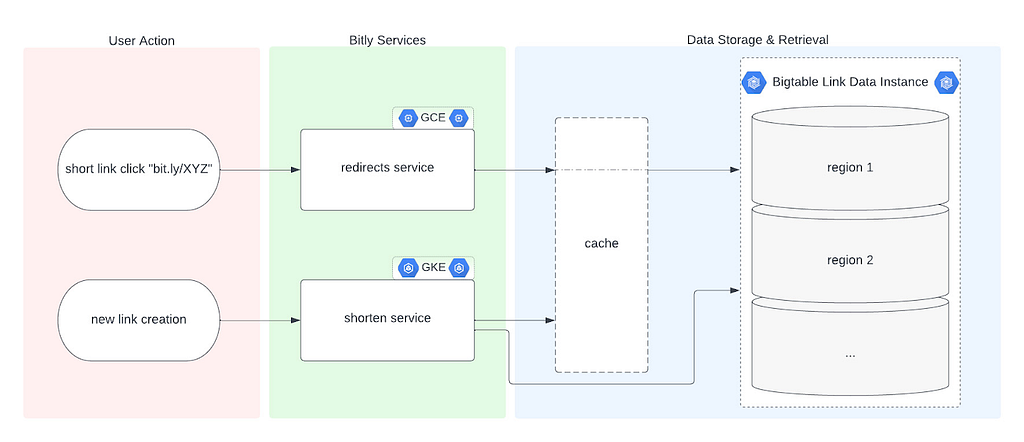
Example 1: URL Shortener (Like Bitly)
Problem Statement
Users want to convert:
https://example.com/some/very/long/url
into:
https://short.ly/abc123
And when someone opens the short link, they should be redirected instantly.
Functional Requirements
- Generate a short URL
- Redirect short URL → original URL
- URLs should not collide
- URLs should expire optionally
Non-Functional Requirements
- Very low latency (redirection should be fast)
- High availability
- Massive read traffic
Basic Design (Naive)
- User submits long URL
- Backend generates random string
- Store mapping in database
- Redirect on access
Simple — but problems appear fast.
Database Design
URL_Table
---------
id (PK)
short_code (unique)
long_url
created_at
expires_at
How to Generate Short Codes?
Options:
- Random string (Base62)
- Auto-increment ID + Base62 encoding
- Hashing the URL
Best choice: Auto-increment ID + Base62
Why?
- No collision
- Predictable length
- Fast
Example:
ID = 125 → Base62 = cb
Read Optimization
Redirects are read-heavy.
Solution:
- Cache short_code → long_url in Redis
- DB hit only on cache miss
Flow:
- Check Redis
- If miss → DB → update cache
- Redirect
Scaling Strategy
- Stateless application servers
- Load balancer in front
- Redis cluster
- Read replicas for DB
Failure Handling
- Cache failure → fallback to DB
- DB read replica down → failover
- Expired links → return 404
Final Takeaway
This system teaches:
- ID generation strategies
- Cache-first reads
- Read-heavy optimization
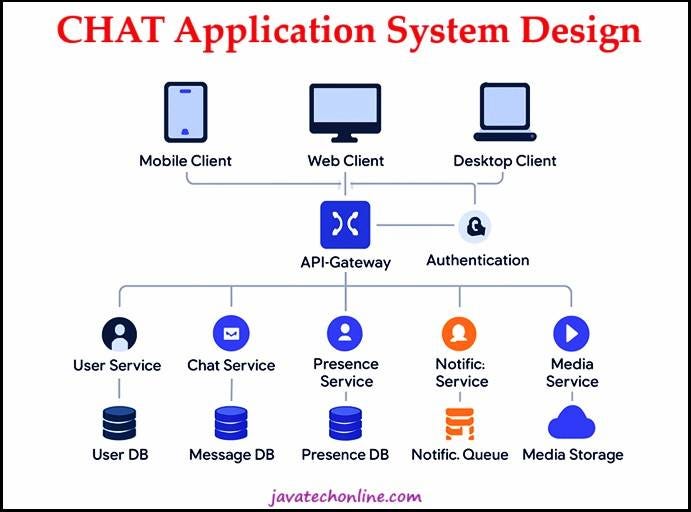
Example 2: Real-Time Chat Application (Like WhatsApp)
Problem Statement
Users should:
- Send messages
- Receive messages instantly
- See online/offline status
- Get messages after coming back online
Functional Requirements
- One-to-one messaging
- Message delivery guarantee
- Online/offline handling
- Read receipts (optional)
Non-Functional Requirements
- Low latency
- High availability
- Message durability
Why HTTP Is Not Enough
HTTP is request-response.
Chat needs real-time, so we use:
- WebSockets
High-Level Architecture
- Client connects via WebSocket
- Server keeps connection alive
- Messages pushed instantly
Message Flow
- Sender sends message
- Server:
- Stores message in DB
- Pushes to receiver if online
3. If offline:
- Store message
- Deliver when user reconnects
Data Model
Message
-------
message_id
sender_id
receiver_id
content
timestamp
status (sent, delivered, read)
Handling Offline Users
Key idea:
- Messages are durable
- Delivery is async
Solution:
- Store messages first
- Push later
Scaling the Chat System
Problem: WebSockets are stateful.
Solution:
- Use sticky sessions OR
- Central session store (Redis)
Message Broker (Advanced)
For massive scale:
- Use Kafka or RabbitMQ
- Decouple message send from delivery
Failure Scenarios
- User disconnects → message stays stored
- Server crashes → client reconnects
- Duplicate delivery → idempotent handling
Final Takeaway
Chat systems teach:
- Real-time communication
- Stateful vs stateless trade-offs
- Message durability
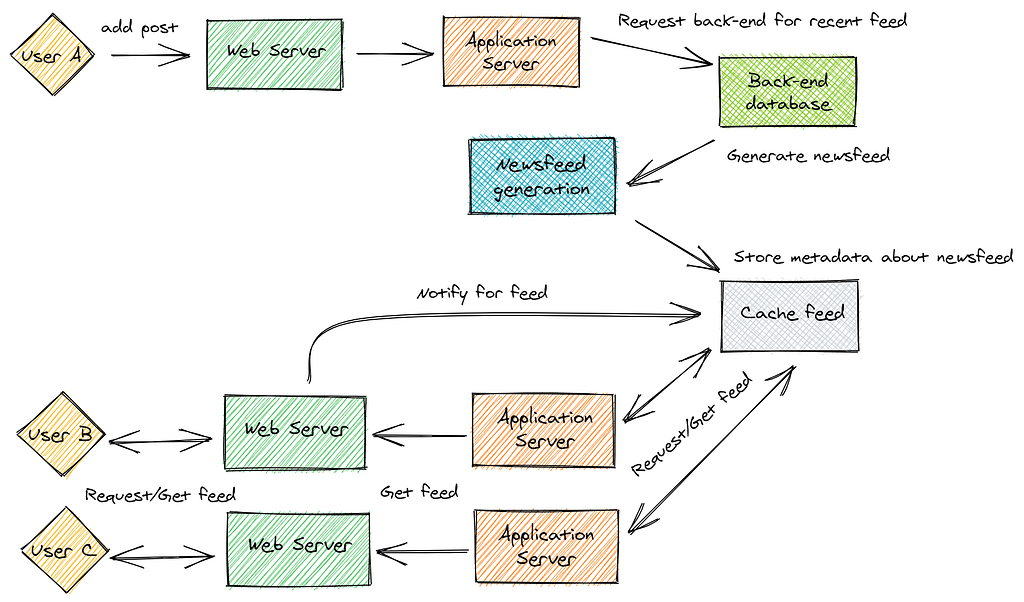
Example 3: News Feed System (Like Instagram)
Problem Statement
Users want to:
- Open app
- Instantly see relevant posts
- Scroll infinitely
Two Approaches to Feed Generation
1. Pull Model
Generate feed when user opens app.
❌ Slow for heavy users
2. Push Model
Precompute feed when content is created.
✅ Faster reads
Chosen Approach: Hybrid
- Push for normal users
- Pull for celebrities
Data Model
Post
----
post_id
author_id
content
timestamp
Feed
----
user_id
post_id
score
Feed Generation Flow
- User posts content
- System:
- Finds followers
- Inserts post into their feed
3. Feed stored in Redis
Ranking Logic
Feed is not chronological only:
- Likes
- Recency
- Relationship strength
Caching Strategy
- Feed cached per user
- Paginated scrolling
- Background refresh
Scaling Challenges
- Celebrity with 50M followers
- Write amplification
Solution:
- Pull model fallback
- Fan-out-on-read
Final Takeaway
Feed systems teach:
- Precomputation
- Ranking
- Heavy write optimization
Example 4: File Storage System (Like Google Drive)
Problem Statement
Users want to:
- Upload files
- Download files
- Share files
- Never lose data
Key Design Insight
Files ≠ Metadata
Store separately.
Architecture
- Metadata → Database
- Files → Object storage
- CDN for downloads
File Upload Flow
- Client uploads file
- File stored in chunks
- Metadata saved
- Version created
Chunking Strategy
Large files split into:
- 4MB or 8MB chunks
- Enables resumable uploads
Data Model
File
----
file_id
owner_id
size
checksum
version
Deduplication
Same file uploaded twice?
- Store once
- Reference multiple times
Reliability
- Replicate files across regions
- Checksums for integrity
Final Takeaway
File systems teach:
- Separation of concerns
- Storage durability
- Data integrity
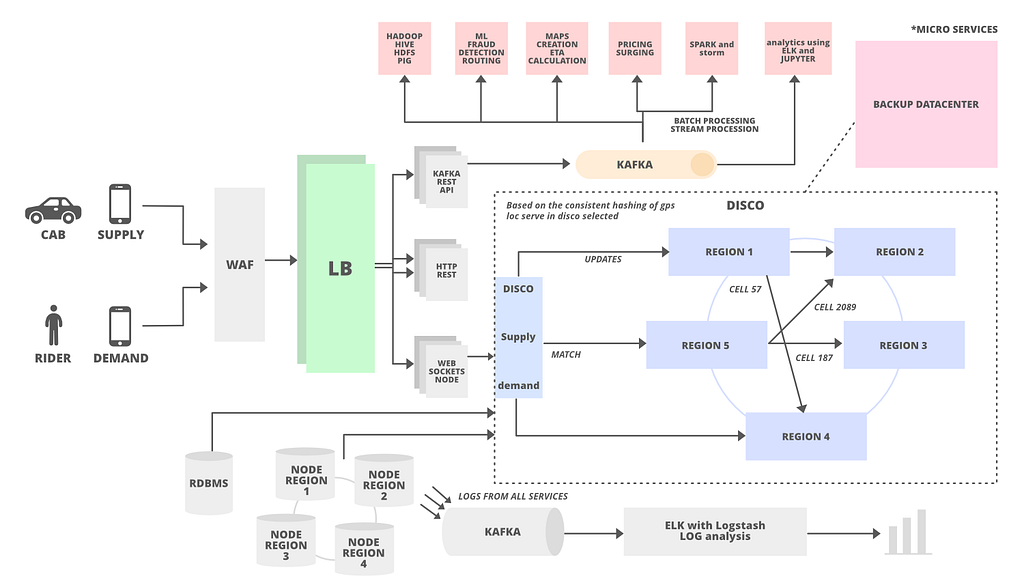
Example 5: Ride Sharing System (Like Uber)
Problem Statement
- Riders request rides
- Drivers accept
- Track location live
Core Challenges
- Real-time location
- Matching drivers fast
- High availability
Location Tracking
- GPS updates every few seconds
- Stored in in-memory store (Redis)
Matching Algorithm
- Find nearby drivers
- Rank by distance & rating
- Send request
Surge Pricing
- Based on demand/supply ratio
- Calculated region-wise
Fault Handling
- Driver cancels → reassign
- App crash → state recovery
Final Takeaway
Ride systems teach:
- Real-time systems
- Geo-spatial indexing
- Event-driven flows
How to Think in System Design Interviews
Always follow this order:
- Clarify requirements
- Estimate scale
- Design high-level architecture
- Deep dive into bottlenecks
- Discuss trade-offs
Interviewers don’t expect perfection — they expect clarity of thought.
Final Words
System design is not about memorizing architectures.
It’s about:
Asking the right questions
Making reasonable assumptions
Explaining trade-offs clearly
If you can explain your design like you’d explain it to a teammate —
you’re already better than 80% of candidates.

System Design Explained Like You’re Building Real Products was originally published in Javarevisited on Medium, where people are continuing the conversation by highlighting and responding to this story.
This post first appeared on Read More