

Java Lambda Expressions and Functional Programming
Java 8 introduced lambda expressions to make Java more expressive, concise, and closer to functional programming paradigms.
Before lambdas, writing behavior-based code often required verbose anonymous classes, even for simple operations like sorting or filtering collections.
Lambda expressions allow us to:
- Treat behavior as data
- Pass functions as method arguments
- Reduce boilerplate code
- Write more readable and maintainable programs
In this article, we’ll explore:
- What lambda expressions are
- What functional interfaces mean in Java
- How lambdas work with collections and streams
- Common pitfalls such as variable capture and exception handling
- Important functional interfaces from java.util.function
All examples are explained using a practical Employee domain model.
Understanding Lambda Expressions
Lambda expression implements functional interface. Lambda expression is an anonymous method.
In functional programming the main concept is passing code/function as a parameter.
Taking an example:
Suppose we have a class — Employee POJO which has fields- name, salary, age, email of the Employee.
If I need to display the information of the employees and sort it by salary. The code would look something like this- It would use the Comparator (functional interface in Java):
public class EmployeeInformation {
    public static void main(String[] args)
    {
        List<Employee> Emps = EmployeeData.getData();

        System.out.println("Print List");

        for(Employee emp: Emps)
        {
            System.out.println(emp);
        }

        emps.sort(new Comparator<Employee>(){
            @Override
            public int compare(Employee A, Employee B)
            {
                return A.getSalary().compareTo(B.getSalary());
            }});

        System.out.println("Sorted Print List");

        for(Employee emp: Emps)
        {
            System.out.println(emp);
        }
    }
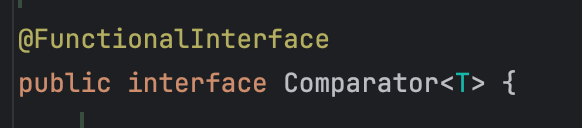
This is how the Comparator class looks internally
@FunctionalInterface
public interface Comparator<T>
public static void main(String[] args)
{
    List<Employee> Emps = EmployeeData.getData();

    System.out.println("Print List");

    for(Employee emp: Emps)
    {
        System.out.println(emp);
    }

    emps.sort((A,B) -> A.getSalary().compareTo(B.getSalary()));

    System.out.println("Sorted Print List");

    for(Employee emp: Emps)
    {
        System.out.println(emp);
    }
}
The functional interface which is implemented using 5 lines is condensed to 1 line
//5 lines functional interface

emps.sort(new Comparator<Employee>(){
  @Override
  public int compare(Employee A, Employee B)
 {
   return A.getSalary().compareTo(B.getSalary());
    }});

//Condensed to 1 line

emps.sort((A,B) -> A.getSalary().compareTo(B.getSalary()));
So what is a Functional Interface
- A functional interface is an interface
- A functional interface has only one abstract method
- Lambda expression implements a functional interface
- Example -> Comparator, Runnable, FileFilter, ActionListener
- Standard ones are in java.util.function
- It can have static methods, default methods or methods inherited from java.lang.Object ( like in the case of Comparator) it has bool
- @FunctionalInterface annotation is optional (just like @Override) but adding it will help compiler validate if it indeed is a functional interface. Or else any interface with one abstract method is a functional interface.
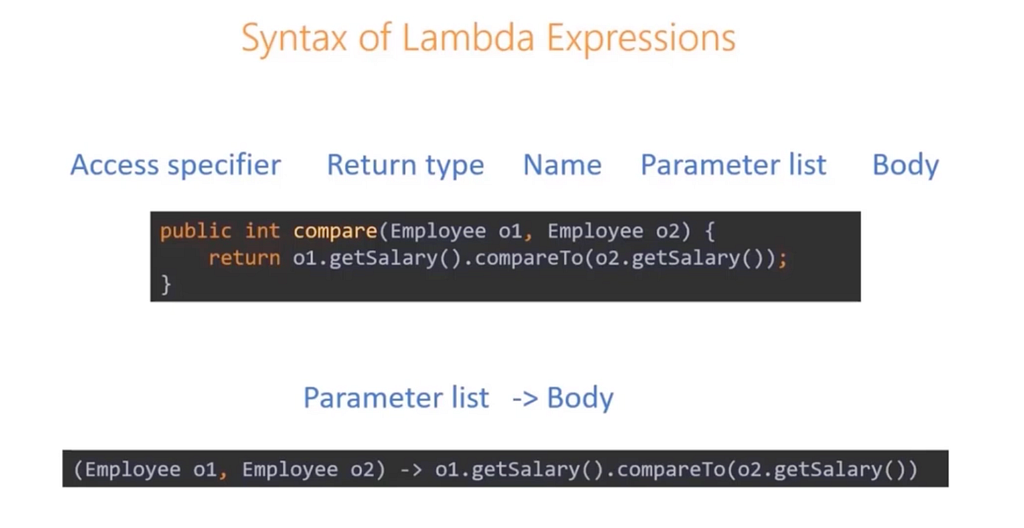
Syntax of Lambda Expressions
For parameter list->
- Parameter types are optionals
- No parameters- empty parentheses
- Single parameter- parentheses are optional
- Multiple parameter — parentheses are mandatory
For Body
- Body can be a single block or single expression
- Single expression- braces are optional
Functional Programming with interfaces
What we are trying to do?
We want to find the employees whose salary is less than 120000, and greater than 120000.
We can create 2 separate methods for this, but the only difference in the method defintions would be the “<” and “>” symbol.
To avoid redundant code we can create a filter interface and use it.
We use annotation @FunctionalInterface on top of the Filter class.
//Functional Interface

@FunctionalInterface
interface EmployeeFilter()
{
    boolean test(Employee employee);
}

public static void printEmployees(List<Employee> empList, EmployeeFilter filter)
{

     for(Employee employee: empList)
      {
          if(filter.test(employee))
          System.out.println(employee);
      }

}


public static void main(String[] args)
{
  List<Employee> empList= EmployeeData.getEmployees();

  //If filter is less than
  printEmployees(empList, (Employee e) -> e.getSalary().compareTo(new BigDecimal(120000)) <0);


  //If filter is greater than
  printEmployees(empList, (Employee e) -> e.getSalary().compareTo(new BigDecimal(120000)) > 0);

}
Implementing a Functional Interface — Three Easy Steps:
- Supply the parameters
- Use “ -> “
- Implement the method with valid return type
@FunctionalInterface
public interface Comparator<T>()
{
    int compare(T o1, T o2);
}
(Employee o1, Employee o2) -> o1.getSalary().compareTo(o2.getSalary())
Capturing Variables in Lambda Expressions
- Lambda expressions can use variables defined in outer scope
- Lambda can capture static variables, instance variables and local variables
- Local variables must be final or effectively final (which means the value of the variable doesnt change in the code)
public static void main(String[] args)
{
  List<Employee> empList= EmployeeData.getEmployees();

  BigDecimal salaryLimit= new BigDecimal("120000"):
  //If filter is less than
  printEmployees(empList, (Employee e) -> e.getSalary().compareTo(salaryLimit) <0);


  // if this was uncommented it would throw an error
   salaryLimit = new BigDecimal("140000");

  //If filter is greater than
  printEmployees(empList, (Employee e) -> e.getSalary().compareTo(salaryLimit) > 0);

}
We can mutate an object, example an ArrayList can be mutated inside a lambda expression.
So in this case we are mutating the same arrayList inside the lambda expression.
public static int countEmployees(List<Employee> employeeList, EmployeeFilter filter)
{
  List<Employee> filteredEmployeeList = new ArrayList<>();

  employeeList.forEach(employee -> {
    if(filter.test(employee))
     {
      filteredEmployeeList.add(employee);
     }
});

return filteredEmployeeList.size();
}
We can also use employeeList.parallelStream.forEach
public static int countEmployees(List<Employee> employeeList, EmployeeFilter filter)
{
  List<Employee> filteredEmployeeList = new ArrayList<>();

  employeeList.stream.forEach(employee -> {
    if(filter.test(employee))
     {
      filteredEmployeeList.add(employee);
     }
});

return filteredEmployeeList.size();
}
Problem in this is that
- If we have huge amount of data in the list
- We run it multiple times
In parallelStream since we are running concurrently there could be an issue in mutating the list inside the lambda expression.
In this case we can do something like
public static int countEmployees(List<Employee> employeeList, Predicate<Employee> empFilter)
{
  List<Employee> filteredEmployeeList = new ArrayList<>();

  return employeeList.parallelStream.forEach.filter(empFilter).count();
}
Handling Exceptions in Lambda expression
The scenario we are seeing in this is “Print the list of employees in a file”
public static LambdaExpressionExample {

  public static void main(String[] args)
  {

    List<Employee> employees = EmployeeData.getEmployees();

//This line directly will throw an exception
//FileWriter writer = new FileWriter("EmployeeList.txt");

  try(filter writer = new FileWriter("Employee_list.txt"))
  {
      employees.forEach(e-> writer.write(e.toString() +"n"));
  }

  catch(IOException e)
  {
      System.err.println("An IO exception" + e.getMessage());
  }
  }

}
The above code would error out on the lambda expression inside the try block because we need to handle the exceptions inside lambda expression.
Correct code for this would be
public class LambdaExpressionExample {

  public static void main(String[] args)
  {

    List<Employee> employees = EmployeeData.getEmployees();

//This line directly will throw an exception
//FileWriter writer = new FileWriter("EmployeeList.txt");

  try(filter writer = new FileWriter("Employee_list.txt"))
  {
      employees.forEach(e-> {
      try {
        writer.write(e.toString() +"n"));
      }

      catch(IO Exception ex) {
        //ex.printStackTrace();  // multiple times handling the exception
        throw new RuntimeException(ex.getMessage());
      }
    });

  }

  catch(IOException e)
  {
      System.err.println("An IO exception" + e.getMessage());
  }


}
In this case due to handling exceptions in lambda expression took more number of lines, we could have easily used for block instead of lambda expressions
Important Standard Functional Interfaces in java.util.function
- Function
- Consumer
- Supplier
- Predicate ( this is what we used above in the EmployeeFilter for parallel streams)
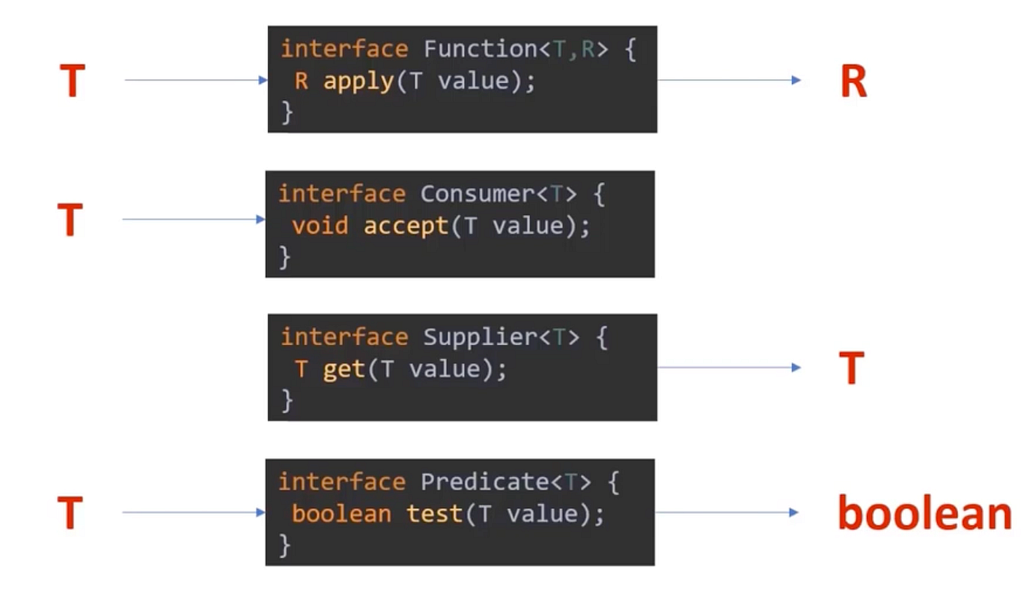
For functions with take 2 inputs we have —
- BiFunction
- BiConsumer
- BiPredicate
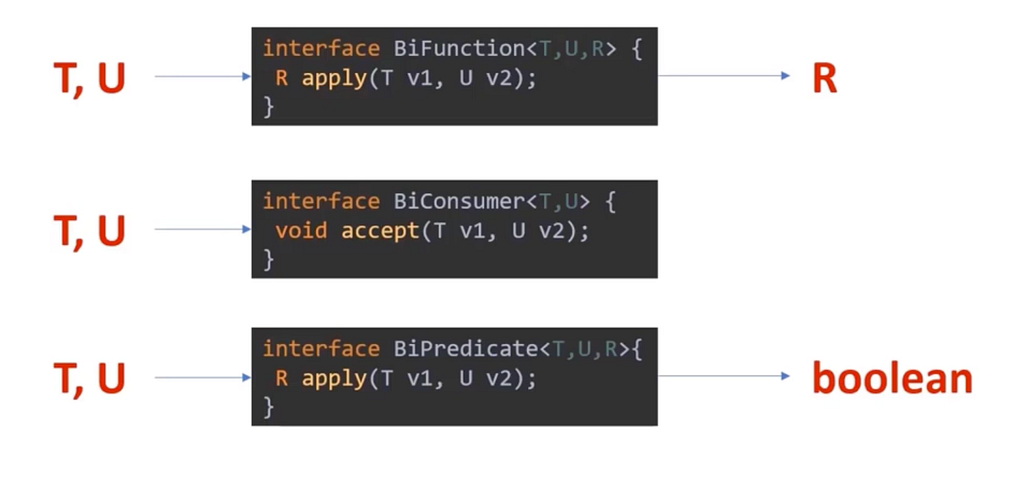
Note: Supplier takes no input so we dont have anything called “BiSupplier”
Coding for Predicate, Function, Consumer
The use case we are covering is “Search Employees and Fetch Salary”
public static LambdaExpressionExample {

  static Optional<Employee> findEmployee(List<Employee> employees, Predicate<Employee> predicate)
  {

    for(Employee employee: employees)
    {
      if(predicate.test(employee))
       {
          return Optional.of(employee);

      }

    }
    return Optional.empty();
   }

  public static void main(String[] args)
  {
     List<Employee> employees=EmployeeData.getEmployees();

     Optional<Employee> employee= findEmployee(employees, e -> e.getName().equals("Vivek"));

      //old way
      if(employee.isPresent())
      {
         System.out.println(employee.get().getSalary());
      }


      //functional style
     employee.map(e -> e.getSalary().isPresent(e -> System.out.println(e));
  }

}
The Optional class in Java 8 is a container object which is used to contain a value that might or might not be present. It was introduced as a way to help reduce the number of NullPointerExceptions that occur in Java code. It is a part of the java. util package and was added to Java as part of Java 8.
Coding with BiConsumer
The use case we are covering is “Group employees by Department”
Understanding Functional Composition
- Its a technique to combine multiple functions
- In mathematics, function composition is the application of one function to the result of another to produce a third function
- For instance, the functions f: T-> R and g: R-> U can be composed to yield a function h:g(f(x)) which maps T->U

- Methods such as .andThen() and .compose() allows us to perform this in Java
Function<Employee, BigDecimal> getSalary =
        Employee::getSalary;

Function<BigDecimal, BigDecimal> calculateBonus =
        salary -> salary.multiply(new BigDecimal("0.10"));

Function<Employee, BigDecimal> employeeBonus =
        getSalary.andThen(calculateBonus);


// using the composite function

employees.stream()
         .map(employeeBonus)
         .forEach(System.out::println);

//Example with compose

Function<Employee, BigDecimal> employeeBonus =
        calculateBonus.compose(getSalary);
- andThen() applies the first function and then the second
- compose() applies the second function first and then the first
- Functional composition helps break complex logic into small, reusable, testable functions
Conclusion
Lambda expressions fundamentally change how we write Java code. By embracing functional interfaces, streams, and immutable-style operations, we can write programs that are:
- Shorter and more readable
- Easier to reason about
- Safer in concurrent environments
- Less prone to bugs caused by shared mutable state
However, lambdas are not always the best choice. For complex logic, heavy exception handling, or unclear readability, traditional loops and methods may still be preferable.
The key takeaway is balance:
Use lambda expressions where they simplify intent — not where they complicate it.
Happy Building! 🙂
Connect with me on:
LinkedIn Profile: https://www.linkedin.com/in/kavisha-mathur/
Github: https://github.com/Kavisha4
Portfolio: https://animated-gumption-c26500.netlify.app/
Medium: https://medium.com/@KavishaMathur


Java Lambda Expressions and Functional Programming was originally published in Javarevisited on Medium, where people are continuing the conversation by highlighting and responding to this story.
This post first appeared on Read More