

Understanding Threads in Spring WebFlux, Couchbase, Kafka, and Kubernetes: A Practical Deep Dive
Introduction
In the era of traditional Spring MVC, threading was simple: One Request = One Thread. If your application got slow, you looked at the stack trace of that one thread.
Modern cloud-native systems have shattered this simplicity. If you are running a Spring WebFlux application integrated with Kafka and Couchbase on Kubernetes, your logic is no longer a straight line; it is a relay race. A single request might be handled by four different thread pools before a response is sent.
Understanding this “threaded handoff” is the difference between a developer who guesses during an outage and a developer who reads a thread dump like a map.
If you are working with Spring WebFlux, Kafka, Couchbase, and deploying on Kubernetes, your application is already running on multiple thread pools managed by different systems — often without you explicitly creating a single thread.
This article explains:
- What threads actually exist in such a system
- Who owns them
- When and why execution switches between them
- How HTTP APIs and Kafka consumers behave differently
- How tracing, logging, and context propagation work across threads
The goal is not just understanding — but being able to debug thread dumps confidently in production.
1. First Principle: Threads vs Logical Flow
A critical mental shift is required when working with reactive systems.
A request or event is a logical flow — not a thread.
In traditional blocking systems:
- One request → one thread → end of request
In reactive systems:
- One request/event
- Multiple execution segments
- Each segment may run on different threads
- Context is propagated logically, not via ThreadLocal
Thread dumps therefore show infrastructure, not business flows directly.
2. The Main Thread Categories in a WebFlux + Kafka System
Let’s break down the most common threads you will see.
When you trigger a jstack or a heap dump in a production environment, you will see several recurring “characters.” Let’s identify who they are and what they own.
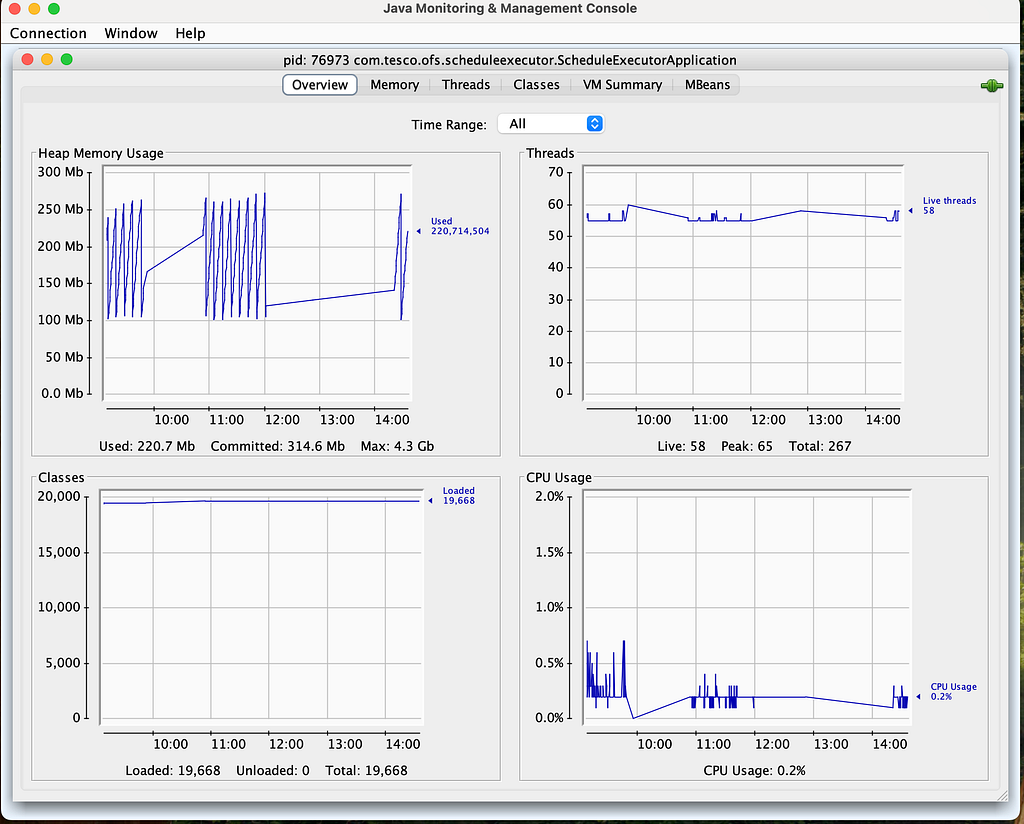
jconsole helps is visualise and see the information of the threads our process is using. jconsole comes as part of JDK environment.
Specific to threads- in this case reactor-http-nio-*
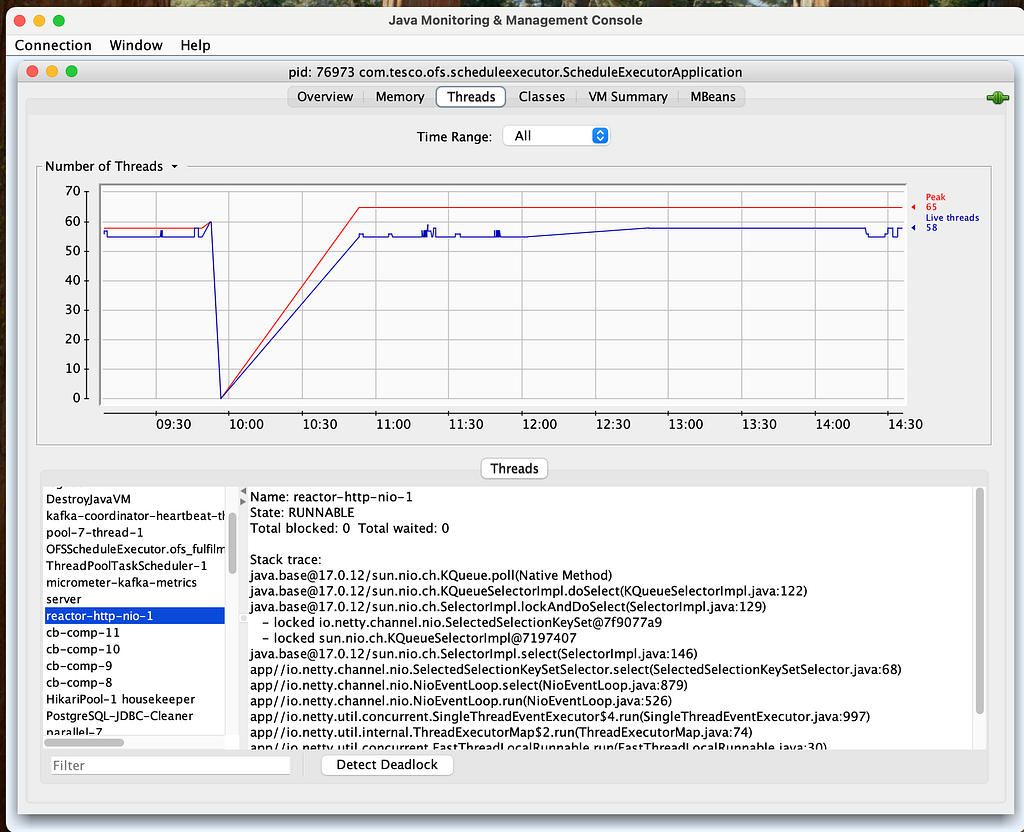
2.1 reactor-http-nio-* — WebFlux / Netty Event Loop
Owner: Netty (used by Spring WebFlux)
Quantity: Usually matches the number of CPU cores
Purpose
- Accept HTTP connections
- Read/write network data
- Schedule reactive pipelines
What it should do
- Lightweight CPU work
- Reactive operator orchestration
What it must never do: If you perform a Thread.sleep() or a blocking SQL call here, you aren’t just slowing down one request—you are potentially stopping thousands of other requests from even being accepted.
- Blocking I/O
- Database calls
- Sleeping
- .block()
If a reactor-http-nio thread blocks, all requests mapped to that event loop stall.
These threads are intentionally few in number.
2.2 boundedElastic-* — Reactor Blocking Scheduler
Owner: Project Reactor
Purpose: Safe execution zone for blocking work
Sizing: Defaults to 10 x number of CPU cores
Used for
- Blocking database calls
- Legacy libraries
- File I/O
- Blocking Couchbase APIs
Characteristics
- Threads are created on demand
- Upper bounded (≈ 10 × CPU cores)
- Idle threads are evicted
This scheduler is the bridge between non-blocking WebFlux and blocking libraries.
When you use .subscribeOn(Schedulers.boundedElastic()), you are telling Reactor: “I know this specific task (like a File I/O or a legacy JDBC call) is going to sit and wait. Don’t do it on my fast Event Loop; do it here.
2.3 Couchbase SDK Threads
You will typically see:
- cb-io-* — network I/O. Handles the low-level Netty I/O with the Couchbase cluster.
- cb-comp-* — computation, retries, deserialization, Handles the “heavy lifting” — encoding/decoding JSON, handling retries, and managing circuit breakers.
- cb-event-loop-* — internal scheduling
Key point
- These threads are owned by the Couchbase SDK
- Your application code does not run directly on them
If you use:
- ReactiveCouchbaseTemplate → fully non-blocking
- Blocking SDK → Reactor offloads first to boundedElastic
If you see high CPU on cb-comp threads, it often means your JSON documents are massive and the cost of serialization is bottlenecking your app.
2.4 Kafka Consumer Threads
Often named like:
OFSScheduleExecutor-*
kafka-consumer-*
Owner
- Kafka client / Spring Kafka
Purpose
- Poll Kafka
- Invoke @KafkaListener
- Commit offsets
Very important rule:A Kafka consumer thread must never block for long.
Blocking here leads to:
- Missed polls
- Consumer group rebalances
- Duplicate processing
- Throughput collapse
Kafka threads are not reactive by default.
If your @KafkaListener logic takes too long, the consumer thread won’t call poll() in time. Kafka will assume the consumer is dead, trigger a Rebalance, and stop processing for everyone.
2.5 HikariCP Threads
Example:
HikariPool-1 housekeeper
Purpose
- Pool maintenance
- Leak detection
- Idle eviction
These threads do not execute queries and are normal in dumps.
2.6 Async Logging Threads
Example:
AsyncAppender-Worker-ASYNCSTDOUT
Purpose
- Perform log I/O asynchronously
- Prevent business threads from blocking on logging
Logs are handed off, not written inline.
3. HTTP API Execution Flow (WebFlux)
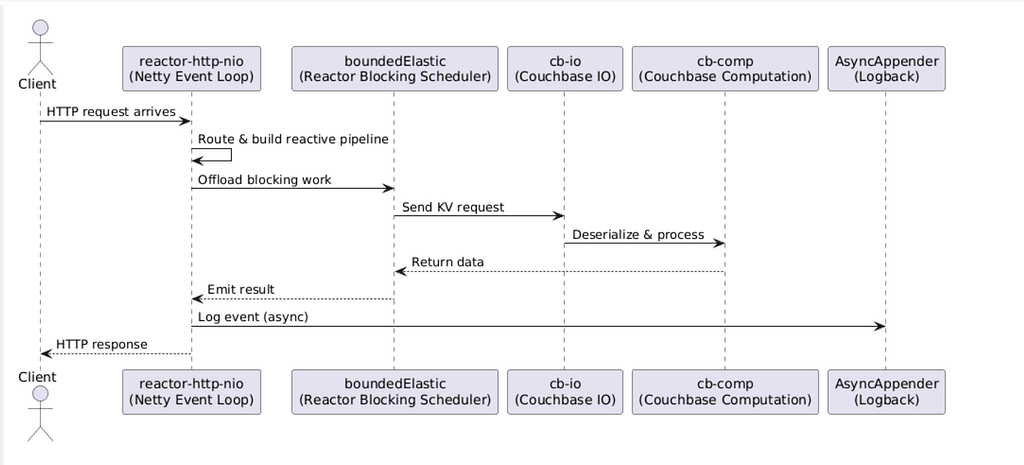
Let’s walk through a real API request.
Step 1: Request Arrival
- Client sends HTTP request
- Handled by reactor-http-nio-*
- Request is decoded and routed
At this point:
- No business logic executed yet
- Still non-blocking
Step 2: Controller & Handler Wiring
Your controller builds a reactive pipeline:
return service.getOrder(id)
              .map(...)
              .flatMap(...);
This phase:
- Constructs operators
- Does not execute blocking code
Still on:
reactor-http-nio
Step 3: Blocking Boundary
If blocking work is needed:
Mono.fromCallable(() -> blockingDbCall())
    .subscribeOn(Schedulers.boundedElastic());
Execution switches schedulers:
reactor-http-nio → boundedElastic
This is not a method call — it is deferred execution on another thread pool.
Step 4: Couchbase Interaction
Inside boundedElastic:
- Blocking Couchbase API is called
- Couchbase SDK internally uses:
- cb-io for network
- cb-comp for computation
Your code does not manage these threads.
Step 5: Response Assembly
Once data is available:
- Control returns to Netty
- Response is serialized
- Socket write happens
Back on:
reactor-http-nio
Step 6: Logging & Tracing
- TraceId is propagated via Reactor Context
- MDC is restored per signal
- Logs are handed to async logging thread
Business execution does not wait for logging.
4. Kafka Consumer Execution Flow
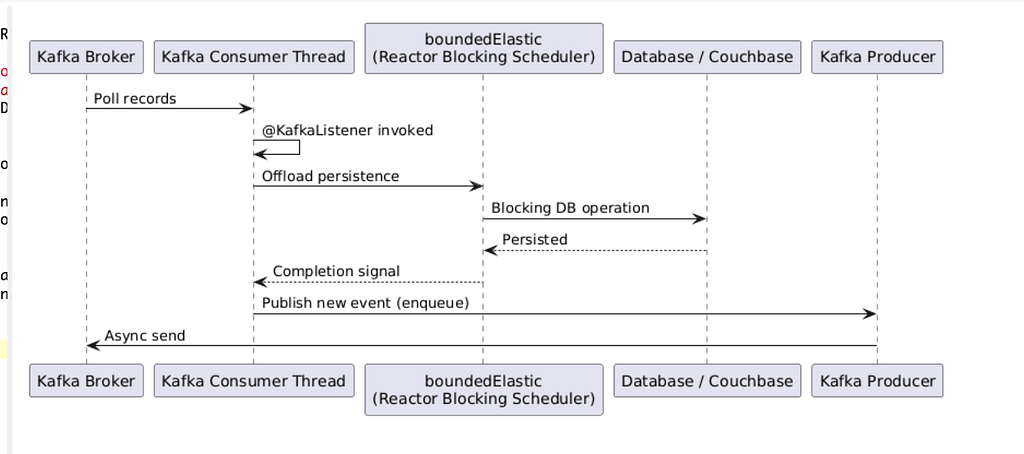
Kafka has a fundamentally different model.
Unlike HTTP, which is “Push” (the client sends data), Kafka is “Pull.” This changes the threading risks significantly.
- Polling: The Kafka Consumer thread fetches a batch of 500 records.
- Processing: By default, Spring Kafka executes your listener on that same consumer thread.
- The Bottleneck: If record #1 triggers a slow DB call, records #2 through #500 sit in memory, waiting.
- The Solution: Offload the processing to parallel() or boundedElastic() to keep the Kafka consumer thread free to keep polling.
Warning: If you offload Kafka processing to another thread, you must handle Manual Acknowledgments carefully. If you “ack” the message on the Kafka thread before the boundedElastic thread finishes, you risk losing data if the app crashes.
Step 1: Polling
Kafka client thread:
- Polls records
- Invokes @KafkaListener
Execution starts on:
Kafka consumer thread
Step 2: Listener Code
If your listener does:
@KafkaListener
public void consume(Event e) {
    repository.save(e);
}
That work runs directly on the Kafka thread.
Blocking here is dangerous.
Step 3: Correct Offloading
Proper design:
Mono.fromCallable(() -> repository.save(e))
    .subscribeOn(Schedulers.boundedElastic())
    .subscribe();
Execution becomes:
Kafka thread → boundedElastic → DB → boundedElastic
Kafka thread remains free to poll.
Step 4: Publishing New Events
Kafka producer:
- Enqueues records quickly
- Actual network send happens on Kafka I/O threads
- Producer calls are effectively non-blocking
5. Context Propagation (Tracing & MDC)
Reactive systems break ThreadLocal assumptions.
In a blocking app, we use ThreadLocal to store TraceIDs or UserIDs. In WebFlux, this is broken because your code moves from reactor-http-nio to cb-comp
Solutions:
- Reactor Context: A specialized Map that travels with the data stream, not the thread.
- Micrometer Tracing / Brave: Automatically “hoists” the TraceID from the Reactor Context into the log MDC whenever a thread starts working on a specific task.
- MDC hooks
This ensures:
- Same TraceId across multiple threads
- Logs remain correlated even with async execution
6. Kubernetes and Thread Behavior
Your threading behavior in a local Docker container will differ from a production Kubernetes pod due to CPU Limits.
- CFS Quotas: Kubernetes uses “throttling” to enforce CPU limits. If your app has a limit of 0.5 CPU, but you have reactor-http-nio trying to use 8 cores, the Linux kernel will “pause” your process.
- Symptoms: You will see “Stuttering” latency — requests take 10ms, then suddenly 200ms, then 10ms again.
- Solution: Ensure your JVM is “Container Aware” (Java 11+). Use -XX:ActiveProcessorCount to manually align the JVM’s perception of “Cores” with your Kubernetes limits.
Example:
limits:
  cpu: "1"
Results in:
- Fewer parallel() threads
- Smaller boundedElastic cap
Thread dumps look small by design.
Conclusion
Understanding threads in a WebFlux + Kafka system is about ownership and responsibility, not memorizing thread names.
- Netty threads orchestrate
- Reactor schedulers isolate blocking
- SDK threads handle infrastructure
- Kafka threads must stay responsive
- Context flows logically, not per thread
Once you internalize this, thread dumps stop being noise — and start telling a story.
The next time there is a performance issue, don’t just look for “RUNNABLE” threads. Ask these three questions:
- Are my reactor-http-nio threads blocked? (If yes, you have a major architectural bug).
- Is my boundedElastic pool saturated? (If yes, your downstream dependencies—Couchbase or APIs—are slowing down).
- Are my Kafka consumers rebalancing? (If yes, your processing logic is too slow for the consumer poll interval).
Happy Building! 🙂
Connect with me on:
LinkedIn Profile: https://www.linkedin.com/in/kavisha-mathur/
Github: https://github.com/Kavisha4
Portfolio: https://animated-gumption-c26500.netlify.app/
Medium: https://medium.com/@KavishaMathur


Understanding Threads in Spring WebFlux, Couchbase, Kafka, and Kubernetes: A Practical Deep Dive was originally published in Javarevisited on Medium, where people are continuing the conversation by highlighting and responding to this story.
This post first appeared on Read More