

Let’s Get Reactive! — The Java Paradigm That Never Sleeps
Let’s Get Reactive!” — The Java Paradigm That Never Sleeps
Reactive Programming is a programming paradigm centered around asynchronous, non‑blocking, event‑driven data flows. Instead of pushing or pulling values manually, reactive systems automatically react to data changes, events, or backpressure signals. It is built around the idea that applications should remain responsive, resilient, elastic, and message‑driven, especially under high load.
In Java, the standard for reactive systems is defined by the Reactive Streams Specification, which provides a minimal and powerful set of interfaces — Publisher, Subscriber, Subscription, and Processor — to achieve non‑blocking message passing with built‑in backpressure. Project Reactor (Mono/Flux), RxJava, Akka Streams, Spring WebFlux, and Kafka reactive consumers all implement these principles to enable highly scalable, high‑throughput applications.
So overall Reactive Programming –
1. Used for asynchronous and non blocking data streams to handle data and events
2. Helps increase efficiency and scalability of applications
3. Data flow is event driven
4. Backpressure of DataStream
What is the Reactive manifesto
It has 4 pillars:
- Responsive → systems respond in a timely manner.
- Resilient → recover from failures (with fallback, retries, timeouts).
- Elastic → scale up/down based on load.
- Message‑Driven → async message passing between components.
What are Reactor Schedulers?
Schedulers → decide where (which thread) reactive code runs.
- Schedulers.boundedElastic() — for blocking tasks (DB, IO calls).
- Schedulers.parallel() — for CPU-bound work.
- Schedulers.single() — single threaded.
- Schedulers.immediate() — run on the current thread.
Example:
Mono.fromSupplier(this::callBlockingApi)
    .subscribeOn(Schedulers.boundedElastic())
    .map(...)
    .publishOn(Schedulers.parallel())
Difference:
- subscribeOn() — decides the thread for the source.
- publishOn() — changes thread in the middle of the pipeline.
What are Hot vs Cold Streams
Cold Publisher
- Every subscriber gets its own fresh sequence (like API call, DB call).
- Mono & Flux.just() are cold.
Hot Publisher
- Emits values regardless of subscribers.
- Examples: Kafka topic, sensor data, SSE.
Flux<Long> hot = Flux.interval(Duration.ofSeconds(1)).publish().autoConnect();
Now that we are well versed some basic concepts lets jump into the differenct “specifications” in reactive java
Specifications
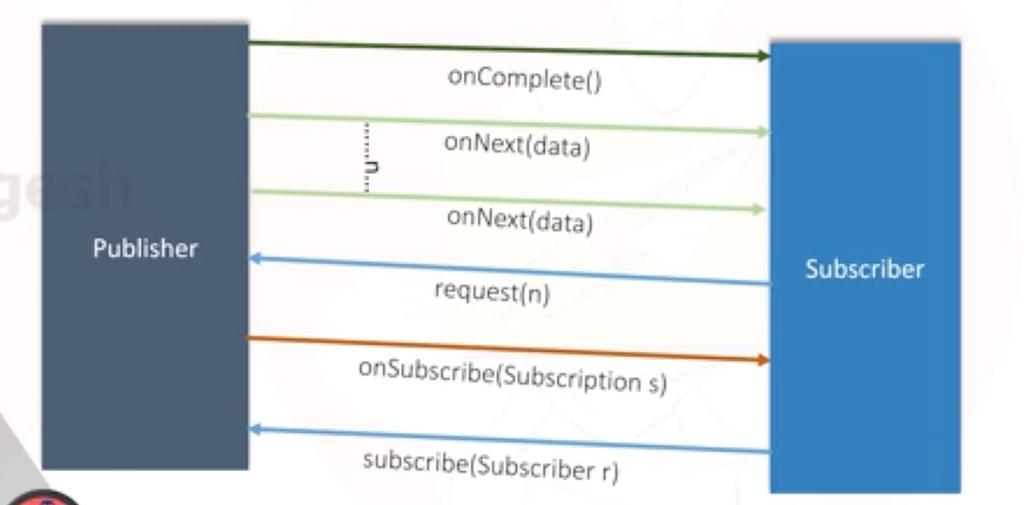
There are 4 main interfaces.
- Publisher
- Subscriber
- Subscription
- Processor
Publisher
It acts as a data source
public interface Publisher<T> {
  public void subscribe(Subscriber<? super T> s);
}
Subscriber
Act as a data receiver.
public interface Subscriber<T> {

  public void onSubscribe(Subscription s);

  public void onNext(T t);

  public void onError(Throwable t);

  public void onComplete();
}
Subscription
Interface has 2 methods; “request(long n)” and “cancel()”. request — the app requesting for data; cancel — once the app decides it does not require any more data.
Subscription is the one which connects the app to the datasource.
public interface Subscription {
    void request(long n);
    void cancel();
}
Processor
Interface has no methods, it extends Publisher and Subscriber. It is rarely used.
public interface Processor<T, R>
        extends Subscriber<T>, Publisher<R> {}
Now that we understand the four core Reactive Streams interfaces — Publisher, Subscriber, Subscription, and Processor — the natural next question is:
“How do we use these in real applications without implementing them manually?”
This is where Project Reactor comes in.
Project Reactor provides two high‑level, developer‑friendly implementations of Publisher:
- Mono → publishes 0 or 1 value
- Flux → publishes 0 to N values
Both Mono and Flux follow all rules of Reactive Streams (lazy execution, backpressure, async flow) but abstract away the boilerplate code.
Instead of writing onNext, onError, onComplete manually, we compose pipelines through operators like map, flatMap, filter, zip, etc.
This section gives a clean transition from the low‑level spec to the practical usage.
Mono
A container that will eventually give you 0 or 1 value, or an error.
Not now.
Later.
Only when someone subscribes.
Unlike a Future, a Mono:
- is lazy
- supports composition
- is part of a stream pipeline
- follows the Reactive Streams specification
Mono<String> mono_example= Mono.just("hello");
Nothing happens yet, because its lazy.
It only executes when we .subscribe() to it
Mono.just("hello")
    .map(String::toUpperCase)
    .subscribe(System.out::println);
This design allows reactive systems to:
- control backpressure
- avoid unnecessary work
- optimize execution at runtime
In reactive programming, data does not flow unless there is demand
Basic Mono Creation
Mono.just(value)
Emits exactly one value
Important:
- The value is created eagerly
- Do not put expensive logic inside just()
Mono<Integer> mono = Mono.just(10);
Mono.empty()
Emits nothing
This is commonly used to represent:
- absence of a value
- filtered-out results
- optional responses
Mono<String> mono = Mono.empty();
Mono.error()
Emits an error
Mono<String> mono = Mono.error(new RuntimeException("Boom"));
Mono.fromSupplier()
Lazy creation
Mono<Integer> mono = Mono.fromSupplier(() -> {
    System.out.println("Computing...");
    return 42;
});
The supplier runs only on subscription.
This is preferred for:
- expensive computations
- blocking logic (wrapped carefully)
- deferred execution
subscribe() – what actually happens
Under the hood, this follows the Reactive Streams lifecycle:
- onSubscribe
- onNext (0 or 1 time for Mono)
- onComplete or onError
mono.subscribe(
    value -> System.out.println(value),      // onNext
    error -> System.out.println(error),       // onError
    () -> System.out.println("Completed")     // onComplete
);
map() – transform data (sync)
map = 1 → 1
Mono<Integer> mono = Mono.just(5)
    .map(x -> x * 2);
mono.subscribe(System.out::println);
Output:
10
Use map when:
- No async calls
- Pure transformation
- you are transforming data
- the logic is CPU-bound
- no reactive calls are involved
Examples:
- DTO mapping
- formatting
- calculations
- string manipulation
flatMap() – async transformation
flatMap = 1 → Mono
Mono<Integer> mono = Mono.just(5)
    .flatMap(x -> Mono.just(x * 2));
Why not map?
Because this would be wrong:
Mono<Mono<Integer>> ❌
Use flatMap when:
- You call another reactive API
- DB / HTTP / async logic
Example: Fake async call
Mono<String> getUser(int id) {
    return Mono.just("User-" + id);
}
Mono<String> result =
    Mono.just(1)
        .flatMap(this::getUser);
result.subscribe(System.out::println);
map vs flatMap
ScenarioUseTransform valuemapCall another MonoflatMapDB / WebClientflatMap
Mental model:
- map → unwrap value
- flatMap → flatten async
Real-World Example
Mono<User> findUserById(String id) {
    return userRepository.findById(id);
}
Mono<Order> getOrderForUser(String userId) {
    return Mono.just(userId)
               .flatMap(this::findUserById)
               .flatMap(this::findOrderForUser);
}
Use flatMap() when:
- calling databases
- making HTTP requests
- chaining reactive APIs
zip() – combine Monos
Zip 2 Monos
Mono<String> m1 = Mono.just("Hello");
Mono<String> m2 = Mono.just("World");
Mono<String> zipped =
    Mono.zip(m1, m2)
        .map(tuple -> tuple.getT1() + " " + tuple.getT2());
zipped.subscribe(System.out::println);
Output:
Hello World
Zip with function (cleaner)
Mono<String> zipped =
    Mono.zip(m1, m2, (a, b) -> a + " " + b);
When to use zip?
- Multiple independent async calls
- Combine results
Practical Use Case
Mono<User> userMono = getUser();
Mono<Account> accountMono = getAccount();
Mono<UserProfile> profile =
    Mono.zip(userMono, accountMono)
        .map(tuple -> new UserProfile(
            tuple.getT1(),
            tuple.getT2()
        ));
Other VERY common Mono methods
filter()
Mono.just(10)
    .filter(x -> x > 5)
    .subscribe(System.out::println);
If condition fails → Mono.empty()
defaultIfEmpty()
Mono.just(2)
    .filter(x -> x > 5)
    .defaultIfEmpty(0)
    .subscribe(System.out::println);
Output:
0
doOnNext() (debugging)
Should not be used for business logic.
Mono.just(5)
    .doOnNext(x -> System.out.println("Value: " + x))
    .map(x -> x * 2)
    .subscribe();
then()
Ignore value, just signal completion
Mono.just("data")
    .then(Mono.just("done"))
    .subscribe(System.out::println);
Useful for:
- sequencing operations
- fire-and-forget logic
Execution Flow
Mono.just(5)
    .map(x -> x * 2)
    .map(x -> x + 1)
    .subscribe();
Flow:
5 → 10 → 11 → subscribe
Top to bottom
Data flows through operators
What is Flux?
In Project Reactor:
Flux<T>
represents a publisher that can emit:
- 0 to N values
- optionally an error
- followed by a completion signal
Conceptually:
onNext → onNext → onNext → ... → onComplete
or
onNext → onError
A Flux is not:
- a List
- an Iterable
- a collection already in memory
A Flux is:
- a description of a data stream
- lazy
- demand-driven
- executed only on subscription
Flux vs Collections: The Core Mental Shift
Imperative collections:
List<Integer> numbers = List.of(1, 2, 3, 4);
numbers.forEach(System.out::println);
Reactive streams:
Flux<Integer> numbers = Flux.just(1, 2, 3, 4);
numbers.subscribe(System.out::println);
Key differences:

In reactive programming, you do not pull data — data is pushed when requested.
Creating a Flux
Flux.just()
Creates a Flux from known values.
Flux<String> flux = Flux.just("A", "B", "C");
This is eager in terms of value definition, but still lazy in execution.
Flux.fromIterable()
Used when converting existing collections.
List<Integer> list = List.of(1, 2, 3, 4);
Flux<Integer> flux = Flux.fromIterable(list);
This does not load everything into memory again — values are emitted one by one.
Flux.range()
Creates a sequence of integers.
Flux<Integer> flux = Flux.range(1, 5);
Emits:
1, 2, 3, 4, 5
Commonly used for:
- testing
- indexing
- retry logic
Flux.create() vs Flux.generate()
These are advanced creation mechanisms.
Flux.generate() — synchronous, one signal at a time
Flux<Integer> flux = Flux.generate(
    () -> 0,
    (state, sink) -> {
        sink.next(state);
        if (state == 5) sink.complete();
        return state + 1;
    }
);
Use when:
- generating sequential data
- maintaining state
Flux.create() — asynchronous, multi-thread capable
Flux<String> flux = Flux.create(sink -> {
    sink.next("event1");
    sink.next("event2");
    sink.complete();
});
Use when:
- bridging callback-based APIs
- integrating legacy async systems
Subscribing to a Flux
flux.subscribe(
    value -> System.out.println(value),
    error -> error.printStackTrace(),
    () -> System.out.println("Completed")
);
Each emitted value triggers onNext.
Unlike Mono, onNext can be called many times.
Transforming Streams with map()
map() transforms each element independently.
Flux<Integer> flux =
    Flux.range(1, 5)
        .map(x -> x * 2);
Flow:
1 → 2
2 → 4
3 → 6
4 → 8
5 → 10
Key idea:
map is applied per element, not to the stream as a whole.
Asynchronous Transformation with flatMap()
Why flatMap is More Complex in Flux
With Mono, flatMap is mostly about flattening.
With Flux, flatMap introduces:
- concurrency
- non-deterministic ordering
- merging multiple streams
Example:
Flux<Integer> flux =
    Flux.range(1, 3)
        .flatMap(i -> Mono.just(i * 10));
Output order is not guaranteed if async work is involved.
Real Async Example
Flux<Integer> flux =
    Flux.range(1, 5)
        .flatMap(i ->
            Mono.fromSupplier(() -> i * 2)
                .delayElement(Duration.ofMillis(100))
        );
Multiple Monos run in parallel.
concatMap() vs flatMap()
OperatorOrderingConcurrencyflatMapNot guaranteedParallelconcatMapPreservedSequential
Flux.range(1, 5)
    .concatMap(i -> Mono.just(i * 2))
Use concatMap when order matters.
Filtering Data in Flux
filter()
Flux.range(1, 10)
    .filter(x -> x % 2 == 0)
    .subscribe(System.out::println);
Only matching elements pass downstream.
take() and skip()
Flux.range(1, 10).take(3);
Emits:
1, 2, 3
Flux.range(1, 10).skip(5);
Emits:
6, 7, 8, 9, 10
Combining Multiple Flux Streams
zip()
Combines elements by index.
Flux<Integer> a = Flux.just(1, 2, 3);
Flux<Integer> b = Flux.just(10, 20, 30);
Flux<Integer> zipped =
    Flux.zip(a, b, (x, y) -> x + y);
Result:
11, 22, 33
Stops when the shortest stream completes.
merge()
Emits values as they arrive.
Flux.merge(flux1, flux2);
Order is not guaranteed.
concat()
Sequential combination.
Flux.concat(flux1, flux2);
Second starts after first completes.
Error Handling in Flux
onErrorReturn()
flux.onErrorReturn(-1);
onErrorResume()
flux.onErrorResume(ex -> Flux.just(0, 0, 0));
Used heavily in resilient systems.
retry()
flux.retry(3);
Retries on failure.
Backpressure: Why Flux Exists
Backpressure is the ability of a consumer to say:
“I can only handle N items right now.”
Reactive Streams enforce this contract.
Flux respects demand:
- emits only what is requested
- prevents memory overload
- enables high-throughput systems
This is why Flux is used in:
- WebFlux
- Kafka consumers
- Streaming pipelines
Side Effects and Debugging
doOnNext()
flux.doOnNext(x -> log.info("Value: {}", x));
doOnSubscribe() / doOnComplete()
Useful for lifecycle tracing.
Blocking (and Why to Avoid It)
flux.blockLast();
This:
- breaks non-blocking nature
- should only be used in tests or migration layers
In production reactive pipelines, never block.
Conclusion
Reactive Programming provides a powerful foundation for building systems that are non‑blocking, asynchronous, resilient under load, and capable of handling high‑volume real‑time data. By understanding the Reactive Streams specification and the roles of Publisher, Subscriber, Subscription, and Processor, we get a clear view of the mechanics behind backpressure and coordinated data flow.
Project Reactor builds on this foundation with Mono and Flux — two expressive abstractions that simplify the orchestration of events, API calls, transformations, and streaming pipelines. Combined with concepts like schedulers, hot vs cold streams, backpressure strategies, and error handling operators, Reactor enables developers to create highly scalable, efficient, and maintainable applications.
Reactive programming is not just a different coding style — it is a mindset shift that encourages declarative pipelines, lazy execution, controlled concurrency, and a deep respect for system resources. Once mastered, it becomes a core tool for any modern backend, especially when working with WebFlux, Kafka, event-driven systems, and high-throughput microservice architectures.
Happy Building! 🙂
Connect with me on:
LinkedIn Profile: https://www.linkedin.com/in/kavisha-mathur/
Github: https://github.com/Kavisha4
Portfolio: https://animated-gumption-c26500.netlify.app/
Medium: https://medium.com/@KavishaMathur
Instagram: https://www.instagram.com/chao.tech_/


Let’s Get Reactive! — The Java Paradigm That Never Sleeps was originally published in Javarevisited on Medium, where people are continuing the conversation by highlighting and responding to this story.
This post first appeared on Read More