

How to solve package validation pain with Publint
Publishing and maintaining a package, whether publicly or within an organization, carries real responsibility. A well-structured package can quietly power thousands of projects, while a small packaging oversight can break things just as quickly.
In this article, we’ll explore how to package your JavaScript or TypeScript code the right way by catching and fixing packaging issues before they ever make it to a publish.
What is package validation?
Package validation is the process of verifying that your library is correctly structured, configured, and ready to be consumed by others before you publish it.
It’s not about checking whether your logic works. That’s what tests are for. It’s about making sure your package metadata, entry points, module formats, and published files all line up so that consumers can install and use it without unexpected runtime errors.
You spin up a new Node.js project with npm init -y and start coding. To keep things simple, imagine your package exposes a small function that returns a custom greeting message:
export const green = (name) => `Welcome, ${name ?? “stranger”}!`;
That’s pretty straightforward JavaScript using ESM modules.
You follow the usual publishing steps and push the package to the npm registry or GitHub Packages. But the moment others install it and try to use it, things start breaking in ways you didn’t see locally.
Why did that happen?
Figuring out what went wrong gets a lot harder once the package is large or has multiple build outputs. What looks fine locally can still fail for consumers, and even experienced developers can miss small packaging details that end up shipping a broken release.
For this particular case, let’s look at the package.json file of the project to find out the packaging problems:
{
  "name": "greeting",
  "version": "1.0.0",
  "main": "index.js",
  "scripts": {
    "test": "echo "Error: no test specified" && exit 1"
  },
  "type": "commonjs",
  // More fields
}
It’s clear from the package.json file that our package type is set to legacy JavaScript (CJS), while our code is written in modern JavaScript (ESM). Setting the package type to “module” would fix the biggest issue here.
But packaging problems don’t stop at module type. It’s easy to miss other details too, like format mismatches, broken or incomplete exports, incorrect entry points, missing published files, dual-publishing mistakes, and a bunch of other small gotchas that only show up after users install your package.
Validating JavaScript packages with Publint
If you’d known the packaging problems beforehand, you wouldn’t have published the library without providing a fix. That’s exactly where Publint comes into the picture.
Publint is a packaging linter designed to validate how your JavaScript package is structured and delivered. It adds a layer of quality control to your workflow by analyzing your package metadata and entry points before they reach users. When you run it from your project root, it surfaces warnings and suggestions based on your current packaging setup.
What does Publint actually check?
Publint analyzes the structure of your package and validates things like:
- Consistency between exports, main, module, and types
- Whether declared entry points actually exist on disk
- ESM and CommonJS compatibility mismatches
- Incorrect or incomplete exports conditions
In short, it checks whether what you declare in package.json matches what you’re actually shipping.
Using Publint is pretty simple. Sticking to our last example, we run npx publint@latest in the project root to find out the packaging problems in the project with Publint:
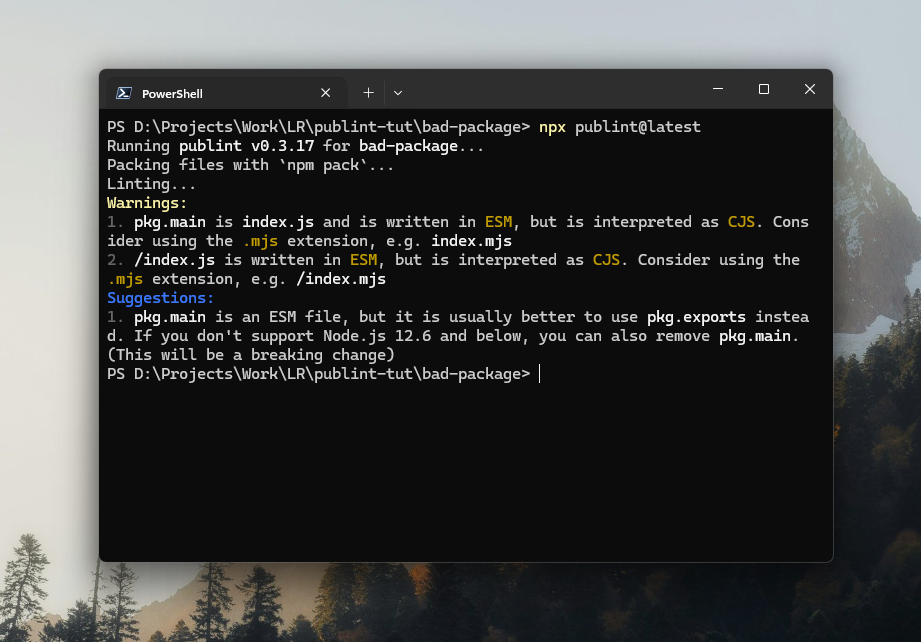
The screenshot above shows some warnings and suggestions that Publint threw in the terminal upon running the command. With these bits of information, we can fix our library and publish and distribute it with greater confidence. If no problems are found, it returns an affirmative message indicating the packaging setup is sound and ready to go.
Automatically running Publint before publishing packages
There may be times when you or someone on your team forgets to run Publint before packaging the code. The best practice here is to run Publint automatically before the publish command is used.
Configure some custom npm scripts in your package.json that run Publint just before the publish command executes:
"scripts": {
  "check-pkg": "publint",
  "prepublishOnly": "npm run check-pkg"
}
The prepublishOnly field is a built-in lifecycle script, and with the above setup, it will run the check-pkg script just before publishing, which then runs Publint to check and validate the package. If problems are found, the publish command will fail, and you’ll see the warnings and suggestions from Publint.
Automating Publint: CI/CD integration with GitHub actions
There’s also the chance that someone on your team publishes with the --ignore-scripts flag. That bypasses any lifecycle scripts tied to the publish command.
If that happens, your prepublishOnly safeguard won’t run at all, and improperly packaged code could still make it out to the registry.
# The below command will ignore our "prepublishOnly" setup
npm publish –-ignore-scripts
To protect against that, you’ll want Publint running in CI so the package gets validated, whether or not someone runs scripts locally.
In this example, we’ll wire it up with GitHub Actions (a common choice for CI/CD). If you’re new to it, you can read up on CI/CD with GitHub Actions first.
Here’s a simple workflow file you can add under .github/workflows in your project root:
# .github/workflows/check-package.yml

name: Quality Check

on: [push, pull_request]

jobs:
  quality-gate:
    runs-on: ubuntu-latest
    steps:
      - uses: actions/checkout@v4
      - uses: actions/setup-node@v4
        with:
          node-version: '20'

      - run: npm ci              # Clean install
      - run: npm run lint        # Run ESLint
      - run: npx publint         # Validate packaging
      - run: npm test            # Run tests
This workflow sets up the environment, installs dependencies cleanly, runs your usual checks, validates the package with Publint, and then runs tests.
With it in place, every push and pull request triggers the same sequence, so packaging issues get caught automatically during review instead of after a release.
From here, you can tweak the steps, split jobs, or add release-only gates depending on how your team ships.
Final notes and best practices
Keep in mind that Publint isn’t there to catch logical bugs in your implementation.
ESLint focuses on syntax and common code issues. Vitest or Jest handles behavioral testing. tsc takes care of type checking. Publint has a much narrower job: making sure your package is structured and published correctly.
Beyond using Publint, here are a few solid practices to follow when shipping JavaScript or TypeScript packages:
Dual-publish with Tsup
If your library needs to support both legacy and modern environments, it’s worth generating both MJS and CJS builds. Tools like Tsup make this straightforward and help prevent issues like invalid or mismatched exports. If you’re new to it, there are solid guides that walk through setting up Tsup for dual builds in your projects.
Use the exports script to specify the correct files
When dual-publishing, make sure to utilize the exports script to specify the right files for imports, requires, and types. This will keep you away from problems like format mismatch.
"exports": {
  ".": {
    "import": "./dist/index.mjs",
    "require": "./dist/index.cjs",
    "types": "./dist/index.d.ts"
  }
}
Use the “Files” array to include required files
Your exports field might correctly reference files inside the dist folder, but if you forget to include dist in the files array, those files won’t actually make it into the published package.
Everything may work fine locally because the files exist on your machine. But once published, the consumer won’t receive them, and the package will break.
To avoid this, always use the files array to explicitly include your build output and any required assets in the final package.
SemVer
Avoid bumping version numbers randomly. Follow semantic versioning instead:
- Patch for backward-compatible bug fixes
- Minor for new features that don’t break existing APIs
- Major for breaking changes
Being consistent with SemVer helps consumers understand the impact of each release before upgrading.
Use peerDependencies correctly
If your library relies on something like React or Tailwind CSS, declare it as a peerDependency rather than a dependency. That way, you don’t force consumers to install a second copy of the same library if they already have it in their project. It keeps versions aligned and avoids duplication issues.
Dry run
Before publishing, always run:
npm publish --dry-run
This won’t publish anything. It simply shows you which files would be included in the final package. If something important is missing, or something unnecessary is being shipped, you’ll catch it before it reaches users.
Consider using provenance
If you want to go a step further on security and transparency, consider enabling npm provenance for your packages.
Provenance links your published package to the exact build workflow that produced it, helping users verify where it came from and how it was built. It adds an extra layer of trust by showing that the package hasn’t been altered somewhere along the supply chain.
Conclusion
Packaging isn’t just a final step before publishing; it’s part of the overall quality of your library.
We’ve looked at why proper packaging matters, how Publint helps catch issues early, and how to automate validation both locally and inside CI/CD pipelines.
We also covered a few practical best practices to keep in mind when preparing a package for the npm registry or GitHub Packages.
If this guide helped clarify things or saved you from a future packaging headache, I’d love to hear your thoughts. Feel free to share questions or suggestions in the comments.
The post How to solve package validation pain with Publint appeared first on LogRocket Blog.
This post first appeared on Read More