

How to design 2FA: Comparing methods, user flows, and recovery strategies
2FA or two-factor authentication is a specific type of multi-factor authentication. As the name suggests, 2FA requires two distinct forms of user verification factors to access a specific protected, registered user-only software system.

In the past, software teams used only a one-factor authentication strategy with users’ passwords, but nowadays, with growing security concerns and user authentication evolution, every digital product uses 2FA with password-based authentication, starting from simple SMS OTPs (One Time Tokens) to futuristic AI-powered adaptive 2FA methods and high-security hardware keys.
Choosing a suitable 2FA method and implementing a painless user flow for it is mandatory for software security and overall product UX, so let’s learn how to do so in this article.
Editor’s note: This article has been significantly expanded and updated to reflect the evolution of two-factor authentication (2FA) over the past decade by LogRocket author Shalitha Suranga. The new version includes modern authentication methods such as hardware keys, push notifications, adaptive 2FA, and emerging passkey technologies, along with expanded UX design guidance, recovery strategies, and implementation considerations for product teams.
The evolution of 2FA
2FA has a rich history that can be divided into four different eras, each marked by significant developments in information security:
1. Early era (before the 2000s)
2FA began with hardware-based 2FA PINs, especially with the development of the RSA SecurID device, which implemented a time-based algorithm to generate a PIN for authentication. However, these 2FA methods were limited to high-security organizations, and most public digital products in this era used password-only authentication due to 2FA’s implementation complexity and user convenience factors.
Growing cyber attacks and powerful hardware that hackers can use for cracking passwords made software teams rethink the risk of not using 2FA, especially in the early 2000s.
2. Basic mobile and email OTP era (early 2000s – 2015)
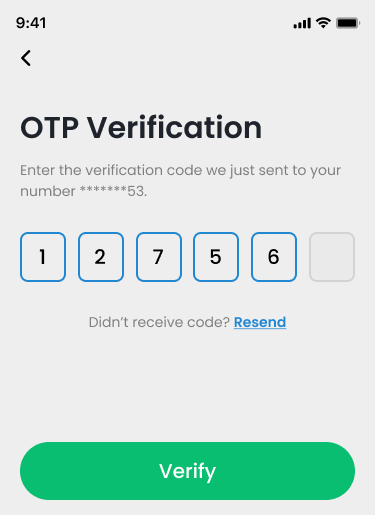
Mobile phones became a widely adopted communication device, so most software products started using SMS or phone-call-based OTP for the 2FA strategy. Verification emails turned into email OTPs, and software products started using email as the secondary 2FA OTP delivery channel or a recovery method. Most products in this era have used a combination of SMS and email 2FA methods, sometimes with phone-call 2FA as well:
3. Modern era (2015 – present)
Security concerns in SMS OTPs, especially the unencrypted nature and the possibility of SIM swapping attacks, were major reasons for the evolution of 2FA beyond the traditional SMS 2FA OTP channel:
- TOTP (Time-Based OTP) Authenticator apps — 2FA apps like Google Authenticator emerged as a secure SMS OTP alternative with offline TOTP generation
- Biometric methods — Biometric 2FA methods emerged with fingerprint and facial recognition strategies since most modern devices have built-in fingerprint readers and cameras
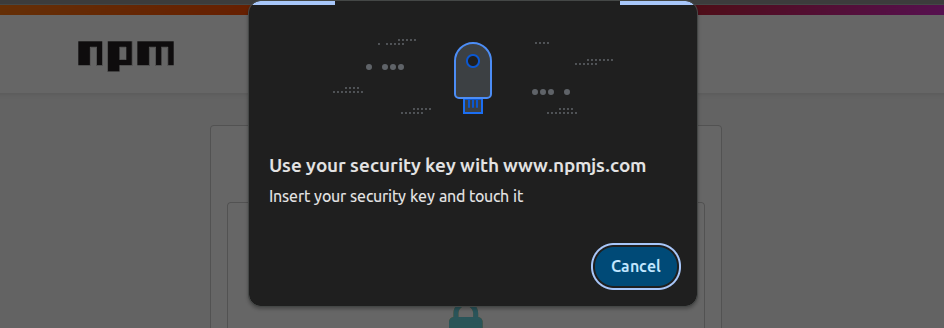
- Hardware keys — Software products also started supporting modern hardware-based 2FA methods like YubiKey that require physical possession of small cryptographic devices
- Push notifications — Mobile versions of digital products display a notification that asks the user to tap “Yes” or “Approve” to approve the current login attempt when the user tries to log in to the desktop version of the product with the password
The idea of adaptive 2FA was initiated in this era, and digital products became more intelligent to improve 2FA UX and security based on dynamic security assessments, e.g., instant logins on trusted devices, app-based 2FA when the primary mobile is connected, triggering the strongest 2FA on untrusted devices, etc.:
4. Futuristic era (being developed in the present for the future)
2FA development is evolving into a more secure, painless standard authentication method that will reduce or eliminate the use of traditional passwords and avoid time-consuming pre-configuration. The software development industry tries to establish the next 2FA era with AI and hardware innovations, experimenting with the following approaches:
- Device passkeys — A cryptographic key generated with device details acts as a user verification method. This method can eventually introduce a way to eliminate the use of passwords and offer users instant login into any product securely
- Multi-modal biometrics — An AI-powered intelligent biometric method that truly identifies the user with a combination of biometric factors, such as fingerprint, retina scan, face, brain waves, behavioral factors like touch pressure and gait, etc.
- Adaptive 2FA — Dynamically triggers different 2FA methods based on the AI-powered security assessment only if needed. Multimodal biometrics-like strong methods for higher security risks and instant access when there is a very low risk (e.g, using a trusted device)
Methods of two-factor authentication
Here is the summary and comparison of all 2FA methods that popular digital products nowadays use:
| 2FA method | Security | Usability | Popularity | Device and service requirements | Recovery options |
|---|---|---|---|---|---|
| SMS OTP | Low-Medium, prone to SIM swapping, MITM (Man-in-the-Middle) attacks | Very easy to use. Built-in features like copy OTP or auto-fill OTP improve UX further | Very popular, the current software industry’s most used method | Any phone that supports SMS | SIM reregistration or using any available 2FA fallback to change the number |
| Phone call | Low-Medium, prone to SIM swapping, call-forwarding, MITM (Man-in-the-Middle) attacks | Easy to use, but the UX is not so productive when the user has to listen and enter the OTP | Lesser-used sometimes, along with SMS OTP | Any phone | SIM-reregistration or using any available 2FA fallback to change the number |
| Email OTP | Medium, prone to phishing and email compromise attacks | Easy to use, but possible delivery delays can cause user frustration | Very popular | A mobile phone or computer with an active internet connection | Email account recovery or using any available 2FA fallback to change the email |
| TOTP authenticator app | High, but the risk of social engineering, phishing, and seed hijacking attacks is not negligible | Moderate, requires downloading a third-party app, configuring it, and manually finding the product name that the user tries to access during authentication | Popular, becoming the current software industry’s most used over SMS | Smartphone | Recovery codes or using any available 2FA fallback to reconfigure the authenticator app |
| Push notifications | Medium, prone to device compromise and social engineering attacks | Very easy to use, but the possible user slips can cause user frustration | Moderate, usually often used only with trusted mobile devices | Smartphone with an active internet connection | Reinstalling the mobile app of the specific product |
| Biometrics (fingerprint or face) | Medium, prone to spoofing, replay, and forced unlock attacks | Very easy to use, but possible recognition failures caused by physical reasons can frustrate users (e.g., using the fingerprint sensor with a dirty hand) | Popular, but not so widely used worldwide, since some users still use devices that don’t have biometric features | A smartphone or computer with a biometric sensor (fingerprint reader or face recognition-ready camera) | Device PIN |
| Hardware keys | High, but the risk of physical theft and cloning is not negligible | Moderate, the user has to secure the hardware component and plug or tap it into the devices | Growing popularity | A physical hardware key (e.g., YubiKey) | Backup hardware key or use any available 2FA fallback |
Most modern digital products let users choose one or more 2FA methods from TOTP authenticator apps, email, or SMS, considering both security and user convenience factors. Meanwhile, some products started implementing high-security hardware key 2FA (i.e., YubiKey) due to its growing popularity, but still support other 2FA methods for user convenience.
User flows for each two-factor method
Different 2FA methods have different user flows for initial configuration and using each method for authentication. Once you select one or more 2FA strategies for your digital product design, create a smooth, simple UX for them by adhering to the following 2FA flows that most users are familiar with:
SMS OTP
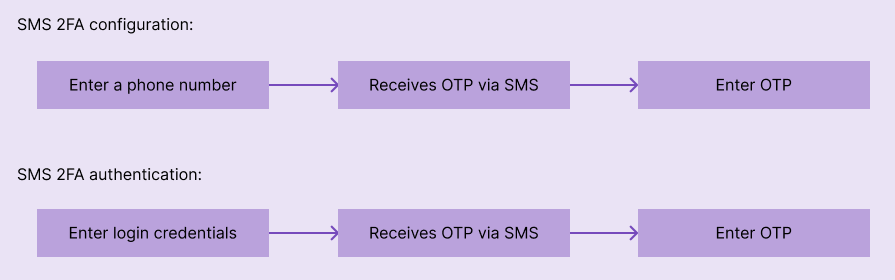
Within the configuration flow, the user has to enter a valid phone number, receive a verification code, and confirm the phone number by entering the received code. The authentication flow just goes through entering the password and validating 2FA by entering the OTP received through SMS:
Phone call
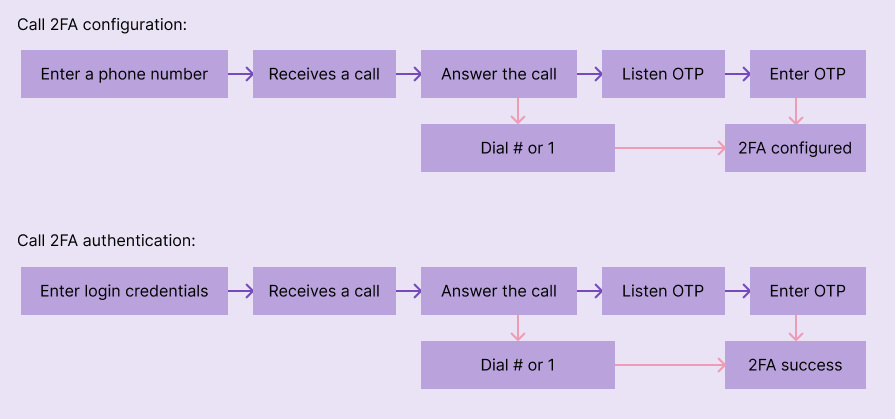
The configuration flow starts with entering a valid phone number. Then, the product backend makes a phone call to the specific number and verifies the user immediately, by asking the user to press a specific dial pad key (e.g., # or 1), or by asking the user to enter an OTP manually. The authentication flow works the same as the configuration flow, but the phone number is automatically identified with the user’s login credentials:
Email OTP
The primary registration email is usually used as the 2FA OTP delivery method, so no pre-configuration is needed. Once the password is entered, the user has to enter the OTP delivered to the email for 2FA authentication:

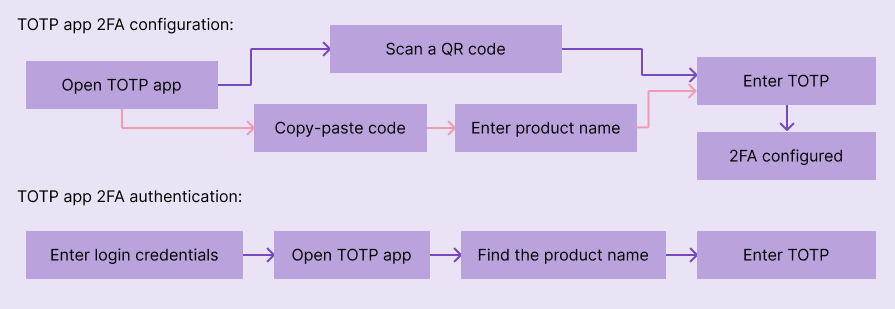
TOTP authenticator app
From the technical perspective, the TOTP algorithm needs a shared secret between the TOTP authenticator app and your product’s server, and this secret should be shared during the initial configuration flow. So the user has to scan a QR code or copy-paste the secret from the product for the authenticator app for 2FA configuration. In the authentication flow, after entering the password, the user has to enter the OTP displayed in the authenticator app to complete the 2FA flow:
Push notifications
No configuration steps except enabling notification permissions for the specific app. The user has to review the current login attempt details (usually operating system name and location) and tap “Yes”, “Approve”, or a similar button to complete 2FA:

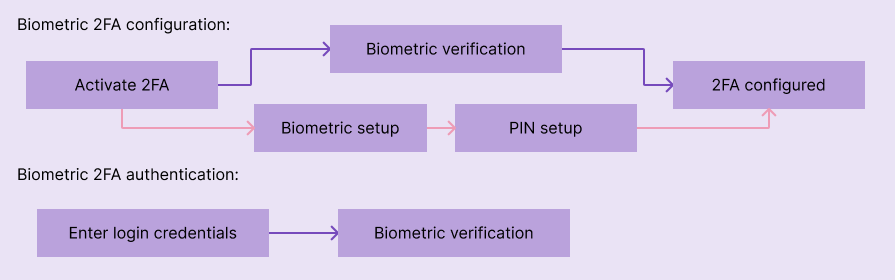
Biometrics (fingerprint or face)
In the configuration flow, the user either has to confirm or register biometrics by using the fingerprint sensor or looking at the device camera. The login flow usually involves confirming the identity through biometric sensors after entering the account password:
Hardware keys
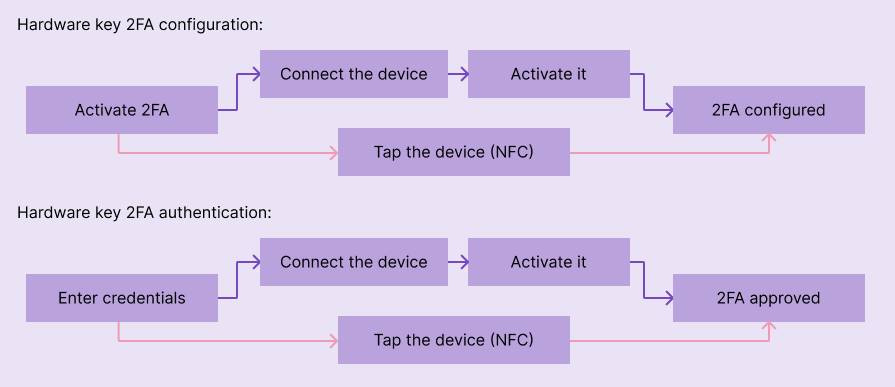
The configuration flow requires going through connecting (for PC through USB) or tapping (on mobile through NFC) the physical hardware key. In the authentication flow, the user has to confirm identity with hardware keys once the account password is entered:
Exceptions to the required two-factor verification
There is the possibility of creating exceptions to avoid verifying your identity every time you log into an app. The most common exceptions include:
- Trusted devices — Some software products automatically mark a device as a trusted device or let users do so. When you log in to the specific software product using a trusted device, it bypasses 2FA and lets you access the product instantly until you revoke the setting or the product raises security risks for the trusted device
- Trusted networks — Sometimes, we can use specific networks to bypass authentication. Similar to the previous example, if a device is connected to a free-access network, you may access the software product without needing to identify yourself through 2FA
- SSO (Single-Sign-On) login — Software products usually skip the 2FA method if the user log ins to the app using SSO (e.g, through Google sign-in) since the user is already authenticated to the particular SSO provider
- Temporary access — If a user loses access to all 2FA methods, in some digital products, system administrators can provide temporary access to reconfigure 2FA using an email verification link or system-generated password, bypassing 2FA
- Special account types — Some software systems may offer special account types without a strict 2FA configuration requirement, e.g., product demo accounts
2FA recovery options
Implementing 2FA for an added layer of security can create additional complexity if a user loses access to the configured 2FA method. While this may not be an issue for biometrics (because facial features or fingerprints generally remain constant), other methods require alternative approaches to regain account access.
Here are some ways to recover your account when you have lost access to the 2FA method:
- Recovery 2FA method — Users can use a secondary method to verify their identity. Recovery 2FA method can be a secondary 2FA method that the user is already configured, or any medium that the digital product can use to verify the user identity, including email, phone, security questions, or a trusted device
- Recovery codes — After setting up 2FA, developers may provide a recovery code that should be stored safely, such as on a laptop, cloud storage, or a physical notepad. If the user can’t use the 2FA method, the user can restore access by using the stored recovery codes
- Document verification — Some digital products offer account self-unlocking services using a document proof, such as the user’s passport, ID card, or driving license
- Customer service — Contacting the customer service team and explaining the situation can also help in recovering your account. They may require you to verify your identity by answering private questions before assisting with the account recovery process
Best practices for designing a 2FA
Designing an intuitive user interface for 2FA involves considering user needs, usability, and clear communication of security measures. Here are some key aspects to consider:
Simplified setup process
Create a step-by-step setup process that guides users through enabling 2FA with clear instructions and minimal effort. Provide options for different 2FA methods (such as SMS codes, email verification, TOTP authenticator apps, biometrics, or hardware keys) and explain their benefits.
Clear, concise explanations
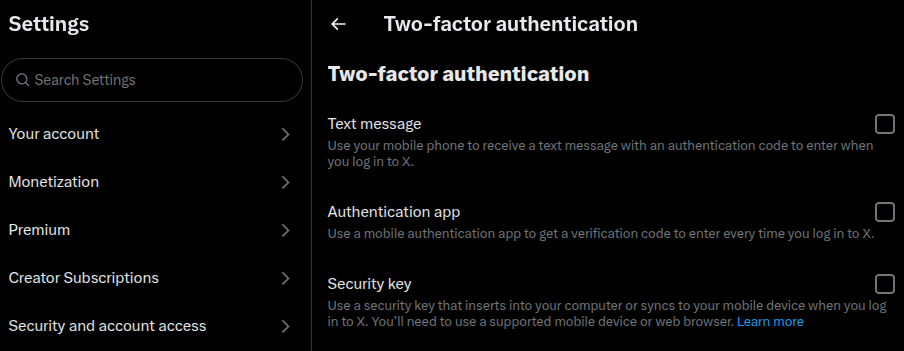
Provide concise and easy-to-understand explanations of each 2FA method, outlining how it adds an extra layer of security and the steps involved in setting it up. Use plain language and visuals to convey the information effectively without using technical jargon:
Visual cues and feedback
Use visual cues (such as icons, progress indicators, or checkmarks) to guide users through the setup process and clearly indicate the completion of each step. Provide feedback messages to inform users of successful actions or any errors that may occur during setup
Mobile-friendly design
Consider that many users access accounts and services on mobile devices. Optimize the user interface for mobile screens, ensuring that the layout, fonts, and buttons are easily readable and interactable on smaller screens
Accessibility
Design the interface to be accessible to users with diverse needs. Consider factors like color contrast for visually impaired users, resizable text, and support for assistive technologies
Account recovery options
In case users lose access to their primary two-factor method (e.g., a lost phone or disabled biometrics), provide clear instructions and alternative methods for account recovery, such as backup codes, secondary email addresses, or phone number verification
Security education
Include brief but informative sections that explain the importance of 2FA, its benefits, and how it enhances account security. Educate users about potential security threats and best practices for safeguarding their accounts.
Consistency and familiarity
Maintain consistency in design elements, terminology, and interaction patterns to provide a familiar experience across different platforms or services. This reduces cognitive load and helps users navigate the interface more easily
User testing and feedback
Conduct user testing to gather feedback and insights on the usability and intuitiveness of the 2FA interface. Incorporate user feedback to make iterative improvements and address any pain points or confusion
Streamlining the authentication process
Implement techniques such as persistent login sessions, remember me options, and device recognition. Persistent login sessions allow users to stay logged in across multiple sessions without the need to re-enter their credentials each time, enhancing convenience while maintaining security. Remember me options provide the choice to store login credentials on the user’s device, enabling automatic login for subsequent visits. Device recognition adds an extra layer of convenience by identifying and trusting known devices, reducing the need for repeated authentication
Frequently asked questions about 2FA design
The following questions and answers most common doubts during 2FA design in modern digital products:
What is the difference between 2FA and MFA?
2FA (two-factor authentication) uses exactly two distinct user verification methods for authentication, and MFA (multi-factor authentication) uses two or more methods for authentication and can be 2FA, 3FA, and so on. 2FA is a specific type of MFA.
Is 2FA enough? Should I use MFA beyond 2FA for my product?
MFA beyond 2FA increases implementation complexity, reduces user convenience, but strengthens security further. So, MFA is suitable for high-security requirements, and 2FA is generally secure and also usable for general software products
What is the best fallback method for 2FA?
The next most secure option that the user has access to is the best fallback method. For example, if the user lost access to the only hardware key but has access to TOTPs, the TOTP authenticator app is the best fallback method.
How do you handle 2FA on shared or public devices?
2FA should be triggered on shared or public devices (untrusted devices), and it should be the most secure method that only the user has already configured.
Why should you consider implementing email and SMS OTP even nowadays?
Not all users still prefer using and have access to hardware keys, TOTP apps, and biometric-enabled devices, so SMS and email are still the most convenient and feasible 2FA methods for most worldwide digital product users
What is the best 2FA method for your app?
To satisfy all users with different 2FA preferences, the best approach is to let users select the preferred method from hardware keys, biometrics, TOTP authenticator apps, SMS, and email:
What is the common user concern about enabling any 2FA method?
Users fear permanent lock-in, where they lose access to the whole account because of losing access to the 2FA method. Recommending the user to set up multiple 2FA methods targeting account recovery through a progressive security checklist is a popular strategy to help users use 2FA without worrying about permanent lock-in.
How to use AI to improve 2FA security and convenience?
You can implement AI-powered risk assessment strategies for dynamically triggering 2FA based on user location, device, and behavior-like factors with the adaptive 2FA concept to improve both security and convenience. AI-powered, advanced, biometric 2FA mechanisms are still in development.
Conclusion
2FA has evolved through old 2FA hardware devices, email, SMS, and voice/call. The modern 2FA era uses high-security hardware tokens and convenient TOTP authenticator apps. However, SMS is still the most used 2FA method due to availability, user convenience, and fair security strength. Hardware tokens provide the highest security, but it isn’t the best 2FA option considering both security and general user preference, so letting users choose multiple 2FA methods and improving both security and user convenience with adaptive 2FA concepts is the best strategy for securing modern digital products.
A good product enables the highest possible security without frustrating users with complex, time-consuming user flows, so make sure to implement productive, reasonable 2FA configuration and authentication flows by prioritizing both good UX and security.
2FA evolution won’t stop here. The next 2FA era will either be improved with AI and bioinformatics. Or, the era of passwords and existing 2FA methods will end with device passkeys or intelligent biometric identity verification.
The post How to design 2FA: Comparing methods, user flows, and recovery strategies appeared first on LogRocket Blog.
This post first appeared on Read More