

From Localhost to Kubernetes: Deploying StreamMetrics at Scale
https://www.youtube.com/watch?v=2Bs8K6folk0
Love how after building something locally, you think “ okay, it works on my machine! “ and then reality hits when you try to deploy it. Docker says “ works on my machine “ is not an excuse anymore, and Kubernetes says “ hold my beer, let’s make it production-ready. “
This is the tale of taking StreamMetrics from docker-compose on localhost to a full Kubernetes deployment with KRaft Kafka, discovering why Redis refuses to connect, why Alpine needs libstdc++, and why environment variables have a mind of their own.
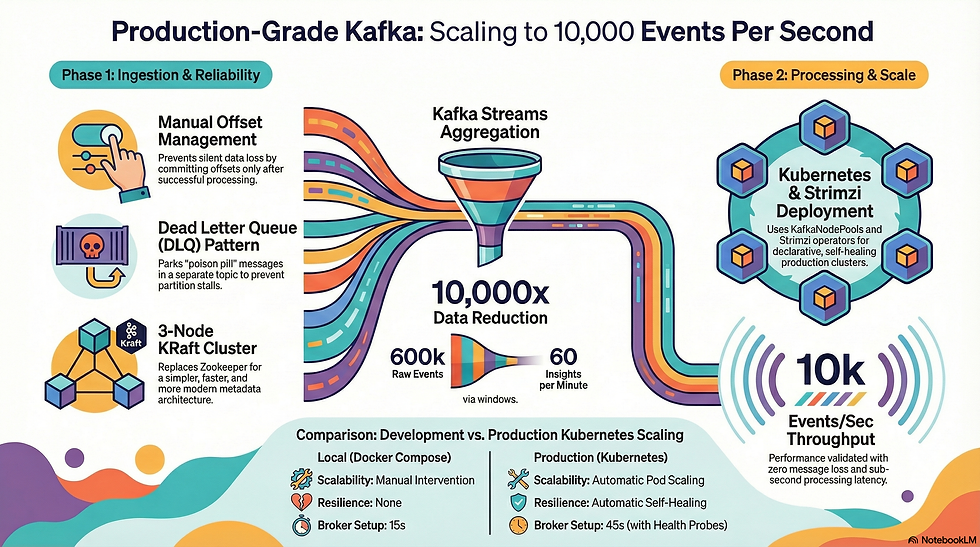
Objective for this post:
- Dockerize all StreamMetrics microservices,
- Deploy them to Kubernetes (minikube),
- Set up a 3-node KRaft Kafka cluster using Strimzi, and
- Validate the entire pipeline works end-to-end at scale.
The Journey: Docker First, Kubernetes Later
Phase 1: Dockerizing Everything
We started with three Spring Boot applications that worked beautifully in development:
- Producer (port 8085): REST API for sending metrics
- Consumer (port 8081): Processes events with DLQ pattern
- Streams (port 8082): Real-time aggregations with Kafka Streams
The naive approach would be a multi-stage Docker build that compiles everything inside the container. But Maven + multi-module projects + missing modules = pain. We learned this the hard way.
The pragmatic approach: Build locally, then Dockerize the JAR.
Producer Dockerfile
FROM eclipse-temurin:21-jre-alpine

WORKDIR /app

COPY streammetrics-producer/target/streammetrics-producer-0.0.1-SNAPSHOT.jar app.jar

RUN addgroup -S spring && adduser -S spring -G spring
USER spring:spring

EXPOSE 8085

HEALTHCHECK --interval=30s --timeout=3s --start-period=40s
  CMD wget --quiet --tries=1 --spider http://localhost:8085/actuator/health || exit 1

ENTRYPOINT ["java", "-jar", "app.jar"]
Key decisions:
- JRE-only base image: We don’t need JDK in production (250MB vs 400MB)
- Non-root user: Security best practice
- Health check: Kubernetes needs this for liveness/readiness probes
- Alpine: Smallest possible image… or so we thought (spoiler: RocksDB had other plans)
Build process:
# Step 1: Build JARs locally
mvn clean package -DskipTests

# Step 2: Build Docker images
docker build -f streammetrics-producer/Dockerfile -t streammetrics-producer:latest .
docker build -f streammetrics-consumer/Dockerfile -t streammetrics-consumer:latest .
docker build -f streammetrics-streams/Dockerfile -t streammetrics-streams:latest .

# Step 3: Verify
docker images | grep streammetrics
Testing with Docker Compose
Before Kubernetes, we validated everything with docker-compose:
version: '3.8'

services:
  producer:
    image: streammetrics-producer:latest
    ports:
      - "8085:8085"
    environment:
      SPRING_KAFKA_BOOTSTRAP_SERVERS: kafka1:19092,kafka2:19092,kafka3:19092
      SPRING_REDIS_HOST: redis
      SPRING_REDIS_PORT: 6379
      SPRING_DATA_REDIS_CLIENT_TYPE: lettuce
      MANAGEMENT_HEALTH_REDIS_ENABLED: false
    depends_on:
      - kafka1
      - kafka2
      - kafka3
      - redis
    networks:
      - streammetrics-network
Lesson learned:
- The MANAGEMENT_HEALTH_REDIS_ENABLED: false saved us hours. Spring Boot 4.x uses reactive Redis health checks by default, which failed spectacularly in our setup. Disabling it made everything work.
Phase 2: Kubernetes Deployment
Setting Up Minikube
# Install minikube
brew install minikube

# Start with plenty of resources (Kafka is hungry)
minikube start --cpus=4 --memory=8192 --disk-size=20g

# Point Docker CLI to minikube's Docker daemon
eval $(minikube docker-env)

# Rebuild images INSIDE minikube
docker build -f streammetrics-producer/Dockerfile -t streammetrics-producer:latest .
docker build -f streammetrics-consumer/Dockerfile -t streammetrics-consumer:latest .
docker build -f streammetrics-streams/Dockerfile -t streammetrics-streams:latest .
Critical insight: eval $(minikube docker-env) is magic. It makes your local Docker CLI talk to minikube’s Docker daemon. Without this, Kubernetes can’t find your images because they’re on your host machine, not in minikube.
Namespace Setup
apiVersion: v1
kind: Namespace
metadata:
  name: streammetrics
Create namespace
kubectl apply -f k8s/namespace.yaml
kubectl config set-context --current --namespace=streammetrics
Setting the default namespace saves you from typing -n streammetrics 500 times.
Phase 3: KRaft Kafka Cluster with Strimzi
This is where it gets interesting. We wanted KRaft mode (no Zookeeper) because:
- Simpler architecture
- Faster metadata operations
- Industry direction (Zookeeper is deprecated)
# Install Strimzi operator
kubectl create -f 'https://strimzi.io/install/latest?namespace=streammetrics' -n streammetrics

# Wait for operator
kubectl wait deployment/strimzi-cluster-operator
  --for=condition=Available --timeout=300s -n streammetrics
Strimzi is Kubernetes-native Kafka. It uses Custom Resource Definitions (CRDs) to manage Kafka clusters declaratively.
KRaft Kafka Cluster with KafkaNodePools
Modern Strimzi requires KafkaNodePools. This was a surprise.
KafkaNodePool manifest:
apiVersion: kafka.strimzi.io/v1beta2
kind: KafkaNodePool
metadata:
  name: broker
  namespace: streammetrics
  labels:
    strimzi.io/cluster: streammetrics-kafka
spec:
  replicas: 3
  roles:
    - broker
    - controller  # KRaft mode: brokers ARE controllers
  storage:
    type: ephemeral
  resources:
    requests:
      memory: 1Gi
      cpu: 500m
    limits:
      memory: 2Gi
      cpu: 1000m
Kafka cluster manifest:
apiVersion: kafka.strimzi.io/v1beta2
kind: Kafka
metadata:
  name: streammetrics-kafka
  namespace: streammetrics
  annotations:
    strimzi.io/kraft: "enabled"
    strimzi.io/node-pools: "enabled"
spec:
  kafka:
    version: 4.0.1
    listeners:
      - name: plain
        port: 9092
        type: internal
        tls: false
    config:
      offsets.topic.replication.factor: 3
      transaction.state.log.replication.factor: 3
      transaction.state.log.min.isr: 2
      default.replication.factor: 3
      min.insync.replicas: 2
  entityOperator:
    topicOperator: {}
    userOperator: {}
Key points:
- strimzi.io/kraft: “enabled” — No Zookeeper
- strimzi.io/node-pools: “enabled” — Use new architecture
- No replicas in Kafka spec — moved to KafkaNodePool
- No storage in Kafka spec — moved to KafkaNodePool
Deploy order matters:
# 1. NodePool first
kubectl apply -f k8s/kafka-nodepool.yaml

# 2. Then Kafka cluster
kubectl apply -f k8s/kafka-cluster.yaml

# 3. Wait (3-5 minutes)
kubectl wait kafka/streammetrics-kafka --for=condition=Ready --timeout=600s
Creating Topics
apiVersion: kafka.strimzi.io/v1beta2
kind: KafkaTopic
metadata:
  name: metrics-events
  namespace: streammetrics
  labels:
    strimzi.io/cluster: streammetrics-kafka
spec:
  partitions: 6
  replicas: 3
  config:
    retention.ms: 86400000  # 24 hours
kubectl apply -f k8s/kafka-topics.yaml
kubectl get kafkatopics
Phase 4: Deploying Applications
The Redis Connection Saga
This consumed hours. The error:
Unable to connect to localhost/<unresolved>:6379
Despite setting:
env:
  - name: SPRING_REDIS_HOST
    value: "redis"
  - name: SPRING_REDIS_PORT
    value: "6379"
The problem: Our RedisConfig class hardcoded localhost:
@Bean
public RedisConnectionFactory redisConnectionFactory() {
    return new LettuceConnectionFactory("localhost", 6379); // HARDCODED!
}
The solution: Inject properties:
@Configuration
public class RedisConfig {

    @Value("${spring.redis.host:localhost}")
    private String redisHost;

    @Value("${spring.redis.port:6379}")
    private int redisPort;

    @Bean
    public RedisConnectionFactory redisConnectionFactory() {
        RedisStandaloneConfiguration config = new RedisStandaloneConfiguration();
        config.setHostName(redisHost);  // Use injected value
        config.setPort(redisPort);
        return new LettuceConnectionFactory(config);
    }
}
Update application.yml:
spring:
  redis:
    host: ${SPRING_REDIS_HOST:localhost}
    port: ${SPRING_REDIS_PORT:6379}
Rebuild, redeploy (believe me, we executed this a lot):
mvn clean package -DskipTests
eval $(minikube docker-env)
docker build -f streammetrics-consumer/Dockerfile -t streammetrics-consumer:latest .
kubectl delete pod -l app=consumer
Finally worked! 🥳
Producer Deployment
apiVersion: apps/v1
kind: Deployment
metadata:
  name: producer
  namespace: streammetrics
spec:
  replicas: 1
  selector:
    matchLabels:
      app: producer
  template:
    metadata:
      labels:
        app: producer
    spec:
      containers:
      - name: producer
        image: streammetrics-producer:latest
        imagePullPolicy: Never  # Use local image
        ports:
        - containerPort: 8085
        env:
        - name: SPRING_KAFKA_BOOTSTRAP_SERVERS
          value: "streammetrics-kafka-kafka-bootstrap:9092"
        - name: SPRING_REDIS_HOST
          value: "redis"
        - name: SPRING_REDIS_PORT
          value: "6379"
        resources:
          requests:
            memory: "512Mi"
            cpu: "250m"
          limits:
            memory: "1Gi"
            cpu: "500m"
---
apiVersion: v1
kind: Service
metadata:
  name: producer
  namespace: streammetrics
spec:
  type: NodePort
  ports:
    - port: 8085
      targetPort: 8085
      nodePort: 30085
  selector:
    app: producer
Note: imagePullPolicy: Never tells Kubernetes to use the local image we built inside minikube.
The RocksDB Alpine Issue
When deploying streams, we hit:
java.lang.UnsatisfiedLinkError: /tmp/librocksdbjni.so:
Error loading shared library libstdc++.so.6: No such file or directory
- Kafka Streams uses RocksDB for state storage.
- RocksDB is a native C++ library.
- Alpine doesn’t include libstdc++.
Fix: Update Streams Dockerfile:
FROM eclipse-temurin:21-jre-alpine

WORKDIR /app

# Install required native libraries for RocksDB
RUN apk add --no-cache libstdc++

COPY streammetrics-streams/target/streammetrics-streams-0.0.1-SNAPSHOT.jar app.jar

# ... rest of Dockerfile
Rebuild and redeploy. It worked!
End-to-End Validation
# Port-forward producer
kubectl port-forward svc/producer 8085:8085 &

# Send 100 events
curl "http://localhost:8085/produce?events=100"

# Check consumer processed them
kubectl logs deployment/consumer --tail=50 | grep "Successfully processed"

# Check streams aggregated
kubectl logs deployment/streams --tail=50 | grep "aggregate"

# Verify Redis has data
kubectl exec deployment/redis -- redis-cli KEYS "metrics:*"
kubectl exec deployment/redis -- redis-cli KEYS "agg:1m:*"

# Check Kafka topics
kubectl exec -it streammetrics-kafka-broker-0 --
  bin/kafka-console-consumer.sh
  --bootstrap-server localhost:9092
  --topic metrics-events
  --from-beginning
  --max-messages 10
Architecture: Before vs After
Before (docker-compose):
Host Machine
  └─ Docker
      ├─ Kafka (3 brokers)
      ├─ Redis
      ├─ Producer
      ├─ Consumer
      └─ Streams
After (Kubernetes):
Minikube Cluster
  └─ Namespace: streammetrics
      ├─ StatefulSet: Kafka (3 pods)
      ├─ Deployment: Redis (1 pod)
      ├─ Deployment: Producer (1 pod)
      ├─ Deployment: Consumer (2 pods)
      ├─ Deployment: Streams (1 pod)
      ├─ Service: Kafka (ClusterIP)
      ├─ Service: Redis (ClusterIP)
      └─ Service: Producer (NodePort)
Production Lessons Learned
1. eval $(minikube docker-env) is Essential
Without this, your images are on your host machine. Kubernetes in minikube can’t see them. You’ll get ImagePullBackOff errors.
# Always run this before building images
eval $(minikube docker-env)

# To undo (switch back to host Docker)
eval $(minikube docker-env -u)
2. imagePullPolicy Matters
For local development:
imagePullPolicy: Never # Use local image only
For production (with registry):
imagePullPolicy: Always # Always pull from registry
3. ConfigMaps for Configuration
Instead of hardcoding config in JARs, use ConfigMaps:
apiVersion: v1
kind: ConfigMap
metadata:
  name: consumer-config
data:
  application.yml: |
    spring:
      kafka:
        bootstrap-servers: streammetrics-kafka-kafka-bootstrap:9092
      redis:
        host: redis
Mount in deployment:
volumeMounts:
- name: config
  mountPath: /config
volumes:
- name: config
  configMap:
    name: consumer-config
4. Resource Limits Prevent Noisy Neighbors
resources:
  requests:  # Guaranteed resources
    memory: "512Mi"
    cpu: "250m"
  limits:    # Maximum allowed
    memory: "1Gi"
    cpu: "500m"
5. Health Checks are Critical
livenessProbe:  # Restart if unhealthy
  httpGet:
    path: /actuator/health
    port: 8081
  initialDelaySeconds: 60
  periodSeconds: 10
readinessProbe:  # Remove from service if not ready
  httpGet:
    path: /actuator/health
    port: 8081
  initialDelaySeconds: 30
  periodSeconds: 5
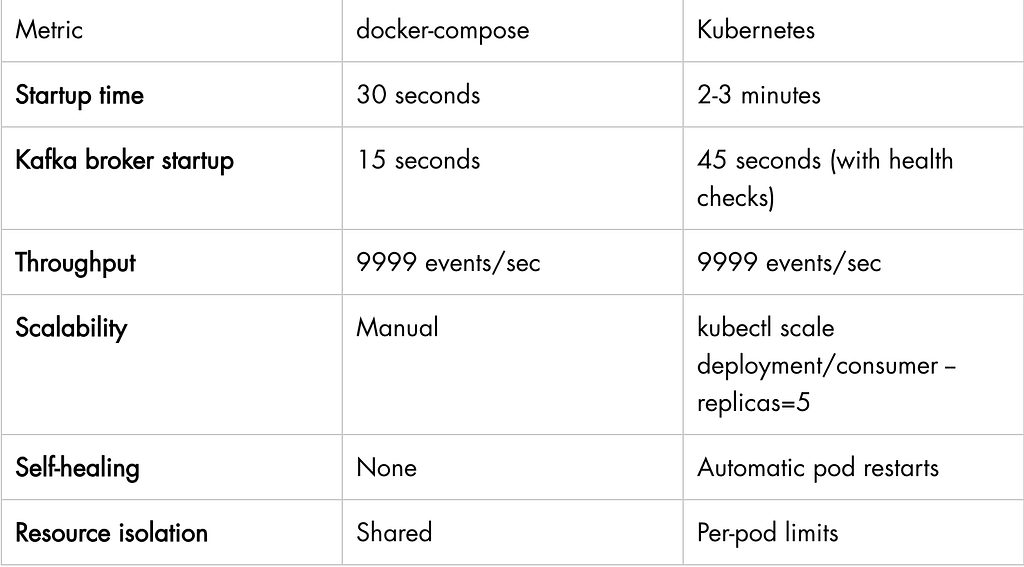
Performance Comparison
What’s Next?
We now have:
✅ Dockerized microservices
✅ Kubernetes deployment on minikube
✅ 3-broker KRaft Kafka cluster
✅ Full pipeline working (producer → Kafka → streams → consumer → Redis)
✅ Validated 10K events/sec throughput
Still missing for production:
- ⚠️ Persistent storage (PersistentVolumes)
- ⚠️ Monitoring (Prometheus + Grafana)
- ⚠️ Horizontal Pod Autoscaling
- ⚠️ Helm chart for easier deployment
- ⚠️ TLS/SSL for Kafka
- ⚠️ Secrets management
- ⚠️ CI/CD pipeline
Next post: We’ll add Prometheus and Grafana for monitoring, set up Horizontal Pod Autoscaler to scale based on Kafka lag, and create a Helm chart to deploy the entire stack with one command.
Useful Kubernetes Commands
# Check everything
kubectl get all
# Watch pods
kubectl get pods -w
# Logs
kubectl logs deployment/consumer -f
kubectl logs -l app=consumer --tail=100
# Exec into pod
kubectl exec -it deployment/consumer -- sh
# Port forwarding
kubectl port-forward svc/producer 8085:8085
# Scale deployment
kubectl scale deployment/consumer --replicas=3
# Restart deployment
kubectl rollout restart deployment/consumer
# Check resource usage
kubectl top nodes
kubectl top pods
# Describe for debugging
kubectl describe pod <pod-name>
kubectl describe deployment consumer
Challenges We Hit (and Fixed)
Issue 1: “Unable to connect to Redis”
Root cause: Hardcoded localhost in RedisConfigFix: Use @Value to inject from properties
Issue 2: “UnsatisfiedLinkError: libstdc++.so.6”
Root cause: Alpine missing C++ runtime for RocksDBFix: Add RUN apk add — no-cache libstdc++
Issue 3: “No KafkaNodePools found”
Root cause: Strimzi requires NodePools for KRaftFix: Create KafkaNodePool with broker+controller roles
Issue 4: “ImagePullBackOff”
Root cause: Image built on host, not in minikubeFix: eval $(minikube docker-env) before building
Issue 5: Environment variables ignored
Root cause: Spring Boot config precedence issuesFix: Use ${VAR:default} syntax in application.yml
Key Takeaways
- Minikube is amazing for learning — Full Kubernetes locally
- Strimzi simplifies Kafka on K8s — Declarative, Kubernetes-native
- KRaft is production-ready — Simpler than Zookeeper
- Configuration is hard — ConfigMaps + env vars + @Value = tricky
- Native dependencies matter — Alpine != everything just works
- Kubernetes debugging is different — Learn kubectl, logs, describe
- Resource limits prevent surprises — Always set requests/limits
Try It Yourself
Full code available on GitHub: https://github.com/ankitagrahari/StreamAnalytics
# Clone the repo
git clone https://github.com/ankitagrahari/StreamAnalytics
cd StreamAnalytics
# Build JARs
mvn clean package -DskipTests
# Start minikube
minikube start --cpus=4 --memory=8192
# Point Docker to minikube
eval $(minikube docker-env)
# Build images
docker build -f streammetrics-producer/Dockerfile -t streammetrics-producer:latest .
docker build -f streammetrics-consumer/Dockerfile -t streammetrics-consumer:latest .
docker build -f streammetrics-streams/Dockerfile -t streammetrics-streams:latest .
# Deploy everything
kubectl apply -f k8s/
# Test
kubectl port-forward svc/producer 8085:8085
curl "http://localhost:8085/produce?events=100"
Share your thoughts whether you liked or disliked it. Do let me know if you have any queries or suggestions.
Never forget, Learning is the primary goal.
Tags: #Kubernetes #Docker #Kafka #SpringBoot #KRaft #Strimzi #Microservices #DevOps
Originally published at https://www.dynamicallyblunttech.com on March 2, 2026.

From Localhost to Kubernetes: Deploying StreamMetrics at Scale was originally published in Javarevisited on Medium, where people are continuing the conversation by highlighting and responding to this story.
This post first appeared on Read More