

From Git Push to Live Container: Everything I Wish Someone Had Told Me About CI/CD, Docker, and AWS
A backend Java developer’s honest account of going from “what is a pipeline?” to understanding the full picture — told in the order that actually makes sense.
I spent years writing production Java. Real pipelines, real concurrent architectures, real LLM integrations at scale. And yet, if someone had asked me a few months ago to explain what happens between git push and a running container in production — I would have bluffed my way through it.
I knew the words. CI/CD. Jenkins. Docker. ECR. ELB. I had Jenkins in my resume. But I did not have the story. I knew the cast of characters but not the plot.
This article is that plot. Written in the order I wish I had learned it — pain first, concept second, code third. No syntax dumps. No tool comparisons without context. Just the real story of how your code gets from your laptop to a live server, and why every piece of the puzzle exists.
By the end you will understand: Maven, CI/CD, Jenkins, GitHub Actions, Docker (properly), and AWS infrastructure — as one connected system, not seven separate topics.
The Friday Evening Problem
Picture this. Five developers on a team. Everyone pushes code all week. Friday evening, someone deploys to production manually — copies the jar to the server, restarts the app. Something breaks. Nobody knows which change caused it. The developer who deployed is now spending their Friday night rolling back by hand.
This is not a hypothetical. This is how software was deployed for years. And this is the exact problem that CI/CD exists to solve.
CI/CD stands for Continuous Integration and Continuous Delivery. The names sound corporate and abstract. The reality is simple: every time a developer pushes code, a machine automatically builds it, tests it, and if everything passes, deploys it. No human remembering to run commands. No Friday night disasters from skipped steps. No “works on my machine” because the deploy happens on a neutral server that knows nothing about your laptop’s quirks.
That automatic sequence of steps is called a pipeline. And Jenkins is — at its core — just software that runs your pipeline.
Maven First — Because Everything Builds on This
Before we get to pipelines, we need to talk about Maven. Because when Jenkins runs your Java pipeline, Maven is the tool doing the actual work.
Maven is a build automation tool. Its entire configuration lives in pom.xml — a file that declares three things: what your project is called, what libraries it needs, and how to build it.
When you run mvn clean install, Maven executes a sequence of phases in strict order:
validate → checks the pom.xml is well-formed. compile → turns your .java files into .class files (bytecode the JVM can run). test → runs your JUnit tests. package → bundles all your .class files plus every dependency into a single .jar file. install → copies that jar into a local cache at ~/.m2/repository/ so other projects on the same machine can use it as a dependency.
The output of all this — the .jar file — is called the artifact. That word will follow you everywhere in CI/CD. An artifact is simply the thing the build produced that you want to deploy.
One important detail: mvn clean deletes the target/ folder before building. Without it, old compiled files can linger and cause subtle bugs. This is why you almost always see mvn clean package or mvn clean install rather than just mvn package.
What Jenkins Actually Is
Jenkins is a Java application. Literally — it ships as a .war file and you run it with java -jar jenkins.war. It starts a web server on port 8080 and you access its interface through your browser.
The architecture has two parts. The master is the brain — it reads your pipeline configuration, decides the order of steps, monitors results, and coordinates everything. The agent is a worker machine where the actual commands run. When Jenkins runs mvn clean package, that command executes on the agent, not on the master.
Jenkins learns that new code exists through a webhook. A webhook is not a Jenkins concept — it is a general web pattern. Jenkins exposes a URL. You register that URL in GitHub settings. Every time anyone pushes code, GitHub sends an HTTP POST request to that URL. Jenkins receives it, wakes up, and starts the pipeline. No polling. No wasted cycles. Pure event-driven — new code arrives, pipeline starts.
The pipeline itself is defined in a file called Jenkinsfile — no extension, capital J, lives in the root of your repository. This is the important design decision: the pipeline is code, stored in the same repository as the application. When the code changes, the pipeline can change with it. No configuration hidden in a Jenkins UI somewhere.
The Jenkinsfile — Reading It Like a Story
A Jenkinsfile is written in Groovy DSL. You do not need to memorise the syntax. You need to understand the structure — because every piece maps to a decision you make about how your pipeline should behave.
pipeline {
    agent any

    environment {
        REGISTRY = "123456.dkr.ecr.eu-west-1.amazonaws.com"
        IMAGE    = "sec-pipeline"
        TAG      = "${BUILD_NUMBER}"
    }

    stages {

        stage('Build') {
            steps {
                sh 'mvn clean package -DskipTests'
            }
        }

        stage('Test') {
            steps {
                sh 'mvn test'
            }
        }

        stage('Docker Build') {
            steps {
                sh 'docker build -t ${REGISTRY}/${IMAGE}:${TAG} .'
            }
        }

        stage('Docker Push') {
            steps {
                withCredentials([usernamePassword(
                    credentialsId: 'ecr-creds',
                    usernameVariable: 'AWS_USER',
                    passwordVariable: 'AWS_PASS'
                )]) {
                    sh 'aws ecr get-login-password | docker login --username AWS --password-stdin ${REGISTRY}'
                    sh 'docker push ${REGISTRY}/${IMAGE}:${TAG}'
                }
            }
        }

        stage('Deploy') {
            when {
                branch 'main'
            }
            steps {
                sh '''
                    ssh ec2-user@your-server
                    "docker pull ${REGISTRY}/${IMAGE}:${TAG} &&
                     docker stop sec-app || true &&
                     docker run -d --name sec-app -p 8080:8080
                     ${REGISTRY}/${IMAGE}:${TAG}"
                '''
            }
        }
    }

    post {
        failure {
            echo 'Pipeline failed. Deployment skipped.'
        }
        always {
            sh 'docker image prune -f'
        }
    }
}
Let me explain the decisions embedded in this file — because this is what interviewers actually ask about.
agent any means “run on whatever Jenkins agent is available.” Jenkins is deployed on some machine (an EC2 instance in production), and that machine is the agent.
environment {} runs before any stage. Jenkins reads these variables and holds them in memory for the entire pipeline run. BUILD_NUMBER is special — Jenkins auto-increments it on every run. So your image is tagged sec-pipeline:1, sec-pipeline:2, and so on. Every build gets a unique, permanent identity. This is how you roll back — just run the previous tag.
sh ‘…’ sends a command to the agent’s Linux shell. sh is the messenger. Everything inside the quotes runs exactly as if you typed it in a terminal.
withCredentials is the secrets pattern. Passwords never live in the Jenkinsfile — that file is in Git, visible to anyone with repo access. Instead, a human adds credentials to Jenkins’ encrypted credential store once. The Jenkinsfile references them by ID. Jenkins injects the actual value at runtime, only for the duration of that block, then wipes it from memory.
when { branch ‘main’ } means the Deploy stage only runs when the push was to the main branch. Feature branches build and test but never touch production. This single line prevents an enormous category of accidents.
docker stop sec-app || true — the || true is shell logic meaning “if this command fails, succeed anyway.” The first time you deploy there is no container to stop. Without || true, Jenkins would abort the pipeline on that failure.
post {} runs after all stages complete. always {} runs regardless of success or failure — used for cleanup. failure {} runs only when something broke — used for notifications.
GitHub Actions — Same Brain, Different Clothes
GitHub Actions is CI/CD built directly into GitHub. You do not need to run a Jenkins server. GitHub provides the machine (called a runner) for free. Your workflow file lives at .github/workflows/ci.yml and GitHub detects it automatically.
The concepts are identical to Jenkins. Only the words change.
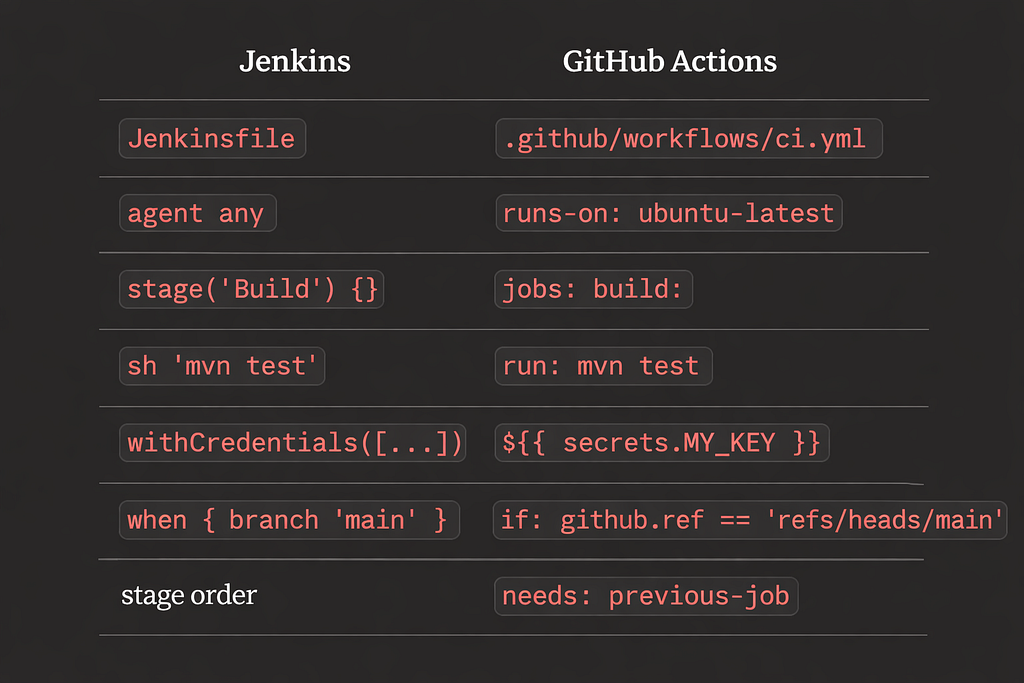
One concept in GitHub Actions that Jenkins handles differently: marketplace actions (uses:). Instead of writing shell commands to set up Java, someone already packaged that work as actions/setup-java@v4. You reference it and it runs. Jenkins has plugins — same idea, but installed on the server. GitHub Actions has marketplace actions — referenced inline in the YAML.
The biggest practical difference: with Jenkins, someone manages the server. With GitHub Actions, nobody does. Startups and modern teams lean toward GitHub Actions for this reason. Enterprises with existing Jenkins infrastructure or security requirements that prohibit external runners keep Jenkins. Understanding both puts you ahead of candidates who only know one.
Docker — What It Actually Is and Why It Exists
Before Docker, deploying a Java application meant: copy the jar to the server, hope the server has the right Java version installed, hope the environment variables are configured correctly, hope the right Linux libraries are present. When something broke, the debugging conversation was always “it works on my machine.” The server was a different environment — different OS version, different Java, different config — and nobody had fully documented what the correct environment was.
Docker solved this by making the environment part of the artifact.
A Docker image is a sealed package containing your jar, the exact Java version your app needs, any OS-level libraries it depends on, and documentation of which port it listens on. When this image runs on any machine — your laptop, a colleague’s laptop, a server in Singapore — it produces an identical environment. The “works on my machine” problem evaporates because everyone is running the same machine.
A container is a running instance of an image. The image is the recipe. The container is the meal made from that recipe. One image can run as ten containers simultaneously. Containers are lightweight because they share the host machine’s OS kernel rather than carrying a full operating system — which is the key difference from virtual machines.
VMs and containers both isolate software. But a VM carries a full operating system inside it — gigabytes of overhead, minutes to start. A container shares the host kernel and only packages the application and its libraries — megabytes of overhead, seconds to start. Same isolation concept, dramatically different cost.
The Dockerfile — Layer by Layer
The recipe for building a Docker image lives in a Dockerfile. Each line creates a layer stacked on top of the previous one.
# Stage 1 — build (heavy, temporary)
FROM eclipse-temurin:21-jdk-alpine AS builder
WORKDIR /app
COPY pom.xml .
RUN mvn dependency:go-offline -q
COPY src/ src/
RUN mvn clean package -DskipTests

# Stage 2 — run (light, what gets shipped)
FROM eclipse-temurin:21-jre-alpine
WORKDIR /app
COPY --from=builder /app/target/sec-pipeline.jar app.jar
EXPOSE 8080
ENTRYPOINT ["java", "-jar", "app.jar"]
This is a multi-stage build and it deserves an explanation.
Stage 1 uses the full JDK (Java Development Kit) — the compiler and all build tools. Maven runs here. The jar is produced here. Stage 2 uses only the JRE (Java Runtime Environment) — the minimum needed to run a jar, not compile one. COPY –from=builder reaches into Stage 1 and pulls out only the jar. Everything else in Stage 1 — the JDK, Maven, your source code — is discarded.
The result: your production image goes from roughly 600MB to roughly 200MB. Faster to push to ECR. Faster for the server to pull. Your source code never ships to production. Less attack surface for security vulnerabilities.
Layer caching is the other concept worth understanding deeply. Docker caches each layer. If a layer’s input has not changed since last time, Docker skips it and uses the cached result. The moment any layer changes, Docker rebuilds that layer and every layer below it.
This is why COPY pom.xml . comes before COPY src/ src/. Your pom.xml changes maybe once a month when you add a dependency. Your src/ changes on every commit. By copying pom.xml first and running mvn dependency:go-offline, you cache the dependency download layer. The next commit only reruns the copy of source code and the compile — not the dependency download. A build that took three minutes now takes twenty seconds.
ENTRYPOINT defines the command that runs when the container starts. It is locked — you cannot replace it by passing arguments to docker run. CMD provides default arguments that can be replaced at runtime. For Spring Boot: use ENTRYPOINT [“java”, “-jar”, “app.jar”] and pass profiles through environment variables. The kitchen analogy: ENTRYPOINT is the chef who always cooks. CMD is the default dish — replaceable by the customer’s order, but the chef always makes it.
Volumes, Networks, and Compose
Three more Docker concepts that come up in every production conversation.
Volumes exist because containers are stateless. Everything written to a container’s filesystem during its lifetime dies when the container stops. For a web server, that is fine. For a database, that is catastrophic.
A volume mounts a folder from the host machine into the container. PostgreSQL inside the container writes to /var/lib/postgresql/data — but that path is actually mapped to /home/ubuntu/pgdata on the real server disk. The container stops, the host folder survives. A new container mounts the same host folder and all data is there. Format: -v host_path:container_path.
Docker networking solves the problem of containers talking to each other. When containers are on the same Docker network, they reach each other using the container name as a hostname. Docker runs internal DNS — the same concept as public internet DNS, just inside the Docker network. Your Spring Boot app connects to PostgreSQL at sec-db:5432 where sec-db is simply the container’s name. No IP addresses. No configuration files. Just the name.
The -p 8080:8080 flag maps a host port to a container port. Left side is the outside world. Right side is inside the container. Your database container should have no -p flag — it is only reachable from inside the Docker network. The internet should never be able to reach your database directly.
Docker Compose collapses all of this into one file. Instead of four separate docker run commands with ports, networks, volumes, and environment variables — you write a docker-compose.yml and run docker compose up. Compose creates the network, starts containers in the right order (respecting depends_on), mounts volumes, and injects environment variables. One command, entire local stack running. This is the standard for local development. In production, the Jenkins pipeline handles deployment.
Where Your Code Actually Lives in Production — AWS
Understanding AWS services becomes simple once you map each one to a problem you already understand from your home network.
Your home router gets one public IP from your ISP. Behind it, your router creates a private network and assigns 192.168.x.x addresses to every device. The internet only knows your router’s public address. To make one specific device reachable from the internet, you configure port forwarding — ”traffic on port 8080 goes to this specific device.”
AWS is the same concept at scale, with managed services replacing manual configuration.
EC2 is a virtual machine you rent — a server in AWS infrastructure with a real public IP that never goes offline.
ECR (Elastic Container Registry) is private Docker image storage. Your pipeline pushes images here. Your servers pull from here. Same concept as GitHub, but for Docker images instead of code.
ELB (Elastic Load Balancer) is port forwarding at scale. It receives all traffic on one public IP and distributes it across multiple EC2 instances. The default algorithm is round-robin — request 1 goes to instance 1, request 2 to instance 2, back to instance 1. ELB also runs health checks — if a container crashes, ELB detects it and stops routing traffic to that instance.
ASG (Auto Scaling Group) watches CPU and memory across your instances. You set rules: “if average CPU exceeds 70% for five minutes, add one more EC2.” ASG launches a new instance, that instance pulls the image from ECR, starts a container, and ELB automatically adds it to the rotation. When load drops, ASG terminates the extra instance. You pay only for what you use.
RDS (Relational Database Service) is managed PostgreSQL. In production, most teams do not run a PostgreSQL Docker container — they use RDS. AWS handles backups, failover, patching, and scaling. Your Spring Boot app connects via the same DB_URL environment variable — just a different connection string. Same code, different infrastructure.
Route 53 is AWS’s DNS service. DNS is the internet’s phone book — it translates human-readable domain names into IP addresses. When you type sec-pipeline.com, your browser asks a DNS resolver, which walks a hierarchy of servers until it finds the authoritative answer — the IP address your domain is mapped to. Route 53 holds that mapping. You create a record: sec-pipeline.com → your ELB’s IP. Route 53 can also register the domain itself, making it both the registrar and the nameserver in one place.
S3 is file storage — unlimited, durable, cheap. If your application handles files (PDFs, images, exports), they go in S3, not in the container.
The Complete Story — One Read-Through
Here is everything, connected, as a single narrative.
A developer pushes code to GitHub. GitHub sends an HTTP POST to the Jenkins webhook URL — Jenkins wakes up. Or if using GitHub Actions, GitHub detects the push and spins up a fresh Ubuntu runner automatically.
A pipeline starts. The agent clones the repository. Maven compiles the Java source into bytecode, bundles dependencies, and produces a jar — the artifact. Maven then runs all JUnit tests. If any test fails, the pipeline stops here. The Docker stages never run. Broken code never leaves this machine.
If tests pass, Docker reads the Dockerfile. Stage 1 uses the JDK to compile and build — but only if src/ has changed since last time. The dependency download layer is almost certainly cached. Stage 2 takes only the jar, packages it with the JRE, and produces the final lightweight image tagged with the build number.
The image is pushed to ECR — remote storage, versioned, private. The pipeline then SSHes into the production EC2 server. The server pulls the exact image — sec-pipeline:47 — from ECR. It stops the running container, starts a new one with the updated image, and passes environment variables for the database URL, API keys, and anything else the app needs. The application starts. Port 8080 is open. The container connects to the PostgreSQL database — either via Docker network using the container name as hostname locally, or via RDS in production.
In front of everything: Route 53 maps sec-pipeline.com to the ELB’s public IP. ELB distributes traffic across however many EC2 instances are running. If load spikes, ASG adds more instances automatically — each pulling the same image from ECR, each added to ELB’s rotation.
Every decision in this pipeline exists because of a specific failure mode someone experienced before it. Tests before Docker build — because building an image of broken code wastes time and can ship bugs. Build number tags — because latest prevents rollback. withCredentials — because secrets in Git are a security incident. when { branch ‘main’ } — because feature branches should never touch production. Volumes for the database — because containers are stateless and data must outlive them.
What This Means for Your Career
The developers who understand this full picture — not just the syntax of one tool, but the entire flow and the reasoning behind each decision — are the ones who can have real conversations in interviews, in architecture discussions, and when something breaks in production at 2am.
You do not need to memorise Groovy syntax or YAML schemas. That is what documentation is for. What you need is the mental model: what problem does each piece solve, how does it connect to the next piece, and what breaks if you remove it.
Push code. Webhook fires. Pipeline builds, tests, packages. Docker image created and pushed. Server pulls and runs. Users hit your domain. Load balancer distributes. Auto Scaling adjusts. Database persists on disk regardless of what containers come and go.
That is the story. Every tool is just a character in it.

From Git Push to Live Container: Everything I Wish Someone Had Told Me About CI/CD, Docker, and AWS was originally published in Javarevisited on Medium, where people are continuing the conversation by highlighting and responding to this story.
This post first appeared on Read More