

5 principles for designing context-aware multimodal UX
UI/UX design evolved with visual design that delivers digital product interfaces for screens. However, the modern multimodal UX design has proven productivity and safety benefits of designing products beyond the screen, using other interaction modes like voice, vision, sensing, and haptics. Multimodal UX still primarily uses screen-based interaction in most products, but it doesn’t focus solely on designing visuals for screens — it focuses on designing the right interaction for the context by progressively disclosing necessary UI elements. Multimodal UX is about building context-aware products that support multiple human-centered communication modes beyond traditional input/output mechanisms.
Let’s understand how you can design accessible, productive multimodal products by designing for context, using strategies like context awareness, progressive disclosure, and fallback communication modes.
Context-aware input/output systems
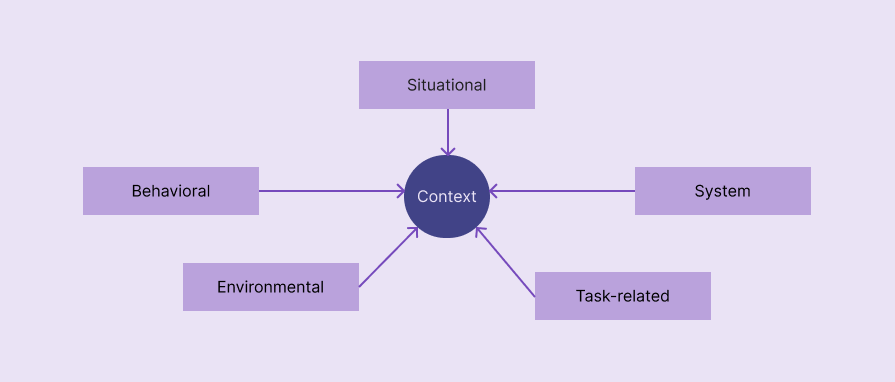
In a multimodal product, context refers to situational, behavioral, system, environmental, or task-related factors that decide the most suitable interaction mode. Multimodal products seamlessly switch interaction modes based on the context to improve overall UX.
The following factors define the mode context of most multimodal products:
- Situational — An activity or special situation that defines the user’s state. Driving, cooking, and working out are common situations that require mode switching
- Behavioral — How the user interacts with the system. Past interaction patterns and the current behavior that the product detects define behavioral factors, e.g., the user always uses voice mode for a specific user flow, so the product enables voice mode automatically for the particular flow
- System — System settings, statuses, and capabilities affect the most suitable interaction mode selection, e.g., a very low battery level restricts camera use to activate vision mode
- Environmental — Noise level, lighting, and social setting in the user’s environment
- Task-related — The current task’s complexity, security requirements, urgency, and input/output data types
Progressive modality
A good multimodal product never confuses users by activating all available communication modes at once or annoys users by asking them to explicitly set a mode, presenting all modes; instead, it activates communication modes progressively on demand. Integrating multiple communication modes shouldn’t complicate products.
Progressive disclosure of communication modes based on context is the right way to implement multimodal UX without increasing product complexity.
Redundancy without duplication
Multimodal UX isn’t about creating separate user flows under each interaction mode — it’s about improving UX by cooperating interaction modes and prioritizing them based on the context. You should effectively spread input/output requirements among modes, using redundancy without duplication:
| Comparison factor | Redundancy in modes | Mode duplication |
| Summary | Each interaction mode presents the same core message or captures the same core input in different, cooperative ways to improve UX | Seperate, duplicated user flows under each interaction mode |
| No. of communication channels active at a time | More than one | One |
| Implementation effort | Higher | Lesser |
| Implementation in existing products | A redesign is usually required | Redesign isn’t required since modes create seprate user flows |
| Accessibility enhancement | Accessibility is further improved with context-aware mode prioritization and cooperation | Offers basic accessibility with switchable communication preferences |
You are not limited to selecting only one interaction mode at a time. Optimize input/output over different modes without unnecessary duplication, e.g., Google Maps’ driving mode outputs voice instructions only when required, and also displays visual signs all the time
Failover modes
Failover modes help users continue the current user flow and reach goals even if the current interaction mode fails due to a system, permission, hardware, or environmental issue. The transition between primary (failed) mode and failover (alternative) mode should be seamless, preserving the current state of the task.
Here are some examples:
- A gesture-enabled music app activates the touch screen interaction mode in a low-light environment
- A voice-activated AI assistant suggests using keyboard interaction in a very noisy environment
- A barcode scanner feature of an inventory management app fails due to missing camera permissions or a hardware issue, then it falls back to manual product search
Accessibility amplification
Implementing multimodal UX is not only a way to improve UX for general users, but also a practical way to improve usability for people with disabilities. When your product correctly adheres to multimodal UX, it automatically increases the accessibility score. Multimodal UX shouldn’t be a separate accessibility mode — it should blend with the overall product UX, prioritizing accessibility, helping everyone use your product productively.
Here are some best practices for maximizing the overall accessibility score while adhering to multimodal UX:
- Implement multiple communication modes, but don’t overload modes; instead, prioritize a mode (or multiple modes) and activate with fallback modes
- Consider system accessibility settings before switching the interaction mode
- Share input/output details among prioritized communication channels optimally considering multimodality and accessibility — use redundancy — not duplication
- Multimodal UX isn’t a separate accessibility design concept, so adapt to all UI-related general accessibility principles, like using clear typography, etc.
FAQs
Here are some common questions about context-driven design in multimodal UX:
Should we use only one communication mode at a time?
No, you can use multiple communication modes simultaneously, but make sure to avoid mode overload and all active modes are synced, e.g., using gesture and voice commands in a personal assistant product.
Is the screen the primary interaction mode that initiates other modes?
Yes, for most digital products that run on computers, tablets, and phones, but some digital products that run on special devices primarily use non-screen interaction modes for initiation, adhering to Zero UI, e.g., speaking “Hey Google” to the Google Home device.
The post 5 principles for designing context-aware multimodal UX appeared first on LogRocket Blog.
This post first appeared on Read More