

Mastering Java Beyond Classes — Part 1: Understanding Interfaces
In OOP, flexibility and scalability are key. Java provides interfaces as a powerful mechanism to achieve and enable multiple inheritance.
In this article, you’ll learn interfaces through practical examples, quizzes, and real-world scenarios. Let’s get started.
What Is an Interface in Java?
An interface in Java is a blueprint of a class that contains abstract methods and constants. It defines what a class should do.
Key Characteristics
- Supports abstraction.
- Enables multiple inheritance.
- Promotes loose coupling.
- Improves code reusability and maintainability.
- Allows implementation of default and static methods.
- Supports private methods.
Syntax
interface Animal{
    void makeSound(); // Abstract method
}
This is how we write abstract methods in an interface.
Example Codes
interface Animal {
    void makeSound();
}

class Dog implements Animal {
    public void makeSound() {
        System.out.println("Bark");
    }
}

public class TestInterface {
    public static void main(String[] args) {
        Animal obj = new Dog();
        obj.makeSound();
    }
}
When a class implement the interface, that class should implement all abstract methods defined in the interface.
Animal defines a contract. Dog implements the interface. Runtime polymorphism allows the interface reference to call the implementation.
Output:
Bark
Question 1
What will the output of the following code be?
interface Vehicle {
    default void start() {
        System.out.println("Engine starting...");
    }
}

class Car implements Vehicle {}

public class Test {
    public static void main(String[] args) {
        new Car().start();
    }
}
Default methods allow interfaces to provide implementations without forcing implementing classes to override them.
Output:
Engine starting...
Now, let’s explore the types of methods in an interface.

interface Calculator {

    // Abstract method
    int add(int a, int b);

    // Default method
    default void display() {
        System.out.println("Calculator Interface");
    }

    // Static method
    static void info() {
        System.out.println("Info");
    }

    // Private method
    private void log() {
        System.out.println("Log.");
    }
}
Common Mistakes Beginners Make
1. Forgetting to use the implements keyword
Beginners often use extends instead of implements when inheriting from an interface.
class Dog extends Animal {} // Incorrect
class Dog implements Animal {} // Correct
2. Not implementing all abstract methods
A class must implement every abstract method defined in an interface unless it is declared abstract.
interface Animal {
    void makeSound();
}

class Dog implements Animal { } // Compilation Error
3. Omitting the public access modifier
Interface methods are implicitly public, so implementing methods must also be declared public.
class Dog implements Animal {
    void makeSound() {} // Weaker access privilege
}
class Dog implements Animal {
    public void makeSound() {} // Correct
}
4. Attempting to instantiate an interface
Interfaces cannot be instantiated directly.
Animal a = new Animal(); // Compilation Error
5. Confusing interfaces with abstract classes
Beginners often struggle to decide when to use an interface instead of an abstract class. Interfaces define contracts, while abstract classes provide partial implementation.
6. Overriding default methods incorrectly
When overriding a default method, the method signature and access modifier must remain public.
interface Vehicle {
    default void start() {
        System.out.println("Starting...");
    }
}

class Car implements Vehicle {
    void start() {} // Must be public
}
7. Trying to modify interface variables
All interface variables are implicitly public static final (constants) and cannot be changed.
interface Config {
    int MAX_USERS = 100;
}

MAX_USERS = 200; // Compilation Error
8. Forgetting that interface fields are constants
Declaring variables without initialization causes errors.
interface Test {
    int VALUE; // Must be initialized
}
9. Calling static interface methods through implementing classes
Static methods belong to the interface, not the implementing class.
interface MathUtils {
    static void display() {
        System.out.println("Utility method");
    }
}

MathUtils.display(); // Correct
10. Assuming interfaces cannot have methods with implementations
Since Java 8 and Java 9, interfaces can contain default, static, and private methods.
11. Not using the @Override annotation
Skipping this annotation can lead to subtle bugs and reduces code clarity.
12. Implementing too many responsibilities in a single interface
This violates the Interface Segregation Principle (ISP). Interfaces should be small and focused.
13. Misunderstanding multiple inheritance with interfaces
While Java doesn’t support multiple inheritance with classes, a class can implement multiple interfaces.
interface Flyable { void fly(); }
interface Swimmable { void swim(); }

class Duck implements Flyable, Swimmable {
    public void fly() {}
    public void swim() {}
}
14. Ignoring diamond conflicts in default methods
When two interfaces provide the same default method, the implementing class must override it.
interface A {
    default void show() { System.out.println("A"); }
}

interface B {
    default void show() { System.out.println("B"); }
}

class Test implements A, B {
    public void show() {
        A.super.show(); // Resolves conflict
    }
}
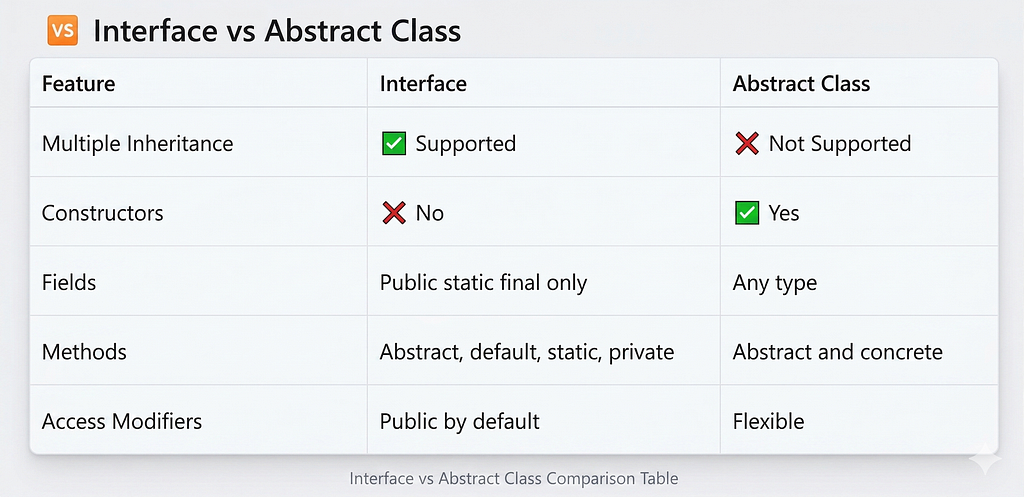
Difference Between Interface and Abstract Class
Question 2
What will be the output?
interface Greeting {
    String MESSAGE = "Hello, Java!";

    void sayHello();
}

class Welcome implements Greeting {
    public void sayHello() {
        System.out.println(MESSAGE);
    }
}

public class Main {
    public static void main(String[] args) {
        Greeting g = new Welcome();
        g.sayHello();
    }
}
Question 3
Which statement is correct?
A. Interfaces can be instantiated.
B. A class can implement multiple interfaces.
C. Interface methods are protected by default.
D. Interfaces cannot contain static methods.
Look at the comments to check your answers, and you can share your answers in the comments.
Best Practices
- Use interfaces to define contracts.
- Prefer interfaces for loose coupling.
- Keep interfaces small and focused (Interface Segregation Principle).
- Use default methods for backward compatibility.
- Favour interfaces in API design and frameworks like Spring.
If you found this article helpful:
- Follow for more Java tutorials
- Share your answers in the comments
- Save this guide for future reference
Next Article: Default and Static Methods in Java Interfaces
Thank you!
Have a great day!

Mastering Java Beyond Classes — Part 1: Understanding Interfaces was originally published in Javarevisited on Medium, where people are continuing the conversation by highlighting and responding to this story.
This post first appeared on Read More