
Tabs pile up fast on mobile. Imagine you’re planning a summer barbecue, and you start by searching for the best rib recipe. Twenty minutes later, you’re 17 tabs deep: comparing marinades, debating side dishes, checking the weather, making a grocery list and adding songs to a playlist.
None of those tabs are organized. They’re mixed in with everything else you’ve been browsing, making it hard to keep track of what you’re saving for later.
Now you can group related tabs in Firefox for Android, keeping them together in labeled, colored groups so you can actually find what you need when you need it.

How it works
Drag one tab onto another, or select a few and tap “Add to group.” Name it, pick a color, and you’re done.
Each group appears as a single card in the tab tray rather than a dozen separate tabs. You can open it, rename it, recolor it, or delete it whenever you want. Search still finds tabs inside a group, too.
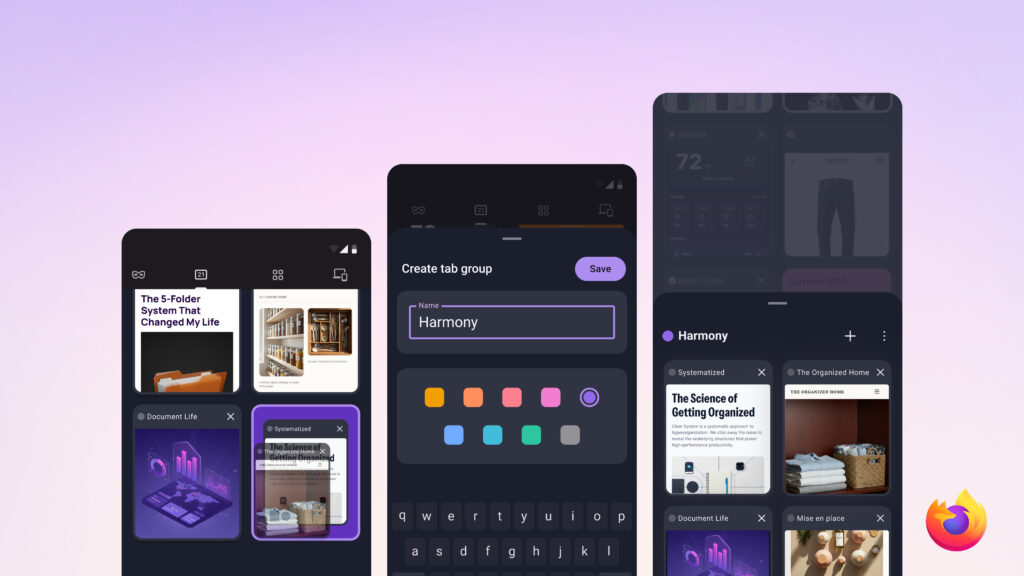
So when you’re standing in the produce aisle looking for that rib recipe, you won’t have to scroll past dozens of unrelated tabs just to find it. Everything for your barbecue is organized together in one place, ready when you need it.
Finally sorted, as it should be
Tab grouping was the most requested feature from Firefox mobile users in 2025. And we get it: your tabs shouldn’t get harder to manage the more you use your browser. Download the latest version of Firefox for Android now to try Tab Groups, with iOS support on the way.
The post Your Android tabs just got a lot more organized with Firefox appeared first on The Mozilla Blog.
This article first appeared on Read More