
Vibe coding began as an inside joke, coined by Andrej Karpathy to describe “fully giving in to the vibes, embracing exponentials, and forgetting that the code even exists.” There’s truth in the joke: we’ve all trusted autocomplete or an AI assistant a bit too much. But if you think vibe coding means skipping fundamentals and letting AI ship your app, you’re missing the point.

It’s funny because there’s truth to it. Every developer has, at some point, trusted autocomplete or an AI assistant a little too much and hoped for the best. But here’s the catch: if you think vibe coding means skipping the fundamentals and letting AI do the heavy lifting, you’re missing the point entirely.
The post below sums up the skeptic’s perspective — vibe coding feels cool in the moment, but once things break, the fantasy ends and the real developers step in. Debugging, deployment, and long-term maintenance bring you right back to square one — wallet out, hiring someone who actually knows the stack:
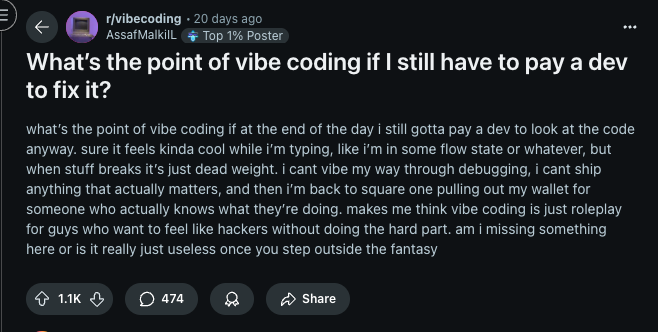
If you’re unwilling to learn how to develop software and rely on vibes to brute-force syntax, you’ll ship risk. This article clarifies what vibe coding is, where it shines, where it fails, and how to do it responsibly.
Where vibe coding works — and where it doesn’t
In practice, vibe coding spans a spectrum: from devs leaning on AI-assisted autocomplete to non-developers prompting their way to scripts, prototypes, and small utilities. The promise is speed. The risk is shipping code you don’t understand.
To different people, vibe coding means different things. For some people, vibe coding is like autocomplete in their IDE, just prompting your way into a functional application. For others, it means non-developers writing code with the help of AI tools.
But vibe coding isn’t a silver bullet. Here’s a table, so you can see where it shines and where it crashes in a glance:
Where Vibe Coding Works  | Where It’ll Burn You  |
|---|---|
| Personal Scripts – Python file organizer, batch renaming tool, download sorter. Worst case? You sort files manually. | Payment Systems – SQL injection vulnerabilities, plain text storage, insecure API endpoints. Lawsuit material. |
| Static Sites – Portfolio pages, landing pages, blog sites. Predictable patterns, minimal risk. | Real-time Features – WebSockets with race conditions, memory leaks, vanishing user data. |
| Learning Projects – Todo apps, weather widgets, calculators. Breaking these teaches you debugging. | Authentication Systems – Plain text passwords, no session management, JWT tokens in localStorage. |
| Prototypes & MVPs – Quick demos for clients, proof of concepts. You’re gonna rebuild anyway. | Healthcare/Finance Apps – HIPAA violations, PCI compliance failures, regulatory nightmares. |
| Data Visualization – Charts from CSV files, simple dashboards. D3.js + AI = quick pretty graphs. | Multi-tenant SaaS – Data isolation failures, cross-tenant data leaks, permission breakdowns. |
| CLI Tools – Markdown converters, file utilities, dev tools. Limited scope, easy to test. | Production APIs – No rate limiting, no caching strategy, no error handling. Server overload guaranteed. |
| Component Libraries – UI components, design systems. Reusable, testable, isolated pieces. | Database Migrations – Destructive operations, data loss, schema conflicts, orphaned records. |
| Content Sites – Blogs with markdown, documentation sites. Content-focused, minimal logic. | Real Money Gaming – Floating point errors, race conditions in transactions, incorrect payout calculations. |
In essence? Use vibes where the blast radius is small and failure is cheap. Avoid it where correctness, security, and compliance matter.
Common failure modes (and how to avoid them)
Here’s where the optimism collapses. When vibe coding turns into prompt-spamming or blind copy-pasting (especially among non-developers building full applications on pure vibes) it stops being creative and starts being reckless. These are the failure modes that turn a clever shortcut into a long-term liability.
Security vulnerabilities
Recent research from studies like the BaxBench experiment and Veracode analysis confirms that foundational AI models generate a significant percentage of insecure code, with one BaxBench study finding a minimum of 36%:
// What AI might generate when you ask for user authentication
const login = (username, password) => {
  const user = database.query(`SELECT * FROM users WHERE username='${username}' AND password='${password}'`)
  if (user) {
    localStorage.setItem('user', JSON.stringify(user))
    return true
  }
}

// What just happened:
// 1. SQL injection vulnerability - someone can login with username: admin'--
// 2. Plain text passwords - your users' passwords are sitting naked in the database
// 3. Sensitive data in localStorage - any XSS attack now has full user access
The scary part? AI tools generate code like this all the time. They’ll happily create authentication systems that look functional but are security disasters waiting to happen. The AI doesn’t know your threat model, it just knows you asked for a login function that works.
Or take this real example – AI suggesting environment variables for API keys, then doing this:
// What AI might suggest for "secure" API calls
const apiKey = process.env.REACT_APP_API_KEY
fetch(`https://api.service.com/data?key=${apiKey}`)
  .then(res => res.json())
  .then(data => displayData(data))

// The problem: This is React frontend code
// During build, process.env.REACT_APP_API_KEY gets replaced with the actual value
// So in the browser, it becomes:
fetch(`https://api.service.com/data?key=sk-1234567890abcdef`)

// Now anyone can:
// 1. Open Network tab and see: api.service.com/data?key=sk-1234567890abcdef
// 2. View page source and find the hardcoded key in the bundle
// 3. Use that key for their own requests
The AI won’t always warn you – it just assumes you understand frontend vs backend context.
Technical debt
Vibe coding by blindly prompting your way into a product is like taking a loan from your future application. That puts scalability and maintenance at risk. Here’s what I mean:
// Month 1: Simple todo app
const todos = []
const addTodo = (text) => todos.push({text, done: false})

// Month 2: Added user support (vibed it)
const todos = {}
const addTodo = (userId, text) => {
  if (!todos[userId]) todos[userId] = []
  todos[userId].push({text, done: false})
}

// Month 3: Added categories (more vibing)
const todos = {}
const addTodo = (userId, categoryId, text, priority, tags) => {
  if (!todos[userId]) todos[userId] = {}
  if (!todos[userId][categoryId]) todos[userId][categoryId] = {items: [], metadata: {}}
  // 50 more lines of nested conditionals...
}

// Month 4: "Why is everything so slow and why does adding a feature take 2 weeks?"
Each vibe coding session was built on top of the previous mess. Now you will have to pay actual developers to untangle what should’ve been a simple schema from the start, but you had no idea. “Prompt-drift” grows complexity without architecture: each “quick add” piles nested state and shape changes.
The debugging problem
You can’t debug what you don’t understand. Concurrency, batching, and rate limits are common blind spots. Let’s look at the AI generated code below:
// AI generated this "optimized" data fetcher
const fetchUserData = async (ids) => {
  return await Promise.all(
    ids.map(id =>
      fetch(`/api/user/${id}`)
        .then(r => r.json())
        .catch(() => null)
    )
  ).then(results => results.filter(Boolean))
}

// aT first this hsiuld work fine... until production
// Problem: 100 users = 100 parallel API calls = server crashes
// Developer's debugging attempt: "AI, why is my server crashing?"
// AI's response: "Try adding a delay"
// New problem: Now it takes 100 seconds to load
The fix is simple if you understand the code, batch the requests, or implement proper rate limiting. But when you’re just vibing? You’re stuck in an endless loop of “AI, fix this” → “New problem” → “AI, fix this new problem.”
The worst part? These developers often end up in forums asking for help, but they can’t even explain what their code does because they never understood it in the first place.
What it takes to become a productive vibe coder
I know AI tools PR has sold a lot of ideas to you, but to be sincere, you need to learn how to code to be a productive vibe coder, in whatever definition you fall into.
So let me say you only use autocomplete in your IDE, it makes you a faster developer, or I say you just prompt your way through an application, for redundant tasks or designs, you stand a better chance of fixing issues on your way to a functional application if you have a foundational experience, but for non-developers writing code with the help of AI tools, you are disadvantaged, and this is because developers stand a better chance of producing great scripts with AI.
No doubt AI tools generate incredible things, so much better than most code shipped to production, and there is a touch to results like this; they don’t come by just prompting most times. They come by precision with these LLMs.
Tips to vibe code like a professional
What you must be to become a vibe coder is a major tip to effectively vibe code, the remaining tips in this section supplement it.
Planning & project structure
Break work into testable, composable units.
Bad approach:
"Build me a complete social media app with users, posts, and comments"
Good approach:
1. "Create a user authentication system with JWT and bcrypt password hashing"
2. "Build a post creation component with image upload and validation"
3. "Add a comment system with nested replies and moderation"
This gives you manageable pieces you can actually understand and debug.
Choose your stack wisely
Stick to popular, well-documented technologies. Here’s what works best with AI:
// AI generates higher quality code for popular stacks
const goodStack = {
  frontend: ['React', 'TypeScript', 'Tailwind CSS'],
  backend: ['Node.js', 'Express', 'Prisma'],
  database: ['PostgreSQL', 'Redis']
}

// Versus obscure frameworks where AI struggles
const problematicStack = ['Svelte Kit', 'Deno Fresh', 'SurrealDB']
Build your component library early
If you don’t build your reusable components earlier on, you’ll get different-looking components for the same thing, like in the example below:
// AI generates this in one file
<button className="px-4 py-2 bg-blue-500 text-white rounded">
  Login
</button>

// Then this in another file
<button className="padding: 8px 16px; background: #3b82f6; color: white; border-radius: 4px">
  Submit
</button>

// And this in a third file
<button style={{backgroundColor: 'blue', padding: '10px', color: 'white'}}>
  Save
</button>
So make sure to build your components earlier:
// Define once, use everywhere
const Button = ({ variant = 'primary', children, ...props }) => {
  const baseClasses = "px-4 py-2 rounded font-medium transition-colors"
  const variants = {
    primary: "bg-blue-500 hover:bg-blue-600 text-white",
    secondary: "bg-gray-200 hover:bg-gray-300 text-gray-800"
  }

  return (
    <button
      className={`${baseClasses} ${variants[variant]}`}
      {...props}
    >
      {children}
    </button>
  )
}
So that you can ask your AI Agent to reuse these components elsewhere. Here’s to consistency.
Effective prompting strategies
Try to be as specific as possible, not vague. For example;
Bad prompt:
"Make a login form"
Good prompt:
"Create a React login form with:
- Email validation (proper email format)
- Password field with show/hide toggle
- Remember me checkbox
- Loading state during submission
- Error handling for network failures
- Accessibility attributes for screen readers
- Form validation using Formik and Yup"
Secondly, put in enough thought into the context. Always provide context like this:
Current tech stack: Next.js 14, TypeScript, Tailwind, Prisma
Database: PostgreSQL with User and Post models
Authentication: NextAuth.js with JWT

I need to create a post creation form that:
[your requirements here]

Here's my current User model:
[paste relevant code]
Lastly, learn to iterate, and not just generate:
Phase 1 – Basic functionality:
// Ask for basic structure first
interface Post {
  id: string
  title: string
  content: string
  authorId: string
  createdAt: Date
}

const createPost = async (data: Omit<Post, 'id' | 'createdAt'>) => {
  // Basic implementation
}
Phase 2 – Add features:
// Then iterate with improvements
interface Post {
  id: string
  title: string
  content: string
  authorId: string
  tags: string[]        // Added
  imageUrl?: string     // Added
  isPublished: boolean  // Added
  createdAt: Date
  updatedAt: Date       // Added
}
Code quality & safety
You must always look out for safety and quality as a developer. These are tips for code quality and safety:
Version control is non-negotiable
Before any AI generation, make sure you:
git add .
git commit -m "Working auth system before adding post features"
And after AI generates code:
# After AI generates code
git add .
git commit -m "AI: Added post creation with image upload"
So when something breaks, which it should, you can :
git reset --hard HEAD~1 # Back to safety
Validate user inputs
Some AI models love to skip validation. Always add it:
// AI might generate this basic form

const createUser = (userData) => {
  return database.user.create({ data: userData })
}

// You should add validation like this
import { z } from 'zod'

const userSchema = z.object({
  email: z.string().email('Invalid email format'),
  password: z.string()
    .min(8, 'Password must be at least 8 characters')
    .regex(/^(?=.*[a-z])(?=.*[A-Z])(?=.*d)/, 'Password must contain uppercase, lowercase, and numbers'),
  name: z.string().min(2, 'Name too short').max(50, 'Name too long')
})

const createUser = async (userData) => {
  const validatedData = userSchema.parse(userData)
  return database.user.create({ data: validatedData })
}
Test edge cases
AI tools handle the happy paths, and they only test edge cases when you ask them to help debug. So it’s your job to do this from the beginning, or ask that it be done from the start as well:
// AI generates the happy path

const calculateTotal = (items) => {
  return items.reduce((sum, item) => sum + item.price, 0)
}

// You need to handle edge cases
const calculateTotal = (items) => {
  if (!Array.isArray(items)) {
    throw new Error('Items must be an array')
  }

  if (items.length === 0) {
    return 0
  }

  return items.reduce((sum, item) => {
    if (typeof item.price !== 'number' || item.price < 0) {
      throw new Error(`Invalid price: ${item.price}`)
    }
    return sum + item.price
  }, 0)
}
Document AI-generated decisions
When vibe coding, you must document all AI-generated code, so that you can easily spot where problems come from. Here’s an example of how you’d do it:
/**
 * AI-Generated: Post creation with image upload
 * Generated: 2024-01-15
 * Modifications: Added error handling and validation
 * Known limitations: Only supports JPEG/PNG, max 5MB
 * TODO: Add support for video uploads
 */
const createPostWithImage = async (postData: PostData) => {
  // AI-generated core logic...

  // Human-added validation
  if (postData.image && postData.image.size > 5_000_000) {
    throw new Error('Image too large')
  }

  // Rest of implementation...
}
When to reset and start over
Sometimes when vibe coding, AI can get confused. Here are some warning signs:
// AI starts generating increasingly broken code

const confusedAI = {
  attempt1: "const user = getUserData()",
  attempt2: "const user = await getUserData().then(data => data.user.userData)",
  attempt3: "const user = Promise.resolve(getUserData()).then(async (data) => await data?.user?.userData?.result)"
}
When this happens, take a step back to reset with clear context:
I'm starting fresh. Here's what I need:

Current working code:
[paste your working authentication system]

New requirement:
Add password reset functionality with email verification

Tech stack: [specify again]
Database schema: [show relevant models]
Use AI-powered IDEs
Tools like Cursor and Windsurf have rules, and those rules should look like this for better results:
// .cursor/rules/security.md
{
  "rules": [
    "Always use environment variables for secrets",
    "Use parameterized queries for database operations",
    "Implement input validation with Zod schemas",
    "Add rate limiting to API endpoints"
  ]
}
Always request for easier code
If the AI-generated code is way above your skill level, turn it down a notch. You should understand at least 80% of what gets generated.
const complexAIGenerated = async <T extends Record<string, unknown>>(
  data: T,
  transform: <K extends keyof T>(key: K, value: T[K]) => Promise<T[K]>
): Promise<Partial<T>> => {
  return Object.fromEntries(
    await Promise.all(
      Object.entries(data).map(async ([key, value]) => [
        key,
        await transform(key as keyof T, value)
      ])
    )
  ) as Partial<T>
}
Ask for a simpler version:
// Much better - you can understand and modify this

const transformUserData = async (userData) => {
  const result = {}

  for (const [key, value] of Object.entries(userData)) {
    if (key === 'password') {
      result[key] = await hashPassword(value)
    } else if (key === 'email') {
      result[key] = value.toLowerCase().trim()
    } else {
      result[key] = value
    }
  }

  return result
}
Vibe coding should make you a faster developer, not a dependent one. Use AI to handle the tedious stuff so you can focus on generic logic.
The case for vibe coding (done right)
Those who roll their eyes at vibe coding might forget they’ve been doing the same thing for years — only slower. Whether it’s relying on a framework scaffold, an autocomplete, or a dozen helper libraries, developers have always used tools to smooth the rough edges. AI just makes that habit more visible.
Let’s be real about what ‘traditional’ coding actually looks like in 2025:
Traditional workflow
- Google the problem → Stack Overflow → Copy snippet → Modify for your use case
- Install 47 npm packages → Deal with dependency hell → Ship it anyway
- Use create-react-app → Abstract away Webpack configs you’ll never understand
- Framework docs → Tutorial hell → Finally understand 20% of what’s happening
Vibe coding workflow
- Describe the problem → AI generates solution → Modify for your use case
- AI writes the utility functions → No dependencies → Customize as needed
- AI explains while building → You learn the patterns → Actually understand the code
- Natural language → Working code → Iterate until it clicks
The only real difference is the middleman: one developer Googles for answers, the other asks an AI. Both rely on external knowledge to move faster. Vibe coders aren’t lazy, they’re just optimizing for effort and offloading the repetitive parts so they can focus on the creative ones.
Remember the left-pad package? It added a few spaces to the left of a string and still racked up over a million downloads. Here’s what it did:
function leftPad(str, len, ch) {
  str = String(str);
  var i = -1;
  if (!ch && ch !== 0) ch = ' ';
  len = len - str.length;
  while (++i < len) {
    str = ch + str;
  }
  return str;
}
For something this simple, developers were more than happy to install a package instead of writing five lines of code. That’s not laziness — it’s pragmatism.
Yet the same people who used left-pad will often roll their eyes at developers using AI tools to do exactly the same thing, just faster.
The difference is control. With packages like left-pad, you depended on someone else’s codebase (and downtime, as NPM learned the hard way). With vibe coding, you can generate the same utility in seconds, fully editable and tailored to your project.
That’s the real power here: vibe coding is about reclaiming effort from grunt work. It lets you offload trivial, repetitive work so you can focus on what actually matters. If there’s a small, fixable pain point in your workflow that’s not worth a weekend of boilerplate, that’s exactly where AI belongs.
Instead of dismissing vibe coding altogether, focus on using it intentionally. The key isn’t avoiding AI, it’s knowing when it actually saves you time
Not all vibe coding is reckless. Context matters. Used thoughtfully, it’s a legitimate way to accelerate simple builds or experiment quickly. Used carelessly, it’s a shortcut to unmaintainable code and a security risk. Here’s a quick breakdown of where vibe coding can boost your productivity, and where you should absolutely steer clear:
| Good for Vibe Coding | Stay Away From |
|---|---|
| Personal scripts & automation | Payment processing |
| Static portfolio sites | User authentication |
| Learning projects | Healthcare apps |
| Prototypes & demos | Real-time features |
| Component libraries | Production APIs |
Conclusion
If you plan to ship production software, don’t rely on vibes alone. Learn the language, understand the architecture, and use AI to accelerate — not replace — your reasoning. Vibe code responsibly: keep blast radius small, validate inputs, test edge cases, and document what the AI generated.
What’s your biggest vibe coding challenge? Share your experience — what worked, what didn’t, and where AI helped or hurt.
The post You’re doing vibe coding wrong: Here’s how to do it right appeared first on LogRocket Blog.
This post first appeared on Read More