
For years, automation has promised to make our lives easier — and to some extent, it has. But in 2025, things feel different. Traditional automation resembles a giant “if-else” statement that struggles to adapt to diverse situations.
Agentic AI changes that narrative by enabling workflows to adjust and optimize themselves for countless scenarios that were difficult for older automation tools.
In October 2025, OpenAI launched its AgentKit tool for building AI agents, and let me tell you, it is glorious! AgentKit lets developers build AI agents that can chain together multiple tools and make autonomous decisions based on context. Will it make Zapier and n8n obsolete?
Not entirely, but it does fundamentally change when and why you’d reach for traditional automation. In this piece, we’ll unpack exactly how AgentKit transforms the automation landscape and what that means for the tools you’re using today.
In the later parts of this article, we will build an ad campaign agent using AgentKit’s Agent SDK and its equivalent in n8n. The agent will be able to analyze ads, make creative decisions, and optimize the ads to improve performance.
Based on my analysis, here’s a quick tl;dr on where AgentKit truly shines:
- Complex, multi-step workflows that require contextual decisions.
- Scenarios with unclear inputs.
- Tasks that benefit from self-optimization and performance tracking.
- Applications where compliance and guardrails are essential.
- Products where the agent itself is the feature, not just background automation.
Now let’s dive a little deeper.
The rise of AI-powered automation
In the past, traditional automation relied on complex systems of triggers and actions, making management challenging without specialized skills. You often hit dead ends when faced with situations that fall outside the set rules. However, AI integration has made it easier to move from fixed, rule-based typing to more dynamic reasoning.
In 2025 and beyond, agentic AI seems to be fully realized. Agents can decide how to achieve simple to complex goals, analyze big data, understand patterns, and be proactive in tackling them all in natural language. AI-powered automation tips the learning curve, allowing for both technical and non-technical audiences to contribute to the automation effort.
OpenAI’s AgentKit is at the frontlines of this shift, providing visual tooling, embedded UI, evaluation, and guardrails all within OpenAI’s architecture. Even though no-code tools like n8n now offer AI agent nodes, they still operate on fixed workflows with logic trees that trigger an AI when instructed.
OpenAI’s AgentKit flips this model on its head by making the AI the core of the workflow itself. Instead of humans defining every branch, the agent decides how to reach a goal, evaluates its own performance, and even adjusts its behavior over time.
AgentKit is not AI-enhanced; it’s AI-native. This transforms your AI agents into a product rather than just a workflow.
What makes AgentKit different from traditional tools
Traditional automation tools like n8n and Zapier require predefined rules to work well with specific workflows. But even n8n’s AI agent nodes aren’t entirely independent. The AI can only function when prompted.
In contrast, OpenAI’s AgentKit offers a reasoning-based agent that can:
- Understand unclear instructions
- Manage loops and multiple decisions
- Change based on outcomes
Imagine a situation where an agent reviews or compares a group of documents, but the user forgets to upload one or more documents. In traditional systems, you would need to create a complex series of rules, including multiple triggers and conditions, to handle this situation before passing it to an agent.
With AgentKit, this process is much more straightforward. The AI assesses the user’s requests and identifies what is missing, adjusting the sequence of operations. It works like a single-person decision tree, removing the need for a lengthy set of rules by selecting the path based on your goals.
The four major components of AgentKit
OpenAI’s AgentKit bundles four major components within its stack to let you build and deploy agentic applications. These components are:
ChatKit
ChatKit is a UI layer embedded into AgentKit, enabling you to integrate chat and agent-style user interfaces into web/mobile applications. Its key features include:
- Pre-built UI components: Production-level chat interfaces, including message bubbles, tool/tool-result renderers, attachments, suggestions, and streaming responses.
- Tooling integration: Support for integrating tools and workflows for visualizing agentic actions.
- Theming and customization: Easily apply your own styles and components to ensure the chat interface feels native to your product.
In summary, ChatKit lets you focus more on building your AI agent rather than user interfaces by providing a consistent UX that reflects what an agent-based UI should be.
AgentBuilder
For avid automation engineers, AgentBuilder feels more familiar. It is a visual low-code/no-code interface for creating agent workflows, enabling you to assemble nodes and develop control flow, conditions, and loops:
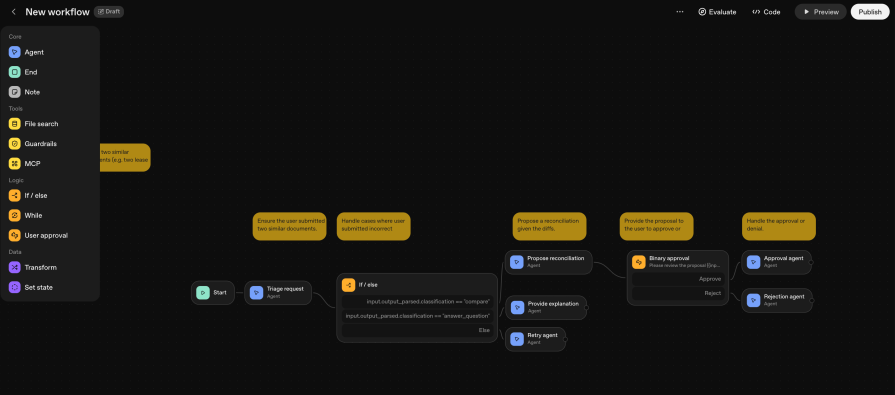
Agent Builder gives teams a quick way to create workflows for their agents by allowing them to compose and configure nodes. Afterward, they can either deploy it to their ChatKit integration or download the agent SDK code in Python or TypeScript to deploy it themselves.
Guardrails
Guardrails are structures within AgentKit that run checks and validations on the agent’s IO. It validates or sanitizes users’ inputs before passing them to the AI models and verifies outputs to ensure they follow a specific schema and detect policy violations/jailbreak attempts.
Just like guardrails in real life, AgentsKit Guardrails ensure that agents who use tools or take actions must be constrained to maintain compliance, data safety, accuracy, and quality.
Evals
Evals let you create reproducible tests for your AI agents, enabling you to measure and improve them using data analytics:
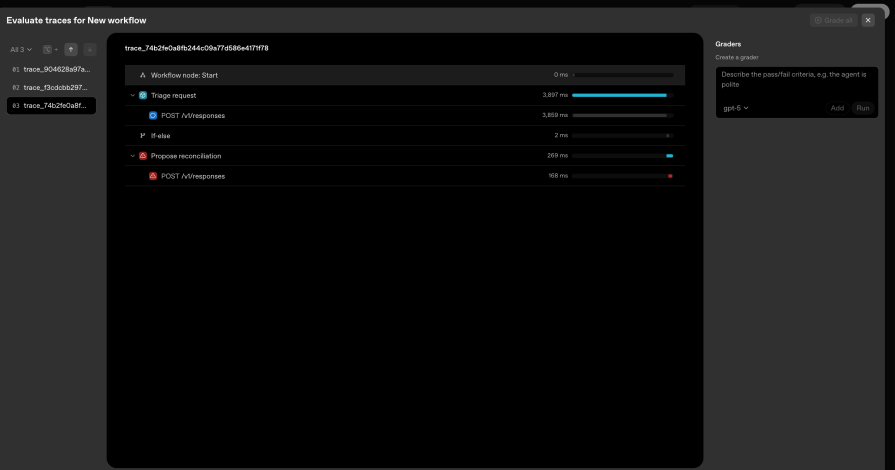
Its key features include:
- Custom evals and registry: Write custom scenarios or use public eval registry tests.
- Trace-aware grading: Evaluate not just the final answer but the agent’s intermediate steps, tool calls, and correctness of arguments.
- Automation and CI: Integrate eval runs into CI to detect regressions as model versions or prompts change.
- Private evals: Run private evals on your data (open-sourced on GitHub).
In a nutshell, Evals let you define metrics to see how your AI agent is performing. AgentKit combines these components to create a robust ecosystem for agentic applications, giving it a clear advantage over legacy automation tools.
Key advantages over legacy tools
Legacy automation tools have their own strengths, but AgentKit’s architecture takes the cake when it comes to the following:
- Ease of use: With a less verbose interface to work with, you get to see all the core toolings and nodes at a glance. Also, AgentKit provides an agent SDK that lets you run AgentKit locally in Python or Typescript. You can integrate support for tools using these programming languages that the AgentBuilder might not traditionally be capable of.
- Auto-optimization: AgentKit integrates with OpenAI’s Evals, enabling trace grading and running optimization prompts based on these evaluations. So rather than guessing how to optimize your AI workflow, these decisions are data-driven and automatic. This leads to shorter iteration cycles and improved success rates for complex workflows.
- Guardrailing: The built-in Guardrail node is a huge advantage. Legacy tools like n8n often force you to go through three or more nodes to have the same results. In later sections, you will see the differences between AgentKit’s guardrails and those in other legacy tools.
Let’s dive deeper to see some of its core capabilities that are tilting the agentic race in AgentKit’s favor.
Core capabilities that change the game
Apart from its usability and architecture, AgentKit has three core capabilities that give it an edge over tools like n8n and Zapier. They determine the quality of interaction, how the agents perform tasks, and how they recall from memory:
Intelligent agents
You can describe an AI agent as intelligent when it can think, make changes based on its results, and come to a decision all on its own following a decision-making loop. There are five decision-making loops that an intelligent AI agent follows:
- Perceive: Understand the current context (inputs, API responses, goals, memory, etc.)
- Think: Consider the next course of action.
- Act: Invoke a tool, API, or workflow.
- Reflect: Ask the question: Did that move me closer to the goal? (might need human approval within this step).
- Repeat: Loop until it completes the task or conditions change (can occur anywhere in the workflow after perceive).
These decision loops help AI agents to refine their approach when faced with an issue that doesn’t follow predefined rules.
Memory and context
AgentKit’s SDK includes a memory session option that lets you recall previous conversations, enabling RAG-like retrieval across sessions and maintaining conversation context. This capability is most useful when your agent needs to perform repetitive actions based on the results or information from previous actions.
Human-in-the-loop
AgentKit provides optional human feedback for sensitive or creative workflows that require human approval before proceeding. It does this using the Human Approval node, which gives the user a binary option to either accept or reject after review.
At the moment, AgentKit does not have fully autonomous self-pause capabilities, but it can work with partial reflection via confidence checks. These capabilities set AgentKit apart from tools like n8n, which do not natively provide human feedback loops.
Agents built with AgentKit can evolve from executors to real problem-solvers. So far, it is all compelling theory till you can see it in action. The following section explores this through a practical example by building an AI-powered ad campaign agent using AgentKit’s Agent SDK.
Hands-on example: Building an ad campaign agent with AgentKit
Let’s build an ad campaign agent that analyzes CSV data, generates content, and optimizes ads via API calls. We will build the agent using two separate platforms: the Agent SDK and n8n. This will demonstrate how the legacy tool compares to a strict agent-building tool. Before you proceed, you’ll need to have the following:
- At least a basic understanding of object-oriented programming, such as Python and JavaScript
- An OpenAI platform account with an active credit balance
- A n8n account
If you have that, you can clone the repository below to have the entire project as a whole:
git clone https://github.com/Claradev32/ad_campaign_agent
cd ad_campaign_agent
The repository contains the code for the ad campaign agent in the Agent SDK and the JSON workflow for n8n.
1. Ad campaign agent using AgentKit’s Agent SDK (Python)
If you have cloned the repository, initialize it by setting up a virtual environment and activating it:
python -m venv venv
# On macOS/Linux:
source venv/bin/activate
# On Windows (cmd):
venvScriptsactivate
Then, install the necessary dependencies in the requirements.txt file:
pip install -r requirements.txt
The command installs:
openai-agents==0.2.8– OpenAI’s Agent SDKpandas==2.3.3– For CSV processingpython-dotenv==1.1.1– For environment variablesrequests==2.32.5– For API callspydantic==2.0.3– For data validation
After, create a .env file in the root of your project using the .env.example as a template:
OPENAI_API_KEY=your_actual_openai_api_key
# For production use cases
ADS_API_KEY=your_ads_api_key
ADS_API_BASE=https://api.example-ads.com/v1
Note: You can get your OpenAI API Key here.
Now, we can walk through the project’s critical components.
Multi-agent architecture
Following a decision-making loop, I decided to base the system on three specialized agents, each with its own responsibility:
# AI_agents.py

# -------------------------
# Agent 1: Data Analyst
# -------------------------
data_agent = Agent(
    name= "Data Agent",
    instructions=(
        "You are an expert ad performance analyst. Analyze campaign metrics and produce"
        "a strategic brief that identifies:n"
        "1. Key performance issues (low CTR, high CPC, poor conversion rates)n"
        "2. What's working well (top performers and why)n"
        "3. Specific recommendations for copy improvementsn"
    )
)

# -------------------------
# Agent 2: Creative Copywriter
# -------------------------
creative_agent = Agent(
    name= "Creative Agent",
    instructions=(
        "You are a senior ad copywriter specializing in high-converting digital ads. "
        "Given a campaign brief and performance data:nn"
        "1. Generate 3 compelling headline variants (max 30 chars each)n"
        "2. Generate 3 body text variants (max 90 chars each)n"
    )
)

# -------------------------
# Agent 3: Campaign Optimizer
# -------------------------
optimizer_agent = Agent(
    name= "Optimizer Agent",
    instructions=(
        "You are a performance marketing strategist. Given:n"
        "- Current campaign performance metricsn"
        "- Generated creative variationsn"
        "- Historical data patternsnn"
        "Your task:n"
        "1. Score each creative variant based on likely performancen"
    )
)
The Data Agent focuses purely on analysis, the Creative Agent handles copywriting, and the Optimizer Agent makes strategic decisions. With this, we have defined the perceive loop by giving the agents the context by which they are to function.
Guardrails: One function vs. multiple nodes
Using one of AgentKit’s most prominent capabilities, we will define an input and budget guardrail in the AI_agents.py file:
async def pii_guardrail(ctx, agent, input_data):
    """
    Input guardrail to prevent sensitive data from being processed.
    """
    text = str(input_data) if input_data is not None else ""

    suspicious_patterns = [
        "@", "password", "ssn", "social security",
        "credit card", "bank account", "routing number"
    ]

    contains_pii = any(pattern in text.lower() for pattern in suspicious_patterns)

    return GuardrailFunctionOutput(
        output_info={"contains_pii": contains_pii},
        tripwire_triggered=contains_pii
    )

data_agent.input_guardrails = [InputGuardrail(guardrail_function=pii_guardrail)]
The Agent SDK demonstrates the elegance of guardrails by intercepting inputs before they reach the agent. Compared to n8n, where you would have to create:
- A separate Code node
- Manual error throwing
- Connection management between nodes
- Explicit workflow routing
The budget guardrail follows the same pattern:
async def budget_guardrail(ctx, agent, input_data):
"""Prevent optimizer from recommending excessive budget increases."""
import re
amounts = [float(m) for m in re.findall(r'$?([d,]+.?d*)', text.replace(',', ''))]
max_single = max(amounts) if amounts else 0
total = sum(amounts) if amounts else 0

exceeds_limit = max_single > 10000 or total > 50000

return GuardrailFunctionOutput(
    tripwire_triggered=exceeds_limit
)
optimizer_agent.input_guardrails = [InputGuardrail(guardrail_function=budget_guardrail)]
The workflow orchestration
The main workflow demonstrates how these agents collaborate to deliver the intended goal, hence reflecting the rest of the decision-making loop:
# ad_campaign_workflow.py

async def run_ad_campaign_workflow(csv_path: str) -> Dict[str, Any]:
    # -------------------------
    # STEP 1: Analyze CSV Data
    # -------------------------
    csv_summary: CSVSummary = summarize_csv(csv_path)
    # -------------------------
    # STEP 2: Generate Strategic Brief (Data Agent)
    # -------------------------
    brief_prompt = f""  "Analyze this campaign performance data and provide strategic recommendations:
Campaign Summary:
- Total rows analyzed: {csv_summary.rows} ""

    data_result = await Runner.run(data_agent, brief_prompt)
    brief_text = data_result.final_output
    # -------------------------
    # STEP 3: Generate Creative Variations (Creative Agent)
    # -------------------------
    creative_prompt = f""  "Campaign Brief:
{brief_text}
Landing Page: https://example.com/landing

    creative_result = await Runner.run(creative_agent, creative_prompt)
    try:
        creative_json = creative_result.final_output_as(dict)
        if isinstance(creative_json, str):
            creative_json = json.loads(creative_json)
    except Exception:
        creative_json = {"raw": creative_result.final_output}
    # -------------------------
    # STEP 4: Optimize and Select Best Variants (Optimizer Agent)
    # -------------------------
    optimizer_prompt = f""  "Performance Metrics:
- Average CPC: ${csv_summary.avg_cpc:.2f}
Creative Variations:
{creative_json}
Campaign Brief Context:
{brief_text[:1000]}
Tasks:
1. Score each creative variant (headlines + bodies + CTAs)""

    optimizer_result = await Runner.run(optimizer_agent, optimizer_prompt)
    optimization_plan = optimizer_result.final_output
    return {
        "csv_summary": csv_summary.model_dump(),
        "strategic_brief": brief_text,
        "creative_variants": creative_json,
        "optimization_plan": optimization_plan,
        "status": "success"
    }
We needed almost no conditions to safely pass processed data between the agents from start to finish. The agents perceived the contexts, thought about them, acted to analyze, and copywrote based on the analysis results. They also made strategic decisions based on the previous two solutions to lay out an actionable plan for running optimized ad campaigns.
Now that we are done with building the ad campaign agent in Agent SDK, let’s build its counterpart in n8n.
2. Ad campaign agent using n8n
To get started, do the following:
- Download the aicampaignn8n.json file from the GitHub repository to your local computer.
- Go to Workflows → Import from File:

- Select
ai_campaign_n8n.json

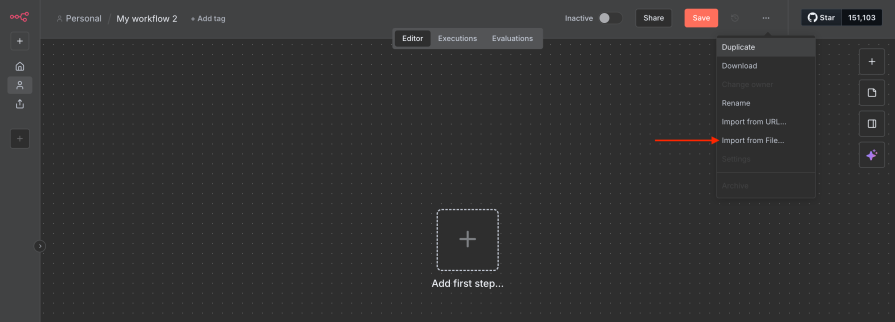
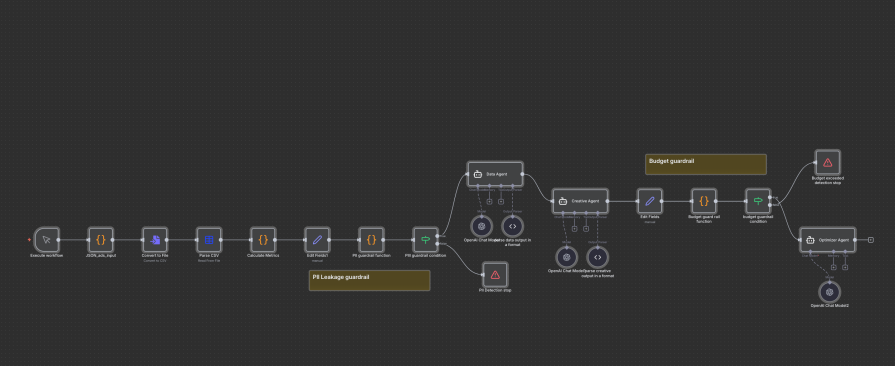
Note: Ensure the OpenAI API credentials are updated on each node. You can do this by selecting the Chat model.
Logically, the workflow between the Agent SDK and n8n is quite similar, but there are still factors that limit its adaptability and intelligence. These factors are:
- The Guardrail problem in n8n: Compared to the Agent SDK, where the guardrails are a single part of the agent, you will need a culmination of three nodes to achieve the same effect in n8n: an
Edit Fieldnode to take the intended input, aC``odenode to handle the guardrail logic, and anIFnode to simulate a trip wire (in case the guardrail condition is false). Since each guardrail will require its own set of three or more nodes, this will lead to a bloated workflow and require strong coding expertise to pull off. - Lack of adaptive intelligence: The agents in the Agent SDK build on the outputs of previous agents without any preprocessing. For n8n, I had to attach a couple of output parsers to achieve the desired output style suitable for the next agent.
The verdict: Comparing AgentKit vs. n8n
Let’s take a look at the quality of response generated from AgentKit’s Agent SDK and n8n. Our evaluation criteria range from the depth of analysis to headline, body copy, and CTA quality to context integration and risk management strategies suggested by the agent:
| Evaluation Criteria | AgentKit Output | n8n Output | Winner |
|---|---|---|---|
| Analysis Depth | Identified 2 key issues with specific benchmarks (CTR <1.5-2%, conversion optimization opportunity) | Generic observations without benchmarks | AgentKit |
| Strategic Recommendations | 4 specific copy improvements + 3 targeting strategies + 3 budget reallocations | Generic bullet points without specifics | AgentKit |
| Headline Quality | “Save More Every Day” (19 chars) “Unlock Big Value Now” (20 chars) “Top Deals for Less” (18 chars) | “Save Big, Shop Smart” (21 chars) “Best Deals Just for You” (24 chars) “Value Meets Quality!” (20 chars) | AgentKit (More concise, stronger hooks) |
| Body Copy Quality | “Join savvy shoppers saving on the brands you love. See today’s top offers!” (76 chars) “Get real savings—shop deals trusted by thousands. Don’t pay full price!” (73 chars) | “Discover great savings today!” (30 chars) “Affordable choices, top quality.” (33 chars) “Shop smart, save more now!” (27 chars) | AgentKit (Within limits, more compelling) |
| CTA Quality | “Shop & Save Today” (18 chars) “Unlock Your Deal” (16 chars) | “Shop Now” (8 chars) “Grab Your Deal” (14 chars) | AgentKit (More specific value prop) |
| Budget Allocation Strategy | Sophisticated: $2k Variant A, $2k Variant B, $1k reserve Reasoning: Statistical significance + flexibility | Simple: 60% ($3k) Variant A, 40% ($2k) Variant B Reasoning: Basic “top scorer gets more” | AgentKit (Includes contingency planning) |
| Bid Strategy | Variant-Specific: – Test: “Maximize Clicks” @ $0.65 max CPC – Post-test: “Target CPA” @ $7 | Variant-Specific: – Variant A: Target CPA @ $6 – Variant B: Maximize Clicks @ $0.50 CPC | Tie (Both intelligent) |
| A/B Test Parameters | 7 days OR 1,500 clicks per variant 50/50 split Success: CTR >1.5%, Conv ≥7.5%, CPA ≤$7.5 | 2 weeks OR 100+ conversions 50/50 split Success: Conv rate improvement, CTR increase, CPC decrease | AgentKit (More specific thresholds) |
| Output Format | Structured JSON + detailed markdown explanation | Structured JSON + detailed markdown explanation | Tie |
| Actionability | Includes “Next Steps” with immediate actions | Includes “next_steps” array | Tie |
| Context Integration | References specific brief findings in recommendations | Generic recommendations | AgentKit |
| Risk Management | Includes contingency fund ($1k reserve) | No contingency mentioned | AgentKit |
Comparing the actual outputs, we can see that AgentKit performed better for the purpose intended of an ad campaign agent.
Conclusion: Did Agent Kit make Zapier and n8n obsolete?
In short: OpenAI’s AgentKit will not kill Zapier or n8n. Traditional automation tools still perform well in clear, repetitive workflows where the path from A to B is straightforward. However, OpenAI didn’t create AgentKit to kill traditional automation; instead, it aims to transform it from a slow, specialized task into something more flexible and dynamic.
AgentKit gives your agent a sense of self. This enables your workflow to handle vague instructions, improve on information, make informed decisions, and address edge cases with little human help.
No-code startups that depend on previous API integrations in a visual workflow are at risk, as AgentKit leads a new era of automation that shifts from app connectivity to integrated intelligence.
The post I tried OpenAI’s AgentKit: Does it make Zapier and n8n obsolete? appeared first on LogRocket Blog.
This post first appeared on Read More