
Editor’s note: This post was updated in March 2026 by Elijah Asoula to include Base UI and add updated examples and use cases to make the comparison more actionable.

Using React component libraries is a popular way to quickly build React applications. Components from these libraries offer several advantages. First, they follow accessibility guidelines such as WAI-ARIA, ensuring that applications are usable by everyone. Second, they come with built-in styling and design so developers can focus on other aspects of their applications. Third, many include pre-defined behaviors — for example, an autocomplete component that filters options based on user input — which saves time and effort compared to building from scratch.
React component libraries are also typically optimized for performance. Because they are maintained by large communities or organizations, they receive regular updates and follow efficient coding practices. Examples include Material UI, Chakra UI, and React Bootstrap.
However, these libraries leave limited room for customization. You can usually tweak styles, but you cannot fundamentally change the underlying design system. A developer may want the accessibility and functionality benefits of a component library while still implementing a completely custom design system.
Headless (unstyled) component libraries were created to fill this gap. A headless component library provides fully functional components without imposing styling. With headless components, developers are responsible for styling them however they see fit.
Tailwind Labs’ Headless UI is one of the most popular headless libraries in the React ecosystem. While it works well for many projects, it is not always the best choice for every use case. This article explores several alternatives for unstyled components, including Radix Primitives, React Aria, Ark UI, and Base UI.
Prerequisites
To follow along with this guide, you should have a basic understanding of HTML, CSS, JavaScript, and React.
Why not just use Tailwind Labs’ Headless UI library?
Headless UI is an unstyled React component library developed by Tailwind Labs, the creators of Tailwind CSS. The library is designed to integrate particularly well with Tailwind CSS, as noted in its documentation. It is also one of the most widely adopted headless libraries, with around 28K GitHub stars and millions of weekly npm downloads.
However, Headless UI is limited in the number of unstyled components it provides. At the time of writing, it offers 16 primary components. The other libraries covered in this article provide significantly more components for broader use cases. Additionally, some of these alternatives include utility components and helper functions that Headless UI does not offer.
Let’s explore these alternatives.
Radix Primitives
Radix Primitives is a library of unstyled React components built by the team behind Radix UI, a UI library with fully styled and customizable components. According to its website, the Node.js, Vercel, and Supabase teams use Radix Primitives. The project has approximately 18K stars on GitHub.
You can style Radix Primitives components using any styling solution, including CSS, Tailwind CSS, or CSS-in-JS. The components also support server-side rendering. Radix provides comprehensive documentation for each primitive, explaining usage patterns and composition strategies.
Installing and using Radix Primitives
The following steps demonstrate how to install and use Radix Primitives. In this example, we’ll import a dialog component and style it using vanilla CSS.
First, create a React project using your preferred framework, or open an existing project.
Next, install the Radix primitive you need. Radix publishes each component as a separate package. For this example, install the Dialog component:
npm install @radix-ui/react-dialog
Now, create a file to import and customize the unstyled component:
// RadixDialog.jsx

import * as Dialog from '@radix-ui/react-dialog';
import './radix.style.css';

function RadixDialog() {
  return (
    <Dialog.Root>
      <Dialog.Trigger className='btn primary-btn'>
        Radix Dialog
      </Dialog.Trigger>

      <Dialog.Portal>
        <Dialog.Overlay className='dialog-overlay' />

        <Dialog.Content className='dialog-content'>
          <Dialog.Title className='dialog-title'>
            Confirm Deletion
          </Dialog.Title>

          <Dialog.Description className='dialog-body'>
            Are you sure you want to permanently delete this file?
          </Dialog.Description>

          <div className='bottom-btns'>
            <Dialog.Close className='btn'>Cancel</Dialog.Close>
            <Dialog.Close className='btn red-btn'>Delete Forever</Dialog.Close>
          </div>
        </Dialog.Content>
      </Dialog.Portal>
    </Dialog.Root>
  );
}

export default RadixDialog;
Next, add styling:
/* radix.style.css */

.btn {
  padding: 0.5rem 1.2rem;
  border-radius: 0.2rem;
  border: none;
  cursor: pointer;
}

.primary-btn {
  background-color: #1e64e7;
  color: white;
  box-shadow: rgba(0, 0, 0, 0.2) 0px 2px 10px;
}

.red-btn {
  background-color: #d32f2f;
  color: #ffffff;
  box-shadow: rgba(0, 0, 0, 0.2) 0px 2px 10px;
}

.dialog-overlay {
  background-color: rgba(0, 0, 0, 0.4);
  position: fixed;
  inset: 0;
  animation: overlayAnimation 200ms cubic-bezier(0.19, 1, 0.22, 1);
}

.dialog-content {
  background-color: white;
  position: fixed;
  border-radius: 0.2rem;
  top: 50%;
  left: 50%;
  translate: -50% -50%;
  width: 90vw;
  max-width: 450px;
  padding: 2.5rem;
  box-shadow: rgba(50, 50, 93, 0.25) 0px 2px 5px -1px,
    rgba(0, 0, 0, 0.3) 0px 1px 3px -1px;
}

.dialog-title {
  font-size: 1.1rem;
  padding-bottom: 0.5rem;
  border-bottom: 3px solid #dfdddd;
  margin-bottom: 1rem;
}

.dialog-body {
  margin-bottom: 3rem;
}

.bottom-btns {
  display: flex;
  justify-content: flex-end;
}

.bottom-btns .btn:last-child {
  display: inline-block;
  margin-left: 1rem;
}

@keyframes overlayAnimation {
  from {
    opacity: 0;
  }
  to {
    opacity: 1;
  }
}
Finally, export and render the component in the DOM.
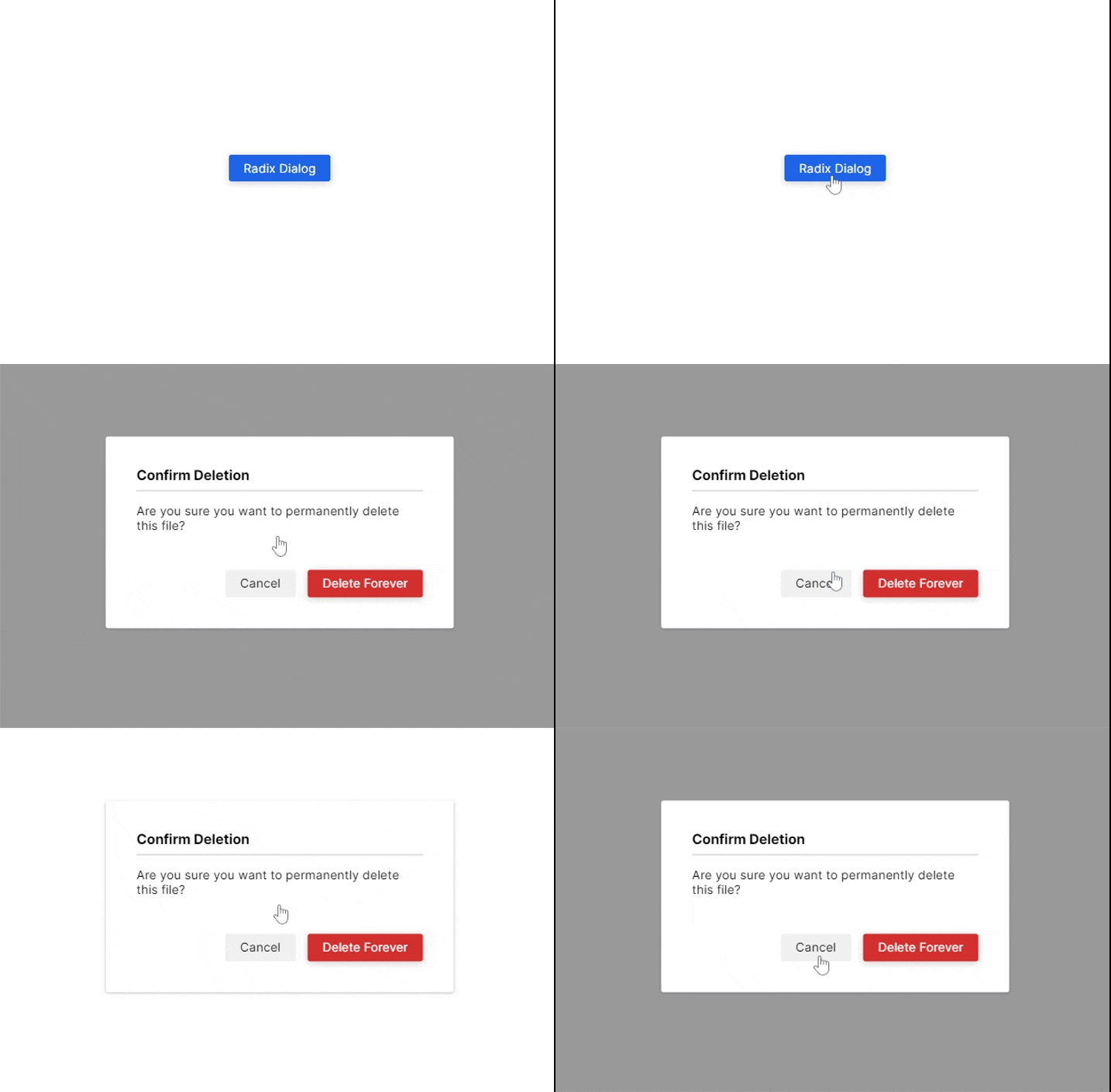
Here is the UI demo of the dialog component we styled above:
Radix Primitives pros and cons
Like every headless library covered in this guide, Radix Primitives has both advantages and tradeoffs.
Pros
- It offers 28 main components, significantly more than Headless UI.
- You can install components individually, allowing incremental adoption.
- It provides an
asChildprop that lets developers change the default DOM element of a Radix component — a pattern known as composition.
Cons
- Installing multiple components individually can feel repetitive.
- The anatomy-based structure of components can take time to understand.
React Aria
React Aria is a library of unstyled components released by Adobe as part of its React UI collection, React Spectrum. While Adobe does not maintain a separate repository exclusively for React Aria, the React Spectrum repository has over 14K GitHub stars at the time of writing. Its npm package, react-aria-components, receives thousands of weekly downloads.
React Aria allows developers to style components using any preferred styling method. It also supports incremental adoption through React Aria hooks, enabling fine-grained control over component behavior.
Installing and using React Aria
In this example, we’ll build another dialog box using React Aria, styled similarly to the Radix example.
First, create a new React application or open an existing project. Then install the component package:
npm install react-aria-components
Next, import the required components to construct a dialog:
// AriaDialog.jsx

import {
  Button,
  Dialog,
  DialogTrigger,
  Heading,
  Modal,
  ModalOverlay
} from 'react-aria-components';

import './aria.style.css';

function AriaDialog() {
  return (
    <DialogTrigger>
      <Button className='btn primary-btn'>
        React Aria Dialog
      </Button>

      <ModalOverlay isDismissable>
        <Modal>
          <Dialog>
            {({ close }) => (
              <>
                <Heading slot='title'>
                  Confirm Deletion
                </Heading>

                <p className='dialog-body'>
                  Are you sure you want to permanently delete this file?
                </p>

                <div className='bottom-btns'>
                  <Button className='btn' onPress={close}>
                    Cancel
                  </Button>

                  <Button className='btn red-btn' onPress={close}>
                    Delete Forever
                  </Button>
                </div>
              </>
            )}
          </Dialog>
        </Modal>
      </ModalOverlay>
    </DialogTrigger>
  );
}

export default AriaDialog;
Now, add styling. React Aria provides built-in class names such as .react-aria-Button, which you can use directly in CSS. You can also override them with custom classes like .btn in this example:
/* aria.style.css */

.btn {
  padding: 0.5rem 1.2rem;
  border-radius: 0.2rem;
  border: none;
  cursor: pointer;
}

.primary-btn {
  background-color: #1e64e7;
  color: white;
  box-shadow: rgba(0, 0, 0, 0.2) 0px 2px 10px;
}

.red-btn {
  background-color: #d32f2f;
  color: #ffffff;
  box-shadow: rgba(0, 0, 0, 0.2) 0px 2px 10px;
}

.react-aria-ModalOverlay {
  background-color: rgba(0, 0, 0, 0.4);
  position: fixed;
  inset: 0;
  animation: overlayAnimation 200ms cubic-bezier(0.19, 1, 0.22, 1);
  display: flex;
  justify-content: center;
  align-items: center;
}

.react-aria-Dialog {
  background-color: white;
  border-radius: 0.2rem;
  width: 90vw;
  max-width: 450px;
  padding: 2.5rem;
  box-shadow: rgba(50, 50, 93, 0.25) 0px 2px 5px -1px,
              rgba(0, 0, 0, 0.3) 0px 1px 3px -1px;
  outline: none;
}

.react-aria-Dialog .react-aria-Heading {
  font-size: 1.1rem;
  padding-bottom: 0.5rem;
  border-bottom: 3px solid #dfdddd;
  margin-bottom: 1rem;
}

.dialog-body {
  margin-bottom: 3rem;
}

.bottom-btns {
  display: flex;
  justify-content: flex-end;
}

.bottom-btns .btn:last-child {
  display: inline-block;
  margin-left: 1rem;
}

@keyframes overlayAnimation {
  from {
    opacity: 0;
  }
  to {
    opacity: 1;
  }
}
Finally, export and render the component in the DOM.
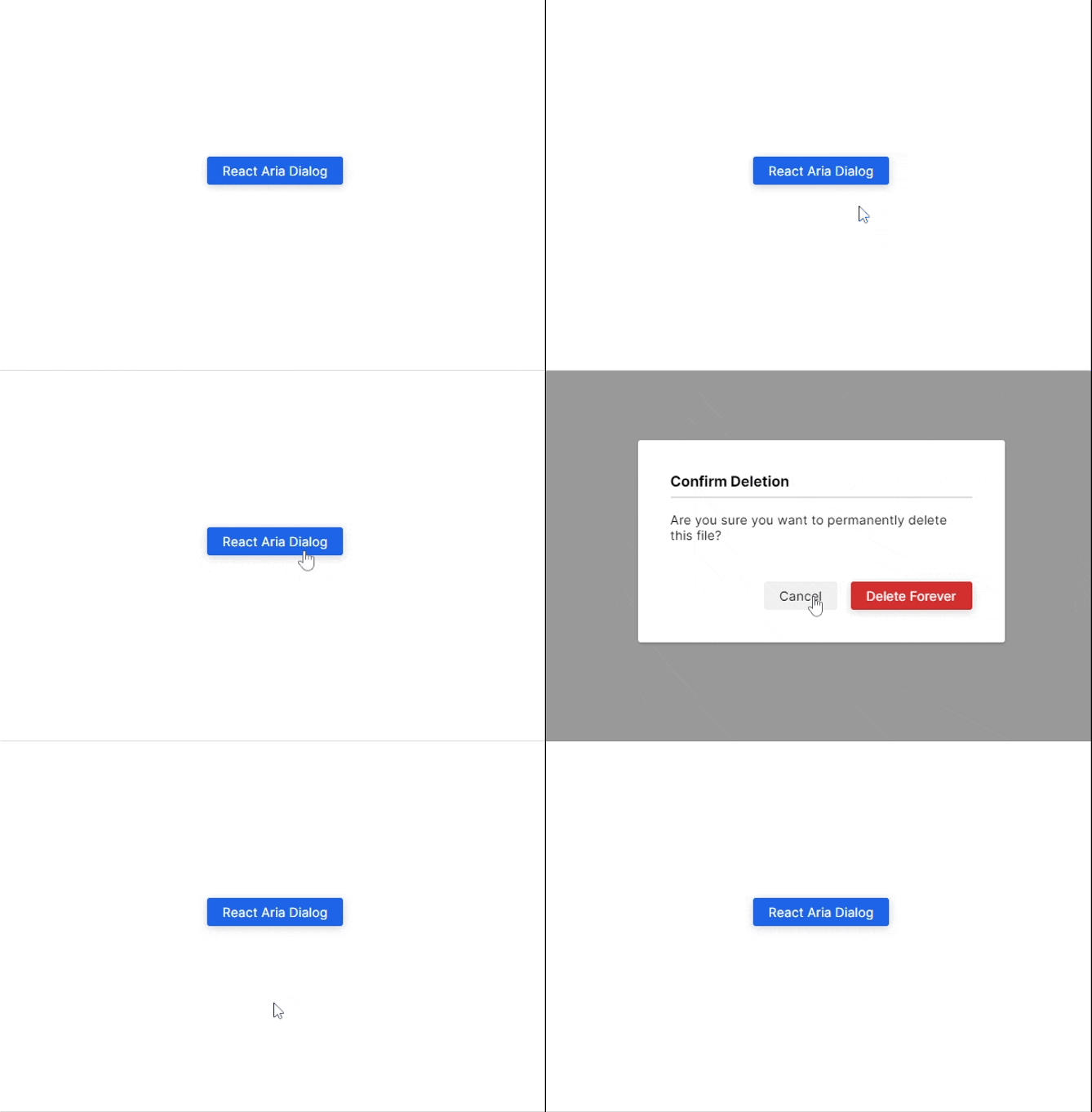
Here is the output of the dialog box in this example:
React Aria pros and cons
Pros
- It offers hooks for individual components, which support incremental adoption.
- It provides 43 main components.
- All components include built-in class names, simplifying styling.
Cons
- Some components require more setup. For example, the dialog required destructuring the
closefunction and explicitly wiring it to buttons. - Components often need to be combined to function fully. In this example, we used
Button,Dialog,DialogTrigger,Heading,Modal, andModalOverlaytogether to build a dialog. This structure can feel complex at first.
Ark UI
Ark UI is a library of unstyled components that work across React, Vue, and Solid. It is developed by Chakra Systems, the team behind Chakra UI. The project has gained steady adoption, with around 4.9K stars on GitHub and thousands of weekly npm downloads.
Like Radix Primitives and React Aria, Ark UI allows you to style headless components using any method you prefer, including CSS, Tailwind CSS, Panda CSS, or Styled Components. One of its distinguishing features is multi-framework support.
Installing and using Ark UI
In this example, we’ll build another dialog box using Ark UI and style it with vanilla CSS.
First, create a new React project or open an existing one. Then install Ark UI for React:
npm install @ark-ui/react
Next, import and use the unstyled components. Below is the anatomy of a dialog in Ark UI:
// ArkDialog.jsx

import { Dialog, Portal } from '@ark-ui/react';
import './ark.style.css';

function ArkDialog() {
  return (
    <Dialog.Root>
      <Dialog.Trigger className='btn primary-btn'>
        Ark UI Dialog
      </Dialog.Trigger>

      <Portal>
        <Dialog.Backdrop />

        <Dialog.Positioner>
          <Dialog.Content>
            <Dialog.Title>
              Confirm Deletion
            </Dialog.Title>

            <Dialog.Description>
              Are you sure you want to permanently delete this file?
            </Dialog.Description>

            <div className='bottom-btns'>
              <Dialog.CloseTrigger className='btn'>
                Cancel
              </Dialog.CloseTrigger>

              <Dialog.CloseTrigger className='btn red-btn'>
                Delete Forever
              </Dialog.CloseTrigger>
            </div>
          </Dialog.Content>
        </Dialog.Positioner>
      </Portal>
    </Dialog.Root>
  );
}

export default ArkDialog;
Now, style the component using your preferred method. Here is a vanilla CSS example:
/* ark.style.css */

.btn {
  padding: 0.5rem 1.2rem;
  border-radius: 0.2rem;
  border: none;
  cursor: pointer;
}

.primary-btn {
  background-color: #1e64e7;
  color: white;
  box-shadow: rgba(0, 0, 0, 0.2) 0px 2px 10px;
}

.red-btn {
  background-color: #d32f2f;
  color: #ffffff;
  box-shadow: rgba(0, 0, 0, 0.2) 0px 2px 10px;
}

[data-scope="dialog"][data-part="backdrop"] {
  background-color: rgba(0, 0, 0, 0.4);
  position: fixed;
  inset: 0;
  animation: backdropAnimation 200ms cubic-bezier(0.19, 1, 0.22, 1);
}

[data-scope="dialog"][data-part="positioner"] {
  position: fixed;
  top: 50%;
  left: 50%;
  translate: -50% -50%;
  width: 90vw;
  max-width: 450px;
}

[data-scope="dialog"][data-part="content"] {
  background-color: white;
  padding: 2.5rem;
  border-radius: 0.2rem;
  box-shadow: rgba(50, 50, 93, 0.25) 0px 2px 5px -1px,
              rgba(0, 0, 0, 0.3) 0px 1px 3px -1px;
}

[data-scope="dialog"][data-part="title"] {
  font-size: 1.1rem;
  padding-bottom: 0.5rem;
  border-bottom: 3px solid #dfdddd;
  margin-bottom: 1rem;
}

[data-scope="dialog"][data-part="description"] {
  margin-bottom: 3rem;
}

.bottom-btns {
  display: flex;
  justify-content: flex-end;
}

.bottom-btns .btn:last-child {
  display: inline-block;
  margin-left: 1rem;
}

@keyframes backdropAnimation {
  from {
    opacity: 0;
  }
  to {
    opacity: 1;
  }
}
Finally, export and render the component. Below is the output of the example:

Ark UI pros and cons
Pros
- It provides 34 main components.
- It includes advanced components such as a carousel and circular progress bar, which can be complex to implement from scratch.
- It supports component composition using the
asChildprop, similar to Radix Primitives.
Cons
- It does not provide built-in class names like React Aria.
- The recommended styling approach relies on
data-scopeanddata-partattributes, which may feel unfamiliar at first.
For example, styling a specific part of the dialog can look like this:
[data-scope="dialog"][data-part="positioner"] {
  position: fixed;
  top: 50%;
  left: 50%;
  translate: -50% -50%;
  width: 90vw;
  max-width: 450px;
}
Developers who prefer a more familiar workflow can assign custom class names using className and target those instead:
.primary-btn {
  background-color: #1e64e7;
  color: white;
  box-shadow: rgba(0, 0, 0, 0.2) 0px 2px 10px;
}
This approach preserves Ark UI’s headless behavior while allowing conventional CSS styling.
Base UI
Base UI is a library of unstyled React components built by contributors from Radix, Floating UI, and the Material UI team. While it follows the same headless philosophy as the other libraries discussed in this article, Base UI places a stronger emphasis on stable APIs that are well-suited for building long-term custom design systems. At the time of writing, Base UI has more than 8.1K stars on its GitHub repository and is actively maintained with regular releases.
Like the other headless libraries in this guide, Base UI components can be styled using CSS, Tailwind CSS, or CSS-in-JS. The documentation also includes guidance on advanced patterns such as controlled dialogs and detached triggers.
Installing and using Base UI
Unlike Radix Primitives, which publishes each component separately, Base UI ships all components in a single tree-shakable package. This makes installation straightforward.
First, create a new React project or open an existing one. Then install Base UI:
npm i @base-ui/react
Next, create a file and import the Dialog component. In this example, we’ll build another dialog box:
// BaseDialog.jsx

import { Dialog } from '@base-ui/react/dialog';
import './base.style.css';

function BaseDialog() {
  return (
    <Dialog.Root>
      <Dialog.Trigger className='btn primary-btn'>
        Base UI Dialog
      </Dialog.Trigger>

      <Dialog.Portal>
        <Dialog.Backdrop className='dialog-overlay' />

        <Dialog.Popup className='dialog-content'>
          <Dialog.Title className='dialog-title'>
            Confirm Deletion
          </Dialog.Title>

          <Dialog.Description className='dialog-body'>
            Are you sure you want to permanently delete this file?
          </Dialog.Description>

          <div className='bottom-btns'>
            <Dialog.Close className='btn'>
              Cancel
            </Dialog.Close>

            <Dialog.Close className='btn red-btn'>
              Delete Forever
            </Dialog.Close>
          </div>
        </Dialog.Popup>
      </Dialog.Portal>
    </Dialog.Root>
  );
}

export default BaseDialog;
Now, add styling:
/* base.style.css */

.btn {
  padding: 0.5rem 1.2rem;
  border-radius: 0.2rem;
  border: none;
  cursor: pointer;
}

.primary-btn {
  background-color: #1e64e7;
  color: white;
  box-shadow: rgba(0, 0, 0, 0.2) 0px 2px 10px;
}

.red-btn {
  background-color: #d32f2f;
  color: #ffffff;
  box-shadow: rgba(0, 0, 0, 0.2) 0px 2px 10px;
}

.dialog-overlay {
  background-color: rgba(0, 0, 0, 0.4);
  position: fixed;
  inset: 0;
  animation: overlayAnimation 200ms cubic-bezier(0.19, 1, 0.22, 1);
}

.dialog-content {
  background-color: white;
  position: fixed;
  border-radius: 0.2rem;
  top: 50%;
  left: 50%;
  translate: -50% -50%;
  width: 90vw;
  max-width: 450px;
  padding: 2.5rem;
  box-shadow: rgba(50, 50, 93, 0.25) 0px 2px 5px -1px,
              rgba(0, 0, 0, 0.3) 0px 1px 3px -1px;
}

.dialog-title {
  font-size: 1.1rem;
  padding-bottom: 0.5rem;
  border-bottom: 3px solid #dfdddd;
  margin-bottom: 1rem;
}

.dialog-body {
  margin-bottom: 3rem;
}

.bottom-btns {
  display: flex;
  justify-content: flex-end;
}

.bottom-btns .btn:last-child {
  display: inline-block;
  margin-left: 1rem;
}

@keyframes overlayAnimation {
  from {
    opacity: 0;
  }
  to {
    opacity: 1;
  }
}
Finally, import and render the component in your application:
import './App.css';
import BaseDialog from './BaseDialog';

function App() {
  return (
    <>
      <BaseDialog />
    </>
  );
}

export default App;
And you should see output similar to the example below:

Base UI pros and cons
Pros
- It ships as a single tree-shakable package, eliminating the need to install components individually.
- It includes strong documentation and supports advanced patterns such as controlled dialogs and detached triggers.
Cons
- Its ecosystem is still growing compared to more established alternatives.
- Because it is unstyled by design, significant styling work is still required to align it with a production design system.
Comparing the headless component libraries
To provide a clearer overview of how these headless UI libraries compare across API design, styling flexibility, composition model, and intended use cases, the table below highlights the key differences between Radix Primitives, React Aria, Ark UI, and Base UI.
| Dimension | Radix Primitives | React Aria | Ark UI | Base UI |
|---|---|---|---|---|
| Primary goal | Polished primitives for app UIs | Accessibility-first primitives | Cross-framework state-driven primitives | Foundation for custom design systems |
| Mental model | Component anatomy and composition | Hooks with explicit state | State machines and parts | Low-level primitives meant to be wrapped |
| Typical usage | Used directly in application code | Composed per component | Assembled from parts | Extended into internal components |
| Styling approach | className, asChild | Built-in classes with overrides | data-part / data-scope with className | className and wrapper components |
| Ease of styling | Easy and familiar | Easy once conventions are understood | Moderate, unconventional at first | Easy, but assumes design ownership |
| Composition flexibility | High | Very high | High | Very high |
| Accessibility transparency | Mostly abstracted | Very explicit | Abstracted via state | Abstracted but predictable |
| Learning curve | Moderate | Steep | Moderate to steep | Moderate |
| Best suited for | Product teams building applications | Accessibility-critical applications | Multi-framework design systems | Teams building custom design systems |
| Framework support | React | React | React, Vue, Solid | React |
This comparison demonstrates that while these libraries often provide similar component coverage, they differ significantly in how components are composed, styled, and extended.
Choosing the right headless UI library ultimately depends on your project goals, team preferences, and long-term maintenance strategy. The following quick guide can help narrow down your options:
- Use Radix Primitives if you want mature, well-documented components that can be used directly in application code with minimal setup.
- Use React Aria if accessibility is a primary concern and you prefer explicit, hook-based control over component behavior.
- Use Ark UI if you need headless components that work across multiple frameworks such as React, Vue, and Solid.
- Use Base UI if you are building a custom design system and want a flexible, long-term foundation for your own components.
The best choice depends less on feature parity and more on how well a library’s design philosophy aligns with your team’s workflow and architectural goals.
Conclusion
This guide explored why developers may look beyond Tailwind Labs’ Headless UI library when choosing unstyled component libraries. We examined several strong alternatives, including Radix Primitives, React Aria, Ark UI, and Base UI.
The frontend ecosystem continues to adopt headless UI libraries because many teams want more control over how components behave and how they are styled. Having multiple headless options available is beneficial, as different projects have different architectural and design needs.
The post Headless UI alternatives: Radix Primitives vs. React Aria vs. Ark UI vs. Base UI appeared first on LogRocket Blog.
This post first appeared on Read More