
What the Bhagavad Gita taught me about parsing messy financial data

I write software for a living (SRE does that too extensively), and somewhere along the way my own bank statements became the messiest, most unglamorous dataset I’d ever tried to tame. This post is about that — not the AI part, the plumbing part. If you’ve ever fought a CSV that lied to you about its own header row, this one’s for you.
I built a personal finance tool that ingests statements from half a dozen banks, each shaped differently, and turns them into one coherent picture. The interesting engineering wasn’t the AI — it was the plumbing. Here’s what building a “charioteer” for your money actually looks like under the hood.
In the Bhagavad Gita, Krishna doesn’t grab the reins from Arjuna and drive the chariot himself. He sits beside him, reads the terrain, and guides — a light hand, not a fist. That’s the exact posture I wanted from a piece of software that touches something as personal as someone’s bank statements. Not “hand me your accounts and I’ll manage them.” More like: “I’ll read the road for you. You still hold the reins.”
The tool is called ArthaSaarthi — artha (wealth) + saarthi (charioteer). And building it taught me that the hardest problem in personal finance software has almost nothing to do with finance, and almost everything to do with the fact that six different banks have six different opinions about what a spreadsheet should look like.
The chaos problem
Ask five banks for a statement and you’ll get five different shapes of data back. One gives you a clean XLSX with a predictable header row. Another gives you the same format, but the header might start on row 2, or row 5, or row 9, depending on some export quirk you’ll never fully explain. A third gives you a PDF — no cell borders, no columns, just words scattered across a page at specific x/y coordinates, and it’s on you to figure out which words belong to the “date” column and which belong to “description.”
Add to that: dates that are ambiguous by design. Is “06–05–2026” the 6th of May or the 5th of June? One bank formats day-first. Another formats month-first. A third gives you an ISO string, unambiguous, but only some of the time. If you write one universal parser that “handles CSVs,” you will be fighting an unwinnable war against every bank’s individual eccentricity forever.
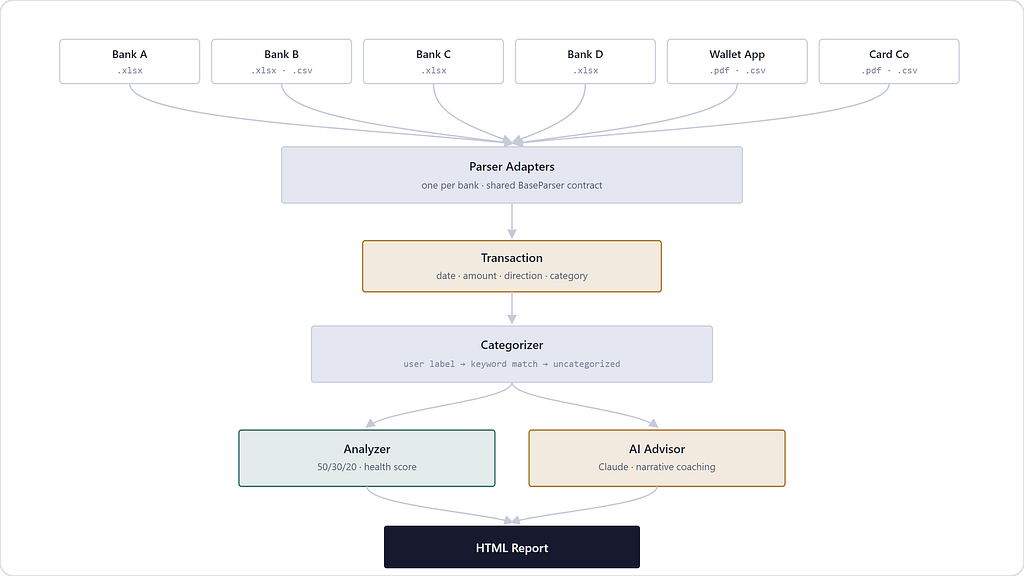
The fix isn’t a smarter universal parser. It’s not trying to be universal. Every bank gets its own small adapter that knows its own dialect, all speaking through one shared contract:
class BaseParser:
    def parse(self):
        raw   = self.load_file()             # auto-detect CSV vs XLSX vs PDF
        clean = self.clean_dataframe(raw)     # bank-specific column renaming, junk-row removal
        return self.extract_transactions(clean)  # bank-specific -> common Transaction shape
Every bank subclass implements clean_dataframe and extract_transactions its own way — one bank’s subclass knows its header row might be anywhere in the first ten rows and probes for it; another knows its “Category” column is sometimes called “Categories” with an s. The base class doesn’t need to know any of that. It just enforces that everyone ends up speaking the same Transaction object at the end: a date, an amount, a direction (debit/credit), a description, and — critically — whatever the human already told you about it.
That last part turned out to matter more than the parsing.
The gnarliest problem: reading a PDF with no table
One statement type had no gridlines at all — just words with x/y coordinates on a page. Some banks’ apps render this beautifully for a screen. For a machine trying to reconstruct rows and columns, it’s closer to reading tea leaves.
The approach that worked: group words into “rows” by how close their vertical position is on the page, then classify each row’s words into columns purely by their horizontal position (words left of some x-threshold are “date,” words in the next band are “description,” and so on). Straightforward enough — until you notice that a single logical transaction’s description sometimes wraps onto the visual row above or below the row that actually carries the date and amount.
So you get a page that looks like: description-fragment, [DATE + AMOUNT], description-fragment, description-fragment, [DATE + AMOUNT]… and you need to figure out which wrapped fragment belongs to which real transaction.
The trick: find every row that looks like a real “anchor” (it has a valid date shape and a numeric amount). Then take every other row — the orphaned fragments — and assign each one to whichever anchor is vertically closest to it, restricted to the same page (because “closest” resets to near-zero at the top of every new page, and an unrestricted search will confidently glue a fragment to the wrong transaction three pages away). It’s a small nearest-neighbor bucketing problem hiding inside what looks like a “just read the PDF” task.
None of this is exotic computer science. But it’s a good reminder that “real-world data ingestion” is usually 80% of the actual engineering effort in a project like this, and it’s the part nobody puts in the pitch deck.
Categorization: human judgment always wins
Once transactions are normalized, they need a category — groceries, rent, dining, savings — so they can be rolled up into a budget view. There’s a keyword-matching engine that does a reasonable job of guessing categories from a transaction’s description. But it is deliberately, structurally subordinate to one thing: if a human already labeled that transaction, that label wins outright, full stop, no negotiation.
This ordering was a conscious design choice, not a fallback-of-convenience. In a personal finance tool, automation’s job is to fill gaps, not to overrule a person’s own judgment about their own spending. The moment automation starts second-guessing an explicit human label, trust in the whole system erodes — and trust is the entire product when the subject matter is someone’s money. So the priority is: explicit human label → keyword-based guess → “uncategorized, please label me.” Never the reverse.
Where the LLM actually earns its keep
Given all that plumbing, where does an LLM fit? Not in classification — a keyword map plus human labels handles that well enough, and an LLM call for every transaction would be slow, expensive, and arguably less predictable than a substring match. The LLM’s job starts after the data is clean: taking a fully-formed financial picture — cash flow, category breakdowns, a health score — and turning it into a narrative. Synthesis and coaching tone, not arithmetic. That division of labor — deterministic code for structure, LLM for language — is doing a lot of the quiet work in making the output feel trustworthy rather than hallucinated.
Lessons learned
Real bank data accumulates weird, hardcoded special cases over time, and that’s fine. A credit-card statement’s “credit” entries are usually refunds and bill payments, not income — treat them differently from a checking account’s credits, or you’ll fabricate income that never existed. Date formats will surprise you in small, infuriating ways. None of this is a design smell. It’s what it looks like to actually ingest the real world instead of a clean synthetic dataset.
The best automation, like the best charioteer, knows when to let go of the reins — it should make the picture clear enough that you can make the decision, not make the decision for you.
Built the agentic way
One more thing worth naming: this codebase — the parser adapters, the anchor-and-reattach PDF logic, the categorizer priority chain — was built agentically, with Claude Code acting as a hands-on collaborator rather than an autocomplete tool. It read the existing statement exports, wrote and ran the parsers, iterated against real edge cases as they surfaced (that ambiguous date format took a couple of rounds), and ran the test suite before calling anything done. The workflow looked less like “ask a chatbot for a snippet” and more like pairing with an engineer who could actually open the files, execute the code, and show you the diff — which, for a project this dependent on messy real-world data, mattered more than any single generated line ever could.
The best automation, like the best charioteer, knows when to let go of the reins — it should make the picture clear enough that you can make the decision, not make the decision for you.

Building a Charioteer for Your Bank Statements was originally published in Javarevisited on Medium, where people are continuing the conversation by highlighting and responding to this story.
This post first appeared on Read More