

Don’t ship blind: A practical checklist for internal launch readiness
Did you see the failed demo of Meta glasses by Mark Zuckerberg recently? Do you remember the famous demos of Apple products by Steve Jobs? Or have you seen demos of Google’s products by Sundar Pichai?

If you’re a PM, you probably answered yes to all these questions. But have you ever seen a demo of an internal product by any of the above-mentioned CEOs?
An internal product is something that’s used within the company itself. Internal products, such as tools built for employees, operations, or partners, rarely get the same spotlight.
They’re not flashy. They’re not shown on stage at keynotes. And yet, they often drive massive business impact: reducing operational costs, improving efficiency, enabling scale, and making external launches even possible.
We’ll have seen demos of products used by customers, but we very rarely see a demo of products used internally, which is why there isn’t much information about how to manage product launches for internal products. They require a different type of communication, stakeholder management, and success measurement.
I’ve led the launch of quite a few internal products, and in this blog, I want to explain how to best prepare for internal product launches. I share my stories of success and failure, and a few important tips that’ll help you launch internal products effectively.
What are internal products, and why does internal readiness matter?
Internal products are tools built primarily for employees, operations teams, or partners rather than end customers. They rarely get public attention, but they often power the experiences that customers see on the outside.
Think of content management systems, logistics dashboards, fraud detection tools, or onboarding portals. If these break, the customer-facing product suffers even if the customer never knows the internal tool exists.
Back at Zalando, I worked on a content management system for 300 internal users. These were photographers, retouchers, and copywriters. We used a legacy tool built 10 years ago. It was super slow, engineering didn’t know a lot of things about how it worked, the operations team had workarounds, and it wasn’t scalable at all.
I was the PM for this product and was tasked to build a scalable system that incorporated future use-cases like supporting videos and automating workflow. These 300 people had built their daily routines, processes, and even identities around the old system. If they weren’t ready for the change, no amount of engineering excellence would matter.
This is why internal readiness is critical. You’re not just shipping a tool; you’re changing the workflow of people, affecting their daily work life.
And unless those people understand the “why,” are included in the development process, and are supported during the transition, adoption will likely fail, no matter how good the product is.
The core pillars of internal readiness
Before launching an internal product, it’s important that you do the groundwork to set your launch up for success. In my experience, there are four key pillars that signal you’re ready for launch:
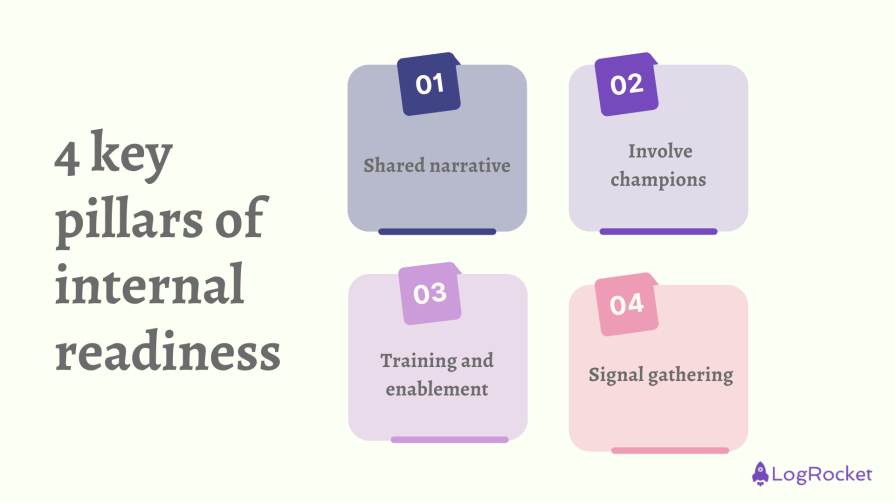
1. Shared narrative: Clear messaging for all teams
Much like any product, it’s important to start with the users. This’ll help you to create a shared narrative, something that the users agree on.
If you don’t create the narrative, each team will create its own, and that leads to confusion. The message has to be clear: who is the user, what problem does this product solve, why do we need to solve it, why do we need to solve it now, and how does it help the users to do their job better?
- How to do it — Talk to the users, understand their problems, prioritize the problems, pick the highest-impact one, and write a one-pager that explains the “why” in plain language. Share it with the users, take their feedback, refine it, and use the same examples in every presentation and email. Keep repeating it until people start repeating it back
- Example — At Zalando, our narrative for the new CMS was: “The old tool slows you down. This new system cuts editing time in half and supports future formats like video.” From higher management to internal users, we used this narrative repetitively until everyone understood and accepted it
2. Involve champions from sales, support, ops, and other teams early
Early champions help you spot problems before they scale, and they give you credibility with their teams. If a respected team member says, “I’ve used this and it works,” adoption is faster:
- How to do it — Select a few people and invite them for user interviews early on. Also, keep them in the loop during all the testing phases before the launch. Give them early access, listen to their feedback, and fix small issues they raise. Publicly thank them later so others see their involvement
- Example — At Zalando, we had a team of power-users. They knew all of the processes right from the start and flagged bottlenecks we weren’t aware of. Because they were included, they later convinced their teams to adopt the system quickly
3. Training and enablement: Workshops, video recording, roadshows
Training isn’t about creating tutorials or showing features; it’s about showing how the product fits into daily work and how it makes the user’s lives easier. Hence it’s important to document how the product helps:
- How to do it:
- Workshops — 30 to 45 minutes, focused on one team’s workflow
- Looms — Three to five minute videos covering “getting started” and “common tasks”
- Roadshows — Go to teams, sit with them, and answer their questions live
- Example — For Zalando, instead of a generic CMS demo, we ran specific sessions after every sprint. We showcased what we built every two weeks and took feedback. We also made sure to take feedback and improve the tools as per it. This helped us to keep thinking like users and understand how they use the tool
4. Signal gathering: Pre-mortems and first user flow checks
The fastest way to kill trust is to launch something broken. Don’t wait until after launch to find problems. Run a pre-mortem: ask “what could go wrong?” and build risk mitigation plans.
You can avoid that by stress-testing before rollout. This is where you will find blockers that might impact you later:
- How to do it — Pick five users, watch them try to complete their first task without help. Note where they get stuck. Do not interfere. Record all their activities (in accordance with the permission) and then understand where they failed and why
- Example — Before rolling out the CMS, we did a test with power users. They flagged one risk: “images won’t load fast enough.” We added monitoring before launch, and on day one, when upload speed dipped, we caught and fixed it before it became a big complaint
Checklist for an internal product launch
Launching an internal product is more than flipping the switch. That’s why I created this checklist that lists all the steps a PM should consider before, during, and after the launch:
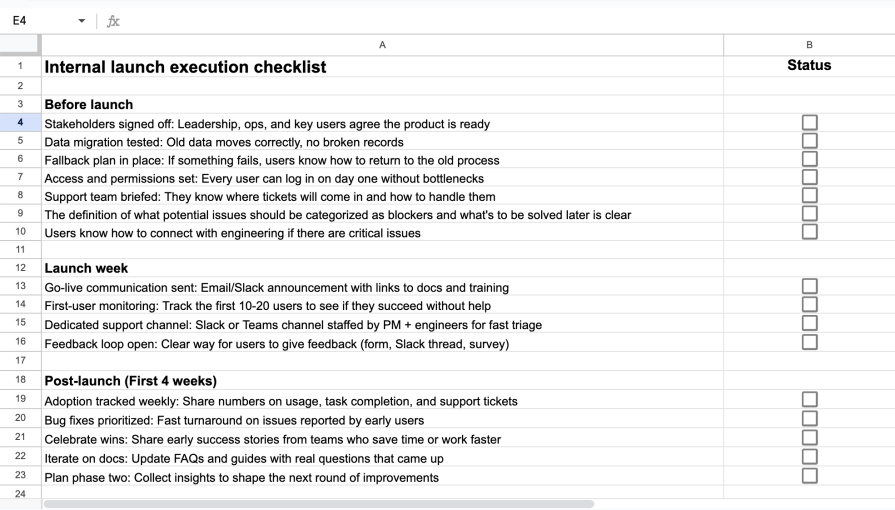
You can use it as a living document and:
- Assign owners to each task
- Update statuses regularly
- Capture notes and blockers as they come up
- Review progress in weekly syncs until adoption is stable
- Share it with stakeholders for transparency
Risks of skipping internal readiness
Launching an internal product before you’ve ready comes with risks. Some of the common ones include:
Loss of trust
Without internal readiness, there’s a high chance that the users would feel they aren’t included in the product development process, and that can impact the trust between product teams and the users. A strong relationship is always needed to build high-impactful and useful products.
Low adoption
When employees don’t feel confident using the new tool, they fall back on what they know. Old spreadsheets, email threads, or half-broken legacy systems stay alive, and instead of one streamlined solution, the company now runs two. I have experienced this in the past, and it creates unnecessary overhead for everyone.
Missed impact
Every internal tool is justified with promises of efficiency, cost savings, or scalability. But when readiness is skipped, those benefits remain on paper. Instead of speeding things up, the tool adds friction. Instead of saving money, it creates new overhead.
Loss of credibility with leadership
And lastly, if the new tool struggles to gain traction or generates more complaints than results, leadership starts questioning whether the product team can deliver. That doubt lingers. It becomes harder to secure budget, headcount, or sponsorship for future initiatives. One failed launch can cast a long shadow over the team’s ability to drive change.
Final thoughts
Internal product readiness isn’t a one-time activity. Instead, as a PM, you need to start it early in the process and continue it even after the product is launched. This way you not only will make sure your product delivers, but you’ll create a long-lasting and strong relationship with your stakeholders and users.
With the advancements in AI, you can mitigate risks as much as you can, but having a structured approach to readiness will help you deliver effectively. If you’re a PM who has worked or is working on internal products, share your checklist and best practices in the comment section below. And, as always, happy product launching.
Featured image source: IconScout
The post Don’t ship blind: A practical checklist for internal launch readiness appeared first on LogRocket Blog.
This post first appeared on Read More