

6 fast (native) alternatives for VSCode
Visual Studio Code has become the default code editor for much of the software industry. Most modern teams recommend it by default, and many go further by building internal extensions that effectively turn VSCode into a full IDE. For a growing number of developers, especially newcomers, installing VSCode is simply part of getting started, often without seriously considering alternatives.
That ubiquity is not accidental. VSCode is approachable, extensible, and powerful enough to cover a wide range of workflows. But its popularity also masks a set of structural trade-offs that become harder to ignore as projects grow or hardware constraints tighten.
As a hybrid application built on web technologies, VSCode does not use system resources as efficiently as a truly native editor. On high-end machines, this overhead is often absorbed without much friction. On low- and mid-range systems, however, it shows up as slower startup times, input latency, and declining responsiveness as extensions accumulate and codebases scale.
These limitations have started to reshape the code editor landscape. In response, a new generation of editors has emerged, built with compiled, native languages such as C++ and Rust, and designed to prioritize performance, lower resource consumption, and more predictable behavior.
This article takes a closer look at VSCode’s fundamental architectural constraints and then surveys fast, native alternatives for developers who are increasingly frustrated with its performance trade-offs.
-
We’ll examine:
-
ecode: A ultra-lightweight C++ editor that delivers VSCode-like features with near-zero resource usage
-
CudaText: A fast, native IDE-style editor focused on stability, explicit tooling, and predictable performance
-
Lite: An ultraminimal C/Lua editor built for maximum speed and total user control
-
Lite XL: A more modern, actively maintained evolution of Lite with stronger out-of-the-box productivity
-
Lapce: A Rust-based native editor that mirrors VSCode’s workflow without Electron’s overhead
-
Zed: A high-performance Rust editor aiming to be a full VSCode replacement with native rendering and built-in AI
-
Unsolvable drawbacks of VSCode
Many of VSCode’s most common performance complaints are not the result of poor implementation or missing optimizations. Instead, they stem from foundational design choices. VSCode is built on Electron, a hybrid architecture that favors cross-platform reach and extensibility over native efficiency. As the editor has expanded in scope, these trade-offs have become more visible.
The following drawbacks are difficult to fully eliminate because they are tied directly to VSCode’s architecture and the complexity required to support its ecosystem at scale:
- Higher resource usage: VSCode relies on Electron to render its interface as a native-looking application. Electron bundles Chromium, Node.js, and a cross-platform API layer into each app, which increases baseline CPU, GPU, RAM, and storage usage compared to truly native editors.
- Native UI mimicking: VSCode’s interface is rendered using the Monaco editor and large numbers of DOM elements. Most UI components are not OS-native widgets; they are drawn through a Chromium-based webview. In practice, VSCode behaves like a web application running inside a platform-specific shell.
- Decision fatigue with extensions: VSCode’s TypeScript-based extension API makes publishing extensions easy, which has fueled a massive marketplace. While this flexibility is a strength, it also leads to overlap and fragmentation, forcing developers to spend time evaluating, configuring, and maintaining extensions for even basic workflows.
- Growing complexity: Electron frequently upgrades its underlying components, including Chromium and Node.js, and VSCode closely follows these releases. As web standards expand and VSCode adds built-in features, the editor’s baseline complexity and resource footprint continue to grow.

Why VSCode’s architecture won’t survive in the future
VSCode is an Electron app built with TypeScript. It renders web-based UI through Chromium and enables OS-level features via Electron API and Node.js:
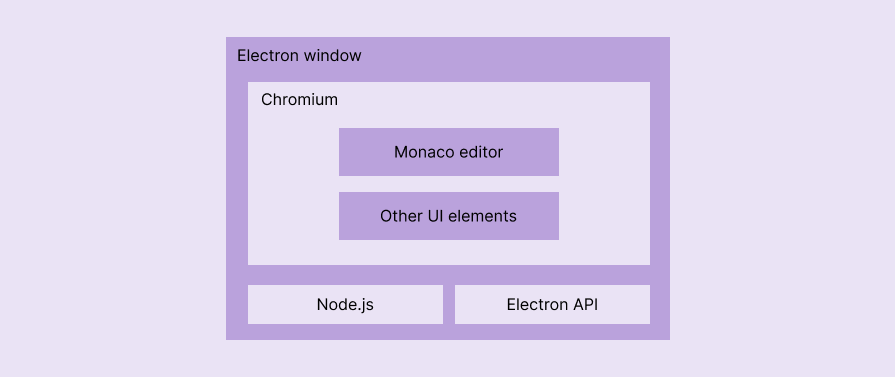
Electron’s architecture solves the cross-platform desktop app development from the developer productivity perspective; it won’t offer a solution to compete with truly native apps from the performance and fair resource consumption perspectives. When developers download VSCode, they also download a copy of Chromium and Node.js, which also start consuming more resources while using VSCode.
Electron, Chromium, and Node.js are growing heavier with new web specifications, so VSCode is becoming more complex and resource-intensive. Developers have to keep upgrading hardware to run up-to-date VSCode smoothly, and the usability of VSCode on a low-end machine has already become a dream.
VSCode’s hybrid app architecture won’t survive in the long run due to the growing excessive, unethical resource consumption.
The rise of native VSCode alternatives
Past platform-specific native code editors didn’t have a good look and feel, weren’t open-source, or missed mandatory productivity features. They couldn’t compete with VSCode. VSCodium, Cursor, and Eclipse Theia-like editors came as VSCode alternatives, but at an architectural level, they are all Electron apps — yet another hybrid code editor won’t become a fast VSCode alternative.
The new open-source, lightweight, cross-platform native editor movement started innovating fast alternatives to VSCode; they have almost all VSCode features, but are fast and lightweight. The following emerging native VSCode alternatives are becoming popular rapidly since they can effortlessly defeat VSCode with impressive performance:
ecode
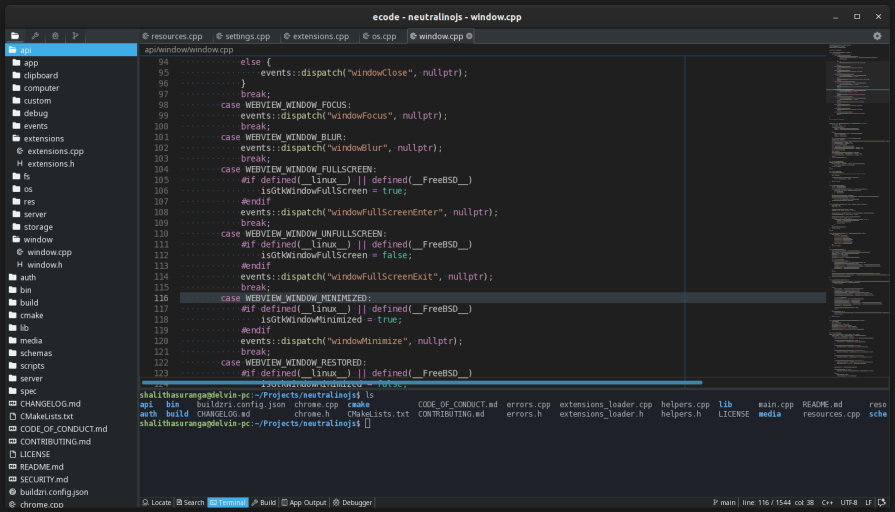
ecode is a lightweight, fast, native code editor written in C++. It offers many features associated with VSCode while aiming for more efficient CPU, GPU, RAM, and storage usage than Electron-based editors. It is minimal and fully featured by default, meaning common capabilities ship with the application rather than requiring extensive post-install configuration.
Highlighted features
- Lightweight: Requires only about 1MB of disk space on most platforms. Working with an average codebase consumes roughly 20MB of RAM
- Modern, ultraminimalistic UI: Focuses exclusively on code editing with minimal visual distraction, similar to working in a terminal-based editor
- Extremely fast: Avoids sudden CPU or GPU spikes common in hybrid editors. Runs smoothly even on very old devices with limited hardware by rendering low-level native graphics through SDL
- Primary VSCode features: Supports syntax highlighting, linting, auto-completion, command palette, console output, find and replace, code scaling, and official or community plugins
- Themes: Includes more than 15 dark and light themes. VSCode’s default theme is also available
- Easily customizable and extendable: Most of Lite’s implementation is written in Lua, allowing developers to customize behavior directly. New features and themes can be added using simple Lua-based definitions
Architecture
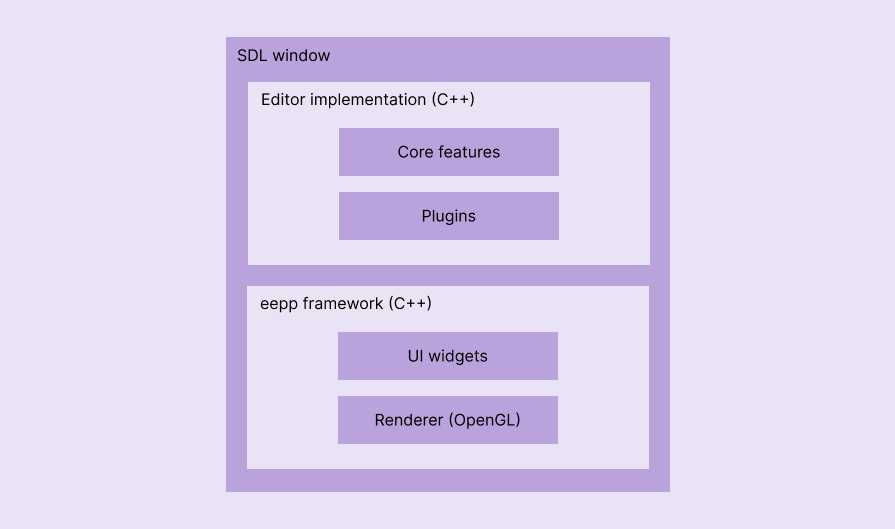
ecode is written in C++ and uses the eepp cross-platform framework for GUI widgets. eepp relies on SDL for OS-level features and OpenGL for low-level rendering:
How do you install ecode?
You can download portable versions of ecode or installers for Linux, Windows, macOS, FreeBSD, and Haiku from GitHub releases.
CudaText
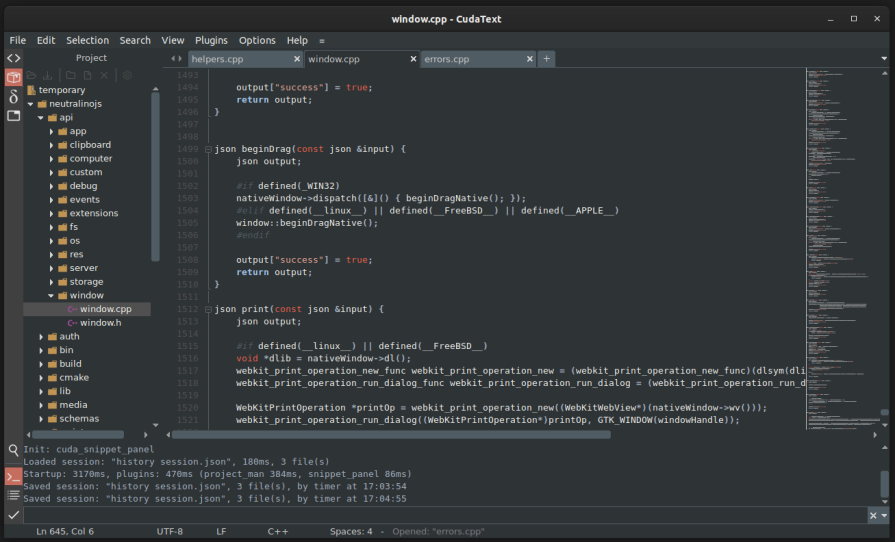
CudaText is a fast, native code editor written in Free Pascal that leans into a traditional IDE-style experience. Its interface may feel retro at first, but under the hood it offers many of the productivity features developers expect from modern editors, while consuming far fewer resources than VSCode. It is especially appealing to developers who value stability, explicit tooling, and predictable performance.
Highlighted features
- Lightweight: Requires about 20MB of disk space, with average projects using roughly 40MB of RAM
- IDE-like, retro but modern UI: Feels familiar to traditional IDE users while supporting modern workflows
- Extremely fast: Native editor components and platform-specific UI avoid the freezes and spikes common in hybrid editors
- Platform-specific and custom UI: Combines custom native UI with OS-level menus and windows for a more predictable experience
- Competitive VSCode features: Supports syntax highlighting, formatting, linting, minimap, folding, editor splitting, command palette, find and replace, and Git integration
- Themes: Ships with more than 10 built-in themes, with additional options available via plugins
- Plugin ecosystem: Python-based addon API with both official and community-maintained plugins
Architecture
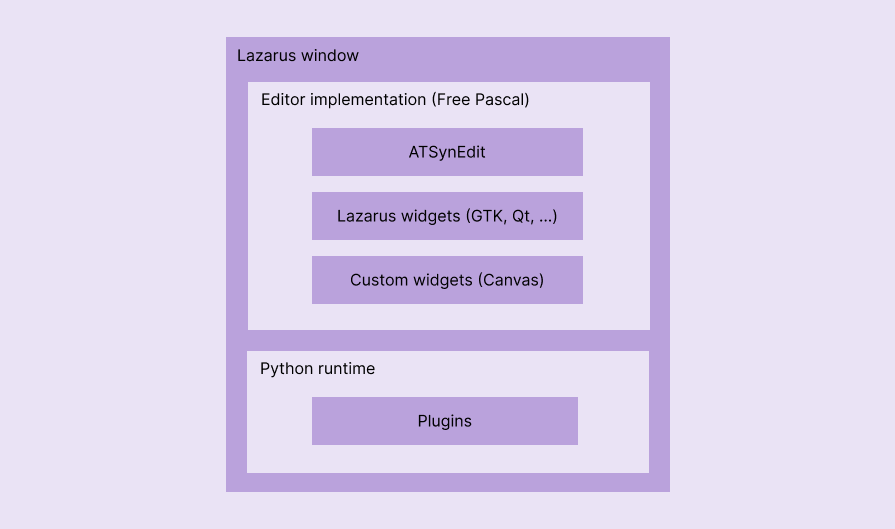
CudaText is a native app written using Free Pascal and Lazarus. It draws native, platform-independent UI components through Free Pascal Canvas and native, platform/widgets-library-dependent UI components via Lazarus Component Library (LCL). Its code editor engine resides in a different project called ATSynEdit:
How to install CudaText?
You can download CudaText for Linux, Windows, Solaris, FreeBSD, etc, from SourceForge. Community-based unofficial builds are available for macOS and Haiku OS, and you can also build the project from source.
Lite
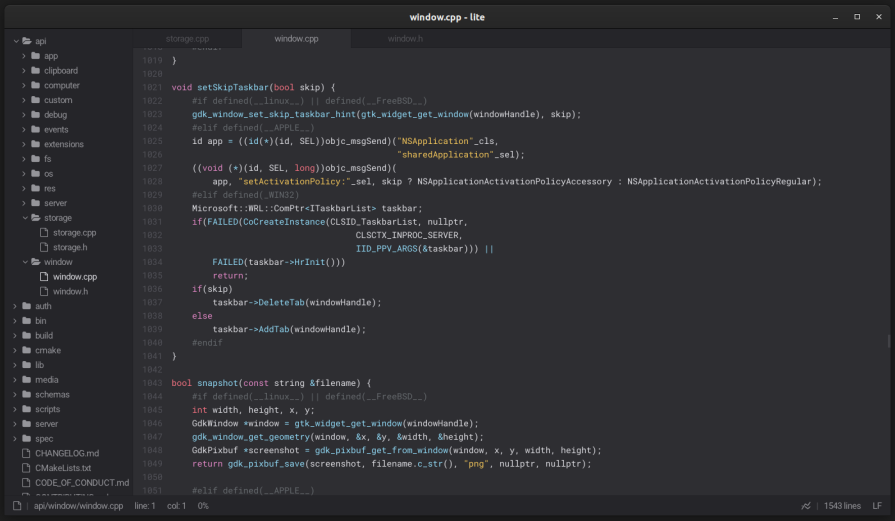
Lite is an ultra-lightweight native editor designed around the idea that a code editor should do very little by default and let users build up functionality as needed. Written in C and Lua, its core is intentionally minimal, with most features implemented through simple, scriptable plugins. Lite favors control and performance over polish, and it works best for developers who enjoy shaping their tools themselves.
Lite is considered a completed project. The official repository is no longer actively updated, and the project philosophy encourages developers to customize, extend, and personalize the editor by writing their own plugins in Lua.
Highlighted features
- Ultralightweight: Uses about 1MB of disk space and roughly 20MB of RAM for an average project
- Ultraminimalistic UI: Strips the interface down to just the essentials, keeping focus entirely on code
- Extremely fast: Renders low-level native graphics through SDL, even on very old or constrained hardware
- Primary VSCode features: Provides syntax highlighting, linting, auto-completion, command palette, console output, and plugin support
- Themes: Includes more than 15 built-in dark and light themes
- Highly customizable: Most of the editor is written in Lua, making it easy to modify behavior or add features
Architecture
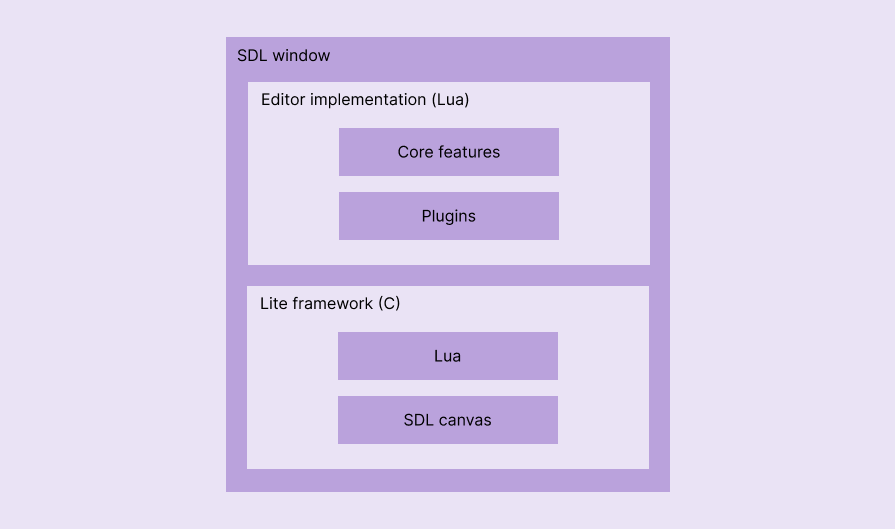
Lite is a native app written in C and Lua. It creates a simple editor framework with low-level, OS-level feature implementations in C by embedding Lua and renders native low-level graphics directly through SDL:
How to install Lite?
You can download pre-compiled Lite binaries for Linux and Windows from GitHub releases, or compile it yourself by downloading the Lite GitHub repository.
Lite XL
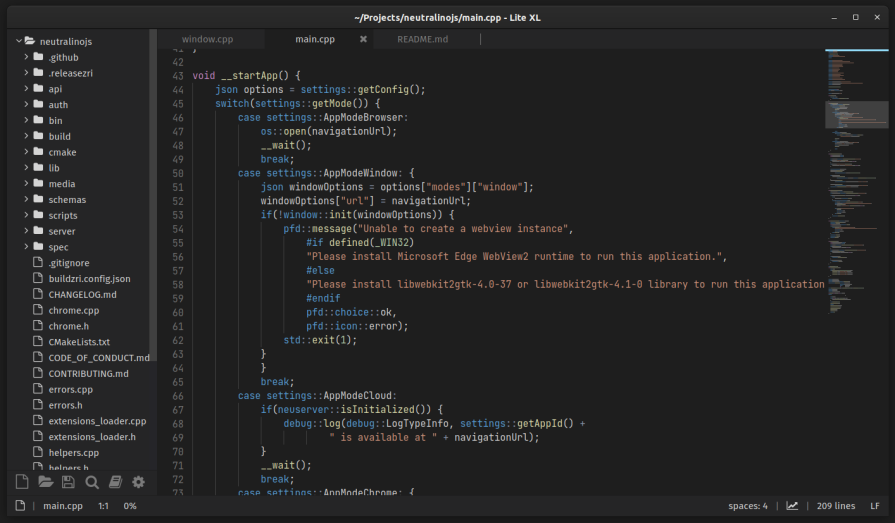
Lite XL builds on Lite’s minimalist foundation while addressing many of its practical limitations. It adds more VSCode-like productivity features, active maintenance, and a growing plugin ecosystem, while remaining extremely lightweight. For developers who like Lite’s philosophy but want a more complete out-of-the-box experience, Lite XL strikes a better balance.
Highlighted features
- Lightweight: Requires about 6MB of disk space, with average projects using roughly 40MB of RAM, making it dramatically lighter than VSCode
- Minimal, modern, productive UI: Keeps distractions low while adding IDE-like conveniences such as a minimap and GUI-based settings
- Extremely fast: Extends Lite’s low-level rendering pipeline to deliver consistently smooth performance even on constrained hardware
- More VSCode features: Supports syntax highlighting, linting, debugger integration, system terminal integration, code preview (minimap), Git workflows, and editor splitting, with active development adding more over time
- Themes: Ships with more than 50 dark and light themes, including VSCode and GitHub-inspired color schemes
- Easily customizable and extendable: Uses Lua scripting for customization, similar to Lite, making deeper personalization straightforward
- Plugin manager and ecosystem: Offers both GUI and CLI plugin managers, with a growing Lua-based plugin ecosystem driven by its low barrier to entry
Architecture
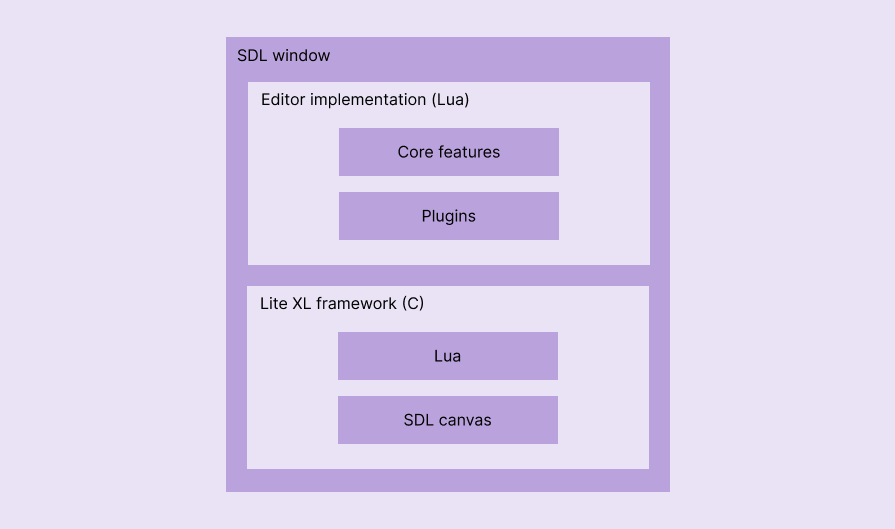
Both Lite and Lite XL apps use the same architecture, and they are native apps written using C with an embedded Lua interpreter:
How to install Lite XL?
You can download Lite XL portable versions or installers for Linux, Windows, and macOS from the official downloads page, download directly from GitHub releases, or build it on any supported platform by downloading the GitHub repository.
Lapce
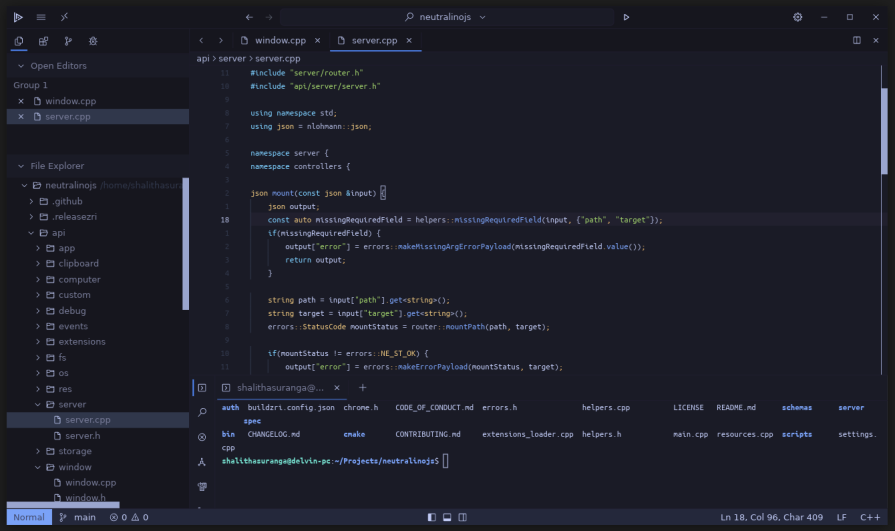
Lapce is a native Rust-based editor that deliberately mirrors VSCode’s layout and workflow, making it easier to switch without relearning core interactions. While not as minimal as some other native editors, it significantly reduces memory usage compared to VSCode and retains many modern IDE features. Lapce is best suited for developers who want familiarity without Electron’s overhead.
Highlighted features
- Lightweight: Uses about 60MB of disk space, with typical projects consuming around 90MB of RAM, significantly less than VSCode while remaining fully featured
- Minimal, modern, productive UI: Closely mirrors VSCode’s familiar layout, including a tree view, editor panes, and multi-tab terminal, easing migration
- Fast: Native, low-level rendering delivers smooth interaction compared to Electron-based editors, even on low- and mid-end machines
- More VSCode features: Implements syntax highlighting, formatting, linting, auto-completion, Git integration, debugger integration, command palette, and multi-tab terminal support, covering most daily workflows
- Modal editing: Includes built-in Vim-style modal editing for developers who prefer keyboard-driven navigation
- Themes: Provides built-in dark and light themes, with additional options available through the extension manager
- Growing plugin ecosystem: Supports plugins written in any language that compiles to WASI, with a VSCode-like GUI for discovering and installing extensions
Architecture
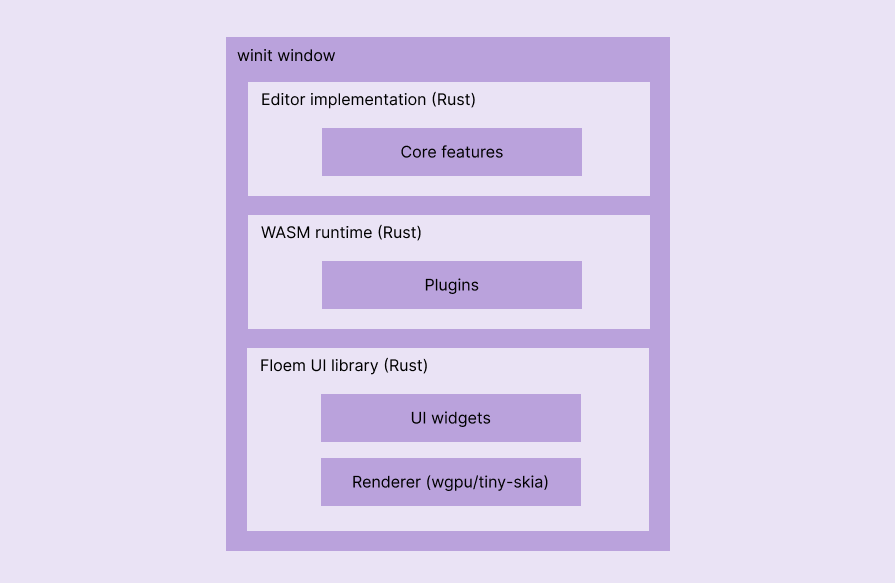
Lapce is a native app written purely in Rust. It uses the Floem cross-platform, native UI library that handles low-level GPU rendering via wpgpu and CPU-based rendering via a lightweight, Rust-based port of Skia called tiny-skia:
How to install Lapce?
You can download the latest Lapce portable package for Linux and installers for Windows and macOS from the official website.
Zed
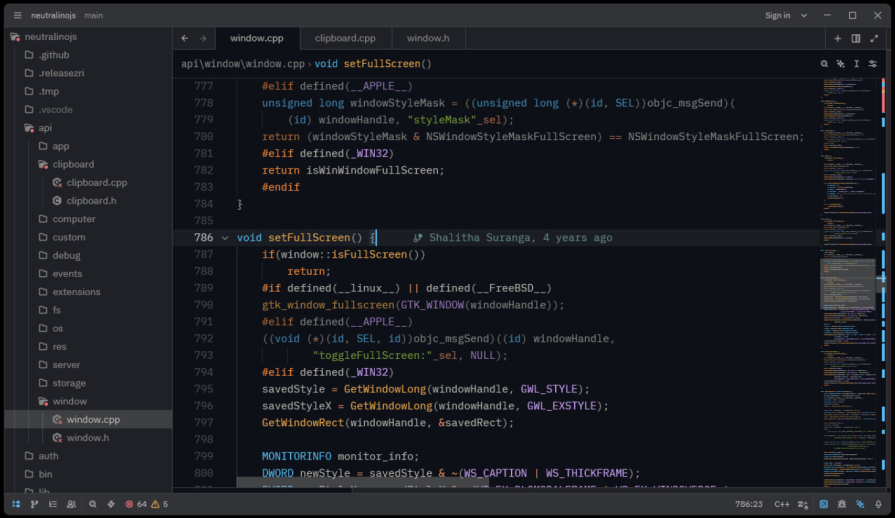
Zed is a modern, performance-focused native editor written in Rust that aims to compete directly with VSCode at the feature level. It is heavier than most other native alternatives, but still far more efficient than Electron-based editors. With built-in AI features, strong Git integration, and smooth onboarding for existing VSCode users, Zed positions itself as the most practical drop-in replacement for modern workflows.
Highlighted features
- Lighter than VSCode: Requires about 400MB of disk space, which is higher than other native editors, but average projects use roughly 90MB of RAM, about six times less than VSCode
- Minimal, modern, productive UI: Presents a clean interface that hides complexity while supporting advanced workflows and collaboration features
- Fast: Uses hardware-accelerated, low-level native rendering via platform GPU APIs to maintain smooth interaction on mid-range hardware
- A fully featured VSCode competitor: Offers AI-assisted coding, intelligent auto-completion, code folding, hover previews, remote development, full Git integration, linting, debugging tools, and other modern IDE features
- Modal editing: Includes built-in Vim and Helix modes for developers who prefer modal editing paradigms
- Instant migration: Improves onboarding by automatically applying keymaps from previously used editors such as VSCode, Sublime Text, and Emacs
- Batteries included: Ships with essential modern programming features enabled by default, reducing reliance on third-party extensions
- Competitive extensions ecosystem: Uses a WASI-based extension model that allows extensions to be written in multiple languages, with rapid ecosystem growth
Architecture
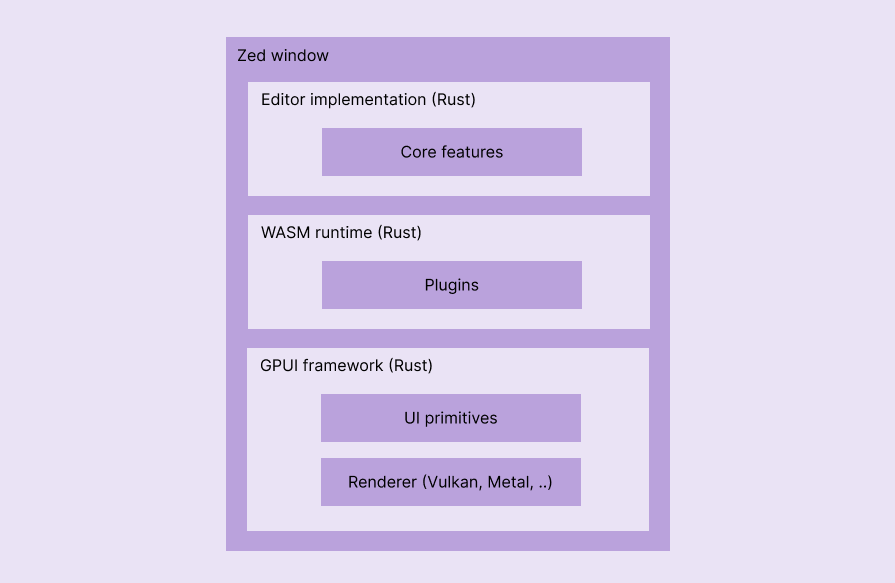
Zed is a native app written in Rust. It uses the GPUI cross-platform native UI library that handles hardware-accelerated, low-level rendering via platform-specific 3D graphics libraries like Vulkan, Metal, and DirectX:
How to install Zed?
You can download Zed for Linux, Windows, and macOS from the official downloads page.
VSCode vs. native alternatives comparison
The following comparison table summarizes VSCode’s and each native VSCode alternative’s features, architecture, and other characteristics:
| Comparison factor | VSCode | ecode | CudaText | Lite | Lite XL | Lapce | Zed |
|---|---|---|---|---|---|---|---|
| Approx. disk space requirement | 500MB | 50MB | 20MB | 1MB | 6MB | 60MB | 400MB |
| Approx. RAM usage (while working on an average-sized project) | 600MB | 40MB | 40MB | 20MB | 40MB | 90MB | 90MB |
| Look and feel | Modern, fully-featured | Retro IDE-like, modern | Retro IDE-like, modern | Ultraminimalistic, modern | Minimal, modern | Minimal, modern | Modern, fully-featured |
| Performance on low/mid-end computers | Slow | Extremely-fast | Extremely-fast | Extremely-fast | Extremely-fast | Fast | Fast |
| Plugins ecosystem status | Overloaded | Small | Growing | Small | Growing | Growing | Growing rapidly |
| Plugins written in | TypeScript/JavaScript | C++ (embedded into the software binary) | Python | Lua | Lua | Any WASI-supported language | Any WASI-supported language |
| Built-in modal editing support | No | No | No | No | No | Yes | Yes |
| Written in | TypeScript | C++ | Free Pascal | C and Lua | C and Lua | Rust | Rust |
| Underlying cross-platform framework | Electrom | eepp | Lazarus/Free Pascal libraries | None | None | Floem | GPUI |
| Rendering handled by | Chromium | OpenGL | Lazarus/Free Pascal libraries | SDL | SDL | wgpu or tiny-skia | GPUI (Vulkan, Metal, ..) |
| VSCode features availability (in a scale of 1 to 5) | — | 3/5 | 3/5 | 2/5 | 3/5 | 4/5 | 5/5 |
| Migration easiness as a long term VSCode user (in a scale of 1 to 5) | — | 2/5 | 1/5 | 1/5 | 4/5 | 5/5 | 5/5 |
| Simplicity and user-control during coding (in a scale of 1 to 5) | 2/5 | 5/5 | 3/5 | 5/5 | 5/5 | 3/5 | 2/5 |
| Code repository | GitHub | GitHub | GitHub | GitHub | GitHub | GitHub | GitHub |
Conclusion
VSCode’s rise reshaped how developers think about tooling. By prioritizing cross-platform reach, extensibility, and rapid iteration, it made powerful workflows accessible to a broad audience. But those same architectural choices also introduced trade-offs that become harder to ignore as projects grow and hardware constraints tighten.
The editors explored in this article illustrate that those trade-offs are not inevitable. Tools like Lite and Lite XL show how far performance can be pushed when simplicity is the goal. Lapce and Zed demonstrate that it is possible to retain familiar, VSCode-like workflows while dramatically reducing runtime overhead. Together, they point toward a different set of priorities: native rendering, predictable resource usage, and tighter control over complexity.
VSCode will likely remain the default editor for many developers. But its dominance is no longer uncontested. As native editors mature and close remaining feature gaps, they challenge the assumption that modern developer tools must be built on heavyweight web stacks. The result is not a single replacement for VSCode, but a more diverse ecosystem where performance, hardware constraints, and architectural choices once again matter.
The post 6 fast (native) alternatives for VSCode appeared first on LogRocket Blog.
This post first appeared on Read More