

Why most design specs fail developers — and how to fix yours
We all know that designers and developers sometimes have some hiccups during a project. However, we have a few guidelines to follow to avoid those roadblocks and improve communication across different teams.
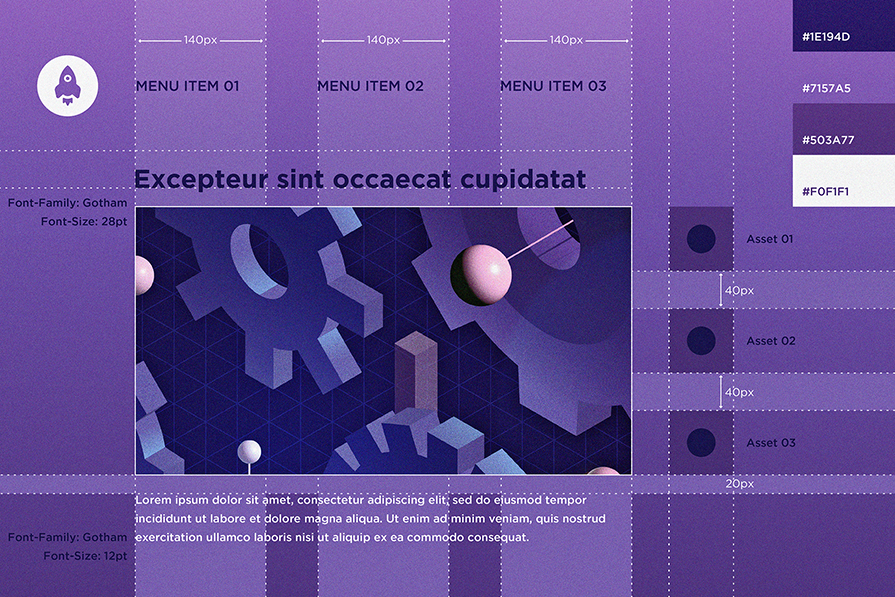
Designers create it, developers make it work. Can you imagine an app designed by engineers or developed by designers? It would be the worst app in history.
As designers, we must have a surgical eye for all UI elements like colors, fonts, alignments, margins, etc. Everything from our side must be pixel-perfect.
On the other hand, developers do not have this trained eye, and they don’t have to. They need to be masters of the technology behind the scenes and ensure all functionalities are working well. Developers turn the designer’s dream into a reality, but during the transition, developers see the dream differently.
Because of that, the development phase for design sometimes becomes stressful for both parties due to countless meetings, especially a few days after the official design handoff. Chaotic design-to-code transitions can eventually delay the product shipment.
Let’s learn how to make design handoff smooth and enable fast product shipping by creating a better, developer-focused design spec before handing off your product prototype to the developers.
Editor’s note: This article was substantially updated in January 2026 by Shalitha Suranga to reflect real-world development workflows. The revision adds depth around states, system logic, platform realities, technical constraints, and realistic data — reframing design specs as tools for building, not just documenting designs.
How do developers read designs?
UI/UX designers create and read product designs from the graphic design perspective. They typically work with colors, typography, visual layers, UI block arrangement, and care about how tiny pixels construct a product interface. That’s not how developers read designs before re-creating them in the real development environment.
Developers read designs from the real implementation feasibility perspective by observing:
- Screens and layout — How many screens should be created and different layouts using their UI design framework/library capabilities, i.e., using the row-column layout system in Flutter
- Components — Which segments can be turned into reusable components, and their composition
- State — States of atomic components and how user actions affect the global app state
- Functionality and connectivity — What are the core functions that trigger with user actions? How do they connect to form the whole functional product?
Since developers prioritize the above factors, providing just a design prototype eventually creates a prototype-like functional product — not the same look and feel designers imagined through design. A design spec addresses this designer-developer design reading gap and enables developers to create the exact look and feel of the prototype at a pixel-perfect level.
What is a design spec?
A design spec is a document or a set of documents where you should specify all UI aspects like colors, styles, margins, alignments, sizes, assets, and so on. In addition, it should include a map of functionalities like related strategies, user flows, pipelines, and every other document you’ve used to plan your design. The goal of the design spec is to provide a blueprint of the designed product to support developers in building the exact product as it is designed by UI/UX designers to satisfy all user and organization requirements.
It delivers exact visual and behavioural properties to the final product through the development process, when developers read the product design from a functionality-first mindset to build the real functional product:
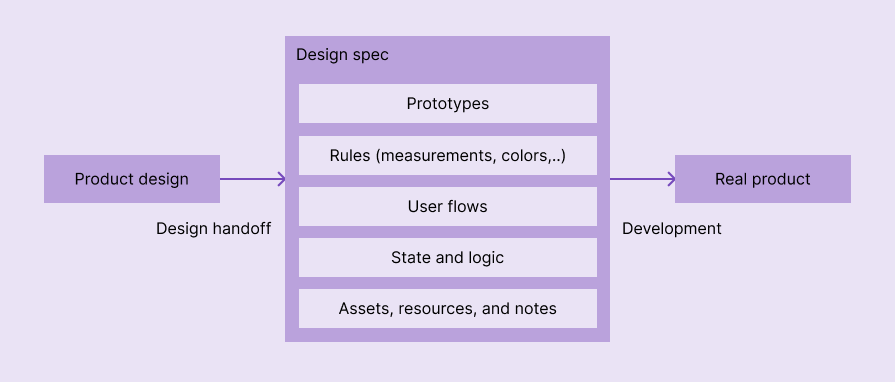
The design spec is not only useful for designers and developers but also for product and quality analysis teams. They should have access to it, understand the flow and its requirements, and ensure the design meets business expectations.
Benefits of a developer-focused design spec?
When a design spec becomes more developer-focused, meaning when it delivers visual properties of the design in a way that developers can productively use for building the real product, the following benefits can be guaranteed:
- Smooth design handoff — Imagine a calm design handoff where you continue with your usual design tasks without spending time helping developers understand the prototype and explaining to them your imagination of the product in endless meetings
- A design handoff that ends early — A developer-focused design spec shortens the design handoff phase since it provides every tiny detail that developers need to build the real product in the way they expect
- Improves the overall product development process — No guesswork, reduced rework, reduced time-consuming designer-developer meetings, and a developer-friendly product blueprint eventually create the exact product as designers imagined it through a smooth development process
- Fast product shipping — Smooth design handoff and streamlined product development enable fast product releases under optimized development budgets
What are the differences between design specs, design systems, and style guides?
As we said, a design spec is a file or a set of files with the design aspects, assets, flows, and prototypes that are relevant only for the project you are working on.
Meanwhile, a style guide is a set of rules and standards that help creatives maintain a consistent and professional brand identity across different media and platforms. It covers how to apply visual elements, such as logos, colors, fonts, and images, as well as how to write and edit content, such as tone, voice, grammar, and punctuation.
Lastly, a design system is a framework that guides designers and developers to create consistent products. Unlike style guides, which focus only on UI and writing, a design system includes technical aspects, such as pieces of code, components, and best practices.
Now that we know the term for design specs (and what it isn’t), let’s get into making one that makes the design handoff smooth and helps ship your product faster.
Design specs step-by-step
Here is a step-by-step approach for creating a better, developer-focused design spec:
1. Show measurements
Once your designs are done, duplicate every single screen and start to add measurement details, including width, height, and space (margin). For example, look at the measurement details added to the following simple card element:
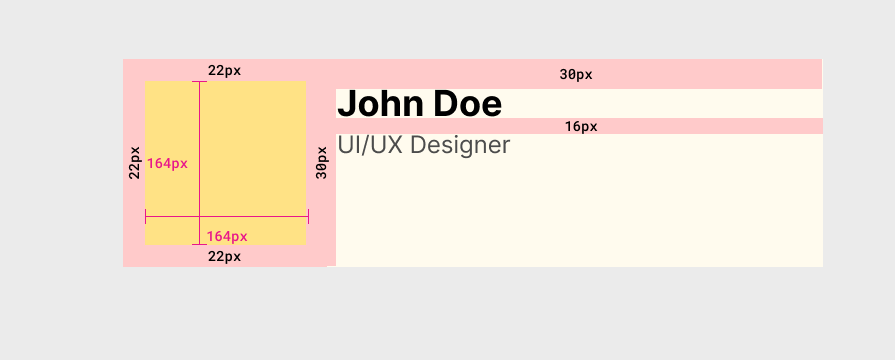
Make sure that these measurements are exact and have a suitable metric, like pixels, so developers can use them in the real product implementation without asking you to double-check metrics.
2. Display color codes
Colors are crucial elements on the UI, so you must ensure developers are adding exactly the shade you need. To do this, copy and paste the color code provided by your design tool into your design specs:
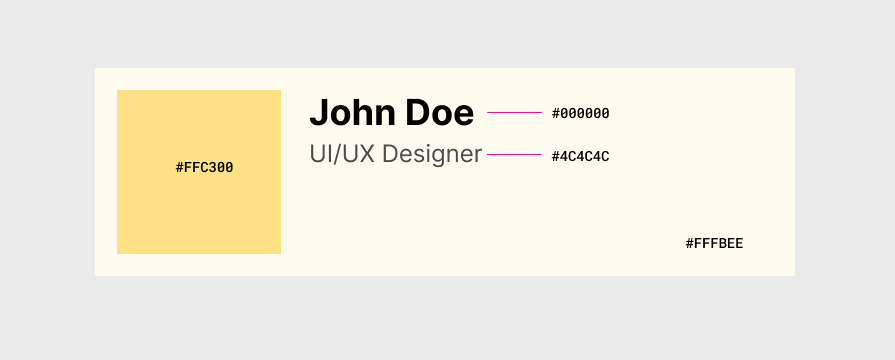
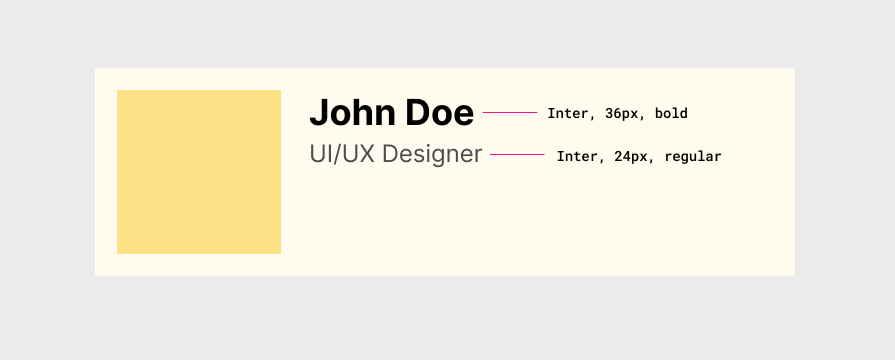
3. Add typography details
Add typography details for every different text element you use throughout the design. Typography details include font, size, weight, and styles. Once you add this, you no longer need to frequently nitpick typography bits in the real product. Here is an example of typography details in a simple card element:
4. States
Add UI element status clearly with a description, so developers don’t invent new, confusing component states or ping you asking how a state of a specific component looks during your next UX meeting. Here is how the Material button design specification clearly lists all button states under the States section:
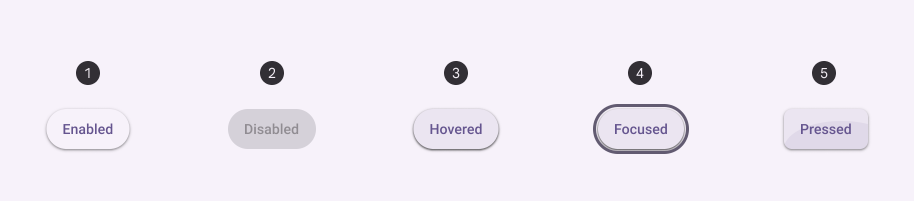
Thinking a bit from the technical aspect during design can save many developer hours and your time on design updates as well. For example, clearly including a loading state with a proper design (e.g., skeleton loading) in the design spec by identifying it at the design stage is better than handing over the design without a proper loading state and letting developers do guesswork or contact you.
Moreover, using better, realistic text instead of “lorem ipsum” placeholder text helps developers easily differentiate between states and implement the right state for the right place. For example, see how the above Material spec sample uses “Enabled”, “Disabled”, etc., instead of just random text.
5. Assets
Put all relevant assets into one folder and share it with everyone involved. An asset pack should include:
- Images and videos — All images and videos you used in the prototype should be in a format that the developer expects. e.g., a high-quality WebP or PNG image for a hero section image
- Icons — High-quality icon versions, usually in SVG format. Icon formats and sizes for special icon resource requirements on platforms, app stores, etc., e.g, iOS icons set
- Fonts — All font files you used for text elements
However, you might think, “Devs have access to Zeplin or Figma Dev Mode. Why should I waste my time doing it?”
It is definitely not a waste of time at all. By doing it, you will make sure they will not miss any part of your design and also avoid messages asking for it.
Let’s picture a scenario here: A developer needs an SVG to add an icon. This person sends you a message asking for it, but you are having lunch and will answer only after one hour. If you have saved all assets in the same place and shared them with everyone involved, this hour would not be wasted.
To find asset formats and dimensions that developers expect, you can contact developers before the handoff process.
6. User flows
Adding all user experience flow details is crucial for good communication among product, design, and development.
At this stage, the designer and the product manager should catch up and write down every single aspect, trying to make the language in the document easy for everyone involved to understand.
Depending on the company, this part could be written by the product manager. However, it doesn’t mean the designer should not help with this process. Both professionals should be on the same page to pitch the flow to the developers, avoiding possible flaws.
One tip is to write pretending you are the user, see the example below:
As a user, I want to click on the logo and go back to the home page.
- The logo is placed on the left side of the page.
- The logo has a link to the homepage.
- Once the user clicks on it, they will be redirected to the home page.
I know it sounds repetitive and sometimes even silly, but we must ensure everyone understands it perfectly, so we need to write down the process with every single aspect explained in detail.
This textual user flow explanation works perfectly for simple flows, but you should present long, complex flows using flow diagrams you created during the UX process, so developers can easily understand the app behavior, and they will implement the whole product behavior as you decided. Also, make sure that the prototype’s user flows and user flow diagrams are synced.
7. Design resources
Design spec isn’t always a single, isolated document — it’s a file that presents design instructions along with prototypes, design files, inspectable prototype links (e.g., Figma Dev Mode links), assets, user flows, and all design resources.
Gather all other design resources, including design notes, meeting highlights, and everything that helps developers build the exact product as designed. However, avoid adding verbose notes, incomplete design files, or any other early design material that doesn’t help development much — always provide final, concise, clear information that is related to the product spec.
8. Platform adaptiveness and limitations
As designers, we design various products, including web, desktop, and mobile. In some scenarios, we design a single app that adapts to multiple platforms. Developers will turn our final design into a real product that runs on various operating systems, web browsers, or custom app runtimes (e.g., Flutter), which comes with various limitations and UX recommendations.
Creating the design spec with platform adaptiveness and limitations in mind avoids costly workarounds that developers will have to implement in the future, and eventually helps the whole team ship the product faster.
Here are some examples of including platform-related details:
- Mentioning that a specific hover segment will appear as usual on desktop platforms, but it will appear on screen tap on mobile platforms
- Listing both standard and macOS keyboard shortcut keys separately for a feature due to the command, option, control, and alt key differences among keyboard layouts
- Adding a note about a cross-platform app window can appear differently based on the OS, so designers won’t think about implementing custom window solutions
To understand platform-specific UX and limitations, you can read platform documentation collaboratively with developers even at the early stages of product design.
8. Gather everything in one place
We have in the market tons of tools that help us organize our Agile environment, tools like Jira and Monday. Normally, scrum teams have their backlog on those tools, and the design spec will be one more (or many more) ticket(s) on their list.
It is a good idea to attach all the things we mentioned before to this ticket. Otherwise, we could miss an important piece of the puzzle.
The key idea is to present the design spec through a standard ticket or something you can track development progress and collaborate with developers.
9. Communication is key
Talking to developers is mandatory, but not only when handing off your work to them.
You should include their team early on in the design process, showcasing your research, ideas, and mostly the prototypes to avoid any roadblocks.
Here are some example early communication scenarios that eventually help finalize an effective, developer-focused design spec:
- Discussing the platform and other technical constraints before finalizing low-level prototypes
- Discussing the feasibility of implementing user flows that are related to some technical aspects like authentication, network usage, and permission handling. e.g, discussing authentication flow differences if social logins are used vs. traditional passwords are used
Once all the design spec files are ready and the tickets are written, now is the time to finally hand them off.
We normally have “refinement” sessions with the entire scrum team (including architects, engineers, a product manager, quality analysts, and, of course, the designer). At this stage, we go over the design spec ticket and make sure all aspects are clear to everyone involved. Normally, those meetings are led by the product manager, and the designer might interject whenever necessary.
As I said before, those calls are refinement meetings. They exist to refine what is written on the ticket, to ensure everybody gets the meaning of the flow, and sometimes even to rethink the designs. Back and forth could happen, and we should be prepared; however, eventually, these back-and-forth discussions and final tweaks make the design spec clear, more developer-focused, and realistic for building the real product.
Recording this meeting for later reference is also a good idea.
10. Design handoff tools
The manually composed design spec with the above elements is enough to build the product, but using modern handoff tools adds extra productivity and collaboration features for both designers and developers, including design version control, better user flow visualization, inspectable designs, etc. So, during the handoff, using a dedicated design handoff tool like Zeplin or using built-in handoff features like Figma Dev mode is a good idea:

Regardless of using a design handoff tool, be certain that the original design spec document is very well organized and contains all mandatory elements we discussed above. However, you can decide on using design spec rules (measurements, typography details, colors, etc.) vs. inspectable design mode in handoff tools by discussing with developers; some development teams may prefer traditional spec rules, but some teams would love to use modern inspectable designs.
11. After the refinements, what happens?
You had a few refinement meetings, where you discussed all design aspects and the developers “sized” them using Agile methods. So, now your work is done? I’m sorry to inform you, but no.
After development, a design review is mandatory because even with those countless meetings and documents you shared, you could miss some pieces of the puzzle. Again, developers do not have the trained eye you have to see small details, and we all know small details matter a lot because they have a huge impact on the user experience.
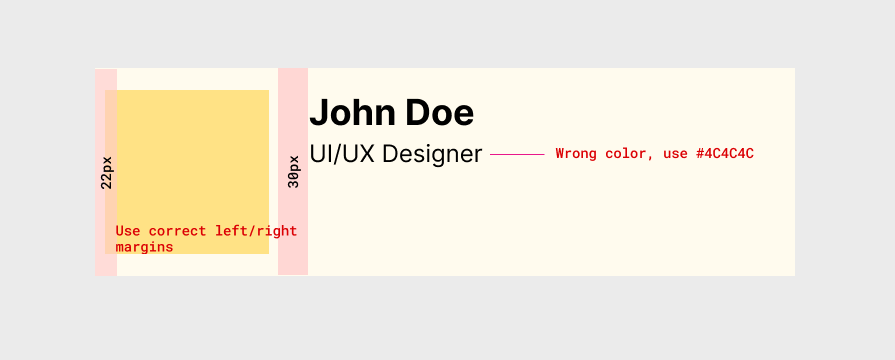
The review will be another simple document. It could be a Word document, an Excel sheet, or an extra ticket with all the small fixes the developers need to make. The idea is to list all the tiny UI/UX-related differences between the real implementation and the product prototype, so developers can eventually make the product and design identical at the pixel-perfect level.
Once this document is ready, maybe an extra screenshot with the missing details could help you to explain issues to them better:
Conclusion
To conclude, the steps to create an effective, developer-focused design spec to enable fast product shipping are:
- Communicating properly with developers since the beginning of the project, especially about platform and technical limitations, and user flow implementation feasibility
- Create images with all visual specifications (margin, colors, font-family, font-size, etc.)
- Include all assets in the document. It could be a ZIP file attached to the design spec ticket or a link to a cloud storage folder where you placed them all
- Write the user flow tickets pretending to be the user (As a user, I need/want to…)
- Include the entire user flow on those tickets, and make sure to include the finalized diagrams that developers can use as a trustworthy reference
- Add to the ticket the user flows, high-fidelity prototypes, low-fidelity prototypes, and even your sketches, which could be helpful for a better understanding of the low-level UX perspective
- Keep your designs organized. Use version control and design management features in design handoff tools if your company decides to buy their licenses
- Wait until the end of the development to conduct a design review and make refinement tickets with a concise description, with screenshots of the real product
Once you get used to it, you will see how handy a design spec is and how natural it will become to you when you are working on your designs and delivering them to the development team.
Creating an effective, developer-focused design spec not only helps developers build the real product as you imagined through prototypes, but also makes the design handoff smoother and enables fast product shipping, while maintaining quality standards.
The post Why most design specs fail developers — and how to fix yours appeared first on LogRocket Blog.
This post first appeared on Read More