
The System Design Interview framework to crack FAANG/MAANG Interviews in 2026
Helllo friends, for months, I felt confident about system design interviews.
I’d watched endless YouTube videos. I’d studied architecture diagrams. I could explain how Netflix builds recommendation systems. I understood Kafka, Redis, load balancers, and microservices. I’d memorized the designs of Twitter, Uber, YouTube, and TinyURL.
Then I sat down for my first real system design interview and froze.
The interviewer asked: “How would you design a notification system?”
I had memorized notification systems. I knew about push notifications, email queues, delivery workers, and retry logic. I could recite architectural patterns.
But suddenly, none of that helped.
I didn’t know which questions to ask first. I started designing before understanding the actual requirements. I built architecture for problems that didn’t exist. I missed obvious bottlenecks.
I couldn’t articulate why I made specific trade-offs. When the interviewer pushed back, I had no framework to adjust.
I failed that interview.
But that failure taught me something crucial: System design interviews aren’t about knowing technologies. They’re about knowing how to think.
After that, I went back and practiced 20 system design problems systematically. Not passively watching solutions. Actually designing. Making mistakes. Refining my approach. And somewhere around problem 12, a pattern emerged.
The best candidates didn’t know more technologies than anyone else. They had a framework.
They asked the same questions in the same order. They structured their thinking consistently. They could handle curveballs because their framework was flexible. They reasoned through trade-offs explicitly.
Here’s the framework that finally made it click for me.
The Problem with Memorization
Before I share the framework, let me explain why memorizing designs fails.
When you memorize “How to Design Twitter,” you learn:
- Use relational databases for users and tweets
- Use NoSQL for timelines
- Cache with Redis
- Use message queues for fanout
- Shard by user ID
- etc.
But here’s the problem: The next problem won’t be Twitter.
It might be Design TicketMaster (a reservation system with high volume and tight deadlines). Suddenly, your Twitter knowledge is partially relevant but mostly confusing.
You start applying Twitter patterns to a problem with completely different constraints. You over-engineer or under-engineer. You miss the actual bottleneck.
Memorization creates false confidence. You think you’re prepared because you know technologies. But system design isn’t about knowing technologies. It’s about knowing how to apply them to a specific problem.
The real skill is: How do you take an open-ended problem, ask the right questions, structure your thinking, reason through trade-offs, and evolve the design under pressure?
That’s what a framework gives you.
The Framework: 8 Steps to Structured Thinking
After practicing dozens of problems, I distilled system design into this simple framework:
1. Clarify the Requirements
What: Ask clarifying questions before designing anything.
Why: False assumptions sink designs. You need to understand what you’re actually building.
Questions to ask:
- What are the functional requirements? (What should the system do?)
- What are the non-functional requirements? (Scale, latency, consistency, availability?)
- Who are the users? What’s their usage pattern?
- What’s the expected traffic? Read/write ratio?
- Do we need strong consistency or eventual consistency?
- What’s acceptable latency?
Example: “Design a notification system”
- Clarify: Is this in-app notifications, push notifications, email, SMS, or all?
- What’s the scale? Millions of users?
- What’s the expected latency for notification delivery?
- Does every notification need to be delivered exactly once, or is some loss acceptable?
- Do we need real-time delivery or can we batch?
Don’t skip this step. Most engineers jump straight to architecture. But clarification prevents wasted effort on problems that don’t exist.
2. Estimate the Scale
What: Do back-of-envelope calculations to understand scale.
Why: Scale determines architecture. A system for 1000 users needs different architecture than 1 billion users.
Key metrics:
- Daily Active Users (DAU)
- Requests per second (QPS)
- Data storage needed
- Bandwidth requirements
Example: For a notification system with 1 billion users:
- If 10% are active daily = 100 million DAU
- If each active user generates 5 notifications = 500 million notifications/day
- 500M / 86400 seconds ≈ 5,787 QPS
- This tells you: you need a system that handles thousands of notifications per second
This simple calculation shapes everything that follows. It tells you whether you can get away with simple solutions or need distributed systems.
3. Define the Core APIs
What: Write the API contracts for the system.
Why: This forces you to clarify the interface before building internals. It’s the contract between clients and your system.
Example: For a notification system:
createNotification(userId, title, body, type, metadata)
getUserNotifications(userId, limit, offset)
markAsRead(notificationId)
getUserPreferences(userId)
updateUserPreferences(userId, preferences)
These APIs are simple, but they define what your system must support. Everything else is implementation detail.
4. Design the Data Model
What: Define database schema and data structures.
Why: This reveals how data flows through the system. Bad data models cascade into bad architecture.
Example: For notifications:
Users table:
- userId (PK)
- username
- preferences
Notifications table:
- notificationId (PK)
- userId (FK)
- title
- body
- type
- createdAt
- readAt
UserPreferences table:
- userId (PK)
- pushEnabled
- emailEnabled
- smsEnabled
- quietHours
Now you’re thinking about:
- How do you query user preferences efficiently?
- How do you find unread notifications for a user?
- How do you handle delivery status?
The data model reveals design requirements.
5. Build the High-Level Architecture
What: Sketch the major components and how they interact.
Why: This is where technologies come in. But only after you understand the problem.
Example: High-level architecture for notifications:
API Server
  ↓
Notification Service (validates, stores)
  ↓
Message Queue (decouples creation from delivery)
  ↓
Delivery Workers (push, email, SMS)
  ↓
Delivery Services (external APIs)
Each component has a specific responsibility. The message queue decouples creation from delivery (allowing backpressure). Delivery workers handle multiple channels.
6. Identify Bottlenecks
What: Explicitly state where the system will break under load.
Why: This prevents over-engineering in wrong places and under-engineering in critical ones.
Example: For notifications, bottlenecks might be:
- Database writes when millions of notifications created simultaneously
- Message queue throughput
- Delivery worker capacity
- External API rate limits
Identifying bottlenecks reveals where you need optimization.
7. Discuss Trade-Offs
What: Explain why you chose specific technologies and what you’re sacrificing.
Why: Every architecture decision has trade-offs. Being explicit shows thinking, not just pattern matching.
Example:
- Why Kafka for the queue? Durability (survives failures), high throughput, replay capability. Trade-off: complexity vs. simpler queue.
- Why eventual consistency for preferences? Users don’t need real-time preference updates. This allows caching and reduces database load. Trade-off: brief window where old preferences are used.
- Why shard by userId? Distributes load evenly. Trade-off: cross-user queries become complex.
Notice the pattern: Every choice has a reason and a cost.
8. Evolve the Design Based on Constraints
What: When interviewer introduces new requirements, adjust systematically using the framework.
Why: Interviews include surprise requirements. A good framework handles change.
Example: Interviewer adds: “Delivery must be guaranteed. No lost notifications.”
Now you need to:
- Add delivery status tracking (Step 4 — update data model)
- Add retry logic and dead-letter queues (Step 5 — architecture)
- Discuss idempotency for retries (Step 7 — trade-offs)
You don’t panic. You follow your framework and adjust each section.
Walking Through a Complete Example: Notification System
Let me apply this framework end-to-end so you see how it works.
1. Clarify Requirements
Me (candidate): “Before I design, let me clarify the requirements:
- Functional: We need to send notifications to users through multiple channels: in-app, push, email
- Non-functional: 1 billion users, 10% daily active. Need to handle 5,000+ notifications per second
- Consistency: Eventual consistency is fine. Users don’t need real-time preference updates
- Latency: In-app notifications should appear within seconds. Email can be minutes
- Delivery: Best effort initially. We can improve to guaranteed delivery later”
Interviewer: “Good. Add: We need analytics. Track delivery success/failure rates.”
2. Estimate Scale
“So with 1B users, 10% DAU = 100M active users.
- If each generates 5 notifications/day = 500M notifications/day
- 500M / 86,400 = ~5,787 QPS baseline
- But peaks could be 5–10x, so we need to handle 30,000+ QPS
- Storage: 500M notifications/day × 365 days × 500 bytes ≈ 90TB/year
- This tells me we need: distributed database, queuing system, and batch processing”
3. Define Core APIs
POST /notifications/create
  - userId: string
  - title: string
  - body: string
  - channels: [in-app, push, email]
  - metadata: object

GET /users/{userId}/notifications
  - Returns: paginated list of notifications
PUT /notifications/{notificationId}/read
  - Marks notification as read
GET /users/{userId}/preferences
  - Returns: user's notification preferences
PUT /users/{userId}/preferences
  - Updates: user's notification preferences
GET /analytics/delivery-stats
  - Returns: delivery success/failure rates
4. Design Data Model
Users:
- userId (UUID, PK)
- phone
- createdAt
Notifications:
- notificationId (UUID, PK)
- userId (FK, indexed)
- title
- body
- channels (array/enum)
- createdAt (indexed)
- readAt
- metadata (JSONB)
DeliveryLog:
- deliveryId (UUID, PK)
- notificationId (FK)
- userId (FK)
- channel (enum: in-app, push, email)
- status (pending, sent, failed)
- attemptCount
- lastAttemptAt
- error
UserPreferences:
- userId (PK)
- pushEnabled
- emailEnabled
- smsEnabled
- quietHours
- unsubscribedCategories (array)
- updatedAt
NotificationQueue:
- queueId (UUID)
- notificationId (FK)
- status (pending, processing, completed, failed)
- createdAt
- processedAt
Notice: I’m not overthinking this. Simple schema that answers questions: “How do I find unread notifications?” (query by userId, readAt IS NULL). “How do I track delivery?” (DeliveryLog table).
5. Build High-Level Architecture
┌─────────────────────────────────────────┐
│         Client Applications             │
│ (Web, Mobile, Admin Dashboard)          │
└──────────────┬──────────────────────────┘
               │
┌──────────────▼──────────────────────────┐
│      Notification API Service           │
│ - Validates requests                    │
│ - Stores notifications                  │
│ - Checks user preferences               │
└──────────────┬──────────────────────────┘
               │
┌──────────────▼──────────────────────────┐
│      Apache Kafka (Message Queue)       │
│ - Decouples creation from delivery      │
│ - Handles backpressure                  │
│ - Enables replay for debugging          │
└──────────────┬──────────────────────────┘
               │
    ┌──────────┼──────────┐
    │          │          │
┌───▼──┐  ┌───▼──┐  ┌───▼───┐
│In-App│  │Push  │  │Email  │
│Worker│  │Worker│  │Worker │
└───┬──┘  └───┬──┘  └───┬───┘
    │         │         │
    └─────────┼─────────┘
              │
    ┌─────────▼─────────┐
    │  Notification DB  │
    │  (PostgreSQL)     │
    └───────────────────┘

┌──────────────────────────┐
│  External Services       │
│ (Firebase, Twilio, etc.) │
└──────────────────────────┘
Each worker handles one delivery channel. They pull from Kafka, attempt delivery, log results. Simple but scalable.
6. Identify Bottlenecks
“The bottlenecks are:
- Database writes: Creating 5,000+ notifications/second. Solution: Shard by userId, use write-optimized database
- Kafka throughput: Need to handle 5,000+ msgs/sec. Solution: Partition by userId, scale consumer groups
- Delivery workers: Must keep up with Kafka output. Solution: Auto-scale based on queue depth
- External API limits: Firebase, email services have rate limits. Solution: Queue locally, respect rate limits, retry backoff
- Storage growth: 90TB/year. Solution: Archive old notifications, tiering strategy”
Now I know where to optimize, not where to panic.
7. Discuss Trade-Offs
“Important trade-offs:
Message Queue (Kafka vs RabbitMQ):
- Chose Kafka: High throughput (5K+ msgs/sec), persistent (survives worker crashes), partition support
- Trade-off: More complex to operate than RabbitMQ
Eventual Consistency vs Strong Consistency:
- Chose eventual: Preferences cached in workers, updated every 5 minutes
- Trade-off: Users might see outdated preferences briefly. Worth it for 10x less database load
Shard by userId vs Shard by Time:
- Chose userId: Distributes load evenly, straightforward
- Trade-off: Some queries (all notifications in time range) become complex
Best-Effort Delivery vs Guaranteed:
- Starting with best-effort: Simpler, sufficient for most notifications
- To upgrade: Add deduplication, idempotency, longer retries. Tradeoff: Added complexity
These aren’t random choices. Each is explicitly reasoned.”
8. Evolve on Feedback
Interviewer: “What if we need to guarantee notification delivery? No lost notifications.”
“Then we need:
- Idempotency keys (Step 3): Each notification gets a unique key. Retries with same key are idempotent.
- Deduplication (Step 5): If a notification is retried, we don’t create duplicates.
- Longer retention (Step 4): Keep delivery logs longer for audit trails.
- Checkpoints (Step 5): Mark notifications as delivered only after confirmation.
- Dead-letter queue (Step 5): Send undeliverable notifications to a queue for manual review.
We still use the same core architecture. We’re just adding layers of reliability.”
Notice: I didn’t redesign from scratch. I followed the framework, identified what needs to change, and evolved systematically.
Why This Framework Works
This framework works because:
- It’s systematic — You follow the same steps for every problem. Consistency reduces panic.
- It’s independent of technologies — You clarify requirements before choosing technologies. You’re not forcing Kafka into every problem.
- It’s flexible — When requirements change, you know which step to revisit. New requirement? Update clarifications → re-estimate → adjust architecture.
- It’s interviewable — Interviewers see clear thinking, not pattern matching. When they push back, you can adjust confidently.
- It’s complete — You think about requirements, scale, APIs, data, architecture, bottlenecks, and trade-offs. Nothing is forgotten.
Building Intuition Through Practice
Knowing the framework is one thing. Applying it under pressure is another.
I practiced this framework on problems like:
- Design a Simple URL Shortening Service (TinyURL) — Simple requirements, teaches API design
- Design Twitter — Complex scaling, feeds, fanout
- Design TiketMaster — Time-sensitive, high concurrency, inventory management
- Design an API Rate Limiter — Small problem, teaches precision
- Design Pastebin — File storage, sharing, expiration
- Design a Video View Count System — High-frequency writes, eventual consistency
- Design Craigslist — Search, filtering, inventory
- Design a Nested Comments System — Hierarchical data, efficiency
- Design an Online Presence Indicator Service — Real-time updates, scale
- Design a Tagging Service — Performance, caching, consistency
- Design a Fitness Tracking App — Mobile-first, time-series data
- Design a Weather Reporting System — Data aggregation, multiple sources
- Design a Multi-Device Screenshot Capture System — Distributed processing, file handling
- Design a Conference Room Booking System — Scheduling, conflicts, availability
- Design an Employee Swap System — Complex state machine, transactions
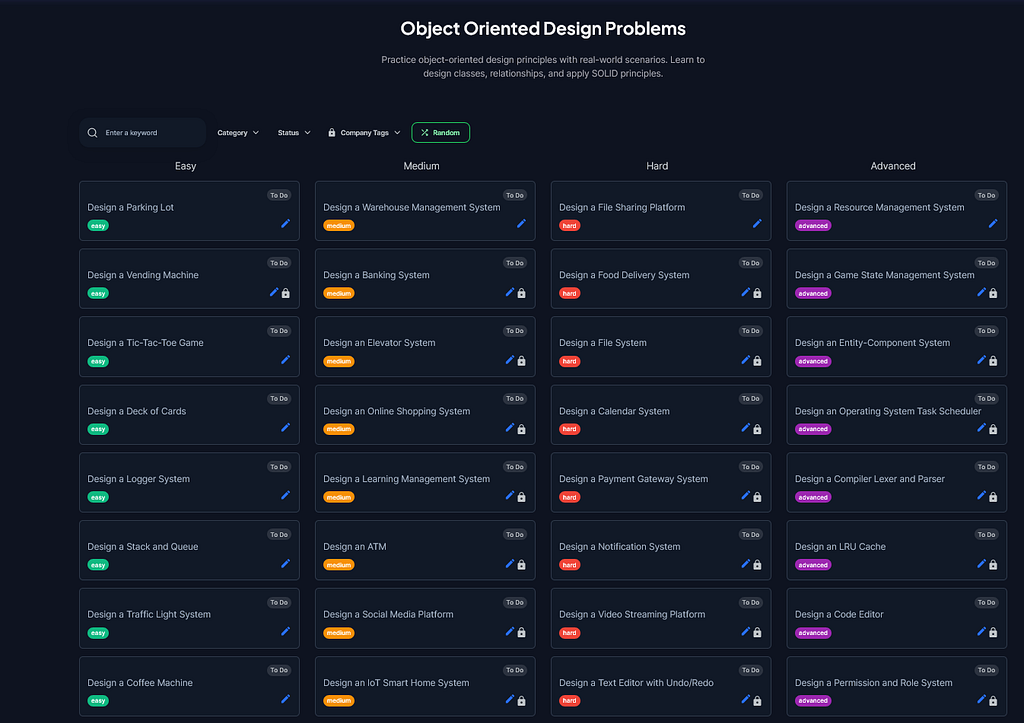
Plus object-oriented design problems like:
- Design a Parking Lot System — Teaches low-level design
- Design an Elevator System — State machines, coordination
- Design a Vending Machine System — State, inventory, transactions
- Design a Resource Management System — Allocation, scheduling
Each problem reinforced the framework. Some required emphasis on different parts (TinyURL: API and data model; Twitter: architecture and bottlenecks; Rate Limiter: algorithms and precision), but the framework held.
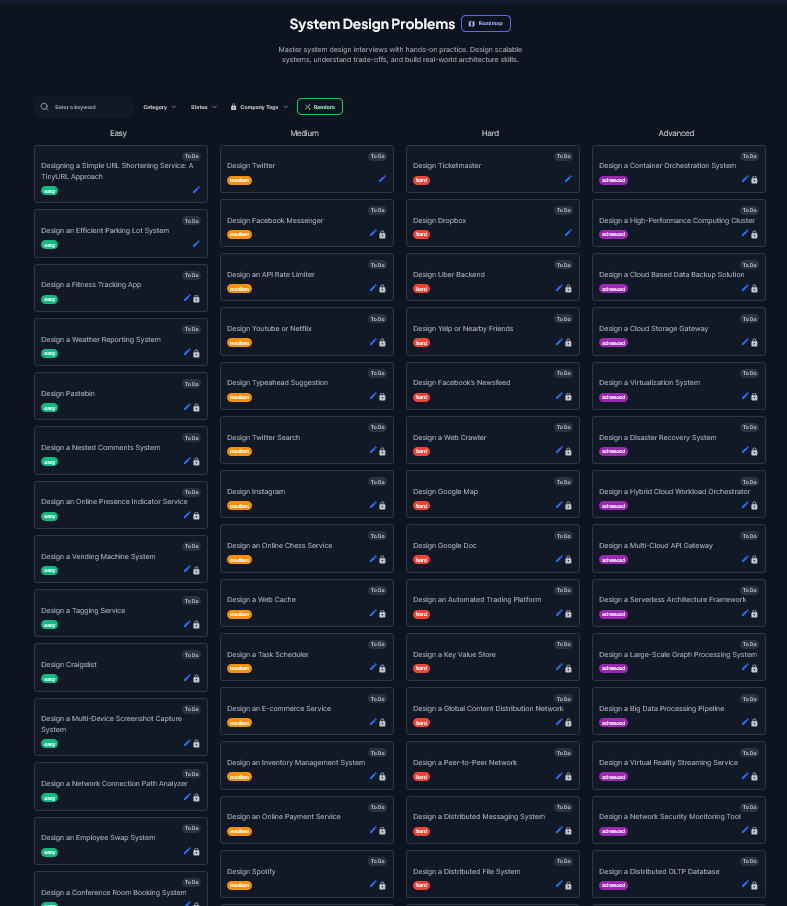
You can see the full list of system design problems here:
The Path from Theory to Confidence
This is the journey:
- Week 1: Watch YouTube videos, feel confident about technologies
- Week 2–3: Practice 5 problems, realize you don’t have a system
- Week 4–6: Practice 10 more problems, start seeing patterns
- Week 7–10: Practice 10 more, the framework crystallizes
- Week 11+: You trust the framework. New problems don’t panic you
By problem 20, you’re not memorizing designs. You’re executing a proven system under pressure. That confidence is what actually matters.
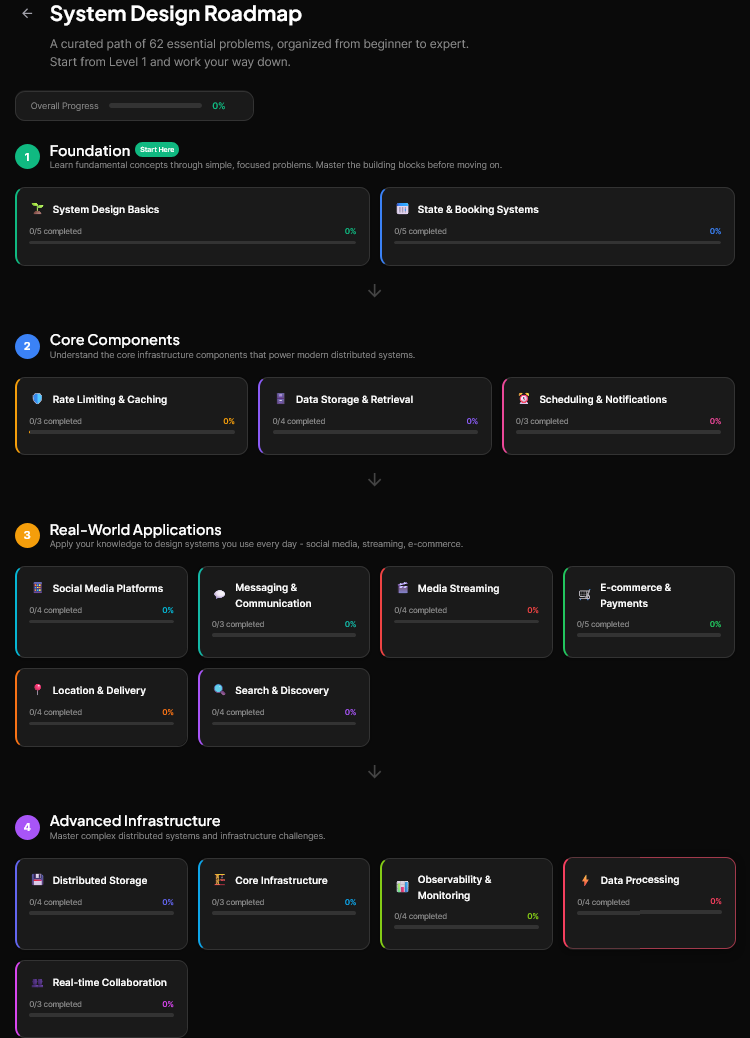
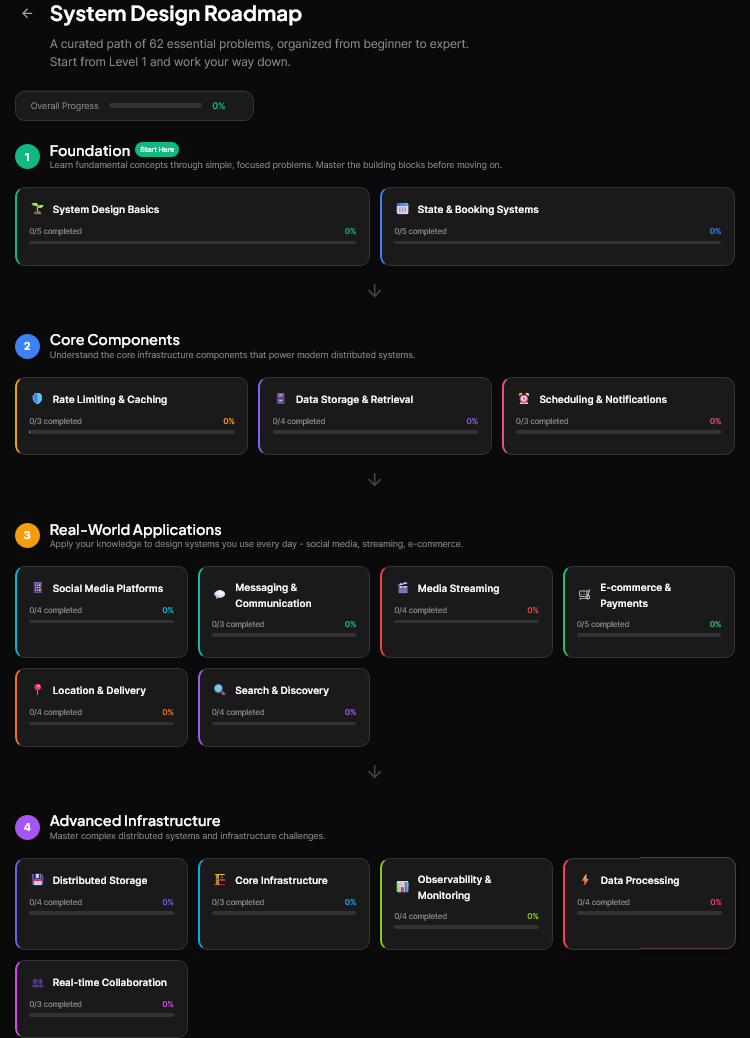
Here is also a curated list of System Design problems you can start solving to crack System Design Interviews:
Where to Practice This Framework
If you want to build intuition with this framework, you need a platform designed for practice. Reading articles or watching videos is passive. Actually designing, getting feedback, and iterating is how it clicks.
Codemia.io is purpose-built for this. It’s not a course. It’s a practice platform with:
- 120+ system design problems across difficulty levels (Easy, Medium, Hard)
- Expert solutions for each problem, showing how professionals think
- Interactive design tools to sketch architecture while practicing
- AI-powered feedback that evaluates your design against best practices
- Difficulty progression (Easy → Medium → Hard) so you build gradually
- Company tags so you practice problems actually asked at FAANG
For structure, they also offer:
- Free course: Tackling System Design Interview Problems — Teaches the fundamentals
- System Design Fundamentals — Deeper dive into core concepts
- Mock interviews — Simulate real interview pressure
- Object-Oriented Design section — For low-level design interviews
This is where you apply the framework repeatedly until it becomes intuition.
Final Thoughts
System design interviews have intimidated me for years. I thought I needed to know more technologies, memorize more designs, understand more patterns.
But after practicing 20 problems and refining this framework, I realized: The skill isn’t in knowing more. It’s in thinking more systematically.
The framework gives you that system. Use it:
- Clarify before you build
- Estimate to understand scale
- Define APIs to clarify contracts
- Design data to reveal problems
- Build architecture only after understanding the problem
- Identify bottlenecks explicitly
- Discuss trade-offs to show reasoning
- Evolve smoothly when requirements change
Apply this framework consistently. Practice on real problems. Get feedback. Refine.
By your 20th problem, you won’t memorize designs. You’ll execute a proven system under pressure. And that’s what separates candidates who fail from candidates who pass.
Good luck. You’ve got this.
P.S. — If you’re serious about system design interviews, start practicing with this framework on Codemia.io. The combination of a solid framework + structured practice is unbeatable.
Check out their pricing — affordable for the value you get. I have got their lifetime plan which provides best value and I recommend the same. It’s not costly, in fact, its similar to what other platform charge for their annual membership.
Codemia | Master System Design Interviews Through Active Practice

I Practiced 20 System Design Problems. Here’s the Framework That Finally Made It Click was originally published in Javarevisited on Medium, where people are continuing the conversation by highlighting and responding to this story.
This post first appeared on Read More