
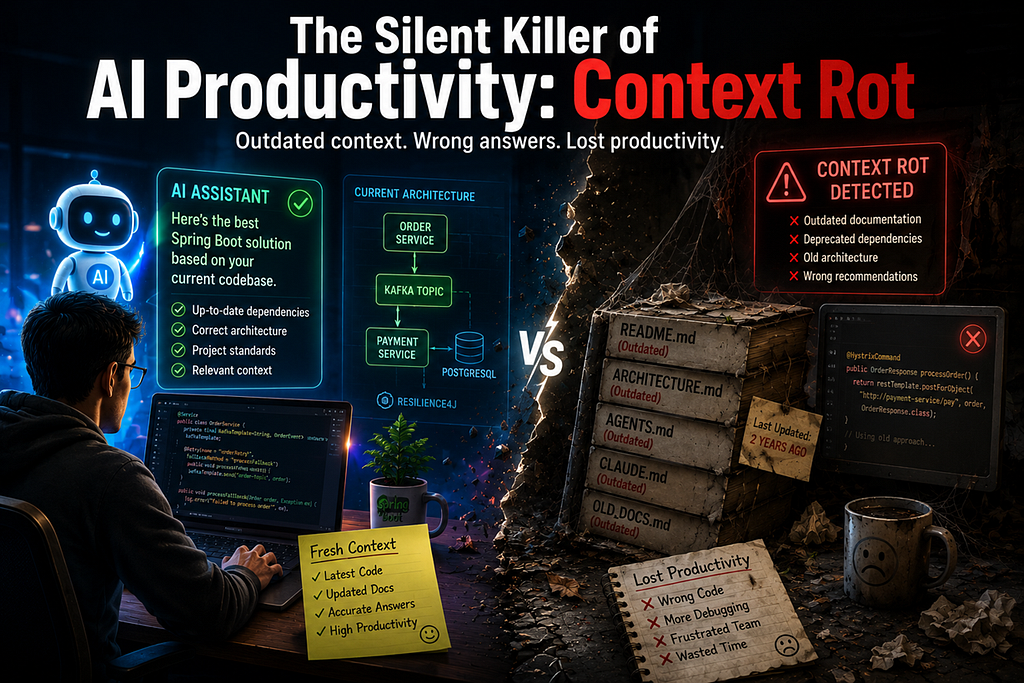
AI coding assistants such as GitHub Copilot, Claude Code, Cursor, and ChatGPT have transformed how developers write software. Tasks that once required searching documentation, navigating repositories, or consulting senior engineers can now be completed with a simple prompt.
However, many engineering teams are encountering a new challenge:
The AI assistant was accurate six months ago, but now it frequently generates outdated code, incorrect architecture recommendations, and inconsistent implementations.
The root cause is often not the AI model itself. It is a phenomenon increasingly referred to as Context Rot.
In this article, we’ll explore what Context Rot is, why it happens, and how Java and Spring Boot teams can prevent it.
What is Context Rot?
Context Rot is the gradual degradation of AI-generated responses caused by outdated, incomplete, or inconsistent contextual information.
Modern AI assistants rely heavily on project context such as:
- README.md
- ARCHITECTURE.md
- AGENTS.md
- CLAUDE.md
- Coding standards
- Confluence pages
- Jira tickets
- API documentation
- skills.md
As software systems evolve, these artifacts often fail to keep pace with the actual implementation.
When AI continues using stale context, it begins generating inaccurate recommendations.
A Real-World Spring Boot Example
Imagine a Spring Boot microservices project.
Six months ago, the architecture looked like this:
Order Service
    |
    +--> Payment Service (REST)
    |
    +--> MySQL
The project documentation contained:
Order Service calls Payment Service directly using REST.
We use Hystrix for fault tolerance.
Database: MySQL
The documentation was accurate at that time.
The System Evolves
Over time, the architecture changes.
Today the system looks like this:
Order Service
    |
    +--> Kafka Topic
    |
    +--> Payment Consumer
    |
    +--> PostgreSQL
    |
    +--> Resilience4j
The engineering team migrated:
- REST → Kafka
- Hystrix → Resilience4j
- MySQL → PostgreSQL
Unfortunately, nobody updated the documentation.
The AI Problem
A developer asks:
“Generate retry logic for Order Service.”
The AI reads the outdated documentation and produces:
@HystrixCommand(fallbackMethod = "fallback")
public OrderResponse processOrder() {
    return paymentClient.process();
}
However, the current implementation uses Resilience4j:
@Retry(name = "orderRetry")
public OrderResponse processOrder() {
    kafkaTemplate.send("payment-topic", order);
}
The AI is not wrong because it lacks intelligence.
The AI is wrong because it was given incorrect context.
This is Context Rot.
Why Context Rot Is Growing Rapidly
The rise of AI-assisted development has amplified the importance of project context.
In traditional development, outdated documentation was inconvenient.
In AI-assisted development, outdated documentation directly influences code generation.
Modern enterprise systems often contain:
- Hundreds of microservices
- Thousands of source files
- Thousands of Confluence pages
- Years of Jira history
Keeping all documentation synchronized manually becomes nearly impossible.
As a result, AI assistants start learning from stale information.
Signs Your Team Is Experiencing Context Rot
You may already be experiencing Context Rot if:
1. AI Generates Deprecated APIs
The assistant recommends frameworks or libraries that are no longer used.
2. AI Suggests Incorrect Architecture
It assumes service relationships that no longer exist.
3. Different Developers Receive Different Answers
Depending on which documentation files are included in the prompt.
4. Developers Stop Trusting AI
The most dangerous symptom.
Once trust is lost, AI adoption declines regardless of model quality.
The Hidden Cost
Many organizations focus on reducing AI costs through prompt optimization and token management.
However, Context Rot creates a larger hidden cost:
- Increased code reviews
- Incorrect implementations
- Technical debt
- Developer frustration
- Reduced productivity
A cheaper AI system producing incorrect answers is still expensive.
Why Static Context Files Are Not Enough
Many teams create files such as:
README.md
AGENTS.md
CLAUDE.md
ARCHITECTURE.md
These files work well initially.
The challenge is maintenance.
Every architectural change requires updating:
- Documentation
- AI instruction files
- Architecture diagrams
- Internal wikis
In practice, this rarely happens consistently.
Static context inevitably becomes stale.
The Better Approach: Dynamic Context Retrieval
Instead of relying solely on static documentation, organizations should move toward dynamic context retrieval.
A modern architecture might look like:
Git Repository
       |
       +--> Code Indexer
       |
Confluence
       |
Jira
       |
       v
Vector Database
       |
       v
AI Assistant
When a developer asks a question, the system retrieves:
- Latest source code
- Latest configuration
- Relevant documentation
- Recent design decisions
This dramatically reduces the risk of Context Rot.
Context Caching vs Context Rot
Many organizations are investing in Context Caching to reduce AI costs.
The idea is simple:
Cache project context once and reuse it repeatedly.
While this reduces token usage, it introduces a new risk.
If cached context is never refreshed:
Fresh Context
      ↓
Cached Context
      ↓
Outdated Context
      ↓
Context Rot
Caching without synchronization simply accelerates the spread of outdated information.
The solution is intelligent context refresh and continuous indexing.
Final Thoughts
As AI becomes an integral part of software development, the quality of context becomes just as important as the quality of the model.
The next generation of developer productivity tools will not compete solely on model intelligence.
They will compete on:
- Context freshness
- Knowledge retrieval
- Architecture awareness
- Context governance
In many organizations, the biggest AI challenge is no longer prompt engineering.
It is Context Engineering.
And the first problem every engineering team must solve is Context Rot.
Happy Learning……
#AI #contextRot #SpringAI
Reference
https://www.subconscious.dev/blog/the-cure-for-context-rot

The Silent Killer of AI Productivity: Context Rot was originally published in Javarevisited on Medium, where people are continuing the conversation by highlighting and responding to this story.
This post first appeared on Read More