
More control, better search, and freedom beyond S3 and GCS — a blueprint for decoupled, cloud-agnostic workflow archival
Temporal is excellent at orchestrating long-running workflows. But once a workflow closes, it ages out of the primary persistence store based on your namespace retention window — and that data, including the full event history, disappears unless you archive it. Temporal ships with archival support for AWS S3 and Google Cloud Storage. If you’re on Azure, Cosmos DB, OpenSearch, ClickHouse, or any internal datastore, the default path stops working for you.
This article describes a different approach: a decoupled archival architecture where Temporal’s native hooks stay minimal, and a completely independent service handles the real work of persisting, enriching, indexing, and surfacing archived workflow data. The result is a system you fully own — one that can store data anywhere, search it richly, expose it through MCP tools, and evolve without touching the Temporal cluster.
Temporal runs the workflows. Your archival service preserves, enriches, and unlocks them.
Why the default archival path falls short
Temporal’s built-in archival has two jobs: store closed workflow histories and visibility records, then let you retrieve them via the UI or API. The custom archiver interfaces — HistoryArchiver, VisibilityArchiver, and QueryParser — let you plug in your own storage backend. This is the documented path.
The catch is that implementing those interfaces means putting your archival logic inside Temporal Server. Every change to how you store, index, or search archived data requires rebuilding a custom Temporal image and redeploying the whole cluster. That coupling is fine when archival is a simple blob copy, but archival quickly grows beyond that. Teams end up needing:
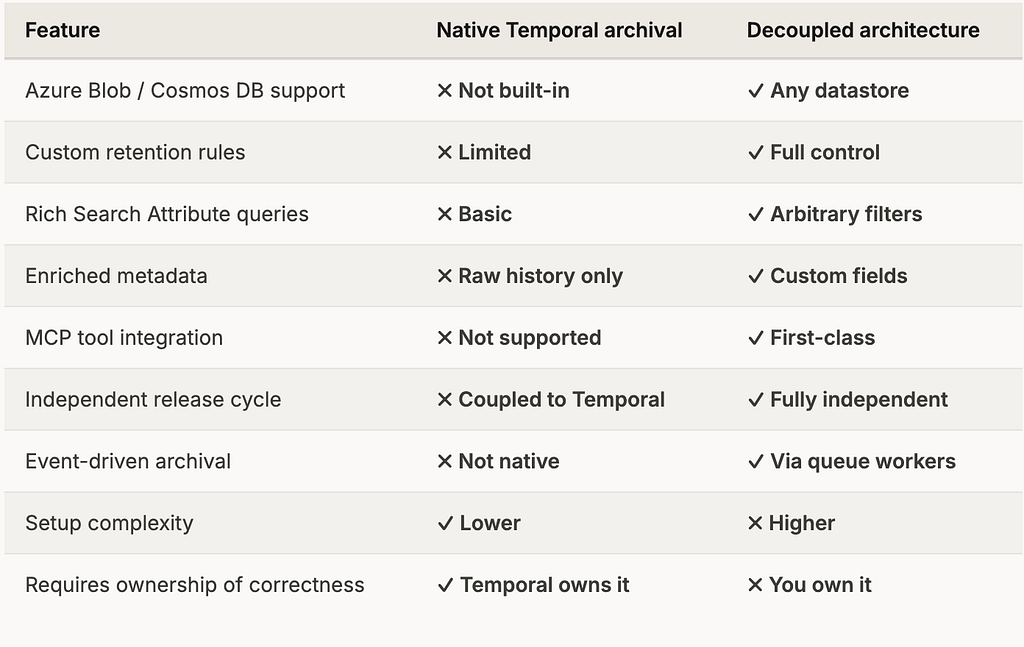
- Support for datastores outside AWS and GCP
- Custom retention rules per namespace or workflow type
- Rich search across Search Attributes and custom business fields
- Enriched archive records with computed metadata (duration, SLA flags, activity summaries)
- MCP tools so engineers can query archived workflows conversationally
- Independent release cycles — change archival logic without touching Temporal infra
- Event-driven or scheduled archival without building it into Temporal itself
These requirements don’t belong inside Temporal Server. They belong in a dedicated archival platform.
The two-layer architecture
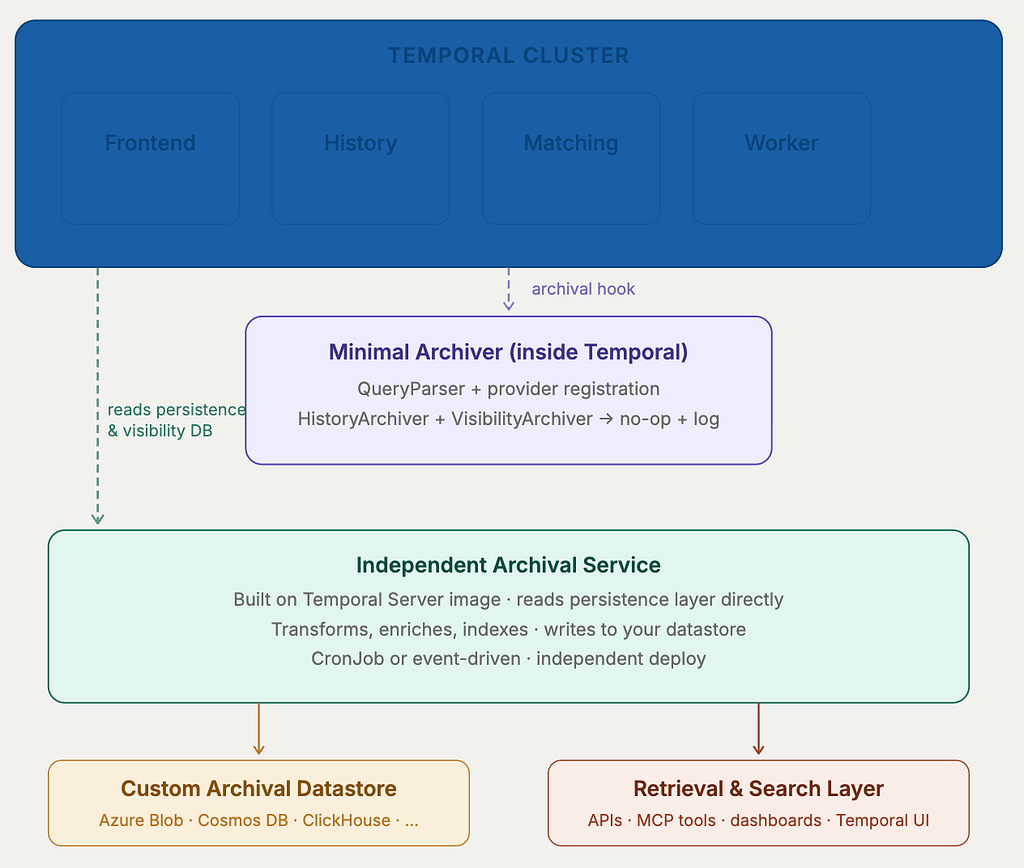
The core idea is a clean separation of concerns. Temporal retains minimal archival integration just enough to satisfy its internal query and UI paths. All real archival work moves into an independent service.
Layer 1: the minimal Temporal archiver
You still register a custom archiver provider inside Temporal. You implement QueryParser properly so that Temporal UI and archived query flows work. You build a custom Temporal Server image and deploy it via your Helm chart. But — and this is the key difference — HistoryArchiver and VisibilityArchiver are intentionally empty. They log the namespace ID, workflow ID, run ID, and the archival request timestamp, and then return. They do not write anything.
This keeps Temporal aware that archival is configured. The UI won’t complain. Archived queries route correctly. But Temporal Server is not your archival engine.
Layer 2: the independent archival service
The real archival engine is a separate service. It’s built on the Temporal Server codebase or image as a base, which gives you access to the full persistence layer — all the code for reading workflow event histories, visibility records, namespace metadata, and Search Attributes is already there. You simply don’t start the server services. Instead, you start your own archival process that reads from Temporal’s databases and writes to your chosen datastore.
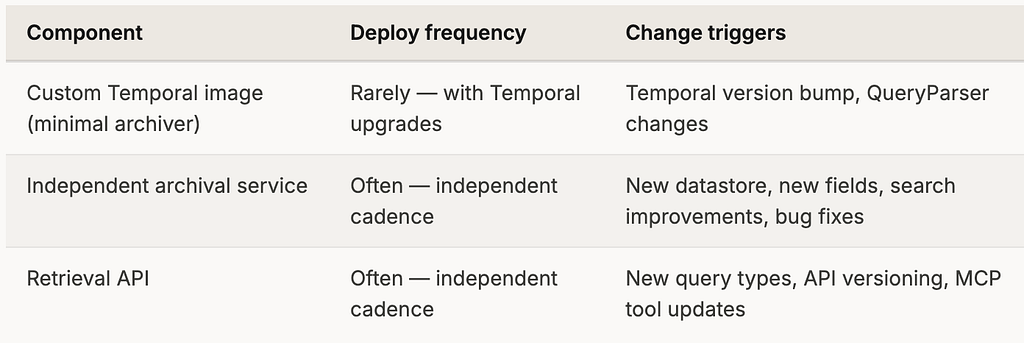
Because this service is deployed independently, its release cycle is entirely decoupled from Temporal. You can add a new storage backend, change how you index Search Attributes, or introduce a new search field without touching Temporal infra at all.
Why use the Temporal Server image as a base?
The persistence layer code — all the Go interfaces for reading workflow histories, event batches, and visibility records from Cassandra, PostgreSQL, or MySQL — is already tested and production-ready inside Temporal Server. Reusing it means you’re not reimplementing persistence clients from scratch. You get the same codec, the same serialization, the same retry logic.
Inside the independent archival service
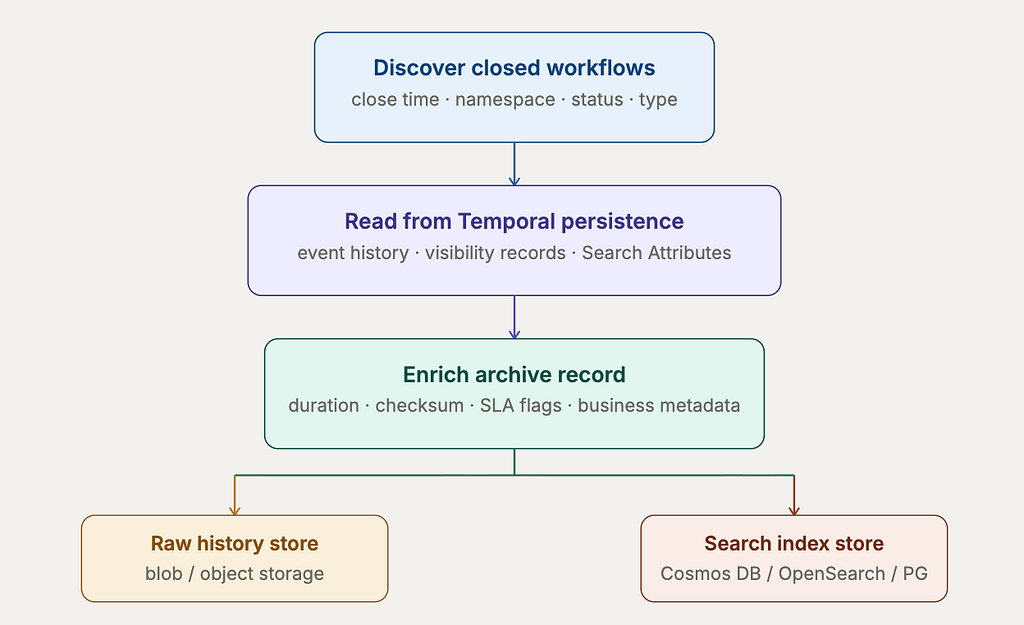
The archival service has four main responsibilities once it runs: discover eligible closed workflows, read their histories and visibility records, enrich the data, and write it to your datastore.
Discovering eligible workflows
The service queries Temporal’s visibility store directly for closed workflow executions past a configurable age threshold. Eligibility is configurable per namespace, workflow type, or status — so you can, for example, archive failed payment workflows immediately while archiving completed ones only after seven days. A status field (PENDING, IN_PROGRESS, ARCHIVED, FAILED, RETRY_EXHAUSTED) tracked in your own metadata store prevents double-archiving.
Reading from the persistence layer
This is where the “built on Temporal Server image” choice pays off. Temporal’s existing persistence layer code handles reading event histories from your configured database — Cassandra, PostgreSQL, or MySQL — including batch loading, deserialization, and codec handling. You call those same functions. No reimplementation. For visibility records and Search Attributes, you read from the visibility store (standard or advanced) the same way Temporal’s history service does internally.
Enriching the archive record
Since you control the pipeline, you can attach any metadata that makes archived workflows useful — not just storable. A minimal enrichment layer might compute execution duration, generate a SHA-256 checksum over the history payload, flag SLA breaches based on the close time, and surface the top-level failure reason without requiring someone to page through 500 history events. You might also attach business identifiers from Search Attributes so support teams can locate the right archive record without knowing the Temporal workflow ID.
{
  "namespace": "payments-prod",
  "workflowId": "payment-settlement-123",
  "runId": "abc-def-ghi",
  "workflowType": "PaymentSettlementWorkflow",
  "status": "FAILED",
  "startTime": "2026-06-01T10:00:00Z",
  "closeTime": "2026-06-01T10:05:00Z",
  "durationMs": 300000,
  "searchAttributes": {
    "merchantId": "M123",
    "paymentRegion": "IN",
    "priority": "HIGH"
  },
  "archival": {
    "archivedAt": "2026-06-02T01:00:00Z",
    "archivalVersion": "v1",
    "storageProvider": "azure-blob",
    "storagePath": "temporal-archive/namespace=payments-prod/year=2026/month=06/...",
    "checksum": "sha256:a4f2...",
    "failureReason": "ActivityTaskTimedOut: ProcessPaymentActivity"
  }
}
The hybrid storage model
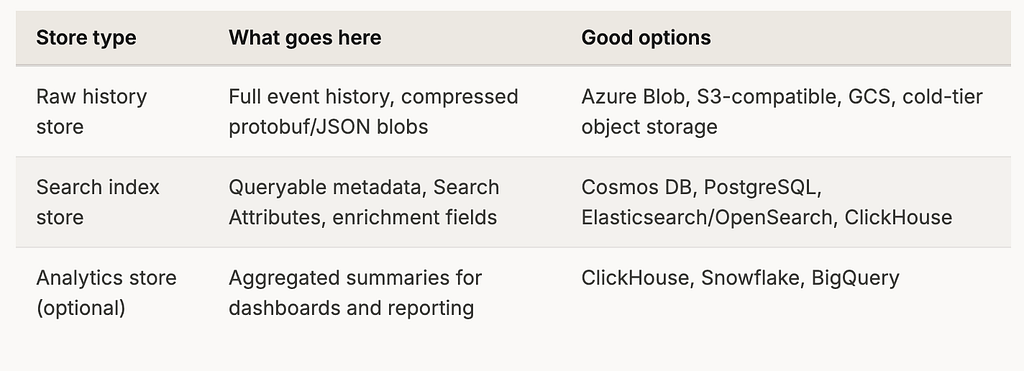
A good archival system separates large immutable history payloads from searchable metadata. Raw event histories — potentially megabytes of protobuf or JSON per workflow — go to object storage (Azure Blob, S3-compatible, GCS, HDFS, or your internal store). Compressed and checksummed, they’re cheap to keep indefinitely. The searchable record, with all the fields you’d want to filter on, goes to a queryable database.
Cron-based vs event-driven archival
The archival service can run in two modes. Cron-based is the right starting point; event-driven is where you end up once volume and latency requirements push you there.
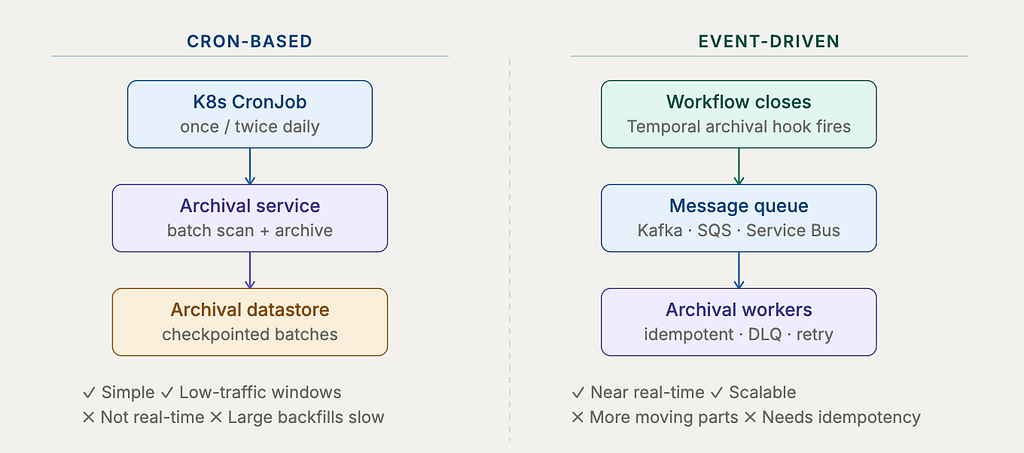
The practical recommendation: start with a Kubernetes CronJob. It’s straightforward, easy to reason about, and runs during low-traffic windows. Add checkpointing so a failed run resumes from where it stopped rather than restarting. Once your archival volume grows or you need near-real-time archival for compliance reasons, extract the same processing logic into workers that consume from a message queue. The archival logic itself doesn’t change — just how it’s triggered.
Retrieval and search
Archival without retrieval is a black hole. The retrieval layer exposes two operations: fetch a specific workflow by its identifiers, and search across archived workflows using rich filters.
Fetch by workflow ID and run ID
The retrieval API accepts namespace, workflow ID, and run ID. It looks up the indexed metadata to find the storage path, downloads the compressed history blob from object storage, deserializes it, and returns the event history in Temporal-compatible format. This powers debugging tools, support dashboards, compliance APIs, and Temporal UI integration for archived queries.
Rich search across archived workflows
Because you control the search index schema, you can offer queries that live Temporal visibility doesn’t support — filtering by arbitrary Search Attributes, custom business identifiers, activity-level failure reasons, or computed fields like execution duration. Some examples:
-- All failed workflows for a specific merchant
SELECT * FROM archived_workflows
WHERE namespace = 'payments-prod'
  AND status = 'FAILED'
  AND search_attributes->>'merchantId' = 'M123'

-- Long-running completed workflows (SLA breach candidates)
SELECT * FROM archived_workflows
WHERE duration_ms > 300000
  AND status = 'COMPLETED'
  AND workflow_type = 'PaymentSettlementWorkflow'

-- Workflows that timed out in a date range
SELECT * FROM archived_workflows
WHERE status = 'TIMED_OUT'
  AND close_time BETWEEN '2026-06-01' AND '2026-06-15'
MCP tool integration
One of the most useful extensions of this architecture is exposing archived workflows through an MCP (Model Context Protocol) tool. An internal AI assistant with access to this tool can fetch a specific archived workflow, summarise the failure path, identify which activity failed, show retry counts, and point to the exact event where the issue started — all from a conversational interface.
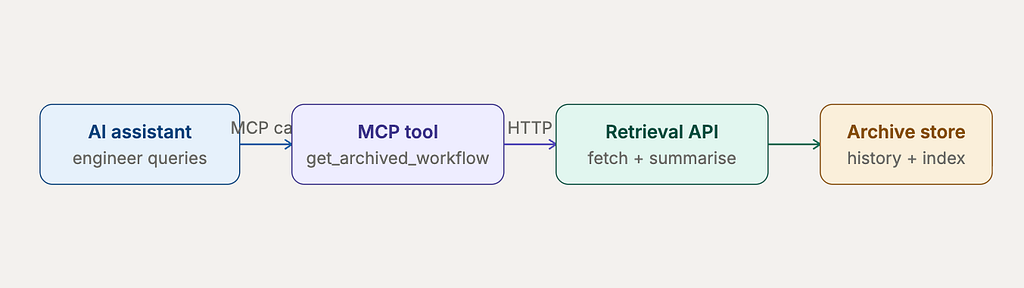
This turns archival from passive cold storage into an active debugging capability. Instead of searching storage buckets manually or writing one-off queries, an engineer can ask “why did this payment workflow fail last month?” and get a structured summary in seconds.
Idempotency, versioning, and safety
A production-grade archival service must handle repeated archival attempts gracefully. The same workflow may be picked up by multiple archival runs due to retries, restarts, or duplicate queue events. The natural idempotency key is namespaceId + workflowId + runId — check for an existing ARCHIVED record before writing, and use a database-level upsert or compare-and-swap for the status transition.
Archive format should be versioned from the first record. Include a metadata envelope alongside every history blob:
{
  "archiveFormatVersion": "v1",
  "temporalServerVersion": "1.x",
  "encoding": "proto-json",
  "compression": "gzip",
  "checksumAlgorithm": "sha256"
}
As Temporal’s payload codecs evolve, as your metadata schema grows new fields, or as you add storage providers, you’ll need migration jobs. Without versioning, you can’t know which records need migration and which are already up to date.
Observability from day one
Archival failures can be invisible until someone needs data that isn’t there. Instrument the service thoroughly before it touches production.
archival_workflows_discovered_total     # how many are eligible
archival_workflows_archived_total       # how many succeeded
archival_workflows_failed_total         # how many errored
archival_duration_seconds               # per workflow
archival_lag_seconds                    # close_time to archived_at
archival_payload_size_bytes             # history blob size
archival_storage_write_errors_total     # object store failures
archival_search_index_write_errors_total
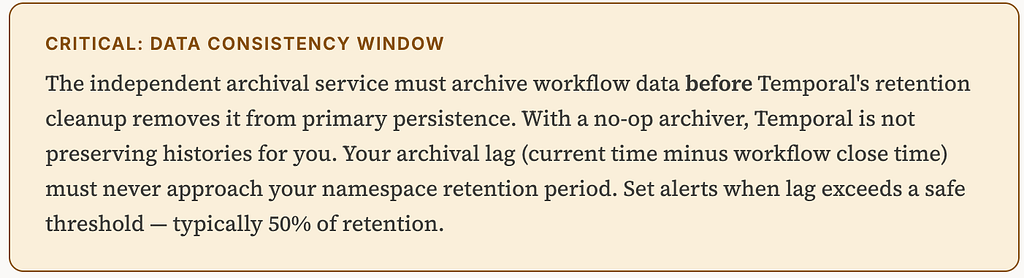
The most important alert is archival lag approaching the namespace retention period. If your retention is 30 days and archival lag reaches 20 days, alert immediately. Below that threshold, you have a window to fix the service and still save the data. Above it, you’re racing the retention cleanup — and losing means permanent data loss.
Deployment model
The biggest operational advantage of this architecture is independence. Once the minimal Temporal archiver is deployed and stable, it should rarely change. All archival evolution — new datastores, new index fields, new enrichment logic, new search capabilities — happens in the independent service.
Comparison: native archival vs this approach
Recommended MVP phases
1. Minimal Temporal integration
Build the custom Temporal image. Register the custom archiver provider. Implement QueryParser properly. Keep HistoryArchiver and VisibilityArchiver as no-op plus logging. Deploy via Helm. Verify that Temporal UI and archived query paths behave correctly.
2. Independent archival service (CronJob)
Build the service on the Temporal Server image. Connect to the persistence and visibility databases. Implement workflow discovery, history reading, visibility record reading, and writes to your first object store and search index. Run as a scheduled CronJob with checkpointing and basic retry logic.
3. Retrieval API
Expose fetch-by-ID and search endpoints. Return Temporal-compatible history format for UI integration. Implement authentication and authorization on all read paths. Build a basic internal dashboard or CLI tool on top of the API.
4. Production hardening
Add full idempotency with status tracking. Add checksum validation on all reads and writes. Instrument all metrics listed above. Set up archival lag alerts. Add archive format versioning. Add access control and audit logs for archive reads.
5. Advanced features
MCP tool for conversational workflow lookup. Failure summary generation from history events. Activity-level search. Event-driven workers consuming from a message queue. Namespace-specific archival policies. Multi-datastore routing. Re-archive and migration jobs.
Final thoughts
Temporal archival is easy to treat as a solved problem once you have S3 working. But for most engineering teams, archived workflow data is valuable operational intelligence — not just backup. It answers questions about failures from months ago, surfaces activity-level patterns across thousands of executions, and gives support teams the ability to investigate without direct database access.
The decoupled architecture described here keeps Temporal’s integration surface minimal and stable. All the interesting work — enrichment, indexing, retrieval, search, MCP tooling — lives in a service you fully own and deploy independently. The trade-off is real: you take on responsibility for data consistency, idempotency, and observability. But for teams that need Azure, Cosmos DB, OpenSearch, custom search, or independent control, that trade-off is worth it many times over.
Treat archival as a first-class platform service, not a storage plugin. Build it to be observable, versioned, and independently deployable from day one. The workflows Temporal runs are your operational record. Your archival service is how you keep them.

Building Your Own Temporal Archival System was originally published in Javarevisited on Medium, where people are continuing the conversation by highlighting and responding to this story.
This post first appeared on Read More