
Every product manager on the internet seems to have an opinion on whether the PRD, or product requirements document, is dead. AI-assisted coding, rapid prototyping, and faster engineering cycles have the traditional 20-page feel increasingly out of touch with how many teams build today.
But that doesn’t mean product teams no longer need documentation. It just means the role of documentation has changed. Instead of treating the PRD as a fixed document, you need to choose the right level of documentation for the decision, risk, team and stage of development.
Keep reading to learn how to adapt your documentation process for AI-assisted product development without slowing your team down.
Why traditional PRDs stopped working for modern product teams
With AI-assisted development, the lengthy product requirements document (PRD) has become a more visible bottleneck. Waiting for upfront requirements and stakeholder alignment can drag down the whole process. When documentation is too heavy, it can lead to issues like:
- Analysis paralysis — Too much feedback can stall iteration
- Low engagement — Stakeholders don’t read or skip parts because it’s too lengthy
- Reduced creativity — Heavy documentation can stifle a team’s ability to think of new alternatives
Many product managers reacted by skipping PRDs entirely. The traditional PRD was designed for a longer development lifecycle, and it started slowing down modern teams. Instead, some teams began to rely on tools like tickets and Slack. While this helped teams move faster, it also created new problems.
What goes wrong when product teams skip PRDs entirely
PRDs often feel like optional reading until something goes wrong. Then they turn into a valuable reference. Some problems that PRDs help prevent include:
- Misaligned expectations — Leadership thought X was happening, but design created Y, and engineering shipped Z
- Hidden constraints — Edge cases get little or no attention
- Re-litigation — Without decision logs, teams debate the same problem multiple times or search through Slack messages to understand how a decision was made
- Onboarding tax — New product managers and engineers don’t have context for why product decisions were made
- Communication siloes — Decisions are made in siloes and not shared with other teams
- Feature creep — Features expand without alignment on time, resources, and budget
Some form of documentation is needed to prevent these issues from happening. For your organization, the traditional PRD may still have value, especially if the product is complex or regulated. However, other organizations may benefit from lighter forms of product documentation.
PRD alternatives for modern product managers
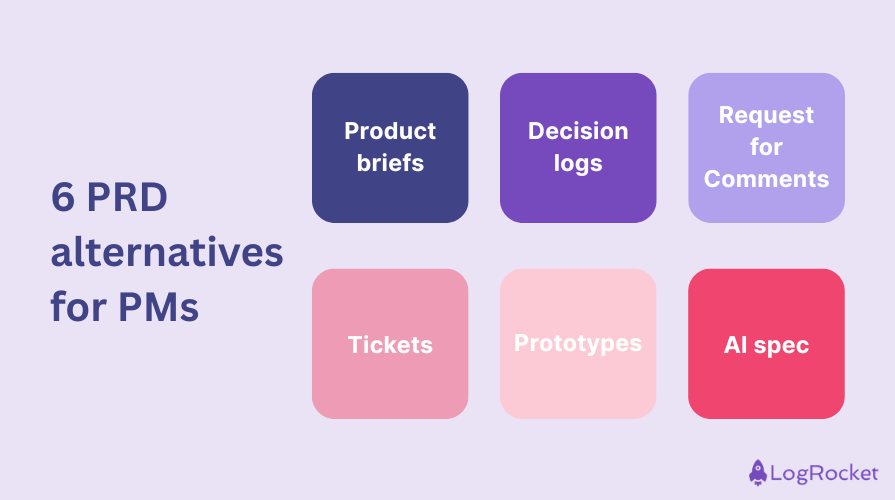
Here are a few PRD alternatives that might work for your organization. You might use one or combine several. The important thing is to find what works best for your team.
The best PRD alternative depends on what your team needs most. Some teams need strategic alignment, some need a record of past decisions, and others need better ways to turn prototypes into clear requirements.
Product briefs
Product briefs are concise, strategic documents that focus on the problem and a high-level solution. “The product feature brief…is more like a summary of what we’re solving, who it’s for, and why it’s important now,” said Monique Piras, Senior Director of Product Management at Ironclad.
Piras also includes the following in briefs:
- Product narrative — A short story of how the product solves a problem or improves the user experience
- Observations and customer impact — Gather information from customer conversations and highlight key quotes and community feedback
- Revenue or business impact — Identify quantifiable impact tied to the problem, like deals lost or churn
- Guiding principles — Agreed decision rules that keep teams aligned
- Success metrics — Measurable outcomes that determine if the product is successful
Unlike a traditional PRD, product briefs are intentionally lightweight. This leaves room for collaboration with design and engineering.
“It takes a lot of pressure off having those granular details upfront, so that way, you have more time to work collaboratively with your triad,” said Pira. “Each phase becomes an opportunity to go deeper – collaborating with design and engineering to define what needs to change and why. Only after this discovery work do we translate findings into detailed product requirements and user stories.”
Decision logs
A decision log is a running record of important decisions made during product development. Each entry contains:
- What was decided?
- Why was that decision made?
- Who was involved in the decision-making process?
- When was the decision made?
- What were the alternative options, and why were they turned down?
This isn’t like meeting notes, where every word is transcribed. Decision logs focus on the outcome of discussions. Having a separate record ensures that a single source of truth remains, even when Slack messages get deleted, tickets get lost, or new team members join.
Request for Comments (RFCs)
A Request for Comments (RFC) document proposes a change and submits it for collaborative review. It’s ideal for work environments that are open to discussing new ideas and can handle feedback. RFCs allow team members and different teams to share their thoughts on the idea. They pull from several perspectives to push an idea into a strategic feature.
RFCs usually address these points:
- Problem — Define the problem getting addressed and why it needs a solution
- Implementation — Share the proposed solution and what needs to happen to create it
- Summary — Summarize the main points, ask any questions you may have, and open the floor to feedback
RFCs aren’t perfectly polished documents. The point is to share your idea and get collaborators to provide feedback on what works and what doesn’t. The RFC can provide a searchable record of decisions and their rationale. It also improves cross-functional collaboration.
Tickets
Tickets are trackable work tasks. A ticket helps with execution and describes what someone needs to do. Tickets are great for breaking down large projects into smaller tasks, visualizing progress, and managing work.
Tickets are part of the PRD replacement, but they’re not strong enough to stand on their own. They don’t cover the “why” of product development. Tickets also don’t share how decisions were made. Ultimately, tickets are best paired with high-level strategy documents, like product briefs.
Prototypes
Prototypes are early designs of a product or feature. They range from clickable wireframes to high-fidelity interactions that mimic the final experience. Prototypes are great for validating usability, exploring ideas, and aligning on UI/UX.
Product teams like prototypes because they can turn vague requirements into a concrete experience quickly. This makes it easier to get feedback and “fail fast” on ideas that don’t work.
But, like tickets, prototypes don’t always address the “why” behind product or feature creation. Stakeholders still need a document that addresses the need to implement the prototype. While teams may not need a lengthy explainer, it still helps to have acceptance criteria that keep everyone aligned on expectations.
AI spec
An AI spec is ideal for companies that are investing in AI prototypes. It’s a lightweight framework that can replace parts of the traditional PRD. Omar Mousa, a product leader, describes the AI spec as “part narrative, part prototype, but fully aligned.”
Here’s what an AI spec includes:
- AI prototype — A clickable flow that demonstrates the intended journey or interaction
- Contextual narrative — A two to three sentence description of the user’s pain point and how the prototype provides a solution
- Edge case scenarios — Identify likely edge cases and annotate these paths
- Linked artifacts — Share direct links to the prototype, code snippets, visuals, and other relevant elements
How to decide how much product documentation you need
Like Goldilocks, you want just the right amount of documentation, not too complicated and not too simple. The big question product managers need to ask is “What’s the blast radius if something goes wrong?” Misunderstandings and wrong implementations can have varying levels of consequences.
- Low risk — Examples include minor UI tweaks or copy changes. If the impact is minor, use tickets, and a short note
- Moderate risk — Getting it wrong means friction, but no serious crisis. For example, if there is a new feature with a few dependencies, consider using a product brief and a prototype
- High risk — Bad implementation can have significant consequences, such as noncompliance, security issues, or customer harm. In these cases, stick with a traditional PRD and keep full documentation
Here are some other questions you want to consider before choosing a documentation process:
- Scope and complexity: How many systems and teams does this touch?
- Novelty: Have our teams done something like this before, or is this new?
- Team context: How stable and aligned are the teams?
A lightweight PRD template for modern product teams
This modern PRD template focuses on aligning around problems, goals, and decisions. Unlike the traditional PRD, it’s not an exhaustive source for everything about the product or feature.
“Templates are templates. They’re starting points,” said Piras. Take this template and adapt it to your team. The main goal is to aim for clarity, not length.
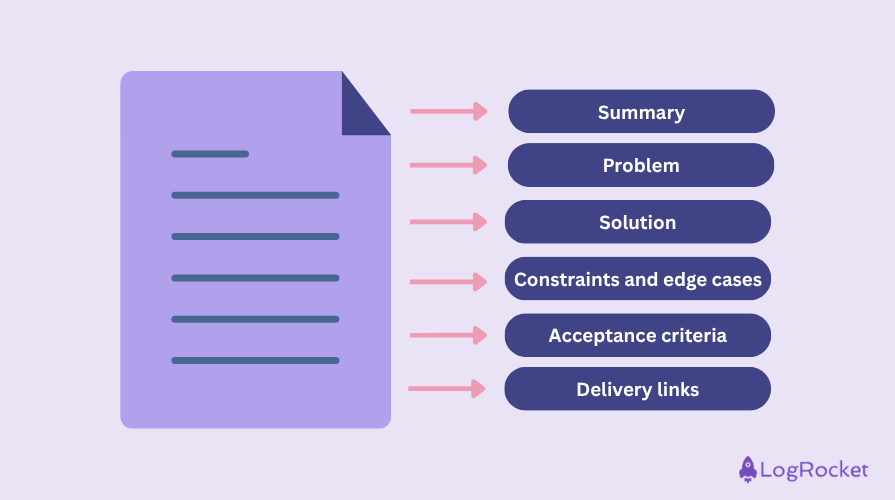
Summary
- What is being built?
- Why build it now?
- Who is it for?
Problem
- What user or business problem does this solve?
- What is the core friction in the current journey?
- What evidence supports the need to fix this problem?
- What’s the primary outcome you’re trying to achieve?
Solution
- What is the proposed solution to this problem?
- Link to a clickable prototype to share what the solution looks like
- Add annotations to describe choices and the rationale. For example, requiring email verification before step X to reduce fraud
Constraints and edge cases
- What edge cases should the team consider?
- Are there any technical or regulatory conditions?
- What are the UX or operational constraints?
Acceptance criteria
- What must be true for this solution to be considered complete?
Delivery links
Add links if you have them:
- Prototypes, mockups, or flows
- Decision log
- Generated code snippets
- RFCs
- Technical documents
Key takeaways
The traditional PRD is a single place where everything about a product lives. AI, prototypes, and tickets can support product development, but they don’t replace the need to document why and how a product was created. Instead of forgoing documentation entirely, product managers should right-size the PRD or replace it with a simpler alternative.
A good first step is to audit your current documentation process. Here are a few questions to ask yourself and your triad:
- Where do we currently document the why and how?
- For successful launches, what documents are actually referenced, and which ones gathered dust?
- For unsuccessful launches, was the problem missing documentation, outdated documentation, or the wrong type of documentation?
- Do team members repeatedly ask the same context questions?
- For high-risk projects, do we have a single source of truth where decisions, acceptance criteria, and constraints are noted?
Once you have your answers, you can cut documents no one reads and strengthen the documents team members actually use. You could also introduce a new documentation process like a lightweight PRD.
Featured image source: IconScout
The post Is the PRD dead? How to choose the right level of documentation appeared first on LogRocket Blog.
This post first appeared on Read More