

Every Model Context Protocol (MCP) server you have to host comes with the same setup tax before you get to the actual work. You install a package or binary, edit a JSON configuration file, generate credentials, decide where to store them safely, restart the client, and hope the connection holds. That tax exists whether the server sits in front of a calendar, a filesystem, or a database, and it is infrastructure a developer has to run, get approved, and maintain just to let an AI client ask a question.
For Neo4j customers already running Aura, that tax should not exist. Your data is already hosted, and your authentication is already handled, so there is no reason any AI client should need its own server and its own credentials just to reach data you have already secured.
Today, we are announcing MCP for Aura, a hosted MCP server included at no additional cost on Free, Professional, and Business Critical tiers, with Virtual Dedicated Cloud (VDC) support coming soon.
Why MCP for Aura
MCP solves discovery, giving a client a common way to find and call tools, but it does not solve hosting. Someone still has to run the server, secure the credentials, and keep it online, and for a database meant to be queried constantly, that operational weight is often the reason a promising AI proof of concept stalls before it reaches production.
The questions we have heard from developers connecting AI clients to their graphs:
- How do I let Claude, Cursor, or other AI clients query my Aura graph without standing up and hosting my own MCP server?
- How do I authenticate an AI client to my graph without storing a long-lived credential in a config file on disk?
- How can I let an AI client safely explore a graph schema it has never seen before it writes anything?
- How do I control whether an AI client can only read my graph or also write to it?
- How do I do all of this without adding a new piece of infrastructure I have to patch, monitor, and eventually explain to a security review?
MCP for Aura is built to answer all of the above.
What is MCP for Aura
MCP is an open standard that lets AI applications such as Claude Desktop or Cursor connect to external data sources through a common interface. In MCP terms, these applications act as hosts, and Neo4j Aura is now a server they can connect to. Neo4j has built several community MCP servers over the past year, alongside an official local MCP server, and most of them follow the same pattern. You install them locally, point them at a database you specify, and they expose tools the AI can call against it.
MCP for Aura looks the same from the AI client’s side of the connection. From your side, one thing is fundamentally different. The server is already running, because Neo4j hosts it, which means there is nothing for you to install, patch, or keep alive, and nothing new for your security team to have to review and approve.
Authentication runs through the Aura Console using a human-in-the-loop OAuth redirect. The first time you connect, your AI client opens a browser, you log in with the Aura credentials you already use, and you are redirected back with the session established.
Once connected, three tools are available to your AI client:
- Get schema reads the node labels, relationship types, and property keys in your graph, so the AI can understand the shape of your data before it queries anything, rather than guessing at a structure it cannot see.
- Read runs read-only Cypher queries, so the AI can explore and answer questions with zero risk of altering your data, which matters the moment you want to hand a client broad exploratory access.
- Read-write runs queries that can modify data, kept as a separate, explicit tool so that write access is something you choose to grant, not something that comes bundled in by default.
This means you can let an AI client explore and query a production graph freely without also handing it the ability to change what is in it, and you can extend write access only where you have decided it belongs. Together, these tools let an AI client explore a graph it has never seen before and be useful from the first prompt, without you having to write a single line of Cypher yourself. The agent uses the graph schema to generate, run, and retry Cypher queries for your questions/tasks.
More tools are on the way, including support for Graph Data Science. We will also add the ability to choose which tools are exposed to a given client, so you can scope what an AI is allowed to do on a graph-by-graph basis instead of exposing everything by default.
MCP for Aura in Action
What you need
- An Aura account on the Free, Professional, or Business Critical tier; Virtual Dedicated Cloud (VDC) support is coming in a later release
- A database seeded with the movie graph, an example dataset we use to keep the walkthrough simple
- Any MCP-compatible AI client works with MCP for Aura, including Cursor, VS Code, and others in the growing ecosystem. In this walkthrough, we are using Claude Desktop.
- For Claude Desktop, you will need to download node.js
Loading the movie graph
The movie graph is an example dataset comprising actors, directors, movies, and their relationships.
To load it, open your database in the Aura workspace using the Query tool in the left-hand navigation, select Learning, and choose the movie graph. Follow the prompts on step 2 to load the data, and in under a minute, you will have a graph with 38 movies, 133 people, and 253 relationships.
Setting up MCP for Aura with Claude Desktop
Open your Claude Desktop configuration file.
On macOS, it lives at:
~/Library/Application Support/Claude/claude_desktop_config.jsonOn Windows:
%APPDATA%Claudeclaude_desktop_config.jsonAdd the MCP for Aura server entry:
{
  "mcpServers": {
    "aura-mcp": {
      "command": "npx",
      "args": [
        "mcp-remote",
        "https://INSTANCE_ID-staging.mcp-instances.neo4j.io"
       ]
      }
  }
},
Save the file and restart Claude Desktop.
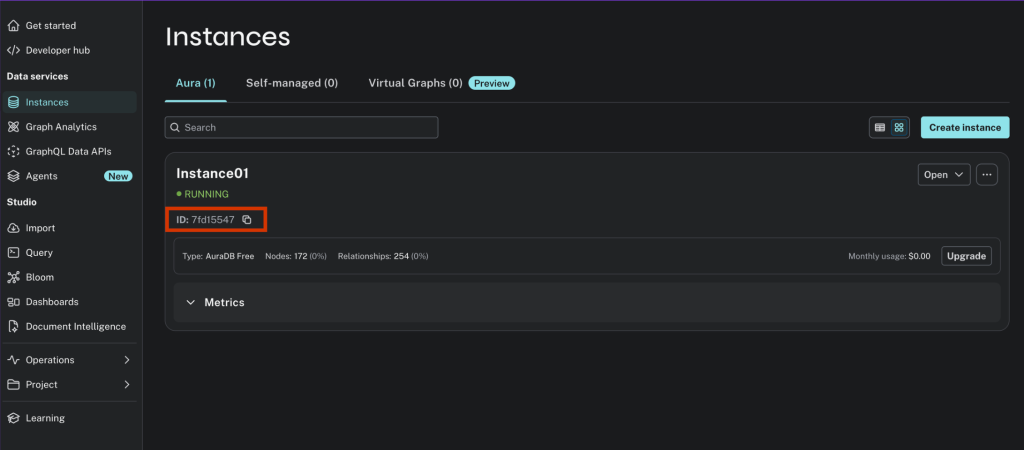
Note: You’ll find the exact ID for your instance in the Aura Console.
The first connection
The next time you send a message that touches an MCP for the Aura tool, Claude Desktop opens your browser and redirects you to the Aura Console login. Log in as usual, and once you are authenticated, the browser redirects you back to Claude Desktop with the session active. You will not need to repeat this until your session expires.
Six questions to try first
Give Claude no context about your graph at all, and let the schema tool do the work.
1. Ask Claude to orient itself
“What’s in my Neo4j graph? Describe the schema.”
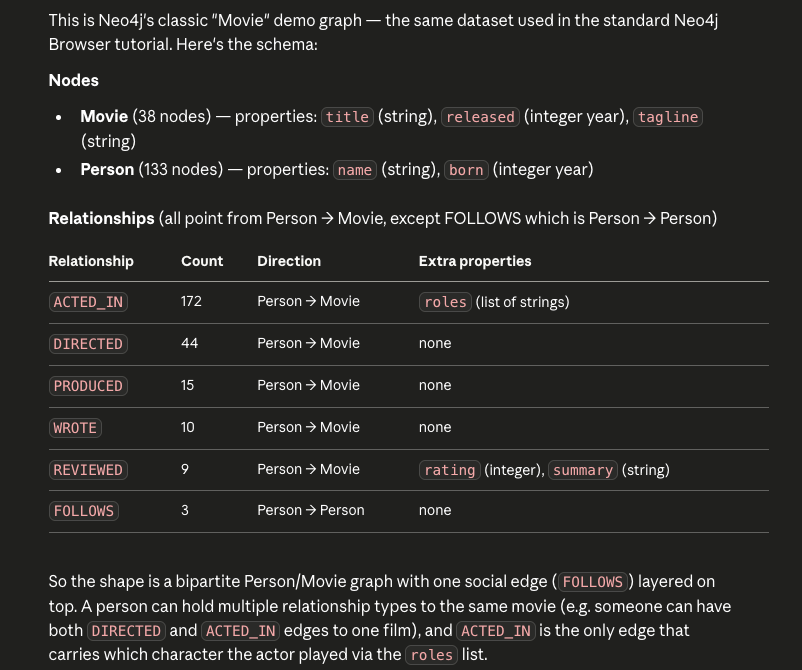
Claude calls the schema tool, reads the node labels and relationships, and gives you a plain-English description of what’s there. For the movie graph, it returns people who acted in or directed movies, with ratings attached, and it takes a few seconds, so none of your follow-up questions need to explain the domain first.
2. A simple relationship query
“Which movies did Tom Hanks act in?”
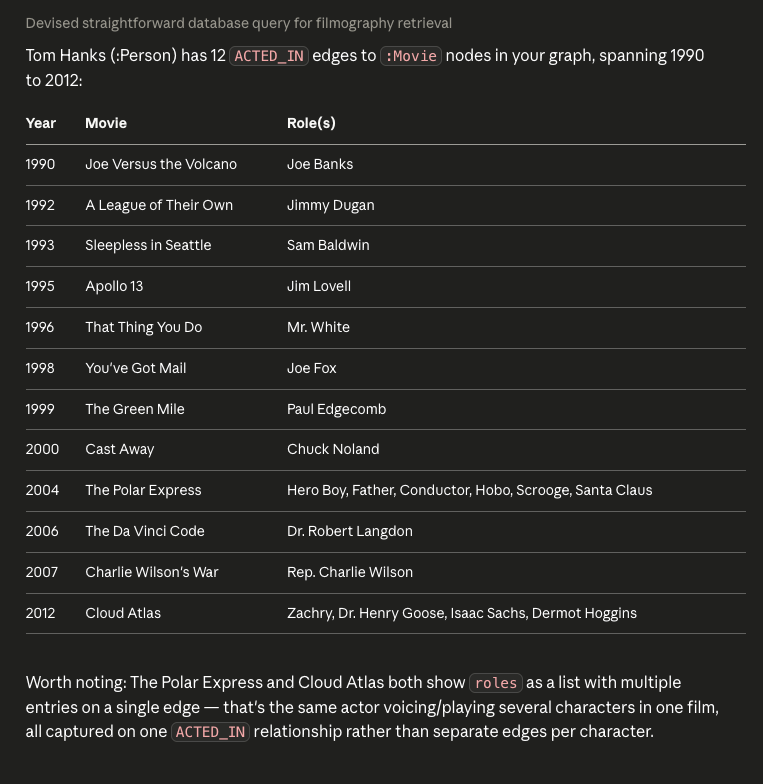
The graph returns an exact answer with no fuzzy matching and no hallucination, because Tom Hanks acted in exactly the movies he acted in, and nothing the model is guessing at.
3. An aggregation that shows the graph earning its keep
“Which director has worked with the most distinct actors across all their films?”
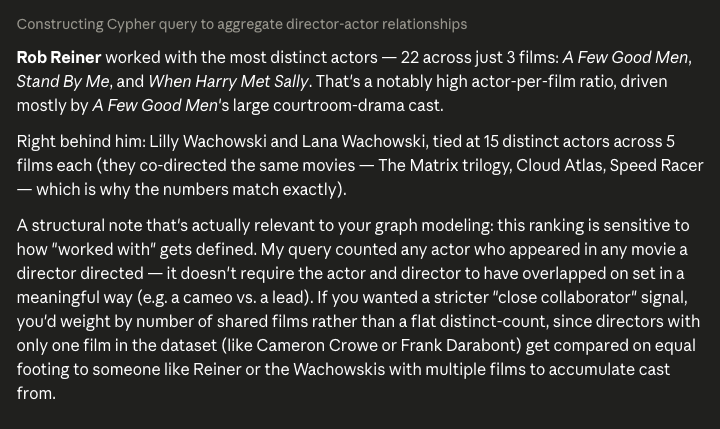
This is the kind of question that is awkward in a relational database and natural in a graph, since Claude traverses DIRECTED and ACTED_IN relationships, counts distinct actors per director, and ranks them.
Try a follow-up:
“Now show me just the directors who worked with more than ten distinct actors.”
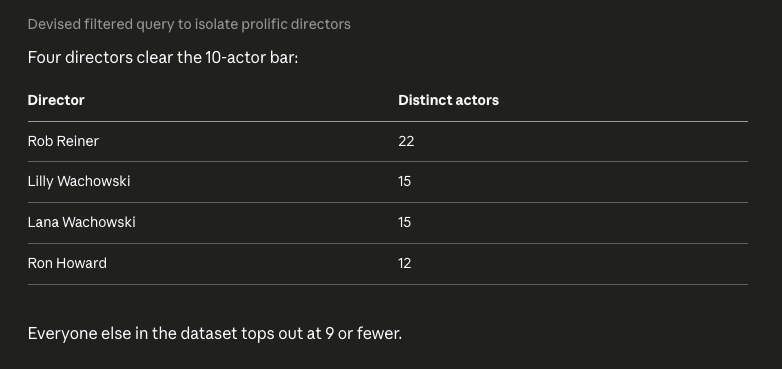
Claude remembers the query that just ran and refines it, so the multi-turn context carries forward without you having to restate the question.
4. A traversal question, the graph’s real strength
“Is there a connection between Keanu Reeves and Meg Ryan through co-starring? What’s the shortest path?”
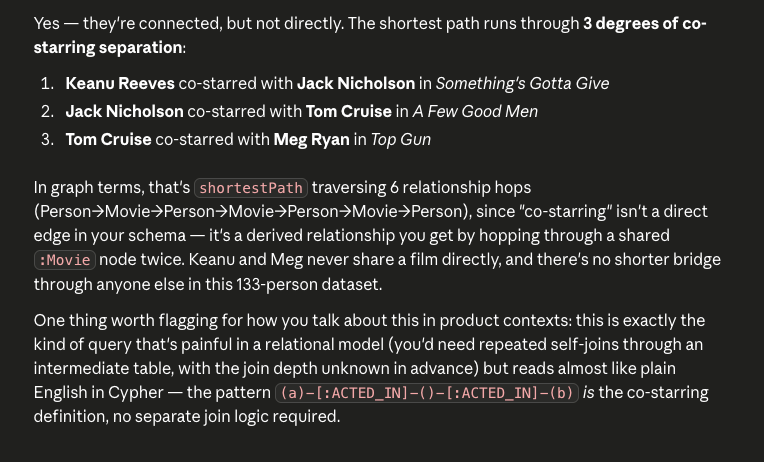
This is a shortest-path query over ACTED_IN edges, tracing relationships among people who appeared in the same films, and it is the kind of question that a table join cannot answer cleanly and that an LLM working from memory would have to make up.
5. Write something
“Add a REVIEWED relationship from a node named ‘Me’ (create it if it doesn’t exist) to The Matrix, with a rating property of 9 and a summary of ‘Bullet time changed cinema.’’
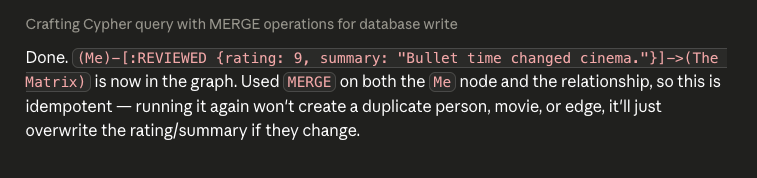
This uses the read-write tool. Claude confirms what it is about to write before running it, and once you approve it, the new relationship lands in your graph, which you can check directly in the Aura workspace if you want to see it arrive.
6. Visualizing the connections
“Give me a network diagram of Keanu Reeves and everyone connected to him within two hops, the actors, movies, and directors.”
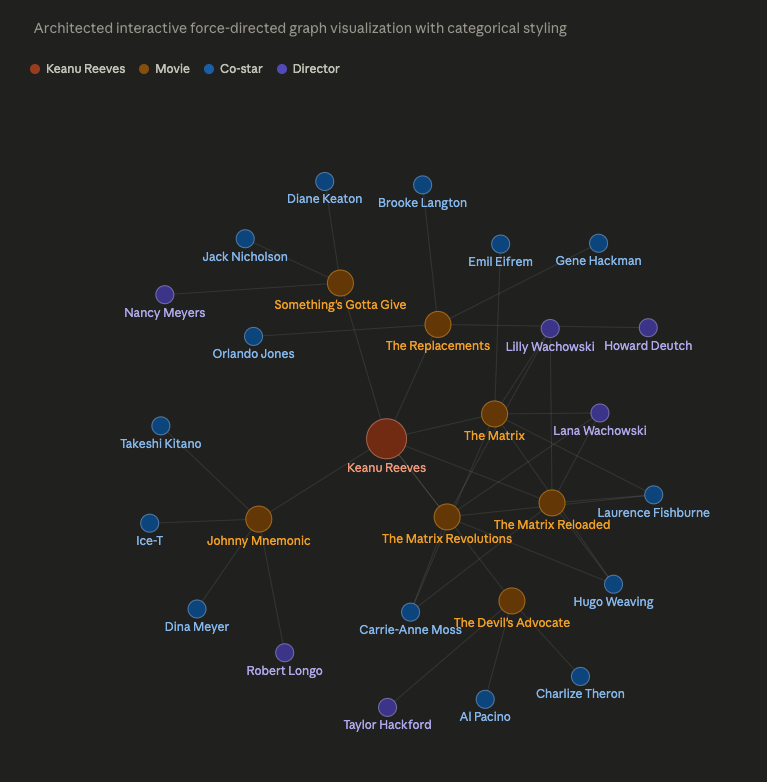
Claude pulls the subgraph using a variable-length Cypher traversal, then renders it as a node-and-edge diagram rather than a table of rows. movies are one shape, people are another, and edges are labeled ACTED_IN or DIRECTED. This is the payoff a raw query result can’t give you on its own. You’re seeing the shape of the network, who’s a hub, who’s a bridge between clusters, instead of reading names back one row at a time.
What just happened
It is worth naming the architecture behind that first message specifically. Claude Desktop called the MCP for the Aura server over HTTPS. The server authenticated your session against Aura, routed the request to your specific database, ran the appropriate Cypher, and returned the results as structured tool output, which Claude then used to compose its reply.
At no point did Claude generate Cypher from ungrounded training data and hope it was right. The schema tool told it what the graph actually contains, and the read tool ran real queries against real data, so the answers you saw above are grounded in your graph rather than in the model’s training data. That is the difference between an AI that knows about your data in the abstract and one that can actually work with it.
What’s next
The same three tools, schema, read, and read-write, work against any Aura database, so the questions get more interesting once it’s your own data behind them. “Which customers haven’t placed an order in 90 days and have an open support ticket?” is a graph traversal, and your AI client can answer it directly.
Ready to get started?
- Connect your AI client now: MCP for Aura is live on every Aura instance. Open the Aura Console, and you are one login away from your first query.
- Read the docs: Full setup steps, tool reference, and authentication details.
- Ask the community: Run into something unexpected? The Neo4j Community forum is a good place to start.
This article first appeared on Read More