

AI tools + AI fluency + human advantage = AI-native designer
From tools to agency, is this what it would take to thrive as a product designer in the AI era?
As a product designer, I have recently been trying to make sense of the rapidly changing AI landscape with both awe and chaos. While Anthropic’s CEO warns that AI could displace up to 50% of entry-level white-collar jobs, at the same time, Zapier’s CEO talks about hiring for AI fluency. Meanwhile, new roles like “model designer” are emerging and the industry is quickly shifting towards more super IC roles.
As AI reshapes how we work, I’ve been asking myself, it’s not just how to stay relevant, but how to keep growing and finding joy in my craft.
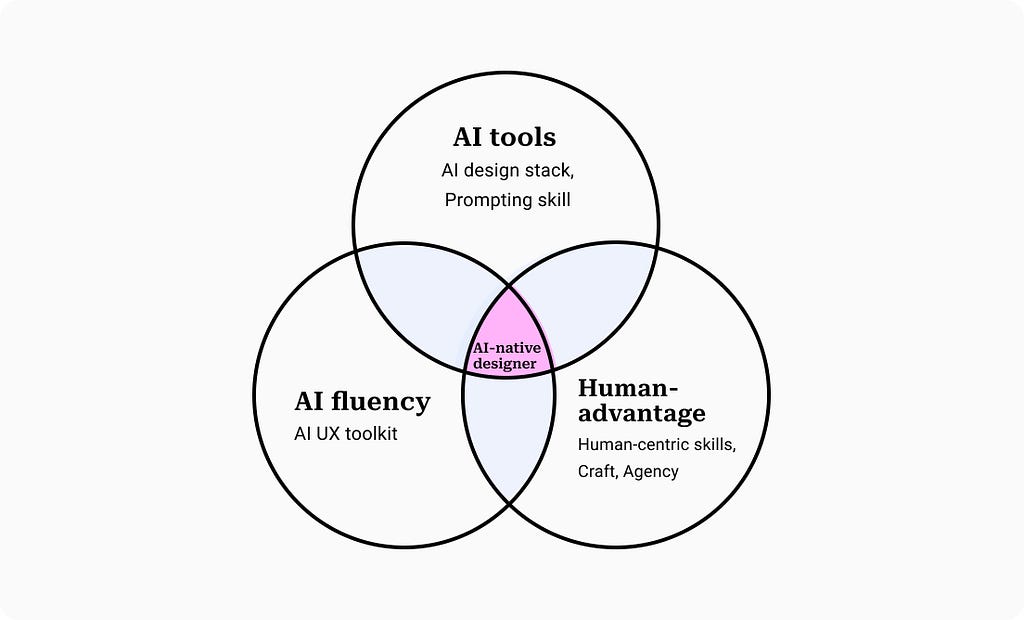
In my learning, the new shift requires leveraging three areas
- AI tools: Assembling an evolving AI design stack to ship fast
- AI fluency: Learning how to design for probabilistic systems
- Human-advantage: Strengthening moats like craft, agency and judgment to stay ahead of automation
- Together with strategic thinking and human-centric skills, these pillars shape our path toward becoming an AI-native designer

1. AI tools
Man is a tool-making animal — Benjamin Franklin
Benjamin Franklin’s definition highlights human creativity in inventing and using tools to extend their capabilities. Today, AI marks a leap in that evolution, from manual instruments to intelligent collaborators.
Velocity is no longer optional. Product teams at ProcessMaker went from shipping twice a year to shipping every two weeks. Figma’s State of Design (2025) states nearly 7 in 10 design teams (68%) routinely use AI to automate wireframing, generate visual assets and analyze user feedback.
As AI becomes embedded in daily workflows, it’s clear that design tools are becoming increasingly proactive, augmenting both speed and imagination.
Build a stack that reflects your craft
Your design stack depends on who you are as a designer. A UX researcher’s stack will look very different from a full-stack product designer’s, a conversational AI designer or a visual artist. There’s no one-size-fits-all.
Over the last six months, I’ve tried over 60 AI tools, chasing every new automation update and shiny product drop. However, the truth is that nearly everything in my workflow runs on just four to ten tools as shown in my AI product design stack.
Thus, the real value lies in intentional experimentation. Try new tools not because they are trending, but because they might unlock something better in your workflow. Ask yourself, Is there a smarter, faster, or more thoughtful way to do this?
Moreover, AI tools are evolving rapidly but the art of design remains human. Deciding what to make and how to make it exceptional still depends on taste, judgment, craft and your toolkit. As design leader Agustín Sánchez observes, “You’re not a great designer because you know the latest tools. You’re great because you know what to do with them.”
Prompting as a core skill
Last year, I repeatedly found myself dismissing AI outputs as mediocre until I realised the problem often wasn’t the model but the way I was designing my prompts. AI models with the right context provide them the information they need to generate meaningful responses.
Shifting my perspective to see AI as a collaborator and learning how to structure context, completely transformed the quality of my outputs
“Prompting is just like getting the AI up to speed — or nudging it in the right direction.” — John Maeda on How Leaders Will Use AI to Unleash Creativity
Alex Klein makes a compelling case that prompting is fundamentally a design activity and about crafting conversations with clarity, context, tone, and intent.
If you’re looking to sharpen your prompting skills, these resources are a great place to start
– Google Prompting Essentials
– IBM — Prompt Engineering Guide
– OpenAI — Prompting Guide
2. AI fluency
AI fluency is the ability to confidently design and work with intent-driven, layered, and probabilistic systems. For product teams, it means understanding AI’s potential, navigating their complexity, and making informed decisions that shape responsible and impactful outcomes.
GUI interfaces require users to achieve their goals through click, scroll and navigating across menus. On contrast, agentic systems introduce a new way for us to interact with systems by focusing on intent-based outcome.
Real-world AI products involve orchestration, memory, tool integrations, UX patterns, and agentic flows. To be fluent is to grasp the system’s behaviour — its variability, its failures, its potential for error or misuse and to design with these dynamics in mind.
Building blocks of AI fluency
- What Is ChatGPT Doing … and Why Does It Work? — by Stephen Wolfram’s provides a foundational understanding of how LLM works
- AI for Everyone — a non-technical course by Andrew NG, will help you understand AI technologies
- Introduction to Generative AI — introductory level course aimed at explaining what Generative AI is, how it is used, and how it differs from traditional machine learning methods
Toolkits for designing with AI
- IBM’s GenAI design principles developed six foundational design principles for generative AI UX . Each principle is paired with design strategies and real-world examples to help practitioners implement them effectively
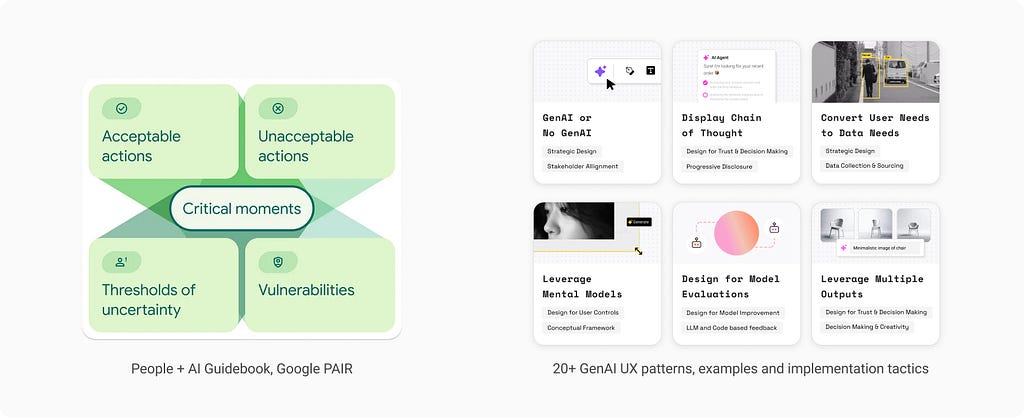
- Google’s People+AI initiative highlights four critical areas for consideration in designing an AI interaction. This framework offers a valuable guide for designing effective AI interactions.
- I have also built a simplified guide to 20+ GenAI UX patterns with examples and implementation tactics

3. Human advantage
With models like GPT-4o and Veo-3, AI now generates high-quality writing and visuals at speed and surpasses human skills and reasoning in many areas. The real question is —
What remains our uniquely human advantage?
Craftsmanship matters more than ever
AI models are trained on massive datasets and reflect dominant patterns rather than any distinct perspective. As a result, their outputs often feel generic, lacking the depth of subjective nuance such as personal style, insights, narrative intent, and creative originality. Designer Michal Malewicz captures this phenomenon with his concept of the “Avg AI line” and describes today’s creative landscape as an “era of meh,” saturated with generic, uninspired AI outputs.
Ironically, this abundance raises the bar!
Moreover, history shows that fundamental skills like narrative, aesthetic judgment and quality of execution remain essential despite new tools. Just as Photoshop didn’t kill graphic design, having an AI co-creator doesn’t negate the need for skill; it shifts it.
Richard Sennett, in his book The Craftsman, highlights that tools evolve but the essence of craft and mastery remains central and differentiates true experts. He urges craftsmen to embrace modern tools and focus on purpose over routine.
Creative direction, agency and keeping human in charge
We define goals, set constraints, and make the high-level decisions that give an AI a direction.
As both speed and quality are overtaken, the debate is not about human vs AI but more about what kind of collaboration we are seeking. In this new dynamic, the designer evolves not into a maker, but one to provide the creative direction, vision and purpose. Designers evolve into creative directors or orchestrators, while AI takes on the role of assistant, creative partner, or even critic.
Julie Zhuo emphasises the importance of agency. Even as AI matches our skills, capabilities and taste, our ability to choose why and where to apply AI skills would be driven by values, intention, and emergent purpose and remains distinctly human.
For instance, two designers using the same AI tools can arrive at vastly different outcomes. One might direct the AI to explore minimalist layouts for a climate nonprofit, while another uses it to generate playful, expressive visuals for a children’s education startup. The divergence isn’t in the tool, but in the human values and intent guiding it.
4. AI native designer
So, what does it mean to be an AI-native designer? Is it simply about using AI tools and having tech fluency or are there deeper skills that will truly matter in this new landscape?
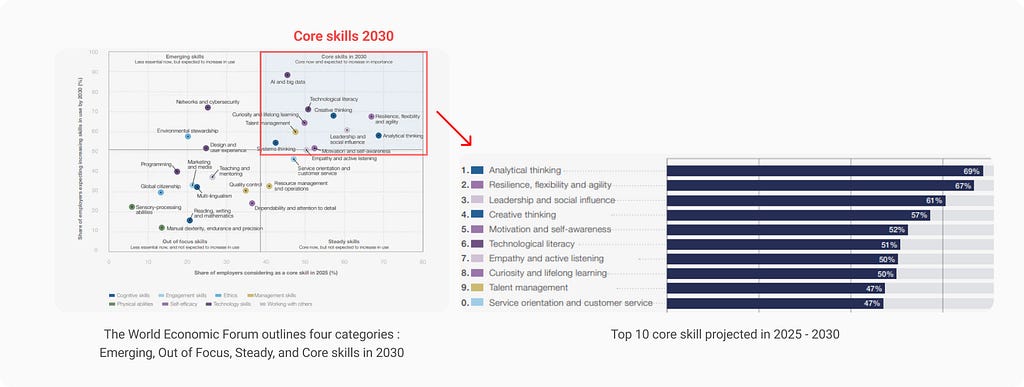
World Economic Forum shows that the most in-demand skills of 2030 are no longer technical. Instead, employers are prioritizing strategic, human-centric abilities like analytical thinking, creative thinking, technology literacy, and resilience as automation transforms work.
As Fabricio Teixeira points out, even in times of rapid technological change, the foundations of design, collaboration and communication are permanent pillars of a design career and outlast any tool.
At the same time, the emergence of “Super IC” roles is redefining senior design careers as many companies are actively supporting hands-on leadership paths valuing deep expertise, quality and high-leverage contribution over traditional people management.
As creation becomes faster and accessible, a designer’s true new moat now lies in crafting AI experiences that are unique, reliable and memorable. Mastery of design principles, storytelling, and problem-solving remains a uniquely human forte.
References
- Alex Klein, Prompts should be designed — not engineered https://medium.com/user-experience-design-1/prompts-should-be-designed-not-engineered-45838a9c3564
- Agustin Sanchez, The Tools Will Change. Your Craft Doesn’t Have To https://byagustin.medium.com/the-tools-will-change-your-craft-doesnt-have-to-3d971ae3cb67
- Conor Bronsdon, Understanding Fluency in AI: What It Is and How It Works https://galileo.ai/blog/ai-fluency
- Fabricio Teixeira, Designers: the only certainty is change https://uxdesign.cc/designers-the-only-certainty-is-change-930a2af62ad
- Stop Pretending You Write Alone: AI, Authorship, and the End of the Solo Genius Myth
https://medium.com/@4O4/stop-pretending-you-write-alone-ai-authorship-and-the-end-of-the-solo-genius-myth-fc9c0850d4d3 - John Maeda, How to talk to AI — https://www.linkedin.com/learning/ai-design-john-maeda-on-design-better/how-to-talk-to-ai
- John Maeda, Simplicity and Agentic Experience (AX) https://johnmaeda.medium.com/simplicity-and-agentic-experience-ax-0087553b73d8
- Michal Malewicz, Welcome to the era of MEH https://michalmalewicz.medium.com/welcome-to-the-era-of-meh-9889c20b990d
- Taste is your unfair advantage https://michalmalewicz.medium.com/taste-is-your-unfair-advantage-71fa02076364
- Julie Zhuo, When AI Has Better Taste Than You https://joulee.medium.com/when-ai-has-better-taste-than-you-0dc8e870db9a
- Google PAIR, Interaction Design Policies: Design for the opportunity, not just the task https://medium.com/people-ai-research/interaction-design-policies-design-for-the-opportunity-not-just-the-task-239e7f294b29

AI tools + AI fluency + human advantage = AI-native designer was originally published in UX Collective on Medium, where people are continuing the conversation by highlighting and responding to this story.
This post first appeared on Read More