
Most collections let you access any item whenever you want. A Queue does the opposite. It enforces order. The first item in is the first item out. That constraint turns out to be exactly what many real systems need.
Java Collections Series — Final PartPart
Part 1: List — ArrayList, LinkedList, Vector
Part 2: Set — HashSet, LinkedHashSet, TreeSet, EnumSet
Part3: Map — HashMap, LinkedHashMap, TreeMap, ConcurrentHashMapPart
Part 4: Queue — Queue, Deque, PriorityQueue (this article)
Think about a support ticket system. A user submits a ticket. Another submits one five minutes later. A third submits one after that. Which ticket gets handled first? The first one submitted. Not the most recent. Not a random one. The first. That is a Queue in action.
A Queue processes items in the order they arrive. The first item added is the first item removed. Java calls this FIFO: First In, First Out. This ordering guarantee is the entire reason Queue exists as a separate type.
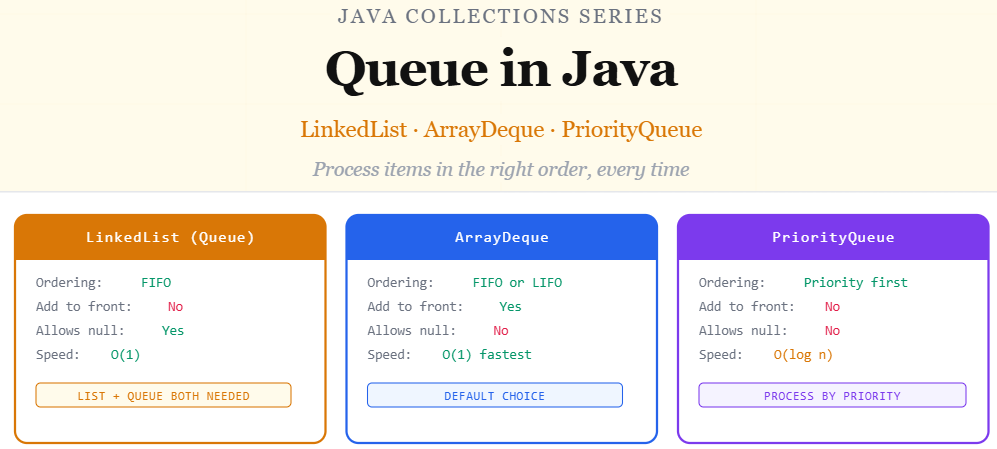
Java gives you three Queue implementations worth knowing. LinkedList for basic queuing. ArrayDeque for a faster double-ended queue. PriorityQueue for when order matters but arrival time does not.
How a queue works
FIFO and why it matters
A Queue has two core operations. You add items to the back and remove items from the front. That is all. No random access. No index lookups. Just an ordered line where items enter from one end and leave from the other.
This constraint makes Queue the right tool for task processing, job scheduling, event handling, and any situation where the sequence of operations must be respected. When fairness or order matters, a Queue is the correct structure.
The four key Queue methods
add() or offer() — add to the back. remove() or poll() — remove from the front. element() or peek() — see the front item without removing it. The difference between each pair: add() and remove() throw exceptions on failure. offer() and poll() return null or false instead. Prefer offer() and poll() in most code.
Linkedlist as queue
LinkedList implements both the List and Queue interfaces. You saw it in Part 1 as a List. Here it plays a different role. When you declare it as a Queue, you get exactly the FIFO behaviour you need without any extra setup.
import java.util.LinkedList;
import java.util.Queue;

public class QueueExample {
    public static void main(String[] args) {

        Queue<String> supportTickets = new LinkedList<>();

        // tickets arrive in this order
        supportTickets.offer("Ticket 001 — Login issue");
        supportTickets.offer("Ticket 002 — Payment failed");
        supportTickets.offer("Ticket 003 — App crash");

        System.out.println(supportTickets.size()); // 3

        // peek, see next ticket without removing it
        System.out.println(supportTickets.peek());
        // Ticket 001 — Login issue

        // poll, process tickets in order
        System.out.println(supportTickets.poll());
        // Ticket 001 — Login issue (removed)

        System.out.println(supportTickets.poll());
        // Ticket 002 — Payment failed (removed)

        System.out.println(supportTickets.size()); // 1 remaining

        // process all remaining tickets in order
        while (!supportTickets.isEmpty()) {
            String ticket = supportTickets.poll();
            System.out.println("Processing: " + ticket);
        }
    }
}
Arraydeque
Faster and more flexible
ArrayDeque is a double-ended queue. Deque stands for “double-ended queue”. You can add and remove from both the front and the back. This makes it useful as both a Queue (FIFO) and a Stack (LIFO: Last In, First Out).
ArrayDeque is faster than LinkedList for most queue operations because it uses a resizable array internally instead of individual nodes. When you need a Queue in Java, ArrayDeque is the preferred implementation over LinkedList.
import java.util.ArrayDeque;
import java.util.Deque;

public class ArrayDequeExample {
    public static void main(String[] args) {

        // used as a Queue, FIFO
        Deque<String> printQueue = new ArrayDeque<>();

        printQueue.offerLast("Document A");  // add to back
        printQueue.offerLast("Document B");
        printQueue.offerLast("Document C");

        System.out.println(printQueue.pollFirst()); // Document A
        System.out.println(printQueue.pollFirst()); // Document B

        // used as a Stack, LIFO
        Deque<String> browserHistory = new ArrayDeque<>();

        browserHistory.push("google.com");   // adds to front
        browserHistory.push("medium.com");
        browserHistory.push("github.com");

        // pop removes from front, most recent first
        System.out.println(browserHistory.pop()); // github.com
        System.out.println(browserHistory.pop()); // medium.com

        // peek at front without removing
        System.out.println(browserHistory.peekFirst()); // google.com
        System.out.println(browserHistory.peekLast());  // google.com

        // add to front, useful for urgent tasks
        printQueue.offerFirst("URGENT: Board report");
        System.out.println(printQueue.pollFirst()); // URGENT: Board report
    }
}
ArrayDeque vs LinkedList — which to use
Use ArrayDeque by default when you need a Queue or a Stack. It is faster than LinkedList, uses less memory, and covers both use cases. Only use LinkedList when you specifically need to use it as both a List and a Queue in the same code.
Priorityqueue
When arrival order does not matter
PriorityQueue changes the rules. Items are not processed in the order they were added. They are processed in priority order. The item with the highest priority comes out first, regardless of when it arrived.
By default, Java uses natural ordering. Numbers come out smallest first. Strings come out alphabetically. You can also provide a custom comparator to define your own priority rules.
import java.util.PriorityQueue;
import java.util.Comparator;

public class PriorityQueueExample {
    public static void main(String[] args) {

        // natural ordering, smallest number comes out first
        PriorityQueue<Integer> numbers = new PriorityQueue<>();
        numbers.offer(30);
        numbers.offer(10);
        numbers.offer(20);

        System.out.println(numbers.poll()); // 10, smallest first
        System.out.println(numbers.poll()); // 20
        System.out.println(numbers.poll()); // 30

        // custom ordering for a task scheduler
        // lower priority number = processed first (like P1, P2, P3)
        PriorityQueue<String[]> taskQueue = new PriorityQueue<>(
            Comparator.comparingInt(task -> Integer.parseInt(task[1]))
        );

        taskQueue.offer(new String[]{"Fix login bug",     "1"}); // P1
        taskQueue.offer(new String[]{"Update homepage",   "3"}); // P3
        taskQueue.offer(new String[]{"Improve performance","2"}); // P2

        // processes by priority, P1 first regardless of add order
        while (!taskQueue.isEmpty()) {
            String[] task = taskQueue.poll();
            System.out.println("P" + task[1] + ": " + task[0]);
        }
        // P1: Fix login bug
        // P2: Improve performance
        // P3: Update homepage

        // reverse order, largest number first
        PriorityQueue<Integer> maxFirst = new PriorityQueue<>(
            Comparator.reverseOrder()
        );
        maxFirst.offer(5); maxFirst.offer(1); maxFirst.offer(3);
        System.out.println(maxFirst.poll()); // 5, largest first
    }
}
PriorityQueue does not sort the internal array
PriorityQueue only guarantees that poll() returns the highest priority item. If you print the entire queue, the order may look random. The priority ordering only applies when you remove items one at a time. This is by design and completely normal.
All three compared side by side
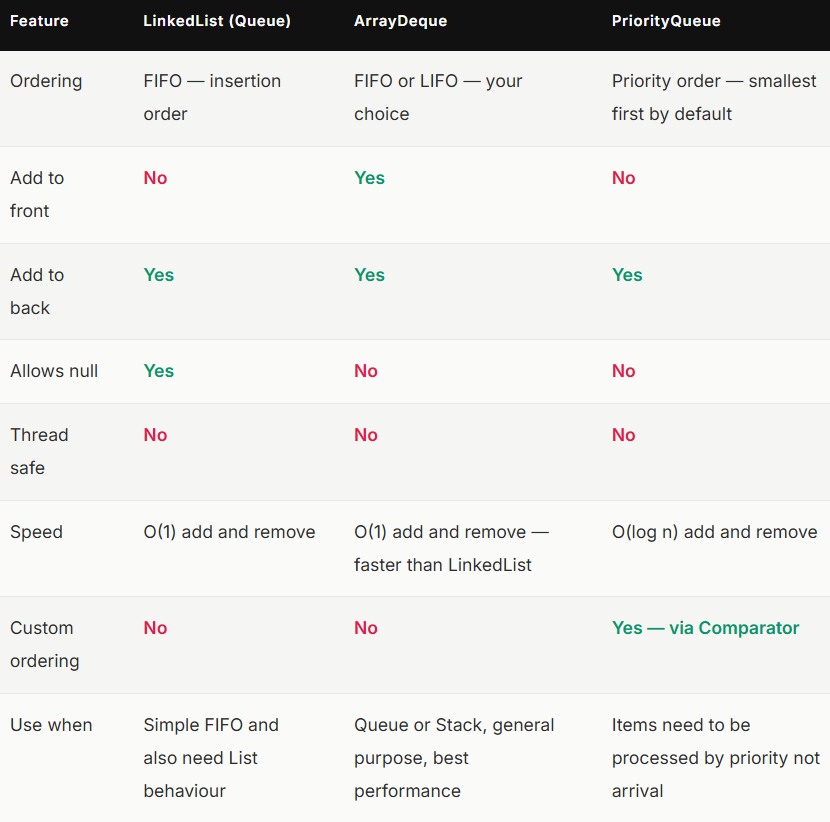
The decision which one to pick
Use ArrayDeque when
You need a Queue or a Stack and performance matters. This is the default choice for most queue use cases. Faster than LinkedList and more memory efficient. Use it unless you have a specific reason not to.
Use LinkedList as Queue when
You need to use the same object as both a List and a Queue in the same code. This is uncommon but happens in certain designs where you need both index-based access and queue behaviour from one collection.
Use PriorityQueue when
Items should be processed by importance rather than arrival time. Task schedulers, event systems, notification priorities, anything where some items need to jump ahead of others based on a rule you define.
A Queue is not just a collection. It is a contract. It tells anyone reading your code that items in this structure will be processed in a defined order. That clarity matters as much as the functionality itself.
ArrayDeque covers most situations. PriorityQueue handles the cases where arrival order is irrelevant and importance drives everything. Pick based on what your system actually needs to do, not what feels familiar.
Resources
- Queue interface — Oracle documentation
- ArrayDeque — Oracle documentation
- PriorityQueue — Oracle documentation
- Deque interface — Oracle documentation
- Queue in Java — GeeksforGeeks
If this article helped you, consider clapping and following for more practical SDET content.
Connect
#Java #Queue #PriorityQueue #ArrayDeque #JavaCollections #JavaBeginner #CoreJava #Programming #SDET #LearnJava

Java Collections: Queue. was originally published in Javarevisited on Medium, where people are continuing the conversation by highlighting and responding to this story.
This post first appeared on Read More