
Meet Antigravity, Google’s AI coding tool, and Chanakya.AI — a finance tracker that keeps all your data private, right inside your browser.
If you have ever wanted to build your own app but felt put off by the setup, the code, the debugging — this one is for you.
I recently built a personal finance tracker called Chanakya.AI using Google called Antigravity. The whole thing took under an hour. More importantly, I spent most of that time thinking about what to build — not wrestling with how to write the code for it.
This post walks through what Antigravity is, how to get it running on Windows, what I built with it, and whether it is actually worth your time.
So what is Antigravity?
Think of it like this: most AI coding tools are like a very smart autocomplete. You type, they suggest the next line. You are still doing the driving.
Antigravity is different. It is more like hiring a junior developer who can work on their own. You say “build me a login page with email and password” — and it actually builds it. It creates the files, writes the code, runs the app in a browser preview, and tells you when it is done. You review; you approve; you move on.
Google launched it in November 2025 and it is currently free to use. It is built on top of VS Code (a popular free code editor), so if you have used that before, the layout will feel familiar. If you have not, do not worry — it is not hard to pick up.
Getting it on your Windows PC
You will need: a Windows 10 PC, a Google account, and Chrome installed.
Step 1 — Download and install. Head to antigravity.google, grab the Windows installer, and run it. Standard installation — next, next, done.
Step 2 — First launch setup. When it opens for the first time it will ask you a few questions. Choose Start Fresh, pick a theme (dark mode is easier on the eyes for long sessions), and then you will hit the most important screen.
Step 3 — Pick your working style. Antigravity asks how much control you want to give the AI:
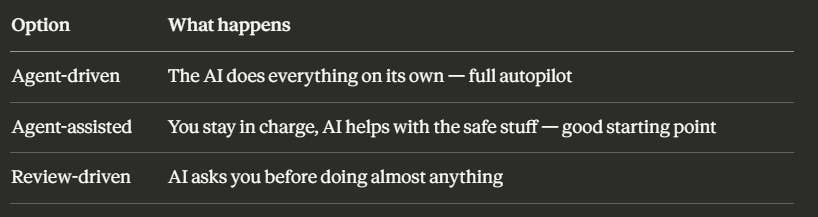
Start with Agent-assisted. It gives you enough automation to feel the difference while keeping you in control.
Step 4 — Sign in and choose a model. Sign in with your Google account and select Gemini 3.1 Pro as your AI model. That is the one optimised for coding tasks.
Done. You are in.
How the “talk to it” workflow actually feels
This is the part that genuinely surprised me.
Instead of writing code, you open a project folder and describe what you want — like texting a developer. Here is the first thing I typed to kick off the project:
Create a new React TypeScript project using Vite.
Install lucide-react for icons.
Set up folders for components, utils, and types.
Don't build anything yet — just the skeleton.
Antigravity opened the terminal itself, ran the setup commands, created the folder structure, and reported back. No manual npm commands needed on my end.
From there I described each feature in plain English. Two modes help here:
Plan mode — before touching any code, the AI writes out a plan in plain language. You read it, tweak it if something looks off, then say go. This is the one to use for anything complicated.
Fast mode — no plan, just does it immediately. Good for small changes like tweaking a colour or fixing a label.
What I actually built: Chanakya.AI
The app is a personal finance tracker designed for Indian users who have transaction data spread across multiple places — a bank statement export here, a payment app history there, SMS alerts from the bank.
The single most important design decision: none of your data ever leaves your device.
Everything runs inside your browser. No account to sign up for, no server receiving your transaction history, no company storing what you spend money on. When you close the tab, the data is gone. This is not a privacy policy promise — it is how the code is built. There is literally no server to send data to.
Here is how data moves through the app:
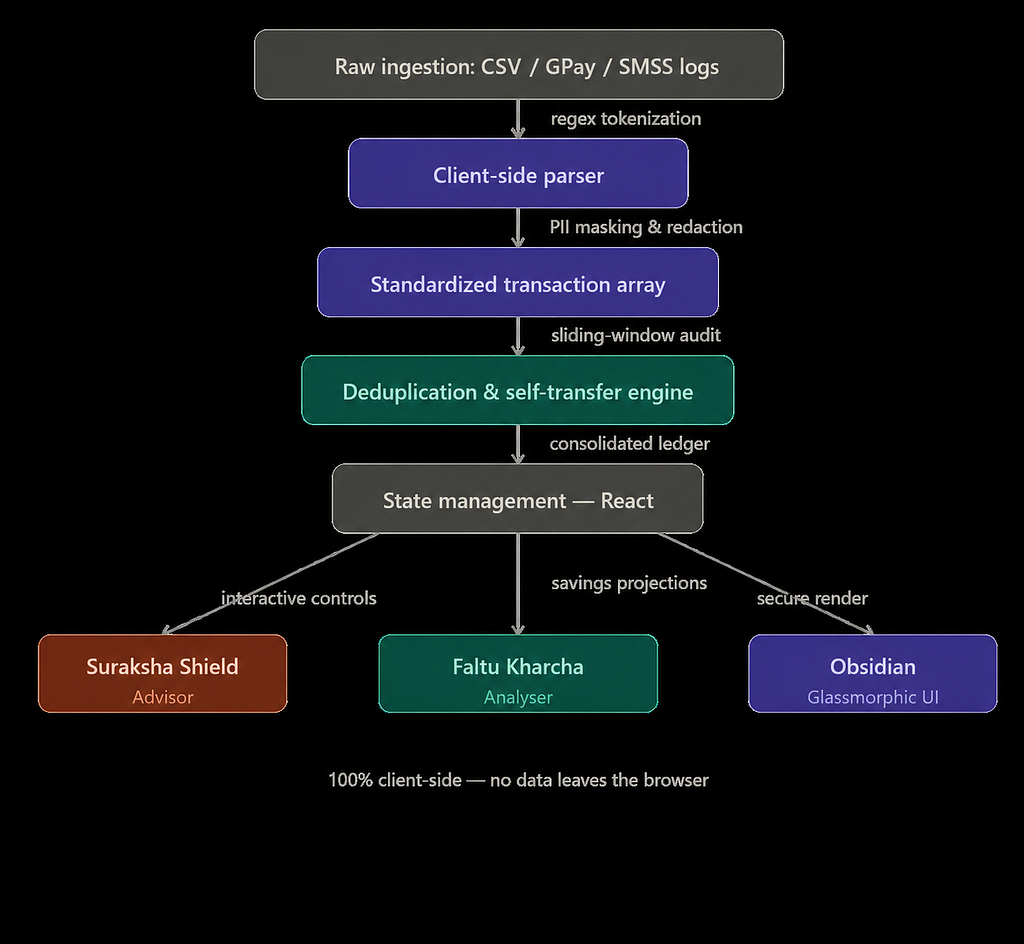
The three things it does
Spending breakdown (50/30/20 Auditor). Automatically sorts your transactions into Needs (rent, groceries, utilities), Wants (dining out, entertainment, subscriptions), and Savings. Then shows you how your actual split compares to the recommended 50/30/20 budget rule.
Emergency fund check (Suraksha Shield). Suraksha means security in Sanskrit — fitting, since Chanakya was an ancient Indian economist and strategist. This module looks at your liquid savings and tells you how many months of essential expenses it covers. Slide the target between 3 and 12 months and watch the gap close or grow.
Spending leak finder (Faltu Kharcha Analyser). Faltu kharcha roughly translates to “pointless spending.” This scans for recurring charges — old subscriptions, bank fees, auto-debits you forgot about — and shows what you would save annually if you cut them.
One clever problem it solves quietly
If you import a bank statement and a payment app export for the same month, the same transaction will appear twice — once in each file. Left unchecked, your totals would be wrong.
The app automatically spots these duplicates by checking if two transactions from different sources have the same amount and happen within 24 hours of each other. When it finds a match, it keeps one and drops the other. You never have to think about it.
What it is built with
For anyone curious about the tech under the hood:
- React + TypeScript — the standard combination for building reliable web apps
- Vite — makes the development server fast and keeps the final file size small
- No database, no backend — deliberately. The browser’s own memory is the only storage.
Is Antigravity actually good? Honest take.
The good stuff. It genuinely speeds things up — not just by typing faster, but by removing the mental overhead of looking up syntax, debugging import errors, and setting up boilerplate. You spend your energy on decisions that matter: what the app should do, how it should behave, where the edges are.
The built-in browser preview is also excellent. The AI can open your app, click around, and fix visual bugs without you having to switch windows.
The catch. The AI is confident even when it is wrong. It will produce clean-looking code that has a logical flaw buried inside — and it will not flag the issue unless you push back. On this project, the duplicate-detection logic needed three rounds of corrections before it handled edge cases properly.
The rule I settled on: always read the diff before approving. Antigravity shows you every change it made before applying it. Do not just hit approve. Spend thirty seconds reading it. This one habit will save you from most of the problems.
The bigger idea
Your bank transactions tell a detailed story about your life. Where you eat, what you spend on health, how you move money. That data should not sit on a startup’s server somewhere.
Chanakya.AI keeps it where it belongs — on your own device, processed in your own browser, visible only to you.
And the fact that something this useful can be built in under an hour, by one person, using a free AI tool — that says something interesting about where software development is heading.
Some glimpseof the app: *seeded/ dummy data
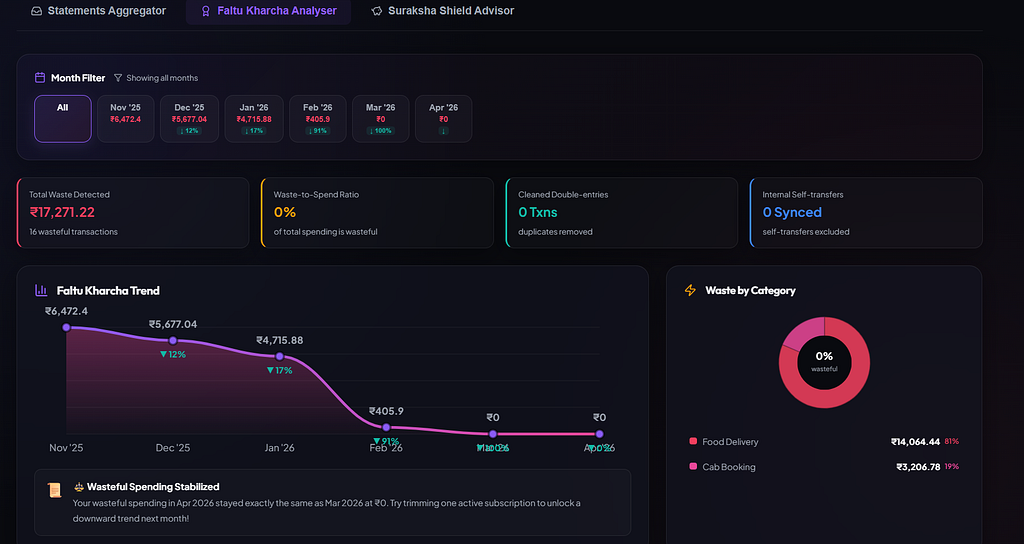
Chanakya.AI is built with React 18, TypeScript, and Vite. Developed using Antigravity by Google DeepMind. Your financial data never leaves your browser.

From Idea to Working App in 58 Minutes — No, I Didn’t Write Most of the Code was originally published in Javarevisited on Medium, where people are continuing the conversation by highlighting and responding to this story.
This post first appeared on Read More