
Can a $599 Mac actually handle coding, content creation, and AI workflows in 2026? I used the MacBook Neo as my primary machine for 14 days to find out.
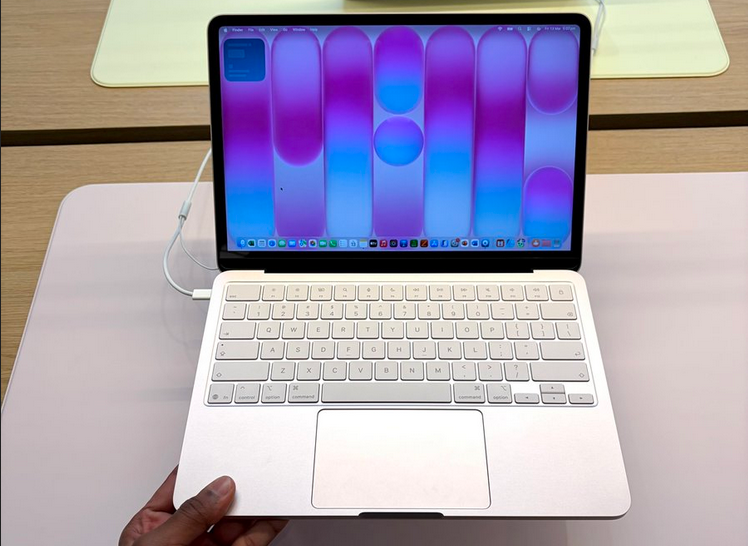
Hello friends, if you are following the buzz then there is a great chance that you have come across the most affordable Macbook yet, the MacBook Neo, but is it really worth it in today’s AI age for developers and content creators? Let’s find out.
I am big fan of Apple products as I regularly use iPhone, iPad, MacBook Pro and Mac Mini but I have yet to try the new MacBook Neo.
I come across this awesome product when I saw this tweet from Tim Cook, the ex-CEO of Apple.
https://medium.com/media/afd3b2d0c1da47e39b8d693072c05d67/href
And it makes sense.
The MacBook Neo isn’t built for power users on paper. Instead, it’s built for students, beginner creators, and first-time developers.
But here’s the real question:
👉 Can it survive real-world developer + creator workloads?
I tested it with:
- Coding (Java, Python, backend APIs)
- Running lightweight VMs
- Writing + publishing content
- AI tools and agents
- Editing short-form content
Here’s what actually happened.
1. Coding on the MacBook Neo (Reality vs Expectations)
For development, I primarily used:
- Visual Studio Code
- IntelliJ IDEA
- Docker (light usage)
- Postman
My Experience:
- Small to medium backend projects? ✅ Smooth
- Running multiple services? ⚠️ Manageable but tight
- Heavy builds / large repos? ❌ You’ll feel the limits
The A18 Pro chip is surprisingly efficient, but 8GB RAM is the real bottleneck.
👉 You can code comfortably… But you need discipline:
- Close unused tabs
- Avoid heavy containers
- Don’t run everything at once
It’s definitely not for tab driven development with 100s of tabs open on Chrome or Safari, but its quite useful for beginner coder, I would say, give it a try, especially if you are learning to code.
2. Running AI Tools & Agents
This is where things get interesting.
With tools like:
- ChatGPT
- Claude
- GitHub Copilot
Most of the heavy lifting happens in the cloud.
My Experience:
- Prompting, coding assistance → ✅ flawless
- Running local AI models → ❌ not practical
- Multi-tab AI workflows → ⚠️ memory pressure kicks in
👉 The Neo is great for using AI, But not for building or training AI systems
This is where devices like:
- MacBook Pro (M-series)
- Mac Mini (M-series) (great for running AI agents like OpenClaw locally)
start to make a real difference.
- Apple 2024 Mac mini Desktop Computer with M4 Pro chip with 12‑core CPU and 16‑core GPU: Built for Apple Intelligence, 24GB Unified Memory, 512GB SSD Storage with AppleCare+ (3 Years)
- Apple 2022 MacBook Pro with Apple M2 Chip (13-inch, 8GB RAM, 512GB SSD Storage) (QWERTY English) Space Gray (Renewed Premium)
3. Content Creation (Writing, Editing, Publishing)
This is where the Neo shines.
I used it for:
- Writing articles
- Editing images
- Light video editing
- Publishing content
My Experience:
- Writing → ✅ Excellent (keyboard is underrated)
- Display → ✅ Sharp and comfortable for long sessions
- Speakers → ✅ Surprisingly good
- Video editing → ⚠️ Fine for short-form, not heavy projects
👉 If you’re a:
- Blogger
- Indie creator
- YouTuber (light editing)
This machine is more than enough. In fact, I would recommend MacBook Neo to all content creator who is looking for a Mac with excellent battery life and smooth performance.
4. Battery Life (The Silent Killer Feature)
This is where I stopped worrying.
- 8–10 hours easily with mixed usage
- Coding + browsing + AI tools → still strong
- No charger anxiety
For developers who move around a lot, this matters more than raw power. If you are looking for an affordable machine with good battery life, Macbook Neo is definitely worth trying
5. Where It Starts Breaking
Let’s be honest.
The Neo struggles when you:
- Run multiple Docker containers
- Use heavy IDEs + browser + AI tools together like opening multiple projects on IntelliJ IDEA. It’s definitely not for Microservices development
- Work on large-scale systems
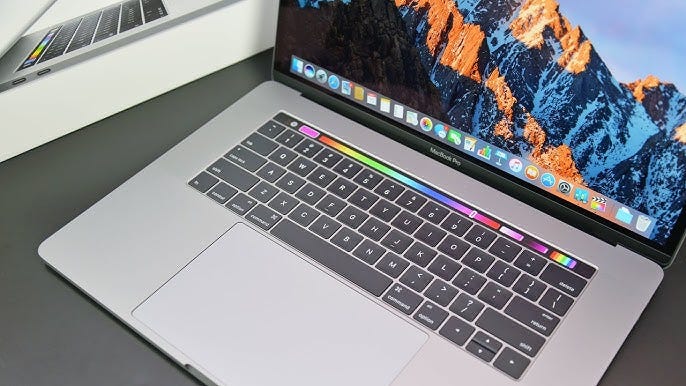
This is where upgrading makes sense. For professional coders and software developers, I would recommend MacBook Pro 15 inch, I use the same machine and its awesome.
6. When You Should Choose MacBook Neo
You should choose MacBook Neo if you are:
- A beginner developer
- A student learning to code
- A content creator starting out
- Someone using cloud-based AI tools
It has got good processing power, great battery life and that smoothness of Apple product which makes working a breeze. On top of that, its the most affordable Mac yet to release.
Here is the link to get your MacBook Neo — Get it Now
7. When You Should NOT Choose It
I would suggest skip Neo and go for more power if you:
- Work with large codebases
- Build AI/ML systems
- Run heavy local environments
- Do serious video editing
In this case, I would recommend MacBook Pro 15 inch, I use the same Mac as my primary machine and its awesome.
8. Better Alternatives (For Serious Builders)
If you’re thinking long-term:
🔹 MacBook Pro (Best for Developers + AI Work)
👉 Apple MacBook Pro 15 inch
- Handles heavy builds
- Runs multiple services easily
- Better for AI agents & local workflows
🔹 Mac Mini (Best Value Power Machine)
👉 Apple Mac Mini
- Perfect for backend devs
- Great for running AI agents locally
- Ideal as a home lab machine
🔹 MacBook Neo (Best Budget Entry)
👉 Apple MacBook Neo 13-inch Laptop
- Affordable
- Lightweight
- Perfect starting point
Final Verdict
That’s all in this review of MacBook Neo for developers and content creators. As I said, the MacBook Neo is not a “power machine.” But that’s the wrong way to look at it.
It’s a gateway device.
A machine that lets you:
- Learn coding
- Build projects
- Use AI tools
- Create content
Without spending thousands.
The Real Truth:
- Neo helps you start
- MacBook Pro helps you scale
- Mac Mini helps you experiment with AI systems
If you’re just getting into:
- Development
- AI tools
- Content creation
👉 The Neo is enough.
If you’re building the future? You’ll outgrow it faster than you think, especially with RAM, but its definitely worth trying for new coders and content creators.
Here is the link to try out — Apple 2026 MacBook Neo 13-inch Laptop with A18 Pro chip: Built for AI and Apple Intelligence

Is the MacBook Neo Good for Developers and Content Creators? My 14 Days Experience was originally published in Javarevisited on Medium, where people are continuing the conversation by highlighting and responding to this story.
This post first appeared on Read More