
Most often JWT appears to be defacto for API security but also confusing as lot to cover but there is no single document that covers why JWT and why not JWT. What is the rationale around token if Username and password are there. Ohh, now you also have access and refresh token, what and why they exist ? If JWT can be decoded by Anyone how can it be secure. If someone stole my token what system should do ? How it fits in with OAuth and many more. Lets discuss all of these questions in one go and sort it out forever.
Imagine you are attending a massive, multi-day music festival. When you first arrive at the gates, you show your ID and your ticket — a rigorous process that proves exactly who you are. Once verified, the guard doesn’t ask you to carry your birth certificate around all weekend. Instead, they snap a plastic wristband onto your arm. This wristband is your “token.” For the rest of the festival, every time you want to enter a stage or buy a drink, you just show the wristband. The staff doesn’t need to call the main office to check if you’re a valid guest; the wristband itself carries the “proof” of your access.
In the digital world, we started with “Birth Certificates” (Username and Password). Every time your browser wanted to talk to a server, it theoretically had to send those credentials. But sending passwords over the wire repeatedly is like carrying your passport in your back pocket while dancing — it’s a recipe for disaster. If an attacker snatches that password just once, they have your identity forever.
This led to the era of Stateful Sessions. The server would verify your password once, create a “session” in its memory (like a massive filing cabinet), and give you a Session ID. However, as the internet grew into the world of microservices — where one app might be powered by fifty different servers — that “filing cabinet” became a bottleneck. If Server A had your session but you were redirected to Server B, Server B would have no idea who you were.
This is where the JSON Web Token (JWT) enters the story.
The Anatomy of the Digital Wristband
Why is JWT designed the way it is? Unlike a Session ID, which is just a random string that points to a server’s memory, a JWT is stateless. It carries the data inside itself.
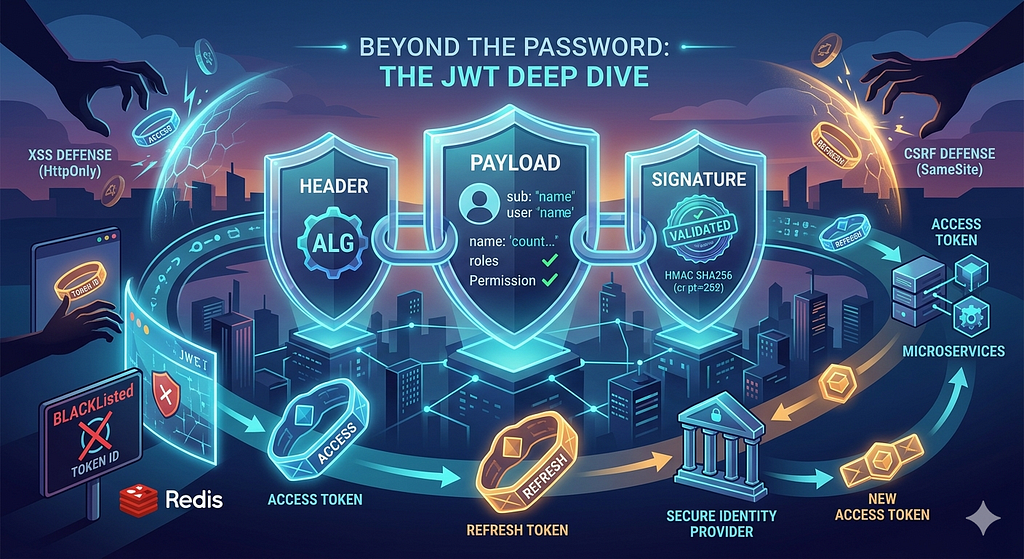
A JWT consists of three parts: the Header (the type of wristband), the Payload (your name and permissions), and the Signature (the holographic seal that proves the festival organizer issued it). Because it is cryptographically signed, the server doesn’t need to look you up in a database. It just checks the signature. If the signature matches, the server trusts the data inside.
However, this design introduced a terrifying realization: If a JWT is stateless and self-validating, how do you revoke it? If someone steals your wristband, you can’t exactly tell the “wristband” to stop working because the wristband doesn’t check back with the office. It just exists.
The Birth of the Two-Token System: Access and Refresh
In the early days of token implementation, developers often used a single, long-lived token. If that token was stolen, the attacker had hours or days of access. This prompted an architectural evolution borrowed from the OAuth 2.0 framework: the split between Access Tokens and Refresh Tokens.
The Access Token is your “Bar Pass.” It is short-lived — often lasting only 15 minutes. It is sent with every single request. Because it expires so quickly, the “window of damage” for a thief is tiny.
But we can’t make a user log in every 15 minutes; that would break the user experience. So, we introduced the Refresh Token. This is your “Front Desk Voucher.” It is long-lived (days or weeks) and is only used to request a new Access Token. It is never sent to the API servers; it only goes to the Identity Server.
The Battlefield: XSS and CSRF
As we moved these tokens into the browser, we opened a door to two classic enemies: Cross-Site Scripting (XSS) and Cross-Site Request Forgery (CSRF).
If you store your JWT in localStorage, a simple XSS attack (a malicious script injected into the page) can “reach out” and steal your token. To mitigate this, modern security dictates storing tokens in HttpOnly, Secure Cookies. Because they are “HttpOnly,” JavaScript cannot read them. They are invisible to the XSS script.
However, using cookies opens the door to CSRF, where an attacker tricks your browser into sending a request to your bank because the browser automatically attaches cookies to requests. We shut this door by using the SameSite=Strict attribute on our cookies and requiring custom headers (like X-Requested-With) that a CSRF attack cannot easily replicate.
Handling the “Handover” Without Breaking the UX
In a web app, we use API Interceptors. Imagine your browser sends a request, but the server says, “Sorry, this Access Token just expired” (401 Unauthorized). Instead of crashing or showing a login screen, the Interceptor catches that 401, sends the Refresh Token in the background to get a new Access Token, and then “retries” the original request. The user never sees a flicker; the browsing behavior remains seamless.
Mobile vs. Web Timings:
- Web Apps: Typically use 15-minute Access Tokens and 24-hour Refresh Tokens. Why? Browsers are high-risk environments for XSS.
- Mobile Apps: Use 1-hour Access Tokens and 90-day (or indefinite) Refresh Tokens. Mobile OSs (iOS/Android) provide “Secure Enclaves” (Keychain/Keystore) that are far more secure than browser storage, allowing for a “logged-in forever” experience.
Damage Control: The Kill Switch
If a token is compromised, we perform “Damage Control” via Token Blacklisting or Refresh Token Rotation.
- Rotation: Every time you use a Refresh Token, the server invalidates it and issues a new one. If an attacker steals a Refresh Token and tries to use it after the user has already refreshed, the server sees the “reuse” and immediately kills every token in that user’s session family.
- Blacklisting: We store the unique IDs (jti) of compromised tokens in a fast-access memory store like Redis.
Implementation: Python and Java (Spring Boot)
To understand how this looks in the “gut” of a server, let’s look at validation.
Python (using PyJWT):
Python
import jwt # Library: PyJWT
SECRET_KEY = "your-distributive-secret"
def validate_access_token(token):
    try:
        # Decodes and checks the 'exp' (expiry) and signature automatically
        payload = jwt.decode(token, SECRET_KEY, algorithms=["HS256"])
        return payload
    except jwt.ExpiredSignatureError:
        return "Token expired. Please use Refresh Token."
    except jwt.InvalidTokenError:
        return "Invalid token."
Java (Spring Boot with JJWT):
Java
// Library: io.jsonwebtoken (JJWT)
public Claims validateToken(String token) {
    return Jwts.parserBuilder()
            .setSigningKey(Keys.hmacShaKeyFor(secret.getBytes()))
            .build()
            .parseClaimsJws(token) // This will throw an exception if invalid or expired
            .getBody();
}
// Invalidation Check (The "Blacklist")
if (redisTemplate.hasKey(claims.getId())) {
    throw new AuthenticationException("Token has been revoked");
}
JWT vs. OAuth2: The Great Confusion
It is a common mistake to ask “Should I use JWT or OAuth2?” OAuth2 is a protocol (the set of rules for the festival), while JWT is a token format (the physical material of the wristband). You often use JWTs inside an OAuth2 flow. However, if you are just building a simple login for your own app, a pure JWT implementation is lighter. If you are building a system where “Login with Google” is required, you must use OAuth2.
When NOT to use JWT
JWT is not a silver bullet. You should avoid it if:
- You need immediate revocation: If you must be able to ban a user and have them logged out in less than a second, use traditional sessions.
- Payload Size: If you need to store lots of user data, JWTs become huge and slow down every single request.
- Sensitive Data: Never put a user’s home address or password in a JWT. It’s encoded, not encrypted; anyone can base64-decode it.
Comparison Table: Authentication Methods

Conclusion
The journey from simple passwords to the sophisticated dance of Access and Refresh tokens represents our growing understanding of the “stateless” web. By decoupling identity from the server’s memory, we have enabled the massive, interconnected world of modern apps. However, as the “wristband” becomes more powerful, our responsibility to protect it through HttpOnly cookies, rotation, and strict validation becomes the frontline of digital defense.
Further Readings:
Official Specifications
- RFC 7519: JSON Web Token (JWT) — The core standard defining the JWT structure and claims.
- RFC 6749: The OAuth 2.0 Authorization Framework — The protocol that standardizes the use of Access and Refresh tokens.
- RFC 7515: JSON Web Signature (JWS) — Technical details on how the digital signatures used in JWTs are calculated.
Security Best Practices
- OWASP JWT Cheat Sheet — The gold standard for developers on how to prevent common JWT vulnerabilities.
- Auth0: JSON Web Token Introduction — A highly visual and beginner-friendly deep dive into JWT architecture.
- “Stop using JWT for sessions” — The critical architectural perspective by Sven Slootweg (helpful for providing a balanced view in your article).
Developer Libraries
- PyJWT (Python) — The most popular Python library for encoding and decoding tokens.
- JJWT (Java/Spring Boot) — The go-to library for JVM-based applications and Android.
- Passport-JWT (Node.js) — A common middleware for protecting routes in Express/Node environments.
Tools for Testing
- JWT.io — An interactive debugger where you can paste a token to see its decoded header and payload (and check signature math).

The Evolution of the Wristband: API Security Must have in 2026 was originally published in Javarevisited on Medium, where people are continuing the conversation by highlighting and responding to this story.
This post first appeared on Read More